macros and vba
6574 Topics
VBE The XLSM file can't save macros
Two computers: On my personal computer, the VBE module shows 'no open projects,' most of the buttons are greyed out, and if I try to click any non-greyed button, it gives an 'error in loading DLL.' On my work computer, the issue is: after creating a new XLSX document and saving it as an XLSM file, it opens fine; however, once I insert a Macro, it shows that the file is corrupted, and repairing it deletes my macro. I’ve tried reinstalling, adding trusted folders, modifying the registry, and rolling back to version 2607, but nothing worked. The personal computer is set to the US region and I downloaded the English version of 365, while the work computer is set to CN and I downloaded the Simplified Chinese version of 365. Also, the USER folder on my personal computer was moved to the D drive. I contacted Microsoft support, and the staff suggested I post in this community .20Views0likes0Comments
GLSU Excel add-in fails to load after Office update from Version 2607 to 2608
Our Excel add-in, Process Runner GLSU , fails to load after Microsoft Office updates from Version 2607 to Version 2608. This started August 17, 2026 and is actively growing in scope. Error messages: Excel: Cannot run the macro 'onLoad' VBA: System Error &H80004005 (-2147467259). Unspecified error VBA: Compile error in hidden module: ThisWorkbook Has anyone encountered similar issue with their own custom add-on. If yes, any pointers to fix it. We are seeking help on priority. Thanks, Vrushali Pawale, Sr. Manager, Insightsoftware.557Views0likes1Comment
VBA Code stops
Not sure what is going on... this was working and now all the sudden the code stops part way through. Here is the current code (linked to a button) Private Sub CommandButton2_Click() Dim cofCom As Object Set cofCom = Application.COMAddIns("SapExcelAddIn").Object Dim api As Object Set api = cofCom.GetPlugin("com.sap.epm.FPMXLClient") api.RefreshActiveWorkbook Application.ScreenUpdating = False ActiveWorkbook.Sheets("Spend Detail").Activate Sheet14.CommandButton2_Click Sheet14.CommandButton1_Click ActiveWorkbook.Sheets("Spend Detail 1").Activate Sheet21.CommandButton4_Click Sheet21.CommandButton3_Click ActiveWorkbook.Sheets("Spend Detail 2").Activate Sheet22.CommandButton6_Click Sheet22.CommandButton5_Click ActiveWorkbook.Sheets("Spend Detail 3").Activate Sheet23.CommandButton8_Click Sheet23.CommandButton7_Click ActiveWorkbook.Sheets("Spend Detail 4").Activate Sheet24.CommandButton10_Click Sheet24.CommandButton9_Click ActiveWorkbook.Sheets("Spend Detail 5").Activate Sheet25.CommandButton12_Click Sheet25.CommandButton11_Click ActiveWorkbook.Sheets("Spend Detail 6").Activate Sheet27.CommandButton14_Click Sheet27.CommandButton13_Click ActiveWorkbook.Sheets("Finance Input Sheet").Activate Application.ScreenUpdating = True End Sub The problem is that all tabs update for the refresh but for some reason, going to each sheet and clicking the buttons is not occurring now. It is essentially stopping at line 6 and I have tried removing the screenupdating false and true and that did not make any difference. Just like for some reason the code stops and it was working a week ago. Any suggestions?463Views0likes4CommentsExcel repair strips all formulas from large .xlsm after March 2026 security update (KB5002849)
Hi everyone, I'm a master's student at Karolinska Institutet in Stockholm. My thesis is a health economic cost-effectiveness model built entirely in Excel — a gender-neutral static Markov cohort model with 34 worksheets. The file has become completely unusable after what I believe is the March 2026 security update, and I'm running out of options. The file: - .xlsm, ~46.5 MB compressed, ~370 MB uncompressed XML - 34 worksheets, four of which are 73–92 MB each (Markov trace sheets) - ~65,000 formulas, ~33,500 shared formulas - Heavy use of LET, LAMBDA, XLOOKUP, XMATCH, CHOOSECOLS, TAKE, MAP, SWITCH - 771 defined names including ~147 hidden _xlpm.* LET/LAMBDA variable placeholders - Stored on OneDrive via KI SharePoint, 34,000+ AutoSave revisions - Contains VBA (vbaProject.bin) The problem: Every time I open the file — on Excel for Mac or Excel Online — the repair engine triggers and strips ALL formulas from every sheet, replacing them with cached values. The file shrinks from ~46.5 MB to ~26 MB. Clicking "No" on the repair dialog just closes the file. There is no way to bypass the repair. What I've verified: - Extracted the .xlsm as a ZIP and confirmed all formulas (<f> tags) are fully intact in the raw XML - Libr€Office Calc can read the formulas but cannot execute them (Err:508 — no LET/LAMBDA support) - Removed 158 broken named ranges (#REF! and #NAME? entries) from workbook.xml and rebuilt the archive — repair engine still strips all formulas - The issue reproduces on every OneDrive version history copy (up until I largely used LET formulas in my sheets - but there is still 1,5months of changes lost) - The issue reproduces on both Excel for Mac and Excel Online Suspected cause: The March 10, 2026 security update (KB5002849) patched CVE-2026-26108, a heap overflow in Excel's file parsing during loading. The same patch was applied to Office Online Server (KB5002846). I believe the tightened parsing now rejects or flags my file's large XML structures as potentially malicious, triggering the repair engine to strip all formulas. This is consistent with: - The known _xlfn. namespace bug on Excel for Mac (reported by multiple users on Microsoft Q&A since late 2024) - The timing - the file was working before this update flawlessly up until March 16th - The fact that Excel Online is also affected (same server-side patch) My questions to the community: 1. Has anyone else experienced formula stripping on large workbooks after the March 2026 update? 2. Is there a way to bypass the repair engine on Mac, or roll back the specific security patch without downgrading all of Office? 3. Would opening this file on Windows Excel (pre-patch or current) preserve the formulas? If anyone with a Windows PC would be willing to try opening and re-saving this file, I would be incredibly grateful. 4. Is there now effectively a size/complexity ceiling for Excel workbooks that makes models like this unviable? If so - should I be migrating this to another environment (R, Python, etc.) going forward? This file represents six months of thesis work. The formulas are all there in the XML. I just need Excel to stop destroying them on open. Any help, pointers, or similar experiences would be hugely appreciated. Thank you, Florian Boschek1.2KViews0likes6Comments
How to move a cell value using an RTD formula (pulling in live updating data) when it changes?
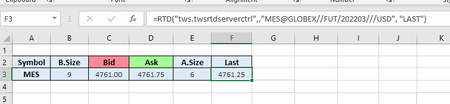
Hi, I am using Interactive Brokers TWS trading platform and they supply a demo excel file that has RTD formulas to pull in a list of available live data trading prices such as Bid, Ask, Last, etc. The RTD connection does not allow you to pull in historical data for the trading prices mentioned above. What I am want to do is the following, if possible: The Last price traded for the MES Futures contract is pulled into cell F3 by using the following formula: I am currently connected to the TWS trading platform and the value in cell F3 is 4761.25 As soon as the markets reopen this value will change continuously. I want to be able to capture the price of 4671.25 that is pulled into cell F3 and move it down by one cell as it changes - for whatever number of cells I decide to capture. For example, if I decide to capture the Last 20 prices, then I want to populate the range F3 to F22. Once I can move the changing values into the cells below, I can then use conditional formatting to change the cell colors based on the criteria I use, which is my objective of the exercise. Thank You.1.3KViews0likes2Comments
Runt-time Error 1401 When Importing a CSV file Using VBA
I am beyond frustrated that I cannot make this work. Let me explain. My spreadsheet needs to import a standard CSV file then parse that information into several different worksheets. The very first time I ran the import code it worked. The second time and every time after that it fails with the "Run-time error '1004': Application-defined or object-defined error" message. I tried this on a different computer with the same results first run it worked, every run after that it fails. Here is the code: Sub ImportCSV() Dim ws As Worksheet Dim csvFilePath As String Dim lastRow As Long ' Set the worksheet where you want to load the data Set ws = ActiveWorkbook.Sheets("Raw") ' Specify the path to your CSV file csvFilePath = "exportusers-all.csv" ' Clear existing data in the worksheet ws.Cells.Clear ' Import the CSV file With ws.QueryTables.Add(Connection:="TEXT;" & csvFilePath, Destination:=ws.Range("A1")) .TextFileParseType = xlDelimited .TextFileCommaDelimiter = True .Refresh End With End Sub This is the code I've found in numerous places when I search the internet when I search how to do it. I have tried this as a normal user and "Run as Administrator" both fail. My Trust Center > Macro Settings are as follows: Enable VBA macros - Selected Trust access to the VBA project object model - Checked The CSV file can be opened in a text editor and Excel without any issues, but if I try to import it, it fails completely. Any help or suggestions to resolve this problem would be greatly appreciated. Thanks.422Views0likes3Comments
Excel Help
Is there a way (either formula or macro /something) for the following. I have 2 different spread sheets (files) open at the same time. First is called Time Card Second is called Wages Time Card will have a staff members details as well as dates and shift times. (20 Tabs for different staff members and their details) Wages will have Tab 1 - Summary of all staff names, hourly rates, hours worked for each day and gross amounts to be paid Tab 2 - 20 payslips with the above mentioned details, but payslip style. Lets call the first person Joe Deer I need something in Time Card next or close, to this person's name, when clicking it it will jump to his payslip in Wages sheet As mentioned. Formula or macro.. Guess anything will do. Thanks507Views1like4Comments
Excel Macros Spreadsheets Not Loading
I've spent some time with Microsoft Support (almost 3 hours, including uninstalling my MS 365 and reinstalling it), but I'm having an issue with my Excel Macro spreadsheets not loading at all. This is what I get each time. Also having an issue with non-Macro spreadsheets that I'm unable to use the Bold, Italic, and Underline functions (get the spinning wheel and then Excel Not Responding), as well as not able to use the Format function (get the same spinning wheel and then Excel Not Responding). I've been using these same Excel Macro Spreadsheets for over 15 years. Please help!614Views1like2Comments
Getting data from Snowflake to Excel
Hello I have multiple no technical users and am trying to find a way to setup a snowflake query for them and then let them refresh it whenever they want or on a schedule, but I couldn't find a good solution this what i found so far: ODBC (Not great for non technical users needs setup on each user desktop) Power Automate (Needs Power Automate Premium which we don't have) Third Party tools (Expensive pricing models) Through Power BI (We want to separate this process from power bi) Any suggested solution please!Solved551Views0likes3Comments