macos
245 Topics
Announcing Microsoft Defender ATP for Mac
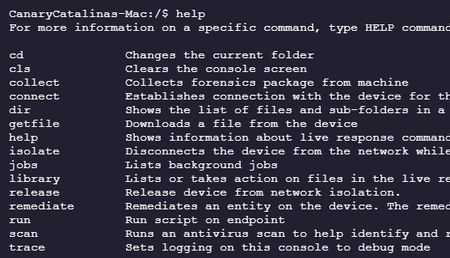
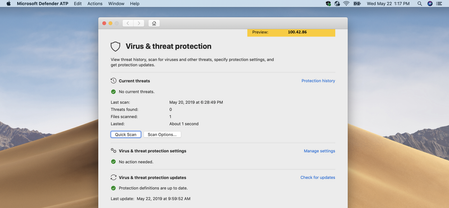
We’re announcing our advances in cross-platform next-generation protection and endpoint detection and response coverage with a new Microsoft solution for Mac. Core components of our unified endpoint security platform will now be available for Mac devices.149KViews14likes21Comments
Teams status is showing as 'status unknown'
We are seeing a strange issue where users of Teams have their status shown as 'status unknown'. In our organisation this only seems to be affecting users who are using Teams on MacOS. Users have tried signing out/back in, restarting their Macs, and also reinstalling Teams.Solved112KViews1like6Comments
Microsoft Teams for MacOS is Blank
Hello there, i have downloaded Microsoft Teams app for my MacBook Pro and after installing it requires my credentials after that only shows the blank screen and splash screen says "Loading Microsoft Teams ..." OS version: MacOS Catalina 10.15.3 could you please help me to fix the issue thanks, Mojtaba BabaeiSolved94KViews3likes24CommentsOneDrive Announcements at Microsoft Ignite 2018
Today at the Microsoft Ignite conference, we announced new innovations for OneDrive to better connect you to your personal and shared files in Office 365, from any device. We’re making it easier to share and work together in real-time while using the power of artificial intelligence to help you be more productive. And we're introducing new security and compliance capabilities to better protect your work79KViews13likes20CommentsSupport tip: Move to declarative device management for Apple software updates
By: Benjamin Flamm – Product Manager | Microsoft Intune Apple recently announced at the Worldwide Developer Conference (WWDC) in June 2025 that mobile device management (MDM) software updates are deprecated in the upcoming Apple OS 26 versions. Instead, software updates will need to use declarative device management (DDM). In this blog, we want to provide you with everything you need to know to navigate this transition and easily manage software updates in DDM. What is DDM? DDM is an enhancement to Apple’s device management protocol that makes devices more proactive and autonomous, and this is perfectly highlighted by the major improvements that DDM brings to managing software updates. Previously, Intune had to send update commands and repeatedly check for the update status. With DDM, Intune simply tells the device the required OS version and the installation deadline, while the device proactively updates Intune on its progress from download to installation. Move to DDM for software updates The MDM software update features in Intune will initially be marked as ‘deprecated’ in the Intune admin center and support will end shortly after Apple OS 26 releases. Devices will ignore MDM update settings when DDM update settings are being enforced, so the only steps you need to do are to create your DDM update policies using the settings catalog. The following table lists the MDM software update features that’ll be unsupported later this year, along with the matching DDM feature that is currently available or coming soon. Legacy MDM feature New DDM feature iOS/iPadOS update policies Software Update or Software Update Enforce Latest settings, located in the settings catalog under Declarative Device Management (DDM): macOS update policies iOS update installation failures report Apple software update failures (Devices > Monitor) which is expected to release with Intune’s August (2508) service release. macOS update installation failures report Software updates report (macOS per-device) macOS software updates (Devices > All devices, select a macOS device > macOS software updates) which is expected to release with Intune’s August (2508) service release. macOS Settings catalog > Software Update payload and settings Software Update Settings located in the settings catalog under Declarative Device Management (DDM): Settings in the iOS or macOS ‘Device restrictions’ template Settings catalog > Restrictions, software update delay settings How do I manage software updates using Intune? With Apple deprecating MDM software updates, DDM is the recommended method to manage software updates in your organization. For a thorough guide that highlights the differences between MDM and DDM, along with how to configure DDM software updates review: Managed software updates with the settings catalog. Useful resources Apple announcements: Announcement of DDM software updates at WWDC 2023 Introduction of Software Update Settings at WWDC 2024 Announcement of MDM update deprecation at WWDC 2025 Intune Apple settings catalog configuration list | Microsoft Learn Apple Platform Deployment guide for managing updates | Apple Support Stay tuned to this post for updates! If you have any questions, leave a comment below or reach out to us on X @IntuneSuppTeam or @MSIntune. Updates: 7/25/2025: Updated the expected release timeline of the new per-device software update report for macOS.76KViews1like8Comments