m365
42 Topics
Frustration with Microsoft’s Task Ecosystem
Why is planner development so slow. Is missing no brainer features that a 12 year old program manager or junior developer would even know what is needed at a very basic level. I’m not going to mention what these features are because this community is full of posts about this. You killed off ToDo which was an incredibly good app and had huge potential now left rotten away. Despite no development for years it’s still a great app and would be up there with the best of them - Todoist, Tick Tick, Apple Reminders, Things. Don’t get me started on Loop. What is the point of it. Planner in Teams is still slow. you have ruined Microsoft Project trying to get it integrated with Planner. Planner licensing is a mess. Planner agent currently doesn’t see premium projects. I know it’s coming. M365 Copilot can only see the default Task list in ToDo but no other list. Who thought that one up? You allow people create multiple lists in Todo but ignore them for Copilot query. I would post a really good convo with Copilot about all of this and even Copilot is scratching its head as to why Microsoft is so crap offering up half baked apps and then drop them for something else thus creating an ecosystem that barely functions and leaves people so frustrated. I could go on but I won’t. Rant over but no wonder people are opting to move to dedicated applications like Asana or Monday.com or Todoist for stuff like this. 🥸🤔😳🤦♂️🤷♂️💋539Views8likes1CommentReading Progress in Microsoft Teams to improve student reading fluency - now rolled out globally!
Reading Progress is a free tool designed to support educators in creating personalized reading experiences that build confidence and reading fluency in their students. Starting today, Reading Progress is beginning global rollout! Expect about two weeks for this tool to be available everywhere. 73KViews6likes12Comments
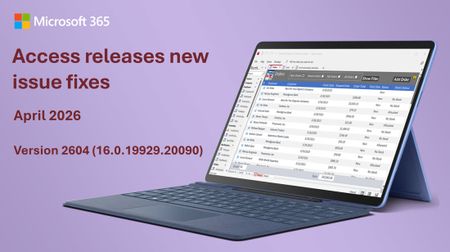
Access fixes released in Version 2604 (Build 16.0.19929.20090)
Bug Name Issue Fixed Values display in the wrong control when using a form as a sublist When a form was used as a sublist (subdatasheet), field values could display in the wrong control, showing data in incorrect positions. Values now display in the correct controls. Applications that use the Access Database Engine (ACEOLEDB) terminate unexpectedly on exit Third-party applications using the Access Database Engine (ACEOLEDB) provider could terminate unexpectedly when closing. The shutdown sequence has been corrected. Long Text field corrupted when a query updates a record while a user is editing it When a query updated a Long Text field on a record that was simultaneously open for editing, the field data could become corrupted. The record update now correctly handles concurrent access to Long Text fields. Rendering errors with Aptos (Detail) font Controls using the Aptos (Detail) font variant could render incorrectly, with characters appearing misaligned or garbled. The font rendering has been corrected. Standard colors in Access didn't match other Office apps The standard color palette in Access used different color values than other Office applications like Word and Excel. The color palette has been updated to match the rest of Office. Option Group with Vertical Anchor Bottom: option buttons show incorrect visual state after clicking When an option group control had its Vertical Anchor property set to Bottom, clicking an option button would not correctly update the visual state of the buttons. The visual state now updates correctly regardless of the anchor setting. Query Design: Insert/Delete Columns don't work when ribbon is set to Show Tabs Only In Query Design view, the Insert Columns and Delete Columns commands on the ribbon did not work when the ribbon display option was set to "Show Tabs Only." The commands now work correctly regardless of ribbon display mode. SQL View: Ctrl+K should toggle pretty formatting off/on In the Monaco SQL editor, the Ctrl+K keyboard shortcut did not toggle SQL formatting. Ctrl+K now correctly toggles pretty formatting on and off. Monaco editor incorrectly converts Unicode characters in SQL view When switching between Design View and SQL View, the Monaco SQL editor could incorrectly convert certain Unicode characters, corrupting the SQL text. Unicode characters are now preserved correctly. Importing text files with Unicode characters in the filename fails Attempting to import a text file whose filename contained certain Unicode characters would fail. File imports now handle Unicode filenames correctly. Added VarP and StDevP to the Totals query aggregate dropdown The VarP (population variance) and StDevP (population standard deviation) aggregate functions were missing from the Totals row dropdown in Query Design view. They have been added alongside the existing Var and StDev options. Added VarP and StDevP to the datasheet totals row dropdown The VarP and StDevP aggregate functions were missing from the Totals row dropdown in Datasheet view. They have been added to match the options available in Query Design view. Access hangs at shutdown when VBA holds temporary DAO field references Access could hang during shutdown when VBA code created temporary DAO field references. The shutdown process now correctly cleans up temporary field references. Full Screen Mode ribbon display option does nothing in Access Selecting "Full Screen Mode" from the ribbon display options had no effect in Access. This option now works correctly, hiding the ribbon to maximize the available workspace.2.2KViews3likes6CommentsCross Tenant Mailbox Migration: NotAcceptedDomainException
This week I'm performing a new cross tenant mailbox migration. I have some experience with this kind of migrations, ( it's the third one I'm in charge of ), and with the new procedure, ( will paste the link with the instructions at the end of this article ), an Azure Key Vault is no longer required, so I was very confident and thought that I would no have any issue. But, as sometimes occurs, I was wrong The setup was quite easy, and the mail users configuration was like always, so no a big deal. But now comes the point... Once I launched the migration batch, half of the users started syncing correctly and the ther ones failed, ( neither a MoveRequest was able to start for them ). Once I checked the errors, I got the same for all the failed ones: " NotAcceptedDomainException: You can't use the domain because it's not an accepted domain for your organization ". Ok. No problem... ( I thought ). I work with Exchange since more than 10 years and this is a common error message. ( Again I was wrong ). I started to check the mail users, looking for some misspelled domain, missing alias, spaces, etc... Basically, the troubleshooting for this kind of errors. But from my perspective all looked good. So, I decided to reconfigure all the mailusers with a script, launch a delta sync, and resume the failed moverequest. But again, same error for all of them. Checked again, with PS, from source and target tenant, checked in AD, all the proxy addresses... Nothing, all was correct! Non sense... Ok. At that point I decid to compare some syncing mail users with some failed ones, looking for anything that could be a pattern. And "voilá"! The syncing users were all licensed in O365... The failed ones not! After assigning a license to the failed ones and resume the MoveRequest, all started to work smoothly. For sure, I would have saved many hours of work if the error message had been: " The user is not licensed ". But, yeah... It would have been too simple 🙂 Summarizing, make sure that the mail users have an O365 license before you start the migration batch. And remember, not always the error messages are what they seems to be 🙂 Cross Tenant Mailbox Migration procedure, ( Preview 😞 https://docs.microsoft.com/en-us/microsoft-365/enterprise/cross-tenant-mailbox-migration?view=o365-worldwide2.4KViews3likes2CommentsAnnouncing new H5P and OneNote integration to help bring interactive content to life
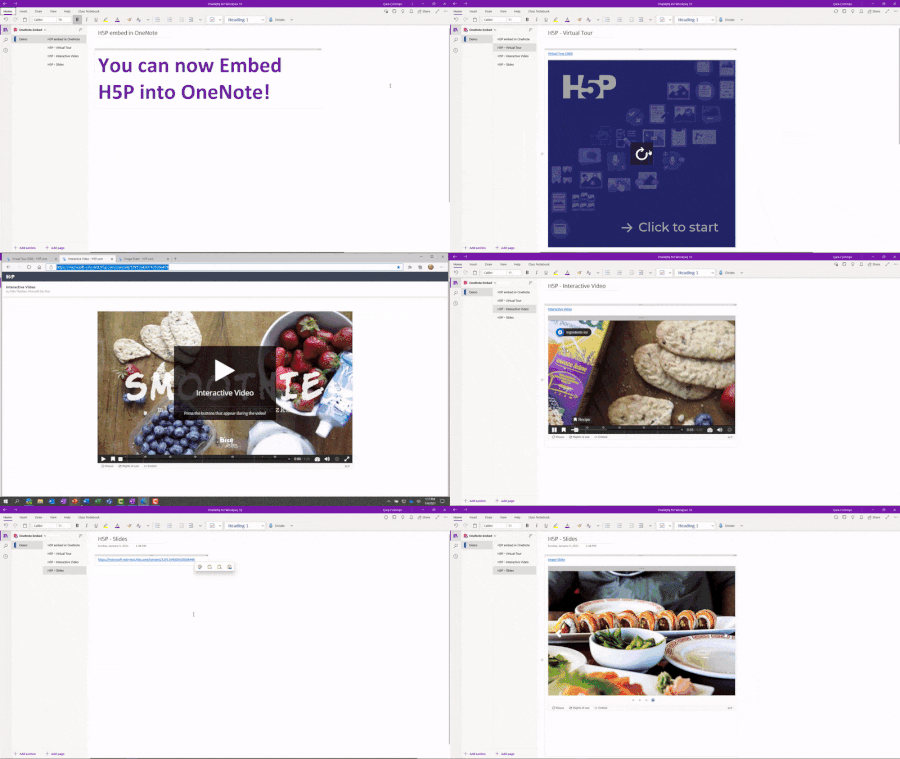
As we continue listening to students and educators, we have heard many requests for OneNote integration with H5P, the tool that allows people to create, share and reuse interactive content. Today we are excited to announce the integration between H5P and OneNote.24KViews3likes7CommentsFrom ESPN to the Spreadsheet Arena: How Excel MVPs Powered the Microsoft Excel World Championship
If you’ve ever watched someone do serious data work in Excel - building a model that feels like magic or using a perfectly crafted LAMBDA to do in one line what used to take a page of helper columns - you already understand the spirit of Excel esports. The Microsoft Excel World Championship (MEWC) turns that spirit into a live competition: timed “cases,” real-time leaderboards, and a crowd that cheers for spreadsheet moves the way sports fans cheer for a buzzer-beater. At the 2025 MEWC Finals (held December 1–3, 2025 at the HyperX Arena in Las Vegas), Microsoft MVPs showed up everywhere - on the broadcast desk, behind the scenes writing cases, and throughout the community sharing training tips and “inside tricks.” And in the biggest MVP moment of all, Excel MVP Diarmuid Early took home the world championship title. “The Excel World Championship is a high-stakes, fast-paced competition where top Excel users from around the world solve complex, timed challenges using advanced formulas and strategies.” – MVP Oz du Soleil Meet the Champion: MVP Diarmuid Early Winning the Microsoft Excel World Championship isn’t about memorizing a few formulas - it’s about staying calm under pressure, translating messy scenarios into clean models, and finding the fastest path from question to answer. In 2025, that combination belonged to Diarmuid Early, who battled through a field of elite competitors and emerged as the Microsoft Excel World Champion. One of the most MVP things about this win is what happened after the confetti: Diarmuid has been sharing how he thinks about cases and how he trains. If you want to learn by watching a world-class workflow end-to-end, start with his Road to Las Vegas 2025 video playlist, then check out his behind-the-scenes breakdown video, I won the Excel World Championship by folding Origami in a spreadsheet. It’s part engineering, part creativity - and 100% Excel. Diarmuid’s story also illustrates the bigger point: Excel esports is community-powered. The same people who teach, write, and answer questions every day are the ones shaping the competition - whether they’re designing challenges, explaining strategies on-air, or helping new players level up. Here’s a look at how MVPs helped make MEWC 2025 happen. (left) and MVP Oz du Soleil (right) in the commentary booth, breaking down the action at the Microsoft Excel Collegiate Championship (MECC) 2025. Photo credit: Giles Male On the mic: MVPs bringing Excel esports to the world “I was leaning over the commentators balcony looking out at hundreds of Excel fanatics who had travelled to Vegas to watch other people battle it out on spreadsheets… I just remember looking at Oz, and Oz looking at me, and he said '... we get to do this for a living?? I love my life'.” - MVP Giles Male For many viewers, the first “wait… Excel has a world championship?” moment happens because MEWC is genuinely fun to watch - especially with experts translating the action in real time. MVPs have been front and center on the broadcast, providing commentary that balanced entertainment with the kind of technical clarity only seasoned Excel educators can deliver. Oz du Soleil (Excel on Fire) is a long-time Excel educator known for making advanced concepts approachable - and for bringing serious storyteller energy. As an Excel esports commentator, Oz helps viewers understand not just what competitors are doing, but why their approach works (and when it doesn’t). Giles Male (Full Stack Modeller) brings deep modeling credibility to the desk - and, as he’s shared, sometimes gets the call with almost no notice. That combination of expertise and adaptability is exactly what makes live Excel commentary work. Jon Acampora (Excel Campus) is a familiar voice to many in the community, and his teaching-first mindset shows up perfectly in esports commentary: quick explanations, smart shortcuts, and a constant focus on helping viewers learn while they watch. Tim Heng (Sum Product) adds both technical sharpness and audience-friendly pacing - calling out the “tiny” decisions that separate good solutions from great ones (keyboard efficiency, formula structure, and when to stop polishing and submit). (left) and MVP Tim Heng (right) adding their commentary at the Microsoft Excel World Championship 2025. Photo credit: MVP Celia Alves What makes MEWC different: cases, clocks, and commentary prep “We get the cases a few days early so we can solve them ourselves - and then we map out how to explain the key moves, because the competition moves incredibly fast.” - MVP Oz du Soleil MEWC challenges competitors with timed Excel “cases” - scenario-based problem sets where accuracy, speed, and strategy all matter. The Finals are streamed on YouTube (and have also appeared on ESPN’s The Ocho), which means the broadcast must serve two audiences at once: hardcore Excel nerds who want to see the formula choices, and curious newcomers who just want to understand why the leaderboard is moving so fast. That’s where MVP commentary shines. As MVPs like Oz and Giles have shared, the commentary team typically receives cases in advance, works through solutions, and plans how to explain the key decision points - because once the clock starts, competitors can be done before you’ve even finished reading the question. “I was asked to step in 48 hours before the finals commenced. Which meant I had to try to learn all 9 battle cases in two days… this was all very intense, nerve-wracking, but just an amazing experience and opportunity overall.” - MVP Giles Male Behind the scenes: MVPs designing the puzzles (and sharing the playbook) Great esports needs great “maps.” In MEWC, that means cases that are tricky, fair, and fun - designed to reward strong spreadsheet fundamentals and creative approaches. Several MVPs contribute to the ecosystem that makes those cases possible, including MVPs David Brown, David Fortin Giles Male, Klinsmann Langhanz, Renier Wessels, and Tim Heng who create Excel challenge cases for the competition and for practice. And then there’s the part you can’t put on a scoreboard: the ongoing sharing culture. Around every battle, MVPs and community experts swap approaches, publish walkthroughs, break down solutions on YouTube, and teach the mental models that help competitors get faster. That might look like a new keyboard shortcut habit, a reusable “personal LAMBDA collection,” or a clever way to structure a model so you can answer six questions without rebuilding your logic six times. Why it matters (beyond bragging rights) Excel is one of the most widely used technology platforms on the planet - and yet many people still underestimate what it can do (or what great Excel users can do with it). MEWC puts advanced spreadsheet skills on a public stage and makes them legible: you can see the tradeoffs, the patterns, the creativity, and the discipline. When MVPs are involved at multiple levels - broadcasting, designing, teaching, competing - it sends a clear signal: this is a real craft, and the community around it is generous with knowledge. “Excel [is] the one tool that almost everyone has had to use at some stage in their career… 95% of the conversations I have with people who don’t know about it start with ‘No way… that exists??’ And then you start watching, and it’s just fascinating to see what a top Excel esport player can actually do.” - MVP Giles Male MVP Giles Male Watch it, learn from it, then try it Want to watch before you try it yourself? You’ve got two great options: a quick recap, or the full multi-hour deep dive. Highlights: Microsoft Excel World Championship 2025 Finals Highlights (12:43) Full competition: Microsoft Excel World Championship 2025 – Finals (4:00:54) And, if you’re thinking “My Excel skills aren’t enough,” that’s actually the perfect place to start - because you improve by doing cases, reviewing solutions, and iterating. You can jump in through Excel Esports Online, and explore practice material with sample cases (free) and case studies (fee). Many competitors (including MVPs) also share solution walkthroughs - often complete with explanations and reusable formulas. The pipeline is real: MECC and the next generation of Excel athletes One of the most exciting parts of the Excel esports story is how quickly it’s building a next-gen talent pipeline. Alongside MEWC is the Microsoft Excel Collegiate Challenge (MECC), a global competition for college students created by Excel MVP David Brown. It’s an on-ramp for students who want to test their skills, meet the community, and learn in public. If you haven’t read it yet, here’s a great starting point: From the Classroom to Las Vegas: MVP David Brown and the Excel Esports Revolution. Together, MECC and MEWC show how Excel learning can be both rigorous and genuinely fun - whether you’re a student, a seasoned analyst, or someone who loves discovering a cleaner way to write the same logic. Join the Excel community (and learn from the MVPs) Whether you watched MEWC on ESPN, caught a highlights clip on YouTube, or you’re quietly building a practice workbook at 1 a.m., the best part of Excel esports is that it’s welcoming. You don’t need to be “ready.” You just need to be curious - then practice, learn, and repeat. “To future competitors: just start. Don’t wait… You get better by competing. So just get stuck in, and learn from the early experiences which we all have to work through!” - MVP Giles Male If you want to sharpen your skills, trade ideas with other spreadsheet nerds, and learn directly from the people who teach the world’s best Excel techniques, join the Excel community and connect with our Excel MVPs. Start by exploring the championship home base at the Microsoft Excel World Championship website, try a few cases, and then share what you learned - because the fastest way to level up is to learn together.829Views2likes0Comments