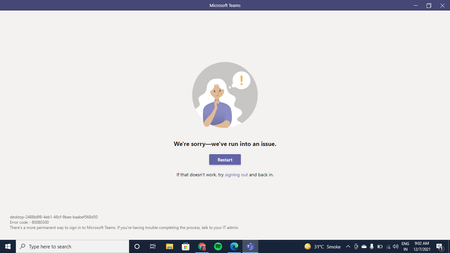
login
24 Topics
Multi-Account into the new Teams
Hi, i'm using the new teams app for University and Personal Stuff. If i log-in my first account logged is the university account and, if i want to switch it's like a new teams page is open letting ALSO the previous opened. If i go to close the previous account window, all teams service will be closed, closing also the one i want to stay opened. It is simply horrible. Please just improved the account switcher system making a true switch from account to account letting just an instance opened. Thank you!243Views0likes2Comments
Teams defaults to expired account
I'm a freelance professional and as such I've had to use differing accounts to log into Microsoft Teams. I have a meeting this afternoon only my tablet for use of Teams. However I am selecting the account I wish to use, yet Teams is repeatedly trying to log me in with the email address of an expired account. I have repeatedly selected the account I require and entered the correct login details, yet Team immediately moves to the log in screen with the email address of the expired account. I select login with a new account, and the loop starts again. How can I make Team accept the details of the account I have correctly entered? Thanks1.9KViews0likes4CommentsSet up teams shift so email address can be extracted
Wanting to know if it is possible to set up Teams Shifts so email addresses can be extracted when exporting schedules as per this article: https://docs.microsoft.com/en-us/answers/questions/32438/how-to-export-from-shift-teams-the-member-email-ad.html Can anyone advise on this and if it will be possible to implement?809Views0likes1Comment
Can't Login with Student Account
Hi, I have an email address for TAFE and can login and use Teams at the TAFE facility or in a Chrome browser but can't login to the program on my PC. It comes up with 'you can't login with a school email here' I'm very confused since it does work in other places2.2KViews0likes2Comments
Can't login to fresh installation of Microsoft Teams
I can't login to Microsoft Teams app on my laptop. It's newly installed on my machine. When it opens I get asked for my email address and then it gives me the error number 0x80190001 with no other information. I have added Teams to my firewall. I'm using TinyWall and I added the process and it TinyWall find the Teams.exe to add. This is better than before because before I add Teams to my TinyWall things were even worse and Teams wouldn't even ask me for my email address. I'm also using Windows Defender Firewall. Even if I switch off my firewalls I still get the same error. I can't find any useful information on any website. I can't see how to delete any log in data for Teams. I can't think of any thing plan of action. Does anyone have any idea what I could try? I have Windows 10 and a new installation of Microsoft Teams.2.1KViews0likes2Comments
Microsoft Teams verification code does work
Hi, I'm trying to set up the free version of MS Teams on my desktop so I can join a meeting at 13:00 Eastern Australian Standard Time 11 June 2021 (tomorrow!). I sign in with my password then it asks for my phone number to send me a code. I enter my phone number and click next. I get a four digit number which I type into the verification box. It tells me the number is incorrect. I've tried this numerous times and all the numbers I have received fail to verify. They are all four digits. This is uncommon, other programs use six digit verification codes. Are the codes I'm receiving truncated? I need this fixed so I can attend my meeting.7.7KViews1like10Comments
Login Bug after Organization Account was deleted
Hello, i have a really annoying bug on my MS Teams desktop Version for Mac. I have left my organization recently and therefore my account was also deleted. Now, whenever I try to log into my MS Teams I get the Pop Up for my organization login (see picture). Then when I close that I get to a page that tells me there was an error and I should try to log out (see picture). However, the "logout" link on that error page does not work. I have already tried to reinstall MS Teams and have deleted the Cache and residue Data with the Apps "Clean My Mac" and "AppCleaner". I also deleted them manually myself. However, the bug is still there. I have not deleted any Office365 files, maybe the relevant information is there? [Recap & System] The Bug Step by Step Recap: 1. Organization Account logged in 2. Organisation Account was deleted 3. Login Mask from Organization comes on launch of MS Teams 4. Logout Button does not work and restart or deinstall neither 5. Can't get back to normal login (works in browser) My System: - MacBook Pro (15-inch 2018) - macOS Big Sur - MS Teams Desktop Version1.1KViews1like0CommentsUnable to Log Into Teams on iPhone. Error: Sign-in Error
Hello, Has anyone been able to resolve the Sign-In Error issue? It appears to be an issue between the Microsoft Authenticator app and Teams. Our organization is using Conditional Access policies to require MFA via the Microsoft Authenticator App. After MFA completes and the phone returns to Teams, the error message is displayed. Azure AD Sign-In log displays MFA success. Steps to produce: 1. Open Teams 2. add account yourdomain.com 3. select work account 4. Flips to Microsoft Authenticator 5. Enter Password 6. Flips to Teams 7. Displays error: Sign-In Error Here is what I've tried: - deleted the account from Teams - restarted the phone - reinstalled teams - tried to delete cache from Teams settings in iOS General (never seems to clear) - removed email address from personal Microsoft accountSolved133KViews0likes11Comments
Can't login to Teams' Android app as a guest in other organization
I can't login to Teams as a guest in another organization in Android app. The error message after trying to login says: Your license doesn't include access to Microsoft Teams. You can upgrade to a supported Office 365 plan on the admin portal. Which is true, my company did not have a that license. But I'm trying to connect to another organization as a guest. No problem accessing from web or Windows app. The problem occurs on the Android app only. I can add that I used the Android app as a guest before. Thanks.Solved4.4KViews1like2Comments