login failed
14 Topics
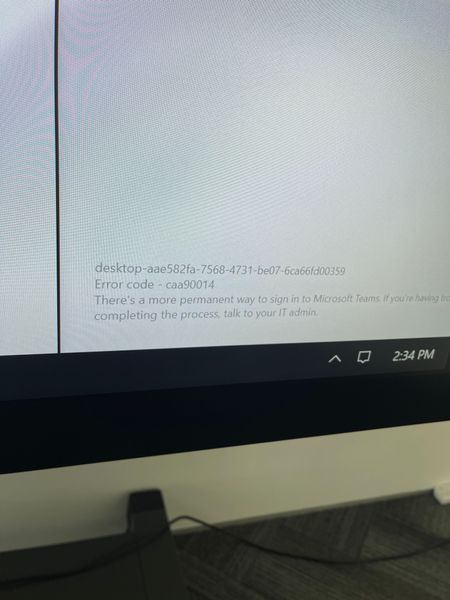
Surface Hub 2s Microsoft Teams Error code caa 90014
Hi all, Anyone in here encounter this Microsoft Teams problem on your Surface Hub after performed Windows update on 24th Nov 2021. Any idea what happened? I have tried to recovery the Surface Hub, but fail to get rip off this issue. And I tried to use other device account on the Surface Hub, and nothing change. If anyone here resolved this issue, please help. Thank you very much.16KViews1like3Comments
Stuck on Teams mobile app "We are signing you in, please wait..."
Hello I am having an issue with the Android Teams app since Friday 13 of November. I needed to reinstall the app and since then I cannot login anymore. Once I enter my username and select the Account it open the below page and remains there indefinetly. I h https://answers.microsoft.com/en-us/msoffice/forum/all/stuck-on-teams-mobile-app-we-are-signing-you-in/8196f2fb-ab61-4240-8ca1-5752ce6e79fd5.9KViews0likes0CommentsUnable to log into Teams Desktop App - macOS Mojave
I have been unable to log into the Teams desktop app on macOS 10.14.5 (and for many earlier versions of Mojave). The app starts and asks for my email address. I enter it and it asks to select a certificate. If I either cancel or choose one it still fails. This error is presented at the bottom: desktop-54d39932-dafe-4ca7-b90e-0c959948b078 Error code - 2:-1001 There's a more permanent way to sign in to Microsoft Teams. If you're having trouble completing the process, talk to your IT admin. There is no response from the app when clicking "signing out". If I right click on the dock icon and choose "Sign Out", similarly nothing happens. If it matters, our tenant is in a hybrid environment with our AD on premises.5.6KViews0likes2Comments
Microsoft Teams Educamadrid: I cannot login
When my daughter tries to login at Microsoft Teams with the user and password used by organization: educa.madrid.org, Teams returns that the password is invalid. Altough she can login without problem in the web mail of this organization with her credentials. What does she need to do in order to have a suscessful login?2KViews0likes2CommentsTeamsaccount
Sehr geehrte Damen und Herren, ich kann mich leider nicht mehr in Teams anmelden, da eine Fehlermeldung erscheint (Kein Benutzer mit diesem Username). Das letzte Mal ging dies noch letzten Montag. Mein login ist mailto:schmidinger@e-think.ac.at Mit freundlichen Grüßen, David1.3KViews0likes2CommentsLesson Learned #515:Recommendations for Troubleshooting - Login failed for user 'XXX'. (18456)
During a recent support case, a customer encountered the error: pyodbc.InterfaceError: ('28000', "[28000] [Microsoft][ODBC Driver 18 for SQL Server][SQL Server]Login failed for user 'XXX'. (18456) (SQLDriverConnect); ") using a Python code. Following, I would like to share my lessons learned to fix this issue. The error code 18456 is typically caused by login issues, such as incorrect or missing credentials, rather than connectivity or networking problems. In our investigation, we identified the root cause and suggested recommendations to prevent and resolve similar issues. Root Cause The application was configured to retrieve the database server and host name from environment variables. However: Missing Environment Variables: One or more variables were not set. Default Value Misconfiguration: The code defaulted to a hardcoded value when variables were missing. For example, the server defaulted to "localhost", which was not the intended database server. As a result, the application attempted to connect to an unintended server with incorrect or missing credentials, leading to the Login failed error. Recommendations 1. Validate Environment Variables Always validate critical environment variables like server, username, and password. If a required variable is missing or empty, the application should raise an explicit error or log a clear warning. 2. Avoid Misleading Defaults Use placeholder values, such as "NOT_SET", as defaults for critical variables. This approach ensures that misconfigurations are immediately visible and do not silently fail. 3. Log Connection Details Log critical details like the server and database being accessed. Ensure this information is included in application logs to make troubleshooting easier. Avoid logging sensitive information such as passwords. Python Solution I was thinking how to improve the Python code, implementing a validation of environment variables, handle errors and log critical connection details: import os def get_env_variable(var_name, default_value=None, allow_empty=False): """ Retrieves and validates an environment variable. :param var_name: The name of the environment variable. :param default_value: The default value if the variable is missing. :param allow_empty: If False, raises an error for empty variables. :return: The value of the environment variable or default_value. Example: server = get_env_variable("DB_SERVER", default_value="NOT_SET") """ value = os.getenv(var_name, default_value) if value is None or (not allow_empty and (value.strip() == "" or value.strip() == "NOT_SET" or default_value is None)): raise ValueError(f"Environment variable '{var_name}' is required but not set.") return value1.2KViews0likes0Comments
No puedo suscribirme a MS Teams Free
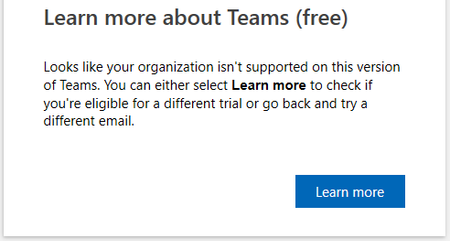
Hola, Necesito ayuda para borrar una organización que creé en MS Teams en su momento. Me comuniqué con el soporte técnico telefónico y me derivaron acá. En este momento no puedo loguear ni suscribirme a MS Teams Free. Mi suscripción es Office 365 Hogar por lo que no estoy usando ningún mail laboral o educativo. Esto ocurre cuando intento suscribirme. Y esto cuando intento loguearme Básicamente no puedo usar MS Teams de ninguna manera. Necesito ayuda para poder solucionar este issue. Saludos y gracias.1.1KViews1like1Comment
Microsoft 365 OneDrive Android (OxygenOS 13.1) login fails with WebView / Error 2604
On OneDrive Android app, login through Microsoft 365 work / corporate profile fails and always ends up with either blank screen or "No Internet connection" error 2604. Here's the details: Device & Environment: Device: OnePlus 8 Pro (IN2023) OS Version: OxygenOS 13.1 (build IN2023_13.1.0.591(EX01)) Android System WebView Version: 142.0.7444.102 App Affected: OneDrive (latest version from Google Play, 26th Nov 2025) Network: Wi-Fi / Cellular (both tested) VPN/ Private DNS / AdBlockers: Disabled Problem Description: Attempting to log in to OneDrive using a corporate/work Microsoft 365 account: The login screen either shows a blank white screen or fails immediately with Error 2604: “No network”, despite internet connectivity being functional. Logging in with the same credentials in Chrome works, confirming network is not the issue. Issue persists after clearing app data, reinstalling OneDrive, updating Chrome, updating Android System WebView, and ensuring all app permissions and background data settings are correct. Steps to Reproduce: Start with OnePlus 8 Pro (IN2023) running OxygenOS 13.1 Ensure Android System WebView is version 142.0.7444.102 Install latest OneDrive app from Google Play Open OneDrive and attempt to log in with corporate/work Microsoft 365 credentials Observe blank screen or error 2604 Expected Behavior: OneDrive should allow login with corporate Microsoft 365 account Embedded WebView authentication should complete successfully Account token should be saved for ongoing use Additional Notes: Problem appears specific to embedded WebView login on this OS/device combination Likely a systemic issue affecting Microsoft 365 apps relying on WebView for login flows on OxygenOS 13.1 Logging in to a personal outlook.com microsoft account works normally. Hence, it seems to be tied to the WebView failure. Is there any fix to this?1.1KViews0likes1Comment