lists
3214 Topics
Custom Formatter for Read-Only Fields conditional based on other columns
Hello! Does anyone know if it's possible with the fieldsettings, readonly formatting, to make it conditional based on a Person field? It's a multi people field if that makes a difference? I ideally want to make certain fields read only based on who is viewing it (without having to use a Power App customised form!). This is what I want (but I know the syntax is likely all wrong!) but not sure if it's possible to use an IF statement with boolean statements? { "sections": [ {} ], "fieldsettings": [ { "name": "Comments", "readonly": "=if([$People.email] == me, false, true)" } ] }73Views0likes2Comments
MS List Column Width Forced
Hi, I've had a number of MS lists and been able to enter grid view and amend the width of columns and the text doesn't overflow which I want to keep the overall list width smaller; but as of yesterday all my columns are forced to be as wide as the text, meaning the that 1 column can be multiple screens wide for multi-line columns and they can't be resized smaller Is this a bug? Any help appreciated.78Views0likes2CommentsSharePoint list dynamic filtering on a multi-choice column
Hello, I was wondering if anyone has a solution/work around for a limitation I'm running into with using dynamic filtering on one of my SharePoint lists. The way I have it set up: there is a "Tags" column that has multi-selectible choices like "x", "y", "z", etc. The problem I'm running into is when you try doing dynamic filtering on the list webpart and want to view every item with tags "x AND y", it filters using the logic "x OR y". So, the output contains way too many unrelated items and the filtering is pretty much pointless. This is on top of the limitation that you can only dynamically filter by 1 column at a time, which is why I needed to add every tag to a multi-selectable choice column in the first place. Has anyone found a way around this? Or is there some solution I'm not seeing?Solved74Views0likes1Comment
SharePoint Online list filtering not display results
I have a SPO list with around 2000 items. There are around 50 columns. The issue we are facing is that certain columns can be filtered but even though there is a record nothing is displayed using the filter. Some columns do work. I took all totals off and tried but it is still the same. The columns that do work and do not work are all single line text columns. The list permissions are okay and everyone can read all records. What would be causing this behaviour? Thank you29KViews0likes12Comments
Import picklist values for SharePoint List choice field
I have a column in a SharePoint List that uses the choice field type. I'm able to manually enter each choice value by copying/pasting text from an Excel spreadsheet. Is there a way to import a long list of values directly into SharePoint to save time?108Views0likes3Comments
Import list from excel/csv people picker field
I have an existing list that I want to export and import into a different site. The issue is, there are several people picker columns on this list and they are consistently being imported as text fields instead of a people picker column. The export is seemingly fine, but the import is not recognizing these columns as their original type - people. Any tips or suggestions?960Views0likes1CommentExternal Users Unable to Access Microsoft List Form
We have created a Microsoft List and are using the default Microsoft Lists Form for data entry / intake form. Internal users can access the form URL and submit items successfully. However, external users are unable to access the form link, even though they have been granted Contribute permissions to the SharePoint list. External users can: Access the list Create new items using the + New button Edit items based on their permissions However, they cannot access the dedicated Microsoft Lists Form URL and getting following error. This link is only available to internal users. This link is not available to you. Our requirement is to allow external users to: Open the Microsoft Lists Form URL View the form Submit new items without providing additional access beyond what is required for form submission, and without using Microsoft Forms. Is guest/external user access to the Microsoft Lists Form experience supported? If so, what configuration or permissions are required to enable external users to access and submit items through the form URL?Solved203Views0likes3Comments
Dynamic Mandatory Fields
In a SharePoint library, I have folders which are = a. Admin b. Events c. Furniture and Moves d. Janitorial and Maintenance e. Parking and Transportation f. Shipping and Receiving g. Supplies and Equipment h. Waste and Recycling I have Meta data across the library whose data type are all choices and are: a. Document Type = Contract, Financial, planning b. Building = Gym, Garage, Heating c. Asset Category = Office, Playground d. Fiscal Year = FY23, FY24, FY25, FY26, FY27 e. Vendor = Maple Leaf, Canadian Tire, Home Depot f. Status = Active, Pending, Not Active g. Retention Label = 3 years, 5 years h. Service Type = Admin, Events, Furniture and Moves, Janitorial and Maintenance, Parking and Transportation, Shipping and Receiving, Supplies and Equipment, Waste and Recycling Service Type and Retention Label are mandatory fields, with the Rule below for all the files in the various folders: IF Folder Name = Admin, then Service Type = Admin and Retention Label = 5 years; the mandatory fields should be Document Type, Status and Fiscal Year IF Folder Name = Events, then Service Type = Events and Retention Label = 3 years; the mandatory fields should be Document Type, Status and Fiscal Year, Building and Vendor IF Folder Name = Furniture and Moves, then Service Type = Furniture and Moves and Retention Label = 3 years; the mandatory fields should be Document Type, Status and Building IF Folder Name = Janitorial and Maintenance, then Service Type = Janitorial and Maintenance and Retention Label = 3 years; the mandatory fields should be Document Type, Status and Fiscal Year IF Folder Name = Parking and Transportation, then Service Type = Parking and Transportation and Retention Label = 3 years; the mandatory fields should be Document Type, Status and Fiscal Year IF Folder Name = Shipping and Receiving, then Service Type = Shipping and Receiving and Retention Label = 3 years; the mandatory fields should be Document Type, Status IF Folder Name = Supplies and Equipment, then Service Type = Supplies and Equipment and Retention Label = 3 years; the mandatory fields should be Document Type, Status and Fiscal Year IF Folder Name = Waste and Recycling, then Service Type = Waste and Recycling and Retention Label = 3 years; the mandatory fields should be Document Type, Status and Vendor I have used Column Default Value Settings for SharePoint to display Auto-Display the Service Type and Retention Label, but I cannot seem to perform the conditional mandatory fields using Validations setting for the other requirements. Please help122Views0likes1CommentCan you preserve links when exporting from a list to Excel?
Hi! I have a list with a multiline text field set to support enchanced richtext used to store URLs of files. I am inserting data into this list when people submit a Jotform using Power Automate to connect the two. In Power Automate, I build the field value by looping the uploaded files and building out HTML: <a href="https://www.server.com/path/file.png">file.png</a><br> <a href="https://www.server.com/path/file.pdf">file.pdf</a><br> Problem is, if I go to the list and do Export to Excel, the query.iqy file I get just shows file.png and file.pdf as basic, nonlinked text in the column. Is there any way to get Sharepoint to create an Excel file where the links are preserved?105Views0likes1CommentRecycle Bin and Site Content Hidden for Site Members and Site Visitors
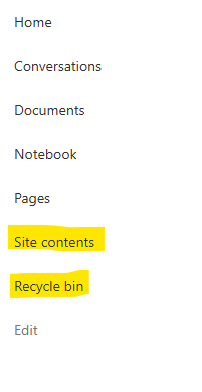
I posted this before but made a mistake with my write up, so I am reposting. I have a requirement that the Recycle bin and Site Contents should be be hidden from the Site Members and Site Visitors. Please how can I achieve this because the Server Infrastructure activation is not working for me. Any workarounds? Please help49Views0likes0Comments