linux
120 TopicsSAP on Azure General Update August 2022
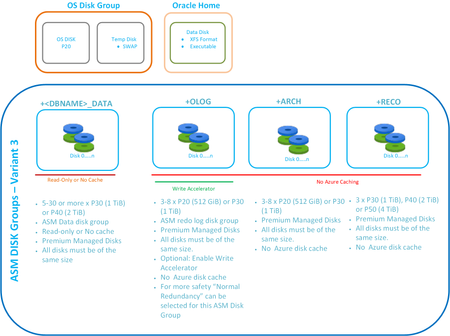
Woolworths Australia goes live on Azure, new recommendations for SAP on Oracle direct from Oracle themselves. Disk Bursting and VM Bursting and new SSD v2 in preview. SQL Server 2022, ODBC 18 and Windows 2022 News for Windows customers and news for Linux customers Important guidance for sizing boot disks on Linux..NET MAUI on Linux with Visual Studio Code
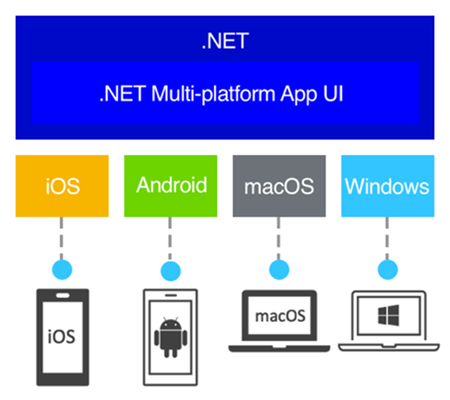
Explore Cross-Platform Development with .NET MAUI on Linux! Dive into the latest release of the .NET MAUI extension for Visual Studio Code, enabling Linux users to develop apps for Android, Windows, iOS, and macOS. This guide offers a step-by-step tutorial on setting up your Linux system for .NET MAUI development, including installation of essential tools and leveraging the C# Dev Kit extension. Whether you're working on Ubuntu or another Linux distribution, this article, enriched with a video walkthrough by Gerald Versluis, simplifies the journey to creating powerful, versatile applications with .NET MAUI.105KViews4likes12CommentsHow to create an Ubuntu VM on Windows 10 using Quick Create
Windows 10 is not just a modern desktop operating system, and it also has some great IT Pro and Developer related features build in. One of them is client Hyper-V. This is the same hypervisor which powers virtualization in Windows Server and the Microsoft Azure datacenters. With Hyper-V, you can create virtual machines running on Windows 10, without the need for third-party software. You can not just run Windows virtual machines, and you can also run Linux virtual machines. In this blog post, I am going to show you how you can create an Ubuntu VM on Windows 10 using Hyper-V. Check out the full blog here: https://www.thomasmaurer.ch/2019/06/how-to-create-an-ubuntu-vm-on-windows-10/49KViews0likes1CommentWLinux – The best WSL for Windows 10
A couple of Windows 10 releases back, Microsoft delivered the Windows Subsystem for Linux. The Windows Subsystem for Linux allows you to run Linux distros, like Ubuntu, Debian, Suse and others, on Windows 10. Around the Microsoft Ignite 2018 timeframe another distro was released to the Windows Store called WLinux. WLinux is a Linux environment for Windows 10 built on work by Microsoft Research and the Debian project. WLinux is a custom Linux distro built from Debian specifically for use on the WSL. While other distros are available for WSL, WLinux is the first optimized for use by users of WSL for WSL. It helps developer run Linux tooling on Windows and integrates into perfectly into Windows. Read more here: https://www.thomasmaurer.ch/2018/11/wlinux/46KViews1like4Comments
Edge on Linux
Hello, I work on IT industry and I often use linux distros. The main requirements for the browser is a support for various types of operating systems, like MacOS, Linux and Windows, because I need to sync my bookmarks, passwords and history between different platforms to continue my current tasks. If Edge will not be available under linux, I will not change my current browser. So, is there any chance to see Edge as native application on Linux? I know, that at this moment there is no support for office and similar applications created by microsoft, but you could use shortcuts for web version (office online, one note online, etc). You are doing a grat job and edge for android rocks, but no support for linux is dissapointing.45KViews46likes47Comments
Issue Loading Microsoft Teams on Ubuntu 18.04
I'm trying to access Microsoft Teams desktop on Ubuntu 18.04 After installation of .deb file, I run "teams" command and two window start, Microsoft Teams and Microsoft Teams Preview. One is blank and the other I cannot open. Any ideas about how to fix this, and use Teams desktop on Ubuntu? (My main aim is to edit xlsx files, but you can't do this in the browser) (I can add my log if that is helpful)44KViews0likes7CommentsError 15404 ‘Could not obtain information about Windows NT group/user '%ls', error code 0x80090304'
Your SQL Linux has been joined to domain and you can connect to the SQL Server instance using Windows Authentication. The connection itself is fine, but when you run some high privilege T-SQL statements like 'Create Login' , 'sp_addsrvrolemember' , you may run into the issue 'Error 15404 ‘Could not obtain information about Windows NT group/user '%ls', error code 0x80090304'' You will find following messages in PALLOG 11/22/2019 13:56:26.448761588 Debug [security.kerberos] <0000040947/0x00000200> Processing SSPI operation 0x0000000F 11/22/2019 13:56:26.449366379 Error [security.ldap] <0000040947/0x00000200> Initializing credentials for use in new cache failed: Keytab contains no suitable keys for red4$@SQLREPRO.EDU 11/22/2019 13:56:26.449613575 Debug [security.kerberos] <0000040947/0x00000200> Import name [ADMINISTRATOR@SQLREPRO.EDU] returned [ADMINISTRATOR@SQLREPRO.EDU] 11/22/2019 13:56:26.449633375 Debug [security.kerberos] <0000040947/0x00000200> Import name [red4$] returned [red4$] 11/22/2019 13:56:26.449753473 Debug [security.kerberos] <0000040947/0x00000200> Import name [RED4$] returned [RED4$] 11/22/2019 13:56:26.449905471 Debug [security.kerberos] <0000040947/0x00000200> Import name [red4$] returned [red4$] 11/22/2019 13:56:26.450014469 Error [security.kerberos] <0000040947/0x00000200> GSS MAJOR: 851968 GSS MINOR: 39756033 Error acquiring credentials in AcquireCredCaseInsensitive 11/22/2019 13:56:26.450029069 Error [security.kerberos] <0000040947/0x00000200> Unspecified GSS failure. Minor code may provide more information 11/22/2019 13:56:26.450039869 Error [security.kerberos] <0000040947/0x00000200> No key table entry found for red4$@SQLREPRO.EDU 11/22/2019 13:56:26.450053069 Debug [security.kerberos] <0000040947/0x00000200> SSPI operation 0x0000000F returned status: KerberosStream.cpp:2021 Operation unsuccessful 11/22/2019 13:56:26.450119868 Debug [security.kerberos.libos] <0000040961/0x0000020c> GetSecContextByUserABI() return value: 0x80090304 11/22/2019 13:56:26.488617991 Debug [security.kerberos.libos] <0000040961/0x0000020c> QueryContextAttributes() return value: 0x00000000 11/22/2019 13:56:26.488748289 Debug [security.kerberos.libos] <0000040961/0x0000020c> QueryContextAttributes() return value: 0x00000000 11/22/2019 13:56:26.489370580 Debug [security.kerberos.libos] <0000040961/0x0000020c> LookupAccountSid() return value: 0x00000001 Why? When you run queries like 'create login', it will cause permissions to be checked. The first time you do it, it invalidates current permission. When you do it again, the permission check will be rechecked. When doing the permission check, SQL Server has to go through the mssql.keytab to pick up the machine entry key or MSA key. If SQL Server does not find the entries or find invalid entries, it raises error in question. Here are three common scenarios that will cause the issue. 1.The machine account entries are not added. (mssql.keytab is configured by machine account) If you skip the step 'Option 1: Using UPN to configure the keytab' in article https://docs.microsoft.com/en-us/sql/linux/sql-server-linux-active-directory-authentication?view=sql-server-2017, you will run into this issue. For example, here is a screenshot of valid mssql.keytab. If you don't have the entries highlighted, error 15404 happens. 2.Credentials of the MSA are not added. (mssql.keytab is configured by Managed Service Account) This is similar to the scenario 1. For example, here is a screenshot of valid mssql.keytab. If you don't have the entries highlighted, error 15404 happens 3.The machine account entries are expired. (mssql.keytab is configured by machine account) To my knowledge, updating the machine account password cause the KVNO increase, and the machine account entries stall. If someone in the SQL Server Linux runs following command: adcli update --computer-password-lifetime=0. It will update the machine account password and caused the KNVO increase. Please note, Windows domain controller does not control the machine account password update. It’s the client decision to update the password or not. Even you have the 'Domain member: Maximum machine account password age' policy enabled, domain controller does not force clients to update machine account password. Solution === 1.For scenario 1 &2, just add then entries back. 2.For scenario 3, you need to recreate the mssql.keytab. The ‘adcli update’ commands update machine account password, and refresh the /etc/krb5.keytab. You need to following the step ‘Option 1: Using UPN to configure the keytab’ , but with some changes. The original steps is : Now, you need to ‘Delete all the entries by their slot number that are not the UPN’, and delete all stalled UNP entries. Only UPN with latest KVNO are left. For example, here is a screenshot of /etc/krb5.keytab. You need delete all the entries, keep the entries highlighted.38KViews0likes5Comments
MS Edge - Sidebar and copilot not working on Linux Ubuntu v24 LTS
Sidebar not syncing or accepting new app additions (+). Copilot button is dead/inactive. Sidebar settings are well configured. Using the latest version of the Ubuntu OS and MS Edge. Functionality appears to be absent as product was released without full functionality....Lame!29KViews45likes59Comments