licensing
437 Topics
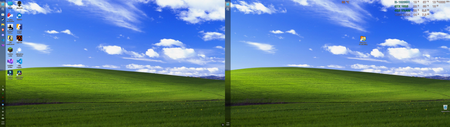
The left-side taskbar in Windows 11 offers an excellent experience in a multi-monitor setup
I’ve always been used to having the taskbar at the bottom, but recently I saw someone on Reddit using a left-side taskbar layout, so I gave it a try. It turned out to be surprisingly good on a dual-monitor setup—not only is it more efficient, but it also looks more balanced. Best of all, many apps look more natural with the taskbar on the left; for example, Discord’s left-side menu pairs very well with the taskbar. Configuration: Device: Dell G15 5510 laptop CPU: i5-10200H @ 2.4GHz GPU: GTX 1650 (laptop version) RAM: 16GB DDR4 Storage: 512GB NVMe SSD10Views0likes0CommentsThe installation of Windows 11 gets stuck and won't continue
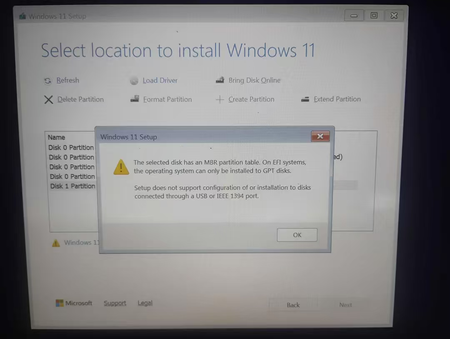
I've been trying to clean install Windows 11 on my Acer Aspire A515-43 (Ryzen 3 3200U, 4GB RAM, 119GB storage), but I always get stuck at the same screen and can't move forward. I'm using a 32GB SanDisk Ultra USB drive with only the Windows 11 installation media on it, and I have basically zero experience with this kind of thing. Is there a way to get past this screen? Do I need to convert the drive to GPT, and if so, how do I do that? Or is Windows 11 just not meant to run on this laptop? If anyone can explain it like I'm five, I'd really appreciate it.58Views0likes2Comments
Windows 11 won't activate following BIOS upgrade and reinstall (0xC004F213)
I upgraded my bios and did a full reinstall of Windows 11 on my PC. Everything went well, but I get the following error: 0xC004F213 When I follow the instruction to reactivate after a "hardware change", I just can't get my PC to be activated. In my Microsoft account, I do still see my PC which I can't activate anymore. Is there anything I could do to fix this or I need to call the Microsoft support directly?55Views0likes3CommentsWhy does the touch keyboard keep popping up on my non-touch laptop?
Why does the touch keyboard keep appearing at random times on my Windows 11 laptop, even though it doesn't have a touchscreen and I have no intention of using it? Why does it sometimes pop up when I click into a text field, and why does it refuse to stay closed even after I dismiss it? Could this be caused by a setting in the taskbar, a driver issue, or something in the accessibility options? And is there a way to disable it permanently without breaking other input features?35Views0likes0Comments
Windows 11 Activation after Drive changed
Hi all, I recently had a host of issues on my SSD and this lead to me having to install windows on a new SSD. I wasn't too worried since I had a digital license from when I upgraded to windows 11. After the setup though I am seeing that I am no longer activated. I have run the Troubleshooter (With the Hardware change option) and it just says: "We can’t find any devices linked to your Microsoft account that can be used to reactivate the device that you’re using at the moment. Make sure that you’re signed in with the same Microsoft account that you linked to the Windows 10 digital licence on this device, or try again later." I do see the new drive's PC name on the Microsoft Devices list I would prefer to contact someone at Microsoft who can look at my account directly but there is no way past the AI chatbots95Views0likes2CommentsDisk usage on a 1TB SSD running Windows 11 has reached 100%
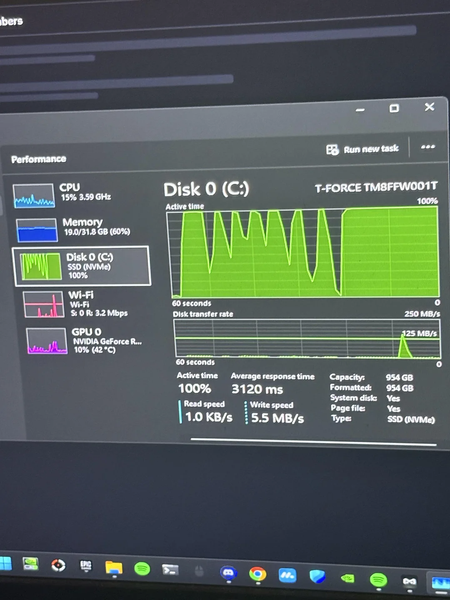
I’ve been using this 1TB solid-state drive for about a year, and recently, whenever I boot up my computer, download a game, or try to take a screenshot, the disk usage spikes to 100%. Sometimes, while playing games or watching videos, it even causes the entire screen to freeze. I’ve tried all the common solutions and checked the drive’s health status, which shows everything is normal. I’m not sure if there’s a problem with the drive itself or if it’s infected with malware, but right now I simply can’t afford to replace it.98Views0likes1CommentThe Bluetooth and Wi-Fi buttons randomly disappear from Quick Settings in Windows 11
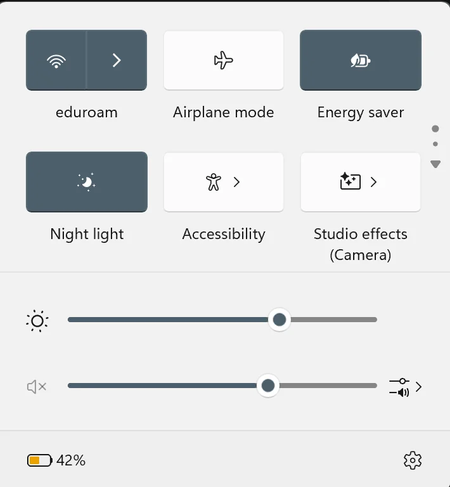
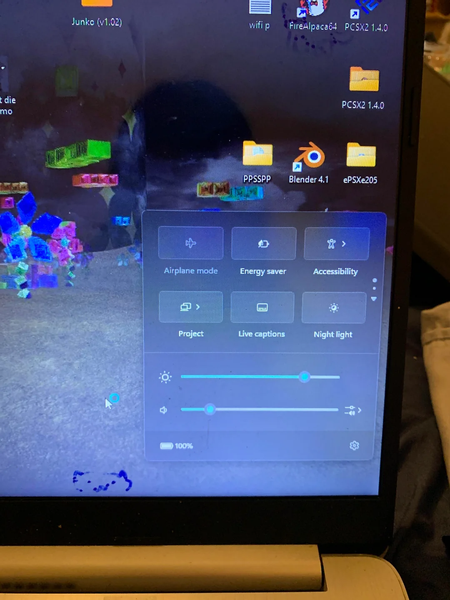
I recently encountered a strange issue: the Bluetooth and Wi-Fi buttons in Quick Settings suddenly disappeared. After restarting, the Wi-Fi button reappeared, but the Bluetooth button is still missing, and I can’t find any way to edit or restore it. I’m currently running Windows 11 Home (25H2) on an Intel Core Ultra 5 125H processor. When I go to the main Settings to try connecting my headphones, the system immediately rejects the connection request. I’ve tried restarting the computer, updating the system, turning the headphones off and on again, and even removing them from the Bluetooth device list, but nothing has worked. I’m still getting the same error.108Views0likes1Comment
Wifi driver completely vanished – reinstall does nothing, I'm out of ideas
Got an HP Laptop 15-ef2xxx and a while ago the wifi button disappeared. Completely gone. I tried reinstalling the driver, even did a full uninstall and restart—still nothing. Downloaded the driver manually from HP's site, installed it, still no sign of it anywhere. No wifi option, no adapter showing up, nothing. I've tried command prompt fixes, system restore, network resets, multiple reboots—same result every time. At this point I'm starting to think the wifi card itself is dead. I could crack it open and take a look, but I'd need some guidance on what to actually check or try once I'm in there. Any help would be appreciated.55Views0likes0CommentsWhy does Windows 11 keep forgetting my Wi-Fi password after every restart?
Why does my Windows 11 PC make me re-enter my Wi-Fi password every time I restart, even though I check "Connect automatically" and "Remember this network"? Why does it forget the password after a reboot but not after a normal sleep or wake? Is this a bug with the network profile, a credential manager issue, or something specific to my adapter? And is there a fix that keeps the password saved permanently?71Views0likes1Comment
Windows re-activation after CPU change
Hi everyone, so last weekend I change my CPU from Ryzen 7 5800X to 5800X3D. Easy peasy, everything worked just fine. Today I started my computer and it stated that windows is not activated anymore. So I tried every possible (and described) way to reactivate it (after hardware change) but it simply does not work. A digital license should be linked to my Microsoft account, but the problem solver process states, that it cannot find anything related in my account. In addition: there seems to be no possible way to contact support. So how can I go on? I even tried a fresh install today... but still the same issue. Thank you all!12Views0likes0Comments