library
43 Topics
Sharepoint library - Lookup stopped working just on one column
I have a library with lookup columns pointing to specific lists (providers, companies, products etc.). In particular, I have two columns, "Company" and "Invoicee" pointing to the same list "companies". Everything worked perfectly for months, but suddenly since yesterday the lookup for the "Invoicee" columns stopped working. When I start typing, it seems that it starts looking for a match but it keeps looping forever. The other column "Company" that points to the same lookup list does not present the same problem and is still working properly. I thought it could be a temporary issue but today the problem is still there. Any idea on how to fix this?2.4KViews1like3Comments
Restored SharePoint 2013 content database has missing libraries
I recently added a new site collection to a SharePoint 2013 environment and attached a restored content database from a different environment (also 2013). The process involved was: backup SP database on original environment restore database to new environment add restored db as new content database in SP create new site collection to use the new db It all worked fine, with no issues occurring, but when I view the Site Contents in SP, the only libraries visible are the standard ones (Documents, Site Assets, Site Pages, etc) - none of the libraries that were part of the restored database appear. A count of AllDocs confirms that the documents are in the db - it's just there are no libraries showing. I can confirm in the Site Collection List in SP Central Admin that the new site collection is pointing to the right db. I've also double checked this from PowerShell using: $site=Get-SPSite "http://<sp_url>" write-host $site.ContentDatabase.Name Did I do something wrong? Or miss something out? The backup and restore of the original SP database was done by the DBAs and was pretty lengthy due to its size (~3.8TB), so I'm really hoping this doesn't have to get re-done! Thanks...965Views0likes0CommentsRemoved libraries are reappearing automatically
Hey, my customer has the problem that in th past synced SharePoint libraries are suddenly reappeared and now are syncing again completly out of nowhere. Even when I unistall OneDrive, delete the registry keys under and several libraries starting to sync after a short time and even the deleted ones just reappearing out of nowhere. It doesn't matter if I desync them via OneDrive App settings or registry deletion. Do you have any ideas or help in this? Thanks and regards1.2KViews0likes0Comments
Problem in Quick Access SharePoint Sites - default library not found
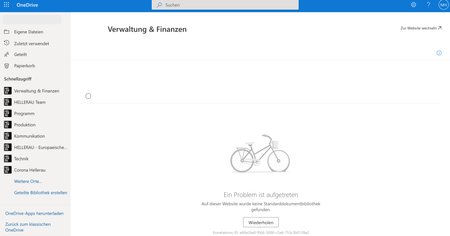
Hi 🙂 a week ago we noticed a problem when trying to access SharePoint Document Libraries over the quick assess bar in the OneDrive Web Application. It says that there is a problem "no default document library was found". This problem only occur when the SharePoint Site do not have a library called "documents". Any Site with a library called "documents" is working correct over the quick assess menue. We would prefer to see an overview over all assigned document libraries to a site, when using the quick assess menue! Does any other seeing this issue? Thanks a lot for help Michael5.8KViews0likes3CommentsSharepoint library view issue
Hi, We have a sharepoint document library with lots of files in it. When we sort the files with date (older to newer) in library, instead of showing the files it shows a message "Load more items". We have to click on this message multiple times and then the files show up. We are deleting the older files from the library and initially we only had click on this message couple times. But as we are deleting the older files now we have to click 8-9 times to show the files. This keeps on increasing and we are not sure how to fix this issue.847Views0likes0Comments
PDF content disappearing when viewing in SharePoint library
We're having a problem with a SharePoint online modern library in displaying PDF files content. The user will navigate to the document in the library, and the content shows at first, and then a moment later the content of the pdf form disappears. One thing to note is that in both Chrome and Edge that this is presenting in the same way for another user. Even after clearing cache and restarting computer. For myself, in testing, it is only happening in Chrome and not Edge. I'm not sure if there are settings I am missing that is causing this, but would appreciate any help or thoughts in solving this.33KViews0likes23Comments
Dynamic hyperlinks to Sharepoint library in Office documents
In the Office documents (Excel, Word, Powerpoint) there is a hyperlink to other documents. The document to which it is hyperlinked is located in the same document library. When the documents are moved to another Team, and are located in another document library - then all hyperlinks must be changed. Is there any functionality that can be used to achieve relative addressing in hyperlinks - so they do not have to be changed (since all documents are in the same Library. In the Word app it Works to remove the path and only use filename in the address, but when i edit the dokument in Teams or in WOrd Online the link need a full url)3.5KViews0likes0Comments
Sorting files in Teams
As stated in at least one other post on this forum which was originally posted in 2017(!!!!!) it is still not fixed by Microsoft! If you have a Teams instance you get an office365 connected group, Sharepoint site and a document library, etc. Within our large organization it is a real nuisance that although files are sorted alphabetically in the connected SharePoint library Teams just keeps on sorting the docs on the last modified date. This just doesn’t makes sense! In some use cases people benefit from the sorting on last modified date but this is a contextual thing. Let’s say I am working on a document and after that I want to sent a mail and attach a document to that mail you can easily make the assumption that I want to be able to quickly share the file I just worked on... Fine... But when accessing an (extensive) document library this isn’t the case. People are just looking for a certain document and at that moment the default last modified sorting option makes that navigation quite a nuisance!! A team should be capable of sorting their document library in any way they find most helpful! Please fix this! I just can’t understand why this minor adjustment isn’t fixed already since it has beenmode three years when it was reported here...11KViews0likes3CommentsSharePoint IDs in my SharePoint Online Library randomly Increased 10-fold? Is this a problem?
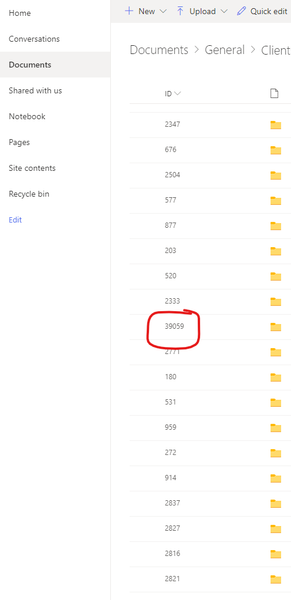
Hello, As you can see in the screenshot below. I created a Sharepoint Library and set it to show the ID field since I use this field as a way to track documents that are created and placed within my library. This is a brand new library that started at 1 when I first created it. All was going good until a couple of days ago when I noticed that the Unique ID field had jumped from around 2000 to 38000 and the number just keeps going up! As far as I know, this ID field is supposed to increment by 1 every time a new file is added correct? I definitely didnt add 36000 files to my library. What is happening here? Should I be concerned that there are some hidden files that are taking up space in my library somewhere? Is this normal and theres nothing for me to worry about? Could this prevent me from adding to my library in the future say if I reach a character limit on the unique id field? Any insight is appreciated!Solved2.2KViews0likes1Comment