issue
4 Topics
Microsoft Print to PDF not working/missing.
The Microsoft Print to PDF was not working on my PC so I tried reenabling it via Windows Features in Optional Features and it won't turn back on. It gives error code: 0x800f0922. I also tried other various methods online and none work. All end with various error codes which all result in the service not working/turning on. I even filed feedback about 2 weeks ago with no response yet. I contacted support, where I was recommended to perform a repair via ISO but was then canceled by the agent as I am on an Insider build. I am on build 26300.8687. This is a summary of my diagnostic from Gemini which I had used to try to solve my issue. Here is a summary of the diagnostic, tracking every command I executed in PowerShell and the specific roadblocks the Windows subsystem threw back. The Add-Printer Layer attempted to use modern PowerShell commands to register the printer onto both the interactive prompt port and the standard local file port. Commands Ran: PowerShell Add-Printer -Name "Microsoft Print to PDF" -DriverName "Microsoft Print to PDF" -PortName "PORTPROMPT:" Add-Printer -Name "Microsoft Print to PDF" -DriverName "Microsoft Print to PDF" -PortName "FILE:" * **Errors Faced:** * `ObjectNotFound: (MSFT_Printer:ROOT/StandardCimv2/MSFT_Printer)` * `HRESULT 0x80070002,Add-Printer` --- ## 2. The Legacy PrintUI Layer To bypass the modern PowerShell cmdlet, I tried using the legacy Windows user interface print engine via standard command prompt syntax and escaped quotes. * **Commands Ran:** ```powershell cmd /c "rundll32 printui.dll,PrintUIEntry /if /b `"Microsoft Print to PDF`" /r `"PORTPROMPT:`" /m `"Microsoft Print to PDF`"" rundll32 printui.dll,PrintUIEntry /if /b "Microsoft Print to PDF" /f "C:\Windows\System32\spool\DRIVERS\x64\3\prnms009.inf" /r "PORTPROMPT:" /m "Microsoft Print to PDF" Errors Faced: A graphical dialog box error: Operation could not be completed (error 0x00000002). The system cannot find the file specified. The Deployment Script Layer (WMI/CScript) I tried deploying the printer using Windows’ built-in visual basic administrative scripts to side-step the user interface layer completely. Command Ran: PowerShell cscript $env:windir\System32\Printing_Admin_Scripts\en-US\prnmngr.vbs -a -p "Microsoft Print to PDF" -m "Microsoft Print to PDF" -r "PORTPROMPT:" * **Errors Faced:** * `Unable to add printer Microsoft Print to PDF Error 0x80041002 Not found` * `Operation PutInstance` * `Provider Win32 Provider` * `Description The system cannot find the file specified. Win32 error code 2` Ultimately, every single command failed with an identical variation of **"File Not Found" (Error 2 / 0x80070002 / 0x80041002)**.465Views0likes4Comments
cant leave windows 11 insider program
Hello, i cannot leave the insider program. Im in windows 11 beta channel right now. If i try to leave the proramm by settings -> windows update -> windows insider program i have two options. I should be able to choose to leave the program with the next windows release, but this option is blurred out and i can not interact with it. The other option is the link at the bottom, which redirects me to a microsoft website. After logging in, it also tells me i can not leave the program now because my mail adress isnt registered. But u dont have another mail adress. I already contacted the support about that, the case number is 7034906605. We tried to create a new user and leave the program by this, but it also didnt work. I also did a windows reinstall with keeping my personal files and data. I would like to get around this issue without having to completely reinstall my windows because its a long process. Is there any way you can get my PC out of the beta insider program please? Greetings, Johannes.1.9KViews0likes5Comments
Problem where a new keyboard layout I have never selected appears in win+space
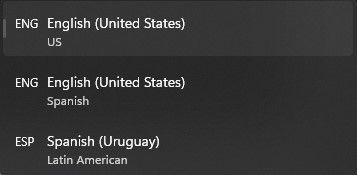
Essentially what appears in the title. In settings I have selected two keyboard languages/layouts, English (US) and Spanish (Uruguay). However, whenever I press win+space to change the layout, a third one appears that is labeled English (US) with Spanish just below it. It appears to be a mixture between the two. Whenever I fiddle with the settings it seems to disappear for a while but then it randomly comes back. This has been happening for a good while, at least half a year. Edition Windows 11 Home Version 22H2 Installed on 19-Mar-22 OS build 22579.100 Experience Windows Feature Experience Pack 1000.22579.100.01.6KViews0likes3Comments[FIXED] Anyone else having OneDrive high CPU usage problem after upgrading to build 19564?
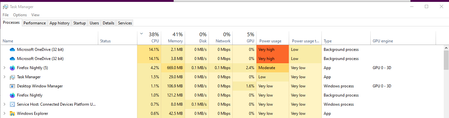
Feedback on Feedback hub app: https://aka.ms/AA7bbm6 please add more details to it. thank you Tried restarting my computer 2 times already with 5/6 hours intervals. I let it run like that for hours, hoping it will finish whatever it is doing but nope, it always stays like that. anyone else having this issue on the same exact build?Solved108KViews4likes37Comments