improvement
103 Topics
Verbose Status Improvement
Hi, I had a idea where for verbose status, you should make it so if its set to 2, it will display the verbose messages under shutdown or restart, example: Restarting (Stopping service: Windows Modules Installer) or make it next to it like Restarting (Stopping Service: Windows Modules Installer)214Views0likes3Comments
Windows Server OSConfig and DSCv3
Introduction I wanted to formalize putting a post out here to get some discussion going on the attempts at modernization of Windows configuration, and importantly, infrastructure-as-code. Hopefully this is a healthy discussion that others can engage in. Much of what I'm going to try and post about is stuff we already are aware of, but I want to highlight how this is an ongoing concern with the Windows Server platform that makes it difficult to encourage people to even consider Windows in their environment other than for extremely legacy purposes. I want Windows Server to be the best it can be, and I encourage others to join in on the conversation! Problem Statement Windows Server needs a modernized configuration-as-code system. Must be capable of orchestrating without cloud tools (offline orchestration) Must provide for regular validation and attestation Ideally should be easily available to 3rd party configuration tools. Since Microsoft appears to have little interest in building their own modernized system that isn't Azure-based, this means that this MUST be orchestrated easily and securely by 3rd party tools. Should be as robust as GPO at maintaining and enforcing state. Security configurations in Windows are a right pain to manage with any 3rd party tooling, with the closest coming to it being the SecurityDSC module which wraps secedit.exe and security policy INFs. Why is OSConfig not the answer? OSConfig doesn't provide for me, as an engineer, to clearly define what the state of my machines are based on my company's business requirements. While the built-in Microsoft policy recommendations are great, there are reasons to deviate from these policies in a predictable and idempotent manner. Applying an OSConfig Baseline -> Then changing settings as-needed with special PowerShell commands This is not the answer. This is a bunch of imperative code that serves nobody. And it makes implementing this feature extremely challenging in today's modern world of Kubernetes, Docker, etc. I encourage the Windows Server team to engage with the PowerShell team on DSC 3.0. I think that team has it right, but they are a small group of people and do not have the resources to implement everything that would make DSC 3.0 a first-class configuration as code platform on Windows. And this is where the Windows team should come in. Steve Lee and crew have done a bangup job working on DSC 3.0, including taking feedback from folks to leverage Azure Bicep language for configuration. Security Policy Challenge The way to access security policies need to change. Even if I were to take DSC 3.0 I'd end up having to create a similar security policy INF file to import into Windows. It just seems so silly to me to have to write all of that out when Windows really should just provide an interface for doing this. In fact, security policy remains to be one of the largest problems to getting a good platform stood up. Windows Firewall Policy and GPO - The reason why host-based firewalling is painful to manage at scale in a Windows environment. GPO is definitely not the right place to be managing Windows firewall policy at scale. Particularly when you often have a core set of management rules you want to implement and application-specific needs. Making robust changes becomes a challenge since each policy is separate, preventing you from doing things like inheriting rules for higher level policies. While this is an inherent limitation of Group Policy, it highlights the need to get off of GPO as the core policy configuration tool for Windows. My recommendations I'd like for the Windows team to implement DSC 3.0-compatible resources for managing all core functionality of Windows. If you can do it in a GPO, you should be able to do it with Configuration as Code. Please stop relying on the community to make this work. All of this should be first party to the platform itself. Furthermore, I'd like to recommend that Microsoft either work with 3rd party configuration systems (Chef, Ansible, Puppet, Octopus, etc.) OR to also provide a way to hit the ground running. Perhaps something that integrates visually into Windows Admin Center would be nice. Conclusion This is a huge problem in the Windows world and continues to seem to fall on some deaf ears somewhere in the organization. While I no doubt am confident that the engineers on all of these teams very well know these issues and maybe even have discussed fixing them, clearly there's a breakdown somewhere.1.1KViews6likes9CommentsSS48: don't remove MacOS Mojave support on Edge, even if Google now announced to us that they will
Suggestion (SS): 48 Classification: Browser Compatibility PRIORITY IN MY OPINION: 10 on a scale from 1 (low) to 10 (high) Few hours ago Senior Dev reported us the no interest of keeping MacOS Mojave support on Chrome. In 2 years they are removing the 2 best MacOS ever released, before Apple started to downgrade features in MacOS (and obviously adding some other too), especially related to all backup workflows, that now are more complex, but even to permissions and multiple other things. We reported the new downgrade for external drives implemented in MacOS 12/13 https://old.reddit.com/r/appledatahoarding/comments/11ikj38/next_macos_downgrade_available_with_monterey/, but this is not the point now. We explained already https://bugs.chromium.org/p/chromium/issues/detail?id=1413784&q=sierra%20chrome&can=1 why they should keep support for such MacOS, and later again https://bugs.chromium.org/p/chromium/issues/detail?id=1322548#c68 Now the point is: we are trying our best to revert such decision, like we wrote https://old.reddit.com/r/appledatahoarding/comments/11jufgo/google_chrome_support_will_end_in_few_months_for/, but it's important that other chromium based devs know about such problematic and evaluate to continue support, if this is technically possible. Remember that MacOS 10.14 is not like all other MacOS released by Apple, so removing such MacOS is not like removing Catalina, High Sierra etc. If there are question why MacOS Mojave support is so important, just write directly to us. We already experienced the direct consequence of removing MacOS on Chromium on all browsers and apps few months ago with Sierra. Please keep in mind that this is not just related to Chrome, but even Chromium based browsers, Mac Apps using Electron, and all other Mac Apps too (because if one is starting to remove support, especially big brands, the other will follow much easier*). So be open with your mind and don't write "i'm not using Chrome or Mojave, doesn't matter for me". There is the possibility that Google maybe know about some changes with Xcode, like we wrote https://old.reddit.com/r/appledatahoarding/comments/11jho7y/meanwhile_the_batch_deletion_of_other_2_macos_by/ but probably is not the case. If this is true, then the situation would be much worse, if now Apple really decides to remove multiple MacOS, like we previously reported with out https://old.reddit.com/r/appledatahoarding/comments/114o7zt/remember_2023_will_be_the_most_crucial_year_of/ *Keep in mind that almost 70%+ of all browsers available for MacOS (80+) are Chromium based. ------------ In case you will not doing that and Google will not keep support for Mojave, please provide directly link to download a browser version compatible with up to MacOS Sierra and one up to MacOS Mojave, instead of just download last version. Avoid auto update of the app too. So don't install new incompatible app automatically, which make no sense at all.2.3KViews0likes0Comments
Suggestions to make Bing more innovative and useful than Google. (Please take a look)
I have recently moved away from Google to Bing and i've been very much satisfied with the provided results but i have tested MANY search engines and i want to share some ideas taken from various different search engines that could be implemented in bing, making it far more useful and innovative than google for every user. - Widgets: These small info boxes are very popular on smartphones, especially android phones, implementing weather, time, mail and other optional and default widgets for Bing Search would make it very useful. Such widgets could be added between the search bar and selective titles (All, News, Images, Videos, Maps and etc) on the search page, while adding it to bing on homepage simply under the search bar would do. - Make homepage more simple and straight-forward: I am completely fine with bing's homepage, since i have tested various search engines, but from a normal users point of view, bing's homepage is filled with various unnecessary elements which could be simplified (not removed). Small changes like making the search bar slightly bigger, move it more towards the center, not show the news section right on the homepage (instead replace it with an arrow, showing users to scroll down to view news section). These small changes will make things more straight-forward, since when people come over from google to bing, too much of things on one page will simply discourage users to search up on bing, making the search bar big and moving it to the center will encourage people to search and make things look less distracting. These are few things i wanted to share, something i think would really help more people to start using bing, many new things like widgets could keep you informed always, like weather for your location. Hopefully this can be passed over to the dev team and contribute to Bing's improvement:) Alyxe1.3KViews0likes1CommentIntroducing Performance Mode in Microsoft Edge | New feature
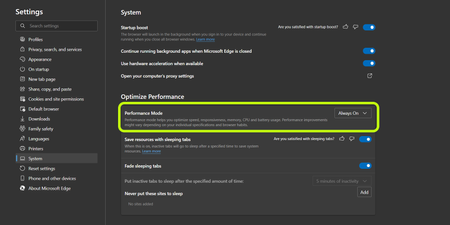
Updates (Version 91.0.864.1 (Official build) canary (64-bit)): This mode helps optimize your browser’s performance by saving battery and minimizing resource usage (memory, CPU). Performance improvements might vary depending on your device specifications and individual browser habits. Details: Puts background tabs to sleep after 5 minutes of inactivity (if sleeping tabs is on). Timer will go back to its previous selection when you're not in performance mode. While we do our best to minimize impact to your experience, performance mode may cause: Videos to be less smooth Animations to slow down when you're not interacting with the browser Want to turn it on? make sure you are at least on Edge canary Version 91.0.856.0 (Official build) canary (64-bit) currently a controlled feature rollout, but you can turn it on using this code at your own risk: --enable-features=msPerformanceModeToggle24KViews4likes10Comments
[Suggestion] If a bookmark folder name starts with an emoji use it as the folder icon
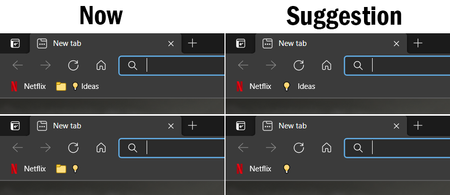
It would be really good for a more personalized experience and, I believe, easy to implement, that it was possible to change the icon of folders in the bookmarks (especially if they are on the bookmarks bar). For a easier solution, instead of creating UI and icons for folders, it would be pretty good, if when naming a folder the first character was an emoji, to use it as the folder icon.1.9KViews3likes2CommentsI just want to tell you that i suggested other 50-100 improvements to Edge Devs in the last time
I don't share such things here, because there are a lot of personal information that i don't want to share with the public, maybe soon i will make a summary of the most important points, if you wish that. Or just wait, until Edge implement it. Then you will see it xD Example of topics: bookmarks, search bar, toolbar, settings, edge in small size, using edge with low resolution display setting, smart search, other smart buttons (i already talked about some previously), better tab management, better domain based features, etc. I submitted different problems that i discovered too. So be ready to see another boost for edge. For different suggestions devs are already on working. Good day Ciao1.6KViews1like3CommentsSS47: resize toolbar / search bar
Suggestion (SS): 47 Classification: TOOLBAR PRIORITY IN MY OPINION: 2-3 on a scale from 1 (low) to 10 (high) If we want to move it to the left is not possible (if we don't have 40 extensions for example). instead you should show me in such way where the extension is visible more to the left and after that i see a white space.3.3KViews0likes7CommentsSS46: Hey Edge - voice control
Suggestion (SS): 46 Classification: VOICE CONTROL PRIORITY IN MY OPINION: 2-3 on a scale from 1 (low) to 10 (high) Bing already has some integration of voice control, Firefox too. Now i think it's time for Hey Edge function. Examples of tasks Hey Edge should be able to do: -Hey Edge, move tabs to the right to another window, hide it in macos, save PDF and add all links to bookmark folder IMPORT for all tabs in this new window; once done close the window. - Hey Edge, reload all techcommunity.microsoft - Hey Edge, change to Bing as default - Hey Edge, mute all - Hey Edge, volume 50% - Hey Edge, go to minute 3.45 - Hey Edge, loop mode - Hey Edge, loop from x to y - Hey Edge, set download path to configuration 1 - Hey Edge, search this with %s1 %s2 ... at the same time - Hey Edge, open %s settings - Hey Edge, add this search to %s and use abbreviation <ed - Hey Edge, duplicate 5 tabs from this - Hey Edge, change my profile image now - Hey Edge, launch xxx (an extension) - Hey Edge, quit Edge in 10 minutes - Hey Edge, open random website from folder XXX - Hey Edge, disable all extensions for 5 seconds. - Hey Edge, random open my most visited youtube links - Hey Edge, write new instagram post (by opening a 3. app for posting) - Hey Edge, activate all disabled extensions. - Hey Edge, reopen last closed session - Hey Edge, reopen last 7 tabs - Hey Edge, move tab to first - Hey Edge, color tab to red - Hey Edge, go back to the source (example when you open webpage a then b ... to z, go back to a) - Hey Edge, pipmode - Hey Edge, go to next video - Hey Edge, save to collections (last used) - Hey Edge, close tabs to left - Hey Edge, merge windows - Hey Edge, quit - Hey Edge, open flags - Hey Edge, activate flag xx - Hey Edge, restart - Hey Edge, share this page to xxx - Hey Edge, new mail to xxx - Hey Edge, install xxx - Hey Edge, create new profile for account mailto:a@a.com - Hey Edge, delete this profile - Hey Edge, activate vpn now (once integrated) - Hey Edge, change background new tab pictures from onedrive folder AA to BB - Hey Edge, open all links inside folder XXX - Hey Edge, download all images that i click in the future, stop it once i say stop - Hey Edge, launch beta profile xxx - Hey Edge, show me when i visited this page in the past - Hey Edge, add this page to bookmarks (using recent folder) as shortcut <emis - Hey Edge open 6x incognito pages with url http://www.... - Hey Edge, ban all selected email from outlook - Hey Edge, start new chat support session - Hey Edge, new feedback - Hey Edge, share this file (in onedrive = this mean you copy directly the url) - Hey Edge, save all picture to onedrive - Hey Edge, open word - Hey Edge, find similar websites - Hey Edge, show me my IP - Hey Edge, export this image as png - Hey Edge, save this files to xxx and rename it as yyy - Hey Edge, open Missy Edge profile - Hey Edge, run workspace 4 now - Hey Edge, run highlight mode now (once integrated) - Hey Edge, save next selected texts to collections - Hey Edge, search hello in youtube as playlist - Hey Edge, disable notifications from all future visited pages - Hey Edge, activate flash always - Hey Edge, open all selected urls in edge dev profile 3 (if we use canary for example) - Hey Edge, copy all urls from tabs - Hey Edge, add selected tabs to my vertical favorite tabs (once integrated) - Hey Edge, open with profile 2 .... (once container is integrated) - Hey Edge, download all images from tabs - Hey Edge, create merge all tab groups and move to new window by hiding it in macos - Hey Edge, download all files in this website with torrent (once integrated) - Hey Edge, open in tabs selected links - Hey Edge, export bookmarks every 5 minutes to my mac - Hey Edge, reverse search this image - Hey Edge, show me social accounts of this person (from a video/photo) - Hey Edge, create new outlook alias mailto:b@.... - Hey Edge, change outlook recovery email to .... - Hey Edge, ban all social accounts for 4 hours - Hey Edge, add label xxx to this page (for history panel, once integrated) - Hey Edge export last 7 days of history to my desktop folder xxx - Hey Edge, activate kids mode - Hey Edge, create new rule for this email and use setting 1 (example forward to 3 emails ...) - etc. If we can run such multiple rules without Hey Edge would be cool too, so something in keyboard maestro style. Obviously first we need to support a better way to run such actions and similar actions without Hey Edge, but once this is done, different action can be implemented in Hey Edge too. Then it depends, sometimes is much faster to do manually instead of saying Hey Edge... (and maybe Hey Edge doesn't understand what we say too...., like Bing does) To be more faster instead of saying "Hey Edge, save pdf for all tabs to the right" or similar, we just say "Hey Edge, pdf right". The same for all other examples You can even integrate a smart Hey Edge, where i can combine my manual and Hey Edge actions. Example: i'm reading a pdf. at the same time i say "Hey Edge, pdf right once i say NOW". then i read pdf on tab 2, 3, 4, 5. Once done i say "NOW" and you export all pdf to the right (based on the tabs where i requested this rule). This means in the same time i can close and open new tabs, you do the action only once i say "NOW". Such "NOW" actions can be implemented in so many workflows and would be a great productivity boost.3.3KViews0likes4CommentsSS45 + BBSS1: reverse video search
Suggestion (SS): 45 + Bing Suggestion (BBSS): 1 Classification: BING PRIORITY IN MY OPINION: 4-5 on a scale from 1 (low) to 10 (high) About a better integration with Bing Image reverse search function and Edge i already wrote different post in the past. Now what Edge and Bing should improve is to reverse search videos: 1) add a button overlay over videos to reverse search identical videos, this means 1a) show HD videos if the video is in SD 1b) if the video is 20s long, show me the original video (example 1m) 2) similar video suggestion based on an interval inside the video or a frame 3) integrate for a specific frame an image reverse search function (without need to use screenshot) 4) show exactly a list of all websites that integrate such video (a bit like facebook does with images now) 5) face recognition: same like the feature i already wrote you about image reverse search 6) automatically detect all songs inside the videos and write a list 7) if the video is in czech, show me websites that offer the same video in english. 😎improve auto translate feature 9) add option "open original video directly, without showing me that inside bing videos" PS: i think that Microsoft is much better with suggestions and reverse search compared to Google. Google in the last time removed a lot of features and create an ugly UI (which can be reverted back in some points thanks to chrome extension, a bit like we can do with Facebook old UI or Reddit or etc.) About Bing Images: i think Bing should integrate something like the old google, without opening a separate popup. You should allow cmd to open multiple tabs too. At the moment you continue to open single popups. Instead you should open each popup inside a new tab. With Bing Videos cmd works very good. Only Bing Images creates problem2.5KViews0likes5Comments