icon
23 Topics
Favicons for bookmarks broken since Edge v149 update
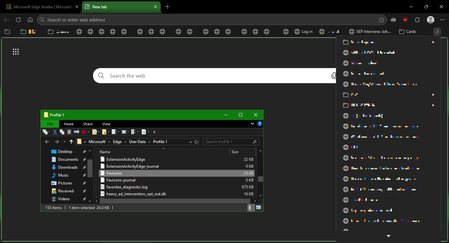
I've recently had Edge update to the v149.0.4022.52 stable-channel releases, and ALL my bookmarks now have no favicons. When I visit any webpage, Edge successfully loads the favicon for the tab of that website. But when I visit a bookmark, the favicon doesn't get updated after it has loaded for the site. And new bookmarks I add also don't show a favicon. If I go into my Edge profile-folder (which can found via edge://profile-internals/ , clicking the heading, then looking next to "Profile Path"), then it is still creating the "Favicon" and "Favicons-journal" files, but I assume isn't populating them with anything? I've tried deleting both files, restarting my PC, but even after Edge recreates them, no bookmarks are gaining any favicons. Is anyone else getting this issue...? OS: Windows 10 Home 22H2 x64 (OS Build: 19045.7291 : May 2026 ESU)Solved4.3KViews4likes23Comments[Feature Request] Please allow hiding the Extensions button in Edge toolbar
I am using Microsoft Edge version 140.0.3485.66 on macOS. In this version, the Extensions menu button (the puzzle icon) is forced to stay visible on the toolbar, and the toggle in Appearance / Customize toolbar settings to hide this button has disappeared. I use some extensions, but I don't want the extension (puzzle) icon to show on the browser interface. You just need to roll back this feature to the state it was in the previous version. Keeping the Edge interface clean is a very good reason why I prefer Edge. I like using Edge instead of Google Chrome, and this is an important reason! I don't want you to make it more and more like Chrome!145Views0likes0Comments
Windows Desktop - New Folder Type Feature
I'd love to see a new desktop icon/folder feature. Adding a specific type of New Folder that will only be displayed on your main/primary display desktop. The folder would always be visible on the main display and contain the icons that show up on all external monitors that are not flagged as the main display. That way, when a laptop isn't connected to an external monitor, those sets of icons are quickly accessible via the special desktop folder on your main display. You would no longer have a flood of icons when using only the laptop and when docked you have them at their normal positions.367Views0likes0CommentsMissing icon in app admin panel when loading custom app created with app studio
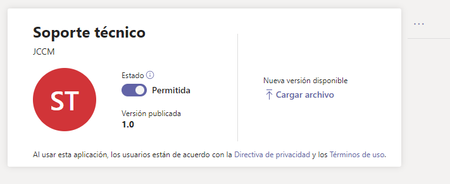
Hello!. I have created a custom app with App Studio. It has completed the validation without errors and when uploading it to the Teams application panel, the icon does not appear. The app does display correctly when opened from Teams and contains the outline icon. Can someone tell me how to correct it? Although it appears correctly in Teams, I would like it to have its icon in the app administration panel. Thanks!2KViews0likes4CommentsEdge Icon in Android
The Microsoft Edge Insider (Edge Beta, Edge Dev and Edge Canary) 's icon in Windows operating system are different colour according to the channel. Edge Beta-Blue Edge Dev-Green Edge Canary-Yellow However, Microsoft Edge Insiders' icon colour in Android are exactly same colour with Edge Canary. Although the apps name is different, it still make Android users confuse between Edge Beta, Edge Dev and Edge Canary because the same batch colour in the icon.1.2KViews0likes0Comments[Search Engines] Favicons do not appear next to the built-in providers by-default
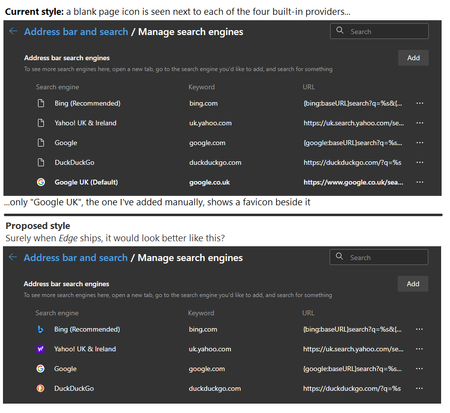
Describe the problem: Edge ships with some built-in search-engines. These vary by-country, but for UK users they are "Bing", "Yahoo!", "Google US" and "DuckDuckGo". None of the built-in engines will initially show any icons next to them -- all just show a blank-page icon, making the feature look broken. Suggest a solution: Either one of the following: Edge should ship with the favicons for each built-in search-engine already cached Or the first time Edge is ran, where a valid Internet-connection is present, it should immediately retrieve the favicon for each one silently, in the background Any workarounds? After the user has visited the website of one of the search-engines that comes built-in, the favicon will get cached. If the user were to return to the "Manage search engines" screen, you will then see the icon next to each one you have visited. However, given many users are unlikely to have visited all of the sites before they first access the "Manage search engines" screen, the result will be blank-page icons for most, if not all, of them. Before posting on this site, have you suggested this previously using the "Send Feedback" feature built-into Edge? I have, yes. Browser and OS versions Edge Stable v90.0.818.62 (Official build) (64-bit) Windows 10 Home (64-bit) Version 20H2 (Build 19042.985; May 2021) Screenshot1.7KViews1like1CommentNew feature | Edge PWAs are getting Hubs
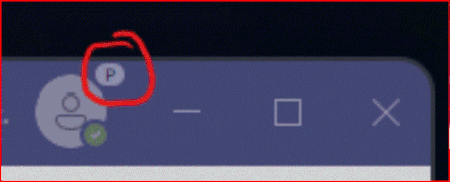
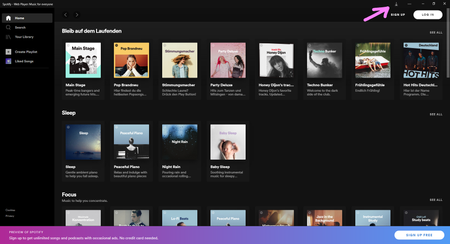
This an example of Spotify web player and YouTube installed as a PWA in Edge Version 91.0.862.0 (Official build) canary (64-bit) in this version, which is the first time this is appearing in a installed PWA, only the downloads button/hub appears there. I hope in the future the Global Media Controls button also become available there, that will make the most sense. we'll have to wait and see whether favorites, history or collections icons will be there too or not.942Views1like0CommentsNew icon for the Web Widget floating button
Previously looked like this. Microsoft Edge Version 91.0.844.0 (Official build) canary (64-bit) So what do you think? I personally would prefer it without the white background, only the Edge icon itself and preferably bigger when the white background is no longer there. I also think it makes more sense now, the previous one wasn't really relatable.1.9KViews1like4Comments