hybrid
1980 TopicsAdvancing sovereign AI with Foundry Local and Azure Local
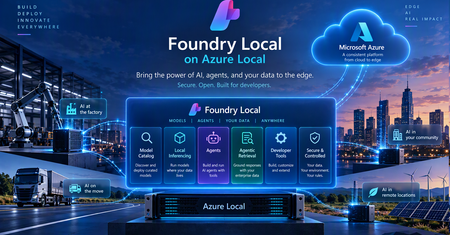
The next chapter of AI is about more than powerful models. It’s about bringing AI closer to the data, applications, and systems that organizations depend on every day. For governments, regulated industries, and organizations operating critical infrastructure, this means making AI accessible in environments where data is sensitive, connectivity may be limited, and greater operational control is essential. Microsoft’s approach to sovereign AI starts with the requirements of each workload. Our vision is to give organizations the choice and flexibility to determine where AI runs, which models they use, and how their data and infrastructure are managed. Depending on the workload, this can include control over where data and models reside, who can access and operate the environment, how AI workloads are governed, and whether critical operations can continue when cloud connectivity is restricted or unavailable. The goal is to help organizations meet their security, regulatory, and operational requirements while maintaining access to modern cloud and AI capabilities. With Foundry Local, entering general availability on Azure Local at Ignite, we're bringing advanced AI capabilities to customer-controlled environments. This enables organizations to build and run AI applications closer to their data, with greater control over how AI workloads are deployed and operated, extending the possibilities of AI beyond the public cloud. Bringing the Microsoft Foundry experience to customer-controlled environments AI delivers the greatest value when organizations can connect it securely to the data, applications, and processes that power their business. Microsoft Foundry is our unified platform for building, optimizing, and governing AI applications and agents. Foundry Local extends these capabilities to customer-controlled environments, allowing organizations to deploy and run supported AI models on Azure Local infrastructure, with local inference, model management, and GPU acceleration. Built on Azure Arc-enabled Kubernetes, Foundry Local supports CPU- and GPU-backed deployments, model lifecycle management, and OpenAI-compatible APIs. Developers can select from an integrated model catalog or bring their own supported models. Models and inference workloads can run locally, including in supported disconnected environments. We're also expanding what organizations can build with Foundry Local, moving beyond standalone inference toward intelligent applications and agents that can securely interact with enterprise data. These capabilities include: Model catalog (general available): Offers a curated model catalog, making it easy to discover and deploy AI models optimized for local and edge environments. Gives organizations greater flexibility to select models based on capability, performance, latency, resource requirements, and the sovereignty needs of individual workloads. Agentic Retrieval (general available): Enables applications to ground responses in enterprise knowledge through local data ingestion, indexing, and multistep retrieval, with citations that allow users to verify the underlying sources. Agents and enterprise connectors (available in preview): Emerging capabilities for orchestrating agents and connecting them to enterprise systems, including on-premises Exchange Server, SharePoint Server, and SQL databases through Model Context Protocol (MCP). Configurable AI guardrails (available in preview): Support for applying safety and compliance controls to local AI workloads, with flexibility to select guardrail models based on security requirements and available compute resources. Together, these capabilities help organizations build AI applications where the data lives instead of requiring the data to move to the AI. From local inference to sovereign AI applications Running AI models locally is an important first step, but sovereign AI extends beyond inference. Organizations need to connect models to enterprise knowledge, build intelligent applications and agents, and maintain control over how those applications are developed, deployed, and operated. Foundry Local helps make this possible by bringing AI capabilities closer to enterprise data and applications. Developers can use familiar Microsoft tools and technologies to build AI applications across cloud and customer-controlled environments, with greater flexibility over where models run and how they interact with organizational data. Azure Local provides the infrastructure foundation for running these workloads across datacenters, distributed locations, and edge environments, including sovereign private cloud scenarios. For organizations requiring greater operational independence, Azure Local disconnected operations enables supported infrastructure and services to operate through a local control plane without continuous connectivity to the public cloud. Sovereignty also extends to the software development lifecycle. With GitHub Enterprise Local, becoming generally available at Ignite, organizations can bring familiar GitHub development capabilities to customer-controlled infrastructure on Azure Local. Developers can manage source code, collaborate, and automate build and deployment processes using GitHub Actions and self-hosted runners while maintaining greater control over their repositories, workflows, and artifacts. Foundry Local can also provide locally hosted models for AI-assisted development scenarios in supported disconnected environments. Together, Foundry Local, Azure Local, and GitHub Enterprise Local provide a foundation for building, deploying, and operating AI applications within customer-controlled environments, extending sovereignty from the infrastructure to the models, applications, and development processes that run on it. What this means for customers The significance of these capabilities is ultimately about what they enable organizations to do. Keep sensitive data in the environment they control. Organizations can bring AI to data that may need to remain within a specific facility, geography, security boundary, or operational environment. Run AI where decisions need to happen. Manufacturers, retailers, transportation providers, healthcare organizations, governments, and others can bring intelligence closer to physical operations and distributed locations rather than depending on every interaction traveling to a remote cloud service. Support environments with limited or disconnected connectivity. Organizations operating in remote, isolated, or highly controlled environments can continue to pursue AI scenarios where constant public cloud connectivity may not be appropriate or possible. Maintain greater control over the AI stack. Customers can make deliberate choices across infrastructure, data, models, applications, operations, and governance based on the requirements of individual workloads. Turn enterprise data into useful AI experiences. Retrieval, connectors, agents, and model capabilities can help organizations build AI experiences grounded in their own information and business processes while keeping those capabilities closer to the systems they support. Most importantly, customers do not have to define a single architecture for every workload. Some AI workloads will benefit from the scale and rapid innovation of the public cloud. Others will require greater local control. Many organizations will need both. Our strategy is to give customers the flexibility to choose the right architecture for each workload while maintaining a consistent foundation across their environments. Sovereignty that enables innovation As AI becomes more deeply embedded across applications, operations, and critical infrastructure, organizations will need architecture that give them both powerful AI capabilities and meaningful control over how those capabilities are deployed. With Azure Local and Foundry Local, we’re continuing to bring Microsoft AI innovation to the places customers need it, from the cloud to customer-controlled datacenters and edge locations. That is the foundation of our approach to sovereign AI: giving every organization the control and choice to pursue its AI ambitions on its own terms. Resources Join us at Microsoft Ignite in San Francisco to explore the latest innovations across Microsoft AI, Azure Local, and sovereign cloud. Learn about AI workloads on Azure Local Explore digital sovereignty at Microsoft Learn more about Microsoft Sovereign Private Cloud67Views0likes0CommentsGitHub Enterprise Local: Bringing modern development to environments you control
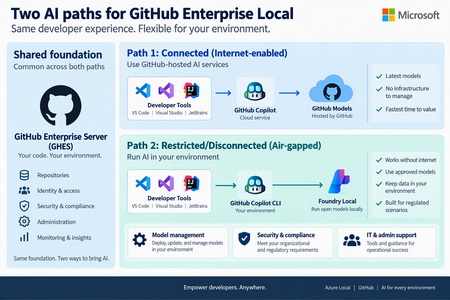
Today at the Frontier Tour in Paris, we’re announcing the next milestone for GitHub Enterprise Local, which will become generally available at Microsoft Ignite. GitHub Enterprise Local brings the GitHub Enterprise Server experience to organizations’ own environments, helping them keep source code and development workflows close to where their business operates. This is especially valuable for regulated industries, sovereign environments, remote locations, and organizations that need to continue working with limited or no internet connectivity. What's New Simpler deployment: A guided Azure experience brings the key deployment steps together and reduces manual configurations. Using AI for connected and disconnected environments: Customers can use GitHub Copilot when cloud connectivity is available or locally hosted models through Foundry Local when AI processing must remain within their environment, subject to current availability and requirements. A simpler way to deploy GitHub Enterprise Local GitHub Enterprise Local now uses Workload Orchestration to provide a guided, user-friendly deployment experience in Azure. Instead of coordinating separate tools and steps, administrators can enter the required settings in one workflow and let the platform prepare the core infrastructure and GitHub Enterprise Server appliance. Deployment secrets are securely stored in Azure Key Vault, helping organizations protect sensitive information and manage access within their environment. The result is a more consistent and repeatable deployment process, with fewer opportunities for configuration errors. Organizations still retain control over important choices such as networking, naming, security, and the environment in which GitHub Enterprise Local runs. This streamlined experience also makes it easier to establish a consistent operating model across multiple locations. Platform teams can apply repeatable deployment practices, protect deployment secrets in Azure Key Vault, and give application teams a familiar GitHub environment wherever the infrastructure is located. Choose the AI experience that fits your environment Organizations do not all operate with the same connectivity, security, or data requirements. GitHub Enterprise Local keeps repositories and core development workflows on customer-controlled Azure Local infrastructure, while giving customers a clear choice for adding AI assistance. Connected environments: use GitHub Copilot When controlled internet access is available, developers can use GitHub Copilot in supported development tools while their repositories remain hosted on GitHub Enterprise Local. To use GitHub Copilot in connected environments GitHub.com identity and license is required. This option is a good fit for organizations that allow managed outbound connectivity and want the broader GitHub Copilot experience without moving their source-code hosting away from their Azure Local environment. Restricted or disconnected environments: use local AI In environments where GitHub Cloud connectivity is unavailable or not permitted, Foundry Local can run approved AI models on Azure Local. AI requests are processed inside the customer-controlled environment, helping organizations support local data boundaries and disconnected operations. Developers can access the local AI endpoint through supported GitHub tooling, while administrators manage the models, security, certificates, and access controls within their own environment. Foundry Local provides a focused local AI option rather than the full cloud-backed GitHub Copilot experience. Availability and supported capabilities may vary, so customers should review the latest product documentation when planning their deployment. Find the right fit Environment Recommended AI path Key consideration Connected GitHub Copilot with GitHub-hosted services Best when approved internet access and GitHub Copilot licensing are available. Restricted / hybrid Use GitHub Copilot for approved connected work, or local models where data must remain in the environment. Choose the AI path based on network policy and data sensitivity. Disconnected Foundry Local with approved models running on Azure Local Designed for environments that cannot depend on GitHub Cloud connectivity. Built for hybrid, sovereign, and disconnected operations GitHub Enterprise Local brings together the familiar GitHub developer experience and the flexibility of Azure Local. Customers can keep code and development workflows in their own environment, deploy the solution through a more consistent process, and choose an AI approach that matches their connectivity and data requirements. Customers can begin with the operating model that best fits their current needs and expand over time. A connected site can use GitHub Copilot through approved cloud access, while a restricted site can keep AI processing local—both supported by the same Azure Local foundation and a consistent approach to management. GitHub Enterprise Local is entering general availability at Ignite. To get started, explore the product information, review deployment requirements, and work with your Microsoft account team to plan the right Azure Local environment for your organization. Learn more about GitHub Enterprise Local107Views0likes0Comments
Sovereign Private Cloud: Bringing more choice and control to AI and cloud infrastructure
To identify which sovereign cloud solution may fit your organization’s needs, take the Microsoft Sovereign Cloud assessment Digital sovereignty is essential for organizations as they modernize critical infrastructure and bring AI into more sensitive and regulated environments. We’re hearing from our customers in Europe and beyond that they want to take advantage of cloud and AI innovation while maintaining greater control over where their data, applications, and infrastructure operate. Microsoft Sovereign Private Cloud, built on Azure Local, extends cloud capabilities into customer-controlled environments, helping organizations meet sovereignty, regulatory, and operational requirements while continuing to modernize applications, infrastructure, data, and AI. At Microsoft Frontier Tour stops this month in London, Paris and Cologne, we’re showcasing exciting new capabilities that expand what our customers can achieve with Sovereign Private Cloud and Azure Local. These advancements range from running frontier AI models locally to strengthening resiliency and workload isolation, enhancing security, and improving developer productivity. Run AI where your data lives with Foundry Local Foundry Local, generally available on Azure Local at Ignite, brings the Microsoft Foundry stack into customer-controlled environments, extending AI capabilities to on-premises infrastructure. Organizations can deploy and run AI models close to their data, enabling local inference while maintaining greater control over their infrastructure, data, and operations. With Foundry Local, organizations can bring the Foundry experience to connected and disconnected environments, giving them greater flexibility in where and how they deploy AI. This enables customers to bring AI to locations and workloads where cloud connectivity, data residency, latency, or operational requirements make local processing important. We’re continuing to expand the Foundry Local model catalog, giving organizations greater choice in the models they can deploy and run locally. Developers can select models based on the needs of their applications while keeping inference close to their data, applications, and operations. Beyond model inference, Foundry Local is expanding to support agentic AI scenarios on Azure Local into public preview. Agentic Retrieval provides local data ingestion, indexing and search, along with agents, tool calling, and Model Context Protocol (MCP) server, and a built-in chat experience with citations. Together, these capabilities enable developers to build AI applications that can use locally available enterprise knowledge, interact through conversational experiences, and connect agents with tools through MCP. This extends Foundry Local from local model inference to a broader foundation for building grounded AI applications and agents in customer-controlled environments. Learn more about Foundry Local on Azure Local. Strengthen resilience and operational flexibility across Azure Local environments Sovereign environments need to remain resilient and adaptable while supporting different teams, tenants, and workloads across shared infrastructure. We’re bringing more choice over how and where our customers can operate infrastructure based on their sovereignty, connectivity, and operational requirements. Azure Local is expanding the ways organizations can operate in their environments. The ability to move from connected to disconnected Azure Local operations is entering public preview, enabling organizations to rehome Azure-connected infrastructure and workloads to a fully disconnected Azure Local environment while maintaining operational continuity and governance. The process includes safeguards such as phased execution, user approval stages, and secure environment back-ups that ensure the safe and accurate migration of both infrastructure resources and workloads to the Azure Local disconnected environment. This empowers customers to more easily transition their environments to Azure Local disconnected operations and meet their evolving operational requirements related to connectivity to the cloud and data sovereignty. Multitenancy, coming soon to Azure Local, provides greater flexibility provides greater flexibility in how organizations use and allocate shared infrastructure. Through logical isolation, organizations can consolidate workloads and make more efficient use of available capacity while maintaining separation across tenants, teams, and workloads. Initial access will be limited to qualified customer opportunities. Together, these capabilities help organizations build Sovereign Private Cloud environments that are more resilient, adaptable, and capable of supporting a diverse range of workloads and operating models. Protect sensitive workloads with confidential computing Protecting data at rest and in transit is critical. For highly sensitive workloads, organizations may also need stronger protections while data is actively being processed. With confidential virtual machines on Azure Local, now generally available, organizations can extend confidential computing protections to customer-controlled infrastructure. Confidential virtual machines provide hardware-encrypted memory and hardware-based isolation between the virtual machine, hypervisor, and host management environment, helping protect sensitive data while it is in use. Hardware-rooted attestation provides additional assurance by enabling the integrity of the platform and workload to be verified before sensitive data or keys are released. Customers can also use integrity protection for the guest operating system to help protect the OS disk and boot chain from unauthorized modification. For organizations running regulated, sensitive, or mission-critical workloads, these capabilities provide an additional layer of protection within Sovereign Private Cloud. By combining customer-controlled infrastructure with hardware-enforced isolation and attestation, organizations can strengthen protection for sensitive workloads while maintaining greater control over where their data and applications run. Learn more about confidential virtual machines on Azure Local. Bring development and DevOps into the sovereign boundary with GitHub Enterprise Local Sovereignty extends beyond production infrastructure. Organizations also need to consider where applications are developed and how development environments are operated. GitHub Enterprise Local, entering general availability at Ignite, brings GitHub Enterprise Server into Azure Local and Sovereign Private Cloud environments. This enables organizations to support local development and DevOps while keeping development environments within their sovereign operational boundary. Delivered as a prebuilt virtual appliance on Azure Local, it keeps repositories, metadata, CI/CD workflows, and development artifacts within the organization’s infrastructure and security boundaries. Developers can use familiar GitHub capabilities including private repositories, pull requests, code reviews, issues, GitHub Actions with self-hosted runners, GitHub Packages, and GitHub Advanced Security, while organizations maintain control over identity, networking, security policies, upgrades, and administration. GitHub Enterprise Local supports both connected and fully disconnected environments. GitHub Enterprise Local supports AI-enabled developer experiences across connectivity models. In connected environments, developers can continue using cloud-connected capabilities such as GitHub Copilot, while in disconnected environments, Foundry Local on Azure Local can provide locally hosted AI models for AI-assisted development scenarios. The general availability of GitHub Enterprise Local expands Microsoft’s Sovereign Private Cloud platform beyond infrastructure and workloads to the tools developers use to build and manage applications. Learn more about GitHub Enterprise Local. Run critical data workloads locally At FabCon, we announced the general availability of SQL Server on Azure Local across connected and disconnected environments, expanding the options organizations have to run critical data workloads where they need greater control over their data and infrastructure. We are continuing to expand the data services available on Sovereign Private Cloud with DocumentDB on Azure Local and Blob Storage on Azure Local, both entering public preview at Ignite. DocumentDB on Azure Local brings a MongoDB-compatible, open-source document database to customer-controlled environments, giving organizations more flexibility to run document and JSON workloads locally. Blob Storage on Azure Local provides cloud-native object storage for unstructured data while keeping the data local, giving organizations more flexibility to store and access data within sovereign environments. Together with SQL Server, these capabilities expand Azure Local beyond infrastructure to support a broader data estate across relational databases, document databases, and object storage. For Sovereign Private Cloud customers, that means greater flexibility to modernize applications and data while keeping critical workloads and data in customer-controlled environments. Resources Learn more about Azure Local Explore digital sovereignty at Microsoft Learn more about Microsoft Sovereign Private Cloud Join us at Microsoft Ignite in San Francisco this November To identify which sovereign cloud solution may fit your organization’s needs, take the Microsoft Sovereign Cloud assessment181Views1like0Comments
Deploying Logic Apps Hybrid through an Azure DevOps pipeline
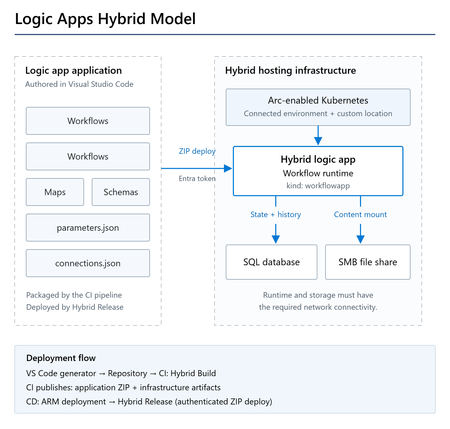
Overview Logic Apps Hybrid runs Standard workflows on your own infrastructure: an Arc-enabled Kubernetes cluster that appears in Azure as a connected environment. You still author and manage the workflows in Azure, but the runtime is yours. Until now, setting up CI/CD for this meant writing the ARM template and the pipeline YAML by hand, and working out a few Hybrid-specific details along the way. The Azure Logic Apps (Standard) extension for Visual Studio Code can now generate all of it for you: the infrastructure template, its parameter file, and both pipelines. A separate Azure DevOps extension supplies the pipeline tasks that do the Hybrid-specific work. This post covers the whole path: generating the assets, what is inside them, the service connections and variables you need to supply, and running both pipelines. Things to consider first Three things work differently in Hybrid than in a cloud-only Standard deployment. The generated assets handle all of them, but the pipelines are much easier to follow once you know what they are. Connections cannot use managed identity Infrastructure as code for Standard normally produces managed API connections that authenticate with ManagedServiceIdentity . That does not work in Hybrid, because the runtime executes inside a container on your own cluster where no Azure managed identity is available. Hybrid connections use ActiveDirectoryOAuth with a Microsoft Entra ID app registration instead. The Hybrid Build task rewrites this at build time, so you do not have to. Any *-Authentication parameter of type ManagedServiceIdentity becomes: { "type": "ActiveDirectoryOAuth", "tenant": "@appsetting('WORKFLOWAPP_AAD_TENANTID')", "clientId": "@appsetting('WORKFLOWAPP_AAD_CLIENTID')", "secret": "@appsetting('WORKFLOWAPP_AAD_CLIENTSECRET')", "audience": "https://management.core.windows.net/" } The @appsetting() references resolve at runtime against Container App environment variables that the infrastructure template sets. The same package can therefore go to any environment; only the app settings change. The runtime runs on your cluster A Hybrid logic app uses Azure Container Apps on Arc-enabled Kubernetes. It is deployed as a Microsoft.App/containerApps resource with kind: workflowapp , tied to your cluster through a custom location. Workflow content lives on an SMB file share mounted at /home/site/wwwroot . Deployment goes through a ZIP deploy endpoint There is no App Service publishing involved. The package is posted to the Hybrid logic app's zipdeploy endpoint, authorized with a bearer token from the client credentials flow. That is why the release task needs its own Hybrid Logic App service connection holding the Entra ID tenant, client ID, and client secret. What you'll build A CI pipeline that packages your workflows and publishes the application ZIP and infrastructure templates, and a CD pipeline that deploys the infrastructure and releases the package to your Hybrid logic app. The runtime runs on your Arc-enabled Kubernetes cluster, with SQL for workflow state and an SMB share for application content. Prerequisites This post assumes the Hybrid environment already exists. If you have not set one up yet, follow the official guide to set up your infrastructure for Standard logic app workflows with hybrid deployment. For an automated AKS-based evaluation environment, you can also use the Azure Arc Jumpstart template, Hybrid deployment for Azure Logic Apps on AKS. Use it for evaluation and validation, not as a production reference architecture. On the Azure side you need: An Arc-enabled Kubernetes cluster with a connected environment ( Microsoft.App/connectedEnvironments ) and a custom location An SMB file share the cluster can reach: host name, share path, user name, and password A SQL Server connection string for the Hybrid runtime state store A Microsoft Entra ID app registration, along with its client ID, object ID, tenant ID, and a client secret On the tooling side: Visual Studio Code with the Azure Logic Apps (Standard) extension, version 3.3.0 or later An Azure DevOps project with a Git repository The Azure Logic Apps Standard Tasks extension installed in your Azure DevOps organization. This extension includes the Hybrid build and release tasks. Install the Azure DevOps extension before you create the pipelines. It provides the pipeline tasks used below as well as the Hybrid Logic App service connection type, and without it the YAML fails validation with an unknown task error. Step 1 — Generate the deployment scripts from VS Code Open your Logic App Standard project in VS Code and work through the wizard: Right-click the project in the Explorer, or open the Command Palette, and choose Generate deployment scripts. For the deployment script type, select Azure DevOps Pipeline. For the deployment target, select Hybrid (Container Apps). Select the subscription and resource group to deploy into. Select the connected environment that hosts your Hybrid runtime. Enter the name for the Hybrid logic app to create in Azure. Launch the wizard from the project context menu in the Explorer. Choose Hybrid (Container Apps) as the deployment target. Only environments in the same region as the selected resource group are listed. A couple of things happen for you here. The connected environment list only shows environments in the same region as the resource group you picked, so you cannot end up with a cross-region mismatch. The environment's resource group is read from its resource ID rather than typed in, which helps because the connected environment often sits in a different resource group from the logic app. Step 2 — Review what was generated The wizard creates a deployment folder in your workspace: deployment/ └── <logic-app-name>/ ├── infrastructure/ │ ├── hybrid-logicapp-template.json │ └── hybrid-logicapp-parameters.json ├── pipelines/ │ ├── CI-pipeline.yml │ ├── CI-pipeline-variables.yml │ ├── CD-pipeline.yml │ └── CD-pipeline-variables.yml └── workflowparameters/ └── parameters.json The generated deployment folder, added to your workspace. The infrastructure template hybrid-logicapp-template.json deploys: Resource Purpose Microsoft.App/connectedEnvironments/storages Registers the SMB file share with the connected environment Microsoft.App/containerApps ( kind: workflowapp ) The Hybrid logic app, pinned to your custom location, with the file share mounted at /home/site/wwwroot It also creates the secrets and app settings the runtime needs, among them: Workflows.Sql.ConnectionString for the runtime state store WORKFLOWAPP_AAD_TENANTID , WORKFLOWAPP_AAD_CLIENTID , WORKFLOWAPP_AAD_CLIENTSECRET and WORKFLOWAPP_AAD_OBJECTID , which the rewritten connection authentication resolves against APP_KIND , FUNCTIONS_EXTENSION_VERSION and IS_ZIP_DEPLOY_ENABLED for runtime configuration The sensitive values ( sqlConnectionString , fileSharePassword , aadClientSecret ) are declared as securestring and passed in by the pipeline at deployment time, so nothing sensitive is committed to the repository. The CI pipeline jobs: - job: logic_app_build displayName: 'Build and publish Hybrid Logic App' steps: - task: AzureLogicAppsHybridBuild@0 displayName: 'Azure Logic Apps Hybrid Build' inputs: sourceFolder: '$(Build.SourcesDirectory)/$(sourceFolderName)' deploymentFolder: '$(System.DefaultWorkingDirectory)/deployment/$(logicAppName)/' archiveFile: '$(Build.ArtifactStagingDirectory)/$(Build.BuildId).zip' - task: PublishPipelineArtifact@1 displayName: 'Publish logic app zip artifact' ... - task: PublishPipelineArtifact@1 displayName: 'Publish infrastructure artifacts' ... The Hybrid Build task copies the project, skipping local-only files such as local.settings.json , applies the authentication rewrite described above, and produces the deployment ZIP. It publishes the application package and the infrastructure templates as separate artifacts, so CD deploys exactly what CI built. The CD pipeline - task: AzureResourceManagerTemplateDeployment@3 displayName: 'Deploy Hybrid Logic App Infrastructure' ... - task: AzureLogicAppsHybridRelease@0 displayName: 'Azure Logic Apps Hybrid Release' ... Task What it does AzureResourceManagerTemplateDeployment@3 Deploys the Hybrid logic app and registers its file share, injecting the three secrets as override parameters AzureLogicAppsHybridRelease@0 Resolves the Hybrid logic app's deployment endpoint, applies runtime settings, acquires an Entra ID token, and deploys the ZIP package Known limitation. The generated CD pipeline also contains a Deploy Managed Connections step, gated by a deployConnections variable. Deploying managed API connections for Hybrid is not supported yet, so leave deployConnections set to false . Create any managed connections your workflows need separately for now. Step 3 — Commit and push Commit the generated deployment folder together with your logic app project and push to your Azure DevOps repository. Both pipelines read their templates and variables from the repo. Step 4 — Create the service connections Hybrid deployment uses two service connections. Both are created under Project settings > Service connections. Azure Resource Manager. Used to deploy the infrastructure and to read and update the Hybrid logic app's configuration. Select your subscription and give it a name, for example azureServiceConnection . Hybrid Logic App. Used to authenticate against the ZIP deploy endpoint. This connection type comes from the Azure DevOps extension. Supply the Entra ID tenant ID, the app registration's client ID, and its client secret, then name it, for example hybridServiceConnection . The Hybrid Logic App service connection type comes from the Azure DevOps extension. Step 5 — Fill in variables and secrets The generated variable files contain placeholders. Replace them with your own values. pipelines/CI-pipeline-variables.yml variables: logicAppName: 'my-hybrid-logicapp' # Folder in the repo that contains the Logic App project (host.json, workflows). # This is the local project name, which can differ from the deployed Logic App name above. sourceFolderName: 'my-project-folder' logicAppCIArtifactName: 'logic-app-artifact' sourceFolderName is the folder in your repository that contains host.json and your workflows. logicAppName is the name of the deployed Hybrid logic app, and it also decides the deployment/<logicAppName>/ folder path. The two are often different, which is why they are separate variables. pipelines/CD-pipeline-variables.yml variables: azureServiceConnection: '<your-azure-service-connection>' hybridServiceConnection: '<your-hybrid-service-connection>' subscriptionId: '<your-subscription-id>' containerAppName: 'my-hybrid-logicapp' resourceGroupName: '<your-resource-group>' location: '<your-location>' logicAppCIArtifactName: 'logic-app-artifact' logicAppEnvironment: 'production' deployConnections: 'false' Set deployConnections to false , as noted in the limitation above. Do not put the secrets in YAML. Add them as secret pipeline variables on the CD pipeline, under Edit > Variables, with Keep this value secret selected: Secret variable Used for sqlConnectionString Hybrid runtime state store fileSharePassword SMB file share authentication aadClientSecret Entra ID app registration secret YAML variables take precedence over pipeline variables, so declaring these in the variables file would quietly override whatever you set in the UI. Keep them in the pipeline UI, a variable group, or Key Vault. All three secrets stored as secret pipeline variables, not in YAML. Last, fill in infrastructure/hybrid-logicapp-parameters.json with your connected environment name and resource group, the custom location ID, the file share details, and the Entra ID identifiers. Most of these are already populated from your wizard selections. Step 6 — Create and run the CI pipeline Go to Pipelines > New pipeline > Azure Repos Git, select your repository, choose Existing Azure Pipelines YAML file, and point it at /deployment/<logic-app-name>/pipelines/CI-pipeline.yml . Then run it. When it finishes you should see two published artifacts: the logic app ZIP and the infrastructure templates. The CI run publishes both the application package and the infrastructure templates. Step 7 — Create and run the CD pipeline Create a second pipeline pointing at CD-pipeline.yml . Before the first run, open the CD YAML and change the pipeline resource to match the name of your CI pipeline: resources: pipelines: - pipeline: cipipeline # TODO: Update with the name of your CI pipeline source: CI Pipeline Then run it. The steps run in order: infrastructure deployment, then release. A successful CD run. The managed connections step is skipped, as expected. Verify the deployment In the Azure portal, open your Logic App (Hybrid) resource. Open the Workflows blade to confirm the workflows are there, then trigger one and check the run history. The deployed workflows, listed and enabled on the Hybrid logic app. Making changes later Which pipeline you need depends on what you changed. You changed Run Workflow definitions or connections CI, then CD ARM template or hybrid-logicapp-parameters.json CI, then CD CD variables or secrets only CD only The middle row is the one that catches people out. CD reads the ARM template from the artifact that CI published, not from the repository: csmFile: '$(Pipeline.Workspace)/cipipeline/infrastructure/hybrid-logicapp-template.json' An infrastructure change that is committed but not rebuilt through CI will not be picked up, so run CI first. Troubleshooting Not found SourceFolder in the Hybrid Build task sourceFolderName does not match the folder in your repository that contains host.json . Remember it is the project folder, not the deployed logic app name. <path>/workflowparameters does not exist The deployment/<logicAppName>/ path is derived from logicAppName . If you rename the logic app, rename the generated folder to match, otherwise the build will not find the deployment assets. Failed to check the resource group status. Error: {"statusCode":400} Usually a placeholder left behind in subscriptionId . A malformed subscription value produces an invalid ARM URL, and the request fails with a 400 before authentication is even attempted. AADSTS7000222: The provided client secret keys for app '...' are expired The client secret behind the service connection has expired. Create a new secret on the app registration and update the service connection. If you would rather not track expiry dates at all, use workload identity federation for the ARM connection. Unknown task AzureLogicAppsHybridBuild@0 The Azure DevOps extension is not installed in the organization, or the pipeline is running in a different organization than the one it was installed into. Wrapping up The generated pipelines package your workflows, deploy the Hybrid logic app infrastructure, and publish the application through its authenticated ZIP deploy endpoint. With the environment details and service connections configured, you can use the same process for subsequent deployments. If you try this out and hit something we have not covered, let us know in the comments. References Azure Logic Apps documentation: learn.microsoft.com/azure/logic-apps Connect to Microsoft Azure with an ARM service connection: learn.microsoft.com/azure/devops/pipelines/library/connect-to-azure Set up your infrastructure for Standard logic app workflows with hybrid deployment Azure Arc Jumpstart: Hybrid deployment for Azure Logic Apps on AKS Azure Logic Apps Standard Tasks extension on Visual Studio MarketplaceWhy do Apple macOS and Ubuntu clients display Exchange meeting times one hour earlier than scheduled
If a meeting is generated from Apple macOS and Ubuntu clients showing the meeting time as one hour earlier than the actual scheduled time email solution is exchange server 2019, what will be the issue.164Views0likes1CommentAnnouncing flexible provisioning for SQL Server on Linux Azure VMs (Public Preview)
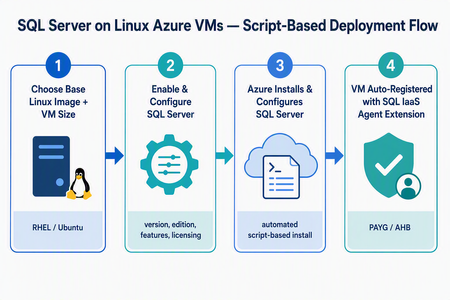
What’s changing We’re introducing a new script-based deployment experience for provisioning SQL Server on Linux Azure Virtual Machines (VMs). This experience replaces the earlier model that relied on pre-created SQL Server on Linux Marketplace images, which have been deprecated. Pre-created SQL Server on Linux Marketplace images are no longer available for new provisioning through the Azure portal, the Azure SQL hub, Azure CLI, or PowerShell. Instead, SQL Server is now installed and configured during VM provisioning using a flexible, automated, script-based workflow. The result is a more adaptable and supportable deployment model that keeps SQL Server on Linux Azure VMs fully supported, reduces image-maintenance overhead, and makes it easier to adopt the latest Linux distributions, VM families, and configuration options - all while giving you more control over your SQL Server setup. Why the new model matters Greater flexibility and control — choose your Linux distribution, SQL Server version, edition, and even bring your own mssql.conf to tailor the configuration. Faster access to innovation — new Linux versions and Azure capabilities are picked up automatically, without waiting for a new baked image to be published. Automatic registration built in — every VM is registered with the SQL IaaS Agent extension by default, unlocking licensing flexibility, compliance, and richer visibility. A dynamic, guided UI — the portal enables or disables options based on supported operating system, SQL Server, and licensing combinations, so you only see valid choices. Supported Linux distributions The script-based deployment experience supports the following distributions, and future versions are picked up automatically as they become supported — no manual intervention required: Distribution Supported versions Red Hat Enterprise Linux (RHEL) RHEL 9, RHEL 10 (and future versions) Ubuntu Ubuntu 22.04, Ubuntu 24.04, Ubuntu 26.04 (and future versions) Automatic registration applies to both Red Hat Enterprise Linux and Ubuntu, across all their supported versions. Automatic registration with the SQL IaaS Agent extension SQL Server on Linux VMs deployed through this experience are automatically registered with the SQL Server IaaS Agent extension. Registration creates a SQL virtual machine resource in Azure (separate from the VM resource) and unlocks: Licensing flexibility — choose Pay-As-You-Go (PAYG) or Azure Hybrid Benefit (AHB), and switch between them anytime with no downtime. Compliance — a simplified way to meet Azure Hybrid Benefit product-term requirements without per-resource registration forms. Visibility and telemetry — clear license-type visibility, subscription-level tracking, and better operational insight from the Azure portal, CLI, or PowerShell. Note: Automatic registration is enabled by default during deployment. You can unregister or re-register a VM after deployment through the Azure portal, Azure CLI, or PowerShell. The end-to-end flow at a glance Experience: The “Create a virtual machine” tab Use this flow if you’re starting from the familiar VM creation experience in the Azure portal. In the Azure portal, go to Virtual machines (or Create a resource → Virtual machine) and select Create. On the Basics tab, select your project details (subscription, resource group), instance details, and a supported Linux base image — RHEL 9, RHEL 10, Ubuntu 22.04, or Ubuntu 24.04. Choose your VM size, authentication, and inbound ports as usual. Go to the Advanced tab and select the Install SQL Server checkbox. This enables SQL Server provisioning on the VM. A new SQL Server settings tab becomes available. Open it to configure your SQL Server deployment: SQL Server version — e.g., SQL Server 2025 or SQL Server 2022. Edition — Enterprise, Standard, Developer, Express, and Evaluation editions (options adjust to the selected version). Licensing model — Pay-As-You-Go (PAYG, default) or Azure Hybrid Benefit (AHB). Advanced configuration — Upload a custom mssql.conf file to set SQL connectivity, Azure Key Vault integration, and the tuned performance profile. Select Review + create, review the configuration summary, and select Create. Azure provisions the VM, then automatically installs and configures SQL Server and registers the VM with the SQL IaaS Agent extension. Managing licensing after deployment Because your VM is registered with the SQL IaaS Agent extension, you can change the licensing model anytime — with no downtime and no restart of the VM or SQL Server service. Azure portal: Go to the SQL virtual machine resource → Settings → SQL Server configuration → Manage. Azure CLI az sql vm update -n <VM_NAME> -g <RESOURCE_GROUP> --license-type AHUB Azure PowerShell: Set-AzSqlVM -Name <VM_NAME> -ResourceGroupName <RESOURCE_GROUP> -LicenseType AHUB Note: Switching between PAYG and AHB is immediate, incurs no additional cost, and does not restart the VM or the SQL Server service. Wrapping up The move to script-based deployment modernizes how you provision SQL Server on Linux Azure VMs. By replacing deprecated pre-created Marketplace images with a flexible, automated, script-based flow — and by registering every VM with the SQL IaaS Agent extension automatically — you get more choice, faster access to new Linux and SQL Server versions, and a cleaner path to licensing flexibility, compliance, and visibility. Whether you start from the Create a virtual machine tab or the Azure SQL hub, you get the same guided experience across RHEL 9, RHEL 10, Ubuntu 22.04, Ubuntu 24.04, and future versions. Ready to try it? Head to a Create a virtual machine option in the Azure portal. We’d love your feedback — let us know how the new experience works for your workloads in the comments.267Views1like0Comments