how-to
3245 Topics
Cannot deploy Custom backgrounds for Teams in VDI environment
We have detected (or so we think) a malfunction in Teams on VDI when attempting to deploy Teams backgrounds that should be available to users for their video calls. The only article that documents how to do this is the following: https://learn.microsoft.com/en-us/microsoftteams/custom-meeting-backgrounds It clearly states that the path where custom Teams backgrounds are stored is in the user profile, specifically in the folder: %LOCALAPPDATA%\Packages\MSTeams_8wekyb3d8bbwe\LocalCache\Microsoft\MSTeams\Backgrounds\Uploads Expected Process The process is not direct, but it is straightforward. Using a script, a UUID is generated, which is used to create two image files (JPG, BMP, or PNG format, depending on the original image). For example, if the original is a JPG: UUID.JPG UUID_thumb.JPG These two files are copied to the path above, and on the next Teams session startup they should be available to the user. ✅ This works correctly in physical (non-VDI) environments. Tested many times without issues. What We Have Observed in VDI Even when the file pair is copied to the correct path within the user's FSLogix profile, the image does not become available in the Teams client — even after restarting Teams multiple times or even the VDI session itself. After each restart, the files are confirmed to be persistent and located at the correct profile path.[ %LOCALAPPDATA%\Packages\MSTeams_8wekyb3d8bbwe\LocalCache\Microsoft\MSTeams\Backgrounds\Uploads folder contents] When a background image is added manually through the Teams UI, a folder is created in OneDrive called "Microsoft Teams User Custom Video Backgrounds". If additional images are manually added to that OneDrive folder, they do not appear as available in Teams. This leads us to believe that the upload process performs additional operations in the registry or other configuration locations beyond simply copying the file. A ProcMon capture was performed, but after an initial superficial inspection, it was not possible to determine exactly what is happening under the hood.17Views0likes0Comments
SharePoint document set as Teams Tab
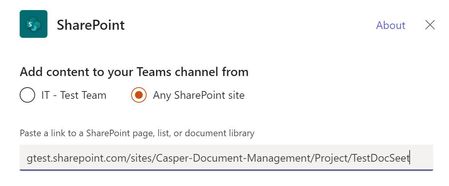
I been testing adding folders as a team tab and these work fine. Also, adding a library that contains document set's also works fine and the document sets seem to browse and operate as expected. When adding a document set URL it produces the error below. The same exact process with a folder works. It's a bit surprising this does not work as the document sets do work when adding the entire library however a specific document set like adding a folder does not work. Any feedback is appreciated.4.1KViews0likes15Comments
Cross-Tenant Shared Meeting Room Spaces
We have two M365 tenancies under our group. We need to allow users from both tenants to use Meeting room resources (book rooms, use calendars etc..). Is this just about configuring Exchange OR Sharing in EXO or do we need anything beyond that to facilitate Teams meeting room resource sharing? Would we also need to sync these meeting room objects across tenancies to allow users to see them in GAL etc.. ? Thank you!4.8KViews0likes4Comments
Still Cannot Bulk Add People or Groups in Team/Channel in 2026
It's 2026, still same issue. As a regular user/leader of a large team (hundreds of people), we still cannot bulk add people in Team/Channel. It's frustrating to add one people at a time. This has been brought up in 2020, 6 years after, same issue. teams and bulk adding of members | Microsoft Community Hub No real resolution.220Views0likes2Comments
Failure to sign in
First of all, I have TEAMS on my old computer. However, I bought a new computer, and I am unable to gain access to the TEAMS file on my new computer. I gain access to TEAMS, it asks me to sign in again. But the sign-up page does not open. It ends there. I have read the instructions and have spent over an hour trying everything without success. It shouldn't be so difficult.181Views0likes1CommentAssign a phone number for user using Direct Routing
Hello, I have setup a trunk for direct routing. I think I have all the proper licensing in place for my user, ie: phone system and calling plan. I am now trying to assign a phone number however the phone number type drop down ( in the general information section of my user in teams admin ) does not have the direct routing option. The only option given is Calling Plan. I want to use number that is on the Direct Routing trunk, not a Calling Plan number. How can I make it so Direct Routing is an option under Assign Phone number -> Phone number Type?20KViews0likes3CommentsWhat’s New in Microsoft Teams | July 2026
I hope everyone is having a great summer - July has flown by. As we head into the second half of the year, we're continuing to innovate in Teams to help people collaborate with people and AI to get work done more efficiently. This month's updates bring together new ways to stay informed, simplify everyday tasks, and put AI to work across more scenarios and roles. One highlight is the new Meeting Recaps app, which makes it easier to find, revisit, and catch up on important conversations across your meetings. We're also expanding how organizations manage apps and agents in Teams with improved request experiences that provide greater transparency for users and more control for admins. You'll also find updates that make collaboration more seamless, from accessing Viva Engage communities directly in Teams to improving calling experiences on mobile. Read on to see everything that's new in Microsoft Teams this month. Feature categories: (All features listed are generally available unless otherwise noted) Chat and Collaboration Meetings Teams Phone Workplace - Places and Teams Rooms Fundamentals and Security Platform Frontline Workers Certified for Teams Devices Chat and Collaboration Access Viva Engage communities in Teams Staying connected to your communities meant leaving Teams to check Viva Engage. Now you can open and interact with your organization's communities straight from the Teams left rail and get notified in Activity when something relevant happens. Keyboard Shortcut Dialog has search functionality. Long shortcut lists are hard to scan when you just need one. The keyboard shortcut dialog now lets you search by shortcut name or by the key combination itself. LinkedIn Hiring Assistant integration for Microsoft Teams Recruiting teams can now bring LinkedIn Hiring Assistant directly into Microsoft Teams to streamline candidate review and hiring manager collaboration. Recruiters can share candidates in Teams, collect structured feedback, and keep hiring decisions moving without requiring hiring managers to switch tools. The integration helps teams reduce feedback delays, improve alignment earlier in the hiring process, and collaborate where work is already happening. Available for LinkedIn Hiring Assistant customers. Learn more: Hiring Assistant for LinkedIn Recruiter & Jobs Meetings Meeting Recaps app Stop hunting through chats and calendars for the meeting notes you need. The Meeting Recaps app brings your intelligent recaps together in one convenient, pinned app in the Teams sidebar, making it easier to find and catch up across your meetings. Browse meetings with Recap from the past 30 days and use quick filters to instantly surface the meetings that matter most, like when you were mentioned in the discussion. You can also generate a podcast-style Audio Recap summary across multiple meetings so that you can conveniently catch up on the go. Teams Phone Queues app for Microsoft Teams in GCC High Government organizations need advanced collaborative call handling without leaving their compliance boundary. Now available in the GCC High environment, the Queues app brings advanced queue management, reporting, and supervisor tools directly into Teams, helping agencies deliver faster, more efficient service to constituents calling government offices and to internal customers, such as employees contacting an IT Help Desk. Queues app is available through Teams Premium. View the interactive Queues App demo for more details. Teams Phone user multi-line on Teams Mobile (iOS) Juggling separate devices or accounts for different roles is a hassle. Teams Phone multi-line now works on Teams mobile iOS: admins can assign up to 10 numbers to one user, each appearing as its own tab, so you can stay organized across roles or regions from a single Teams account. If the player doesn't load, open the video in a new window: Open video Speed dial on Teams mobile Finding the right person to call should not slow you down. A dedicated speed dial tab in Teams mobile now lets users more easily add, edit, and label key contacts by role or priority, with updates synced across devices for a consistent calling experience. For frontline workers such as nurses, that means reaching the right contact faster to help accelerate patient care. Workplace - Places and Teams Rooms AI-powered notes for in-person meetings with Facilitator in Teams Rooms on Android and Windows Avoid ending in-person meetings with no record of what was decided. In Teams Rooms on Android, the Facilitator agent captures notes, decisions, and actions for in-person meetings alongside scheduled and hybrid ones. Invite it with one tap of the room console; notes appear on the front of room display or touch board and are available in meeting recap when shared, then deleted if no one keeps them. Nothing stays in the room. Available with Teams Rooms Pro. Bulk application of app settings to Teams Rooms on Android devices in the Pro Management portal Configuring rooms one at a time eats up an IT Admins day. Admins can now apply Teams Rooms on Android app settings to multiple devices in bulk from the Pro Management portal. Available in Teams Rooms Pro. Digital signage support for Teams panels Screens sitting dark outside meetings are a missed opportunity. Idle Teams panels can now display digital signage, just like Teams Rooms front of room displays, with source and settings managed in the Pro Management portal. Available with Teams Rooms Pro or Shared space licenses. Human interpreter listening mode supported in Teams Rooms on Windows Multilingual meetings lose nuance when there's no live interpretation. Professional interpreters can now listen in and translate in real time in Teams Rooms on Windows, without disrupting the speaker. Organizers preset the languages, and participants choose and switch among them. Available with Teams Rooms Pro. Teams Phone devices support for Interpreter (VoIP calls) Don’t let language barriers impact calls. With AI Interpreter, Teams Phone devices provide real‑time language interpretation directly within the call experience. Users can participate naturally in multilingual conversations while the device interprets spoken audio, reducing language barriers and supporting clearer communication in everyday calling scenarios. Entra passwordless resource account support for Teams Rooms on Windows devices Shared room accounts with passwords are a security weak spot. Teams Rooms on Windows now support Entra resource accounts for secure, passwordless sign-in that separates device and user identities. A migration wizard and Pro Management portal dashboard make moving over and tracking progress straightforward. Individual settings page with 2-way settings sync between device and the Pro management portal for Teams rooms on Android and panels Not knowing how a device is configured makes troubleshooting slow. A new individual settings page in the Pro Management portal shows how each Android-based device is set up, with two-way sync so changes flow between the device and the portal, for Teams Rooms on Android and panels. Call quality feedback surveys for Teams Rooms on Android Organizations can't fix call quality problems they never hear about. Users can now rate calls and meetings and give feedback on audio, video, and screen-sharing in Teams Rooms on Android, helping your organization keep experiences consistent. Join Google Meet meetings in Teams Rooms on Windows for GCC and GCC-H Cross-platform meetings shouldn't be off-limits for government organizations. GCC and GCC-High now get two-way Direct Guest Join between Google Meet and Teams: Teams Rooms on Windows can join Google Meet, and Google Meet devices can join Teams, with one-click join from the calendar or by meeting ID. Fundamentals and Security Choose how Teams on the web handles sign-in Teams on the web now honors a user's sign-in preference, giving them the choice to stay signed in across browser sessions or be prompted to sign in again when the browser is reopened. This helps balance convenience on personal devices with security on shared computers. Platform Improved request flows for apps and agents blocked by admins We're making it easier for users to request access to apps and agents that aren't currently available to them in Teams. A simplified and more transparent request experience helps users understand what action is needed, track the status of their requests, and receive updates when decisions are made. For admins, enhanced request management capabilities in Teams Admin Center and new request notifications make it easier to review and act on requests, helping organizations accelerate access to approved apps and agents. Frontline Workers Get Started Faster with Improved Onboarding First impressions matter, and the new onboarding experience makes day one in Shifts a breeze. The app adapts to who you are — frontline manager or worker — and surfaces the right next step exactly when you need it. Managers can now spin up a brand-new team and its first schedule in a single action. One-click access to help articles and clear guidance on permissions means no one hits a dead end. Whether it's your team's first day in Shifts or your hundredth, you'll be productive in moments. Easily Restore Deleted Schedules Accidental deletions happen, but getting back on track should not slow your team down. With schedule restore, managers can quickly recover a previously deleted schedule right from the schedule creation flow. Simply choose the version you want to bring back, restore it in a few clicks, and pick up where you left off — no rebuilding from scratch, no lost momentum, and no extra support needed. It is a simple safety net that helps teams move confidently, even when plans change or mistakes happen. Reach the right people and close the loop with Follow Up Frontline managers often spend too much time chasing updates across chats, messages, and meetings. With Follow Up in Frontline Agent, a manager can send a single Teams request, automatically collect responses by a set deadline, and review a consolidated summary in one place. This helps teams quickly confirm task completion, shift coverage, handoffs, compliance requirements, and operational readiness. Managers can also track responses, follow up with non-responders, edit requests, and add recipients, with support for up to 20 people per request. Run hands-free inspections with voice-driven Site Walkthrough Site Walkthrough transforms inspections, audits, and compliance checks into a hands-free, voice-driven experience. Workers can start a walkthrough with or without a checklist, speak observations naturally, and let Frontline Agent capture and organize everything automatically. When complete, Frontline Agent generates a structured report, checks off completed tasks, flags follow-up items, and records timestamps for audits and compliance. This helps teams complete checklists faster, stay focused on their environment, and capture critical insights without manual data entry. Experience Teams for Frontline with a new interactive demo Curious what Microsoft Teams looks like for frontline workers? The new Teams for Frontline demo experience lets you step into the shoes of a retail associate, nurse, or warehouse worker and explore a fully functional frontline environment in just one click. No purchase, trial, or sign-up required. Immerse yourself in the day-to-day experience of frontline work and see how Teams helps employees stay connected, manage schedules, and get work done with AI-powered assistance. Check it out at aka.ms/FLWdemo! Certified for Teams Devices Q-SYS Scheduling Panel The Q-SYS Scheduling Panel is built on the Microsoft Device Ecosystem Platform (MDEP), as a Microsoft Teams Panel. Displaying meeting details, availability, and allowing users to reserve meeting spaces on the spot. MAXHUB XT20-VB Kit The MAXHUB XT20-VB Kit integrates the XCore Kit Pro and XBar U50 to deliver a complete Microsoft Teams Rooms solution for small to medium meeting spaces. XCore Kit Pro includes an 11.6-inch touch console and a 12th gen Intel Core i5 mini-PC running Microsoft Teams Rooms for seamless collaboration, with 4K wired content sharing and dual-screen display capabilities. XBar U50 is a 100MP dual-lens USB videobar with 12 beamforming microphones, dual 15W speakers, AI video features including Auto Framing and Speaker Tracking, and FlexMount for easy installation. MAXHUB's Pivot Plus enables remote device management. The kit includes a 3-year warranty and local support. ThinkPad Dual-mode Wireless ANC Foldable Headset 8550 (USB-A & USB-C, Teams) Certified by Microsoft Teams for open office, ThinkPad Dual-Mode Wireless ANC Foldable Headset 8550 (Aura Edition) redefines best-in-class portable headset for hybrid work, featuring a foldable, lightweight design that’s effortless to carry anywhere. Adaptive hybrid ANC and AI-powered ENC keep distractions at bay, letting you enjoy crystal-clear calls and immersive sound for next-level focus. Sound by Bose technology delivers expertly tuned audio for both calls and music. Connect with tap or via Bluetooth® Receiver- and experience how seamless productivity can be. Lenovo Wireless Speakerphone 6000 Equipped with eight beam forming microphones and advanced AI noise cancellation, it ensures crystal-clear communication-ideal for today’s hybrid work environments. Its high-fidelity speaker provides rich, immersive sound, while Microsoft Teams certification guarantees reliable audio quality and exceptional voice pickup performance for seamless collaboration. Extron Medium and Extra-large conference rooms This system accommodates up to ten people for the medium conference room, and 18+ people in the Extra-large conference room, and includes Microsoft Teams Rooms conferencing capabilities, enabling participants in remote locations to join meetings. Extron AEC – acoustic echo cancellation, ceiling speakers, control processors, and power amplifiers deliver enterprise level security, intelligible speech, and consistent sound levels across the entire meeting area in conjunction with a Audio‑Technica Engineered Sound Wireless systems. This Design Solution has been designed and meticulously tested for best-in-class performance and ease of use. Logitech Express Install: Logitech Rally Bar & Ashton Bentley AB One65 for Teams Rooms on Windows & Android Logitech, in partnership with Ashton Bentley and Samsung, is simplifying room installations with Express Install solutions for Microsoft Teams Rooms on Windows and Android, making high-quality meeting spaces more accessible and easier to deploy. Logitech's Express Install kit for Medium rooms can be installed in under an hour, with minimal labor and no specialist help needed. MAXHUB Panel SP10 The MAXHUB Panel SP10 is a room scheduling solution with native Microsoft Teams integration, empowered by the MDEP. This 11-inch panel delivers a crystal-clear, real-time view of room availability, enabling seamless calendar synchronization and effortless on-the-spot reservations for efficient workspace management. High-visibility LED bars indicate room occupancy at a glance, while one-tap booking enables ad hoc reservations with real-time schedule sync. The mounting bracket is included as standard—no extra purchase needed—along with an industry-leading 3-year warranty that reduces lifecycle costs for bulk deployments. Adapt to any architecture with 4-way installation options: standard wall mount, glass partition, slim door frame, or a flush embedded aesthetic. AudioCodes C456HD Touch Expansion Unit Gen2 The AudioCodes C456HD is a native Microsoft Teams desk phone built on MDEP and Android OS for robust security and simplified, enterprise-grade management. Featuring a vibrant 5” color touch screen (1280 x 720) and a dedicated programmable emergency call button, it can deliver a seamless and intuitive user calling experience. For enhanced productivity, an optional multi-purpose expansion module with a 5” color touch screen is also available. The C456HD also features support for an optional hardware-based Mic Off for secure locations. AudioCodes C456HD Microsoft Native Teams Touchscreen Desk Phone The AudioCodes C456HD is a native Microsoft Teams desk phone built on MDEP and Android OS for robust security and simplified, enterprise-grade management. Featuring a vibrant 5” color touch screen (1280 x 720) and a dedicated programmable emergency call button, it delivers a seamless and intuitive user calling experience. For enhanced productivity, an optional multi-purpose expansion module with a 5” color touch screen is also available. The C456HD also features support for an optional hardware-based Mic Off for secure locations.6.6KViews1like4CommentsVideo Tutorial: How To Use The Microsoft Teams Games For Work App
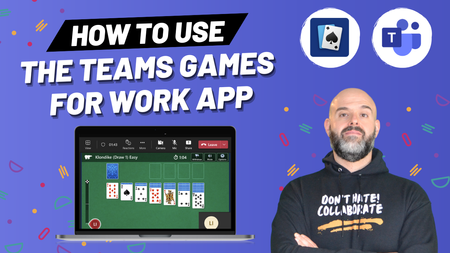
Microsoft recently added the ability to https://youtu.be/JxKLNVRtIJI. In this Microsoft Teams https://youtu.be/JxKLNVRtIJI, I will demonstrate how to use the Microsoft Teams Games For Work app. This app can be added to MS Teams meetings and allows participants to play from one of four games (at the time of release): Microsoft Solitaire, Microsoft Minesweeper, Wordament and IceBreakers. Note that you cannot use this app outside of meetings (i.e. you cannot play games directly in the MS Teams app) and each game supports 1-250 players. The app can also be used on the Microsoft Teams mobile application and is mobile responsive meaning meeting participants joining from their mobile device can also participate in the games. Lastly, the app can also be used in Microsoft Team meeting breakout rooms. To add the Games For Work App to a Microsoft Teams meeting: Click the “+ Add An App” button Search for and select “Games For Work” What are you thoughts about this app?Solved44KViews1like15Comments