how-to
3245 Topics9 tips for meeting with Microsoft Teams
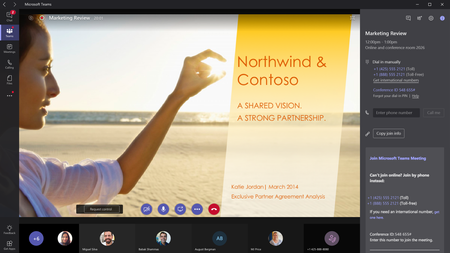
New meeting features for Microsoft Teams expands your options for joining meetings or initiating a call, adds more options for you to control your meeting experience during a meeting, and enables admins to monitor call and meeting quality and get detailed analytics.1.5MViews22likes25Comments
MS Teams Select Background outside of conference call
Is there a way in MS Teams to change or 'try on' different backgrounds before or without starting a new meeting? I have been able to upload backgrounds and test them during conference calls, but have not been able to view them outside of meetings.Solved1.1MViews15likes42Comments
Custom Background In MS Teams
UPDATED It looks like this is in the process of being rolled out or at least actively tested. If you have the version with the option to select a background image, custom images can be added. Save your image /s in the Uploads folder below C:\Users\YOUR_USER_NAME_HERE\AppData\Roaming\Microsoft\Teams\Backgrounds\Uploads Then, in teams while on a call; click the 'More Actions' (Three Dots) at the bottom, select 'Show Background Effects' The pictures you added should show up on the right hand side of the screen with the default options from Microsoft. Good Luck! S689KViews14likes83CommentsOutlook Add-in Missing
Dear all I am unable to make the Outlook plugin work for one of our employees. I know where the plugin-in is located on the computer and when I add it manually - nothing happens. I have also reformatted the entire computer but to no avail. Can other plugins interfere with the proper loading of the Teams plugin? Do you have any suggestions on what I can do? Thanks MassimoSolved500KViews0likes23CommentsTop 10 keyboard shortcuts to make you a Microsoft Teams super user
With more people on Teams than ever, you may be wondering how to become an even bigger super user. We asked the Teams team to share their favorite keyboard shortcuts that help them stay efficient. Check out the top 10 shortcuts for meetings, chatting, and navigation below!446KViews48likes43Comments
Microsoft Teams: Muting All The Participants Without Allowing Them To Unmute
Dear All, Is there any option in Microsoft Teams to mute all the participants without allowing them to unmute back? I mean, Is there is any option for the speaker to mute all the students, and then unmute them back when I want them to speak? Thanks again!Solved409KViews4likes48Comments
Display online status next to name in Outlook Greyed Out
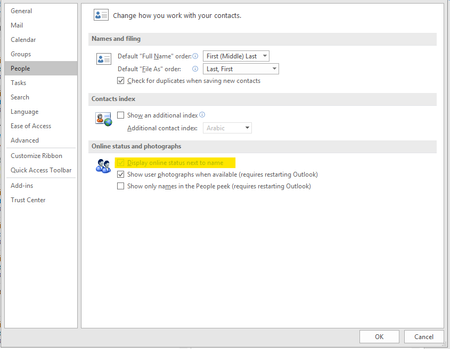
In Outlook you can see the availability of users next to their name thanks to Lync Skype Teams etc This has disappeared for two users and I have not been able to find a fix. It's greyed out in Outlook: File > Options > People and in Teams: Settings >Register Teams as the chat app for Office the option is already selected. Registry settings is already selected as teams Computer\HKEY_CURRENT_USER\Software\IM Providers I have tried uninstalling > re-installing teams Office Repair Updating Teams Uninstalling > Reinstalling Office But the option is not returning to default! Very frustrating because they are all the same Intune image and I re-imaged one machine to try and fix the issue but it reverted. Specs Windows 10 64 Bit Enterprise Microsoft office 365 Pro Plus Microsoft Teams Version 1.2.00.13765 (64-bit). then Microsoft Teams Version 1.2.00.17057 (64 bit).Solved397KViews2likes61Comments
Allowing guests to start a meeting without the organizer present
We run afterschool programs that rely heavily on volunteers. We have about two to three students in a group with each volunteer. Each group has been given their own link, however our program coordinator, who was the organizer of each group/teams meeting, has to go to every link to allow them into the meeting. We have clicked on the meeting preferences to allow everyone in without having to wait in the lobby, however unless the meeting organizer is present, they still have to sit in the lobby. Is there anyway to change that?Solved391KViews0likes23Comments
How to COMPLETELY delete / unistall Teams
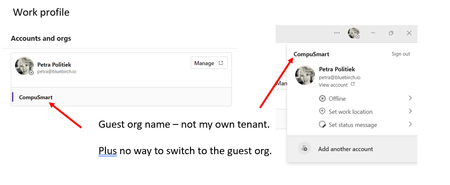
I have an issue with the New Teams. In the old Teams I had access to a guest account and could easily switch. After updating to New Teams - the account that get shown has a combination of the guest org and my own org. I have no way to switch to the guest account. Then when I log out I see a list of other accounts I have used in the past. These are not guest accounts but actual login accounts. I don't have access to them anymore and they are not listed as organisations I'm a member of. I have uninstalled Teams, deleted cache several time but I can not get everything deleted! I have created a new windows profile to test and the issue does not appear there. (not the solution I want) So how do I COMPLETELY DELETE / UNISTALL Teams? I want everything gone from my work profile so I can get a clean install that works.356KViews1like12Comments