glossary
5 Topics
Glossary Terms Governance Model
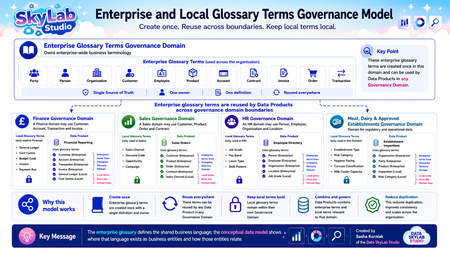
A practical implementation pattern that scales from a Proof of Concept to enterprise deployment. If you're involved in implementing Microsoft Purview or designing an enterprise data governance model, I'd be interested to hear how you're approaching glossary management within your organisation. Do you manage a single enterprise glossary, separate domain glossaries, or a combination of both? I'd love to hear your experiences and any lessons you've learned. https://www.linkedin.com/search/results/all/?keywords=%23microsoftpurview&origin=HASH_TAG_FROM_FEED https://www.linkedin.com/search/results/all/?keywords=%23microsoft&origin=HASH_TAG_FROM_FEED https://www.linkedin.com/search/results/all/?keywords=%23datagovernance&origin=HASH_TAG_FROM_FEED https://www.linkedin.com/search/results/all/?keywords=%23unifiedcatalog&origin=HASH_TAG_FROM_FEED https://www.linkedin.com/search/results/all/?keywords=%23enterprisedatacatalogue&origin=HASH_TAG_FROM_FEED https://www.linkedin.com/search/results/all/?keywords=%23metadata&origin=HASH_TAG_FROM_FEED https://www.linkedin.com/search/results/all/?keywords=%23metadatamanagement&origin=HASH_TAG_FROM_FEED https://www.linkedin.com/search/results/all/?keywords=%23dataproducts&origin=HASH_TAG_FROM_FEED https://www.linkedin.com/search/results/all/?keywords=%23datamesh&origin=HASH_TAG_FROM_FEED https://www.linkedin.com/search/results/all/?keywords=%23federatedgovernance&origin=HASH_TAG_FROM_FEED https://www.linkedin.com/search/results/all/?keywords=%23enterprisearchitecture&origin=HASH_TAG_FROM_FEED https://www.linkedin.com/search/results/all/?keywords=%23dataarchitecture&origin=HASH_TAG_FROM_FEED https://www.linkedin.com/search/results/all/?keywords=%23informationarchitecture&origin=HASH_TAG_FROM_FEED https://www.linkedin.com/search/results/all/?keywords=%23datamanagement&origin=HASH_TAG_FROM_FEED https://www.linkedin.com/search/results/all/?keywords=%23azure&origin=HASH_TAG_FROM_FEED https://www.linkedin.com/search/results/all/?keywords=%23microsoft365&origin=HASH_TAG_FROM_FEED https://www.linkedin.com/search/results/all/?keywords=%23purview&origin=HASH_TAG_FROM_FEED https://www.linkedin.com/search/results/all/?keywords=%23glossary&origin=HASH_TAG_FROM_FEED https://www.linkedin.com/search/results/all/?keywords=%23businessglossary&origin=HASH_TAG_FROM_FEED https://www.linkedin.com/search/results/all/?keywords=%23dataskylabstudio&origin=HASH_TAG_FROM_FEED 😀 Understanding the Enterprise and Local Glossary Terms Governance Model This diagram demonstrates a scalable approach to managing Glossary Terms in Microsoft Purview Unified Catalog. The objective is simple: Create enterprise business terminology once, reuse it across the organisation, and keep specialist business terminology within the Governance Domain that owns it. This approach creates a Single Source of Truth for shared business language, reduces duplication, improves consistency and allows the governance model to scale as the organisation grows. Step 1 – Create an Enterprise Glossary Terms Governance Domain The first step is to create a dedicated Governance Domain specifically for Enterprise Glossary Terms. For example: Enterprise Glossary Terms This Governance Domain becomes the central location where enterprise-wide business terminology is created, maintained and governed. Examples include: Party Person Organisation Customer Employee Product Account Contract Invoice Order Transaction These are business concepts that are commonly used across multiple business functions and Governance Domains. Each Enterprise Glossary Term has: One agreed business definition. One accountable owner. One authoritative source. One location where it is maintained. Unlimited reuse across Data Products. Think of this Governance Domain as the organisation's enterprise business dictionary. Step 2 – Create Business Governance Domains Next, create Governance Domains that reflect your organisational structure. For example: Finance Sales Human Resources Meat, Dairy & Approved Establishments Each Governance Domain is responsible for: Its own Data Products. Its own local Glossary Terms. Its own stewardship and governance. Step 3 – Create Local Glossary Terms Not every business term belongs in the Enterprise Glossary. Many terms are only relevant to a single business function and should remain owned within that local Governance Domain. For example: Finance General Ledger Cost Centre Budget Code Payment Run Sales Sales Channel Campaign Opportunity Discount Code Human Resources Job Grade Leave Type Shift Pattern Pay Band Meat, Dairy & Approved Establishments Establishment Type Hygiene Rating Carcass Classification Milk Cooler Capacity These Local Glossary Terms remain within their own local Governance Domain because they are not intended for enterprise-wide reuse. They can be seen in the Enterprise Glossary. Step 4 – Create Data Products Each Governance Domain creates the Data Products it owns. Examples include: Finance Financial Reporting Sales Sales Orders Human Resources Employee Directory Meat, Dairy & Approved Establishments Establishment Inspections The Data Product becomes the business representation of a collection of related data. Step 5 – Reuse Enterprise Glossary Terms When creating a Data Product, associate the Enterprise Glossary Terms that describe the business concepts used by that Data Product. For example: Financial Reporting Uses: Customer Account Transaction Invoice Sales Orders Uses: Customer Product Contract Order Employee Directory Uses: Person Employee Organisation Establishment Inspections Uses: Organisation Party Product Notice that these Enterprise Glossary Terms are not recreated inside each Governance Domain. Instead, they are referenced from the Enterprise Glossary Terms Governance Domain. This is the key principle behind the model: Create once. Reuse many times. Step 6 – Add Local Glossary Terms Each Data Product can also reference Local Glossary Terms from its own Governance Domain. For example: Financial Reporting Also uses: General Ledger Cost Centre Sales Orders Also uses: Sales Channel Employee Directory Also uses: Job Grade Establishment Inspections Also uses: Inspection Risk Category Each Data Product therefore combines: Enterprise Glossary Terms Local Glossary Terms This provides consistent enterprise language while still allowing each business area to manage its own specialist terminology. Why this model works This implementation separates enterprise business language from specialist business language. Enterprise Glossary Terms provide: A Single Source of Truth. One agreed definition. One accountable owner. Reuse across every Governance Domain. Local Glossary Terms provide: Business-specific terminology. Local ownership. Specialist business knowledge. Flexibility without affecting enterprise standards. Together they provide: Reduced duplication. Consistent business language. Easier governance. Better Discovery Search. Simpler maintenance. Reusable metadata. A scalable governance model. Relationship with the Conceptual Data Model The Enterprise Glossary answers the question: What business concepts does the organisation use? The Conceptual Data Model answers: How are those business concepts related? For example: Customer │ places│ ▼ Order │ contains ▼ Product The Enterprise Glossary defines each business concept. The Conceptual Data Model describes how those concepts relate to one another. Together they establish a common business language that can be reused consistently across Governance Domains, Data Products and the wider Enterprise Data Catalogue. Microsoft Purview Implementation Steps Create a Governance Domain called Enterprise Glossary Terms. Create enterprise-wide Glossary Terms within this Governance Domain. Assign an accountable owner for each Enterprise Glossary Term. Create business Governance Domains that reflect the organisation. Create Local Glossary Terms only where the terminology is unique to that Governance Domain. Create Data Products within each Governance Domain. Associate Enterprise Glossary Terms with Data Products wherever the same business meaning applies. Associate Local Glossary Terms with Data Products where specialist business terminology is required. Continue expanding the Enterprise Glossary as new shared business concepts emerge. Key Principle Create once. Reuse everywhere. Keep local terms local. Enterprise Glossary Terms establish the organisation's shared business language, while Local Glossary Terms allow individual Governance Domains to manage specialist terminology. Together they provide a scalable governance model for Microsoft Purview Unified Catalog that supports Federated Data Governance, Data Mesh principles, and long-term enterprise growth without unnecessary duplication of business definitions.164Views0likes1Comment
Redirecting to Classic Portal Instead of New Portal in Microsoft Purview
I am using the following endpoint in my Python script to create new terms in the Microsoft Purview New Portal: purview_endpoint = "https://api.purview-service.microsoft.com" However, this endpoint redirects me to the Classic Portal instead of the New Portal. Has anyone encountered this issue or knows how to resolve it? Thanks in advance!293Views0likes2Comments
How do I create a Sharepoint glossary without using an app?
Hello everyone, Me again! I'm wondering if you can give me some advice about to create a glossary in SharePoint. The topic my SharePoint is about is quite complicated and I want an easily searchable glossary of terms. Unfortunately our IT department won't let me download the free app that I've seen suggested without applying for them to look at it, test it etc. This process is likely to take several months. Because of the length of time and with no guarantee of being able to have it at the end of it, I really need to create the glossary from scratch. Ideally I'm looking for a navigation bar with the letters of the alphabet and then being able to click on the letter to bring up all terms starting with that letter. Does anyone know a simple way of doing this? Thanks in advance as always, Amber43KViews2likes15Comments
Separate Business Glossaries in Azure Purview
Is there a way to customize the glossary view in Purview. We are working with multiple channels which have a fair amount of common glossary terms as well as glossary terms specific to each business channel. Can we customize the glossary interface users see based on their persona in Azure AD or via some other method?730Views0likes0CommentsWord 2016 - automatically highlight list of words
Hello, everyone, I would like to get rid of the following questions: In Word 2016, is it possible to store a list of words, which are then automatically color-coded by Word? Functionality would be similar to the search/replace function, but fully automatic (after the corresponding list has been defined). Is this a programming question? Application example for illustration: For example, if you have a German text and have it translated into English, there are a number of translation alternatives for individual words (Umsatz could be translated with revenue, sales or turnover, for example). With a manual glossary, the translation can be checked to see if the correct term has been used. With the help of the above-mentioned marking function, used in the German (original) text, the translator would already be visually informed that he needs to check the glossary. This would greatly simplify the process, especially with long glossaries (short glossaries could indeed use the proven Ctrl+F functionality on a manual basis). Any thoughts? Many thanks in advance! The questioner9.1KViews0likes2Comments