general
711 TopicsEnterprise Security Assessment: A Strategic Lens for Mission Critical Environments
Understanding Enterprise Security at Scale Understanding security posture at scale requires more than isolated control reviews or point‑in‑time assessments. The Enterprise Security Assessment (ESA) helps organizations understand their security posture across Azure, Microsoft 365, and hybrid environments from a true enterprise perspective. Instead of assessing individual services or workloads in isolation, ESA provides a single, enterprise‑wide view of security. By examining identity, data security, endpoints, threat protection, and cloud infrastructure together, ESA helps uncover gaps that often span multiple teams and platforms. This broader perspective enables clearer prioritization, stronger alignment across security teams, and a more resilient foundation for long‑term security improvement. ESA complements other Microsoft assessments, such as workload‑specific reviews, by connecting the bigger picture - to align security priorities across teams and platforms, fostering a more cohesive and resilient security approach. From Standard Engagement to Strategic Partnership An Enterprise Security Assessment is typically delivered as a focused engagement designed to establish an enterprise‑wide view of security posture. At Microsoft, we begin by reviewing Secure Score insights, analyzing a defined set of core security datasets, and correlating those signals across Azure and Microsoft 365. For many organizations, this approach works well. Collecting and evaluating these datasets provides a high‑level understanding of security posture, highlights common gaps, and identifies priority improvement areas. In standard enterprise environments, ESA delivers actionable insights with minimal disruption and sets a solid foundation for security improvements. How ESA Evolves in Mission‑Critical Environments In large or mission‑critical environments, security is often distributed across multiple teams and tools. Operational constraints, regulatory requirements, and business dependencies introduce complexity that standard assessments cannot fully capture. For mission‑critical customers, ESA goes beyond a baseline review and becomes more consultative. This typically includes: 📝 Structured discovery sessions across multiple security domains 🤝 Deep‑dive workshops with specialized teams 🎯 Validation of findings against real‑world operating models 🔄 Iterative analysis to validate findings against real operational conditions This ensures recommendations reflect how security is actually managed, not just how it is documented. Why Going Deeper Matters to Customers For organizations operating at scale, this consultative ESA approach delivers significantly more than a standard readout: A realistic, enterprise‑wide understanding of security posture, grounded in actual configurations and operating models Clear visibility into cross‑team dependencies and systemic risks Prioritized recommendations aligned to existing licenses, third‑party tools, and regulatory requirements A realistic, phased security roadmap focused on adoption, not theory The result is a clear starting point for security improvements that teams can execute with confidence. A Continuous Improvement Model ESA is not a one‑time exercise. For most customers, it becomes the foundation for ongoing security maturity. Once a baseline is established, future ESAs are faster and more efficient, allowing organizations to track progress, validate improvements, and maintain alignment as environments evolve. Over time, ESA functions as an annual enterprise security health check, supported by follow‑up reviews and continuous improvement. In mission‑critical environments, this means: The first ESA requires deeper engagement investment Building cross-team alignment takes time Future assessments become smoother and more efficient once a baseline is established Over time, ESA functions as an enterprise security health check that supports continuous improvement. It works best when treated as a starting point for continuous improvement, and Enterprise Security Alignment. What Customers Gain from an Enterprise Security Assessment A true enterprise view Visibility across identity, data, devices, cloud workloads, and threat signals - without losing sight of critical details. A customized security roadmap Recommendations aligned to existing licenses, third‑party tools, hybrid footprints, and regulatory requirements - making adoption realistic, not aspirational. Momentum and measurability Many organizations track progress using dashboards or scorecards to measure improvement and sustain focus over time. Repeatability Once a baseline is established, future ESAs become easier and more efficient - serving as a regular health check rather than a brand‑new effort. A consultative model ESA delivers far more value than a one‑time assessment by fostering collaboration, shared understanding, and long‑term alignment. A Foundation for Continuous Improvement Enterprise security is complex, especially at scale. In mission‑critical environments, security success depends on embracing complexity, aligning teams, and moving beyond a standard assessment playbook. An Enterprise Security Assessment is more than a snapshot. It’s an opportunity to build alignment, inform strategy, and create a resilient security foundation that evolves with the organization.Streamlining PDF and Image workflows on Cloud PCs without installing local software.
Hello everyone, I’ve been exploring ways to optimize document workflows within the Windows 365 environment, especially for tasks that usually require heavy desktop software like PDF editing or financial modeling. To solve this, I’ve been developing and using a suite of browser-based utilities at https://pdfcraftor.com/ I'm curious to know what other lightweight or web-based tools you all are using to keep your Windows 365 setup clutter-free? Would love to get some feedback on this approach!52Views0likes1CommentIncident critique : Edge Sync “Uninitialized”, appareils disparus, identité WAM/MSAL corrompue
Bonjour, Je rencontre un incident critique affectant directement mon identité Microsoft (MSA). Il ne s’agit pas d’un problème local mais d’un dysfonctionnement côté serveur. Voici les éléments techniques constatés : - Le conteneur Edge Sync de mon compte est en état “Uninitialized”. - Tous mes appareils ont disparu de mon compte Microsoft (Device Registration cassé). - Les services d’identité WAM / MSAL / OneAuth ne se réinitialisent plus correctement. - Impossible de créer de nouveaux passkeys ou d’utiliser les services dépendants de l’identité cloud. On dirait que ça nécéssite une intervention côté serveur : réinitialisation des identités WAM/MSAL, du conteneur Edge Sync, et du Device Registration. Je reste à l'écoute de toute aide en vous remerciant par avance.15Views0likes0CommentsExpanding the Reach of AI-enabled Cloud PCs for Frontier Firms
Co-Authored by Lakshmi Rayasam Over the past several months, we’ve been focused on a clear goal: making AI-enabled Cloud PCs easier to adopt, easier to deploy, and available to more customers—wherever they are. Following the momentum from Ignite, releasing Improved Search & Click to Do, we’ve continued to evolve the AI-enabled Cloud PC experience in Frontier Preview, prioritizing scale, accessibility, and product market fit. The latest set of enhancements removes deployment blockers and expands where—and how—customers can get started. We’ve also added a new refreshing AI-enabled end-user experience explaining the value of Frontier while users hover over the AI-enabled (Frontier) tag. Note: Future availability of these features is dependent on the results of this Frontier Preview and is subject to change Removing the need for Windows Insiders AI‑enabled Cloud PCs now work with standard Windows 11 retail builds, eliminating the need for Windows Insider participation. This change alone unlocks broader enterprise deployment scenarios and removes a major barrier for production use. AI-enabled Cloud PCs are just one toggle away as IT admins can join our Frontier Program and enable AI-enabled Cloud PCs via a newly introduced policy setting within the Devices – Onboarding: Windows 365 > User Settings blade, and further filter access based on Microsoft Entra ID group access. Note: After enrolling the latest Windows 11 25H2 (OS Build 26200.7840 or higher) you must reboot your Cloud PC. Expanded regional availability To meet customers where they operate, we’ve expanded AI‑enabled Cloud PCs to additional Azure regions:‑ Japan East Germany West Central South Central US Canada Central This expansion improves latency, supports data residency needs, and enables more global customers to participate in the Frontier Preview. 128GB disk support for Windows 365 Enterprise We’ve added support for 128GB disk size Windows 365 Enterprise licenses, offering greater flexibility for customers who don’t require larger footprints while still enabling AI‑driven workflows. These right‑sized deployments and makes it easier to scale across broader user populations. Together, these updates directly address the most common Ignite feedback and are expected to unlock large‑scale deployments, including enterprise pilots transitioning into sustained usage. What Comes Next Following the March rollout, our CY26 focus shifts to closing parity gaps using cloud‑based models, in close partnership with Windows platform teams. Initial work centers on enabling Text Actions for Click‑to‑Do via a cloud models within Frontier Preview—one of the most requested capabilities from customers.‑‑‑ In parallel, we’ll continue investing in foundational improvements that increase perceived feature depth and usage signals, including cost optimization, reliability enhancements, and productivity scenarios that compound value across the Cloud PC experience.328Views1like2CommentsWindows NVMe-oF Initiator connect error
Hi everyone, I am trying to test the new Windows NVMe-oF Initiator within build 29550.1000 but I am not able to connect to a remote storage array - getting the error "IOCTL_NVMEOF_CONNECT_CONTROLLER failed with error code 0x1f" (see screenshot). Any idea what does this error mean or what can be wrong?128Views0likes1CommentISSUE: Windows Server 2025 - OneDrive Shell Folder does not work in File Explorer
Dear Windows Server Insider team, I am seeing this issue for a longer time now and hoped it would be resolved. Will be repeating my tests with 26311 soon and updating this thread by then. I consider this issue of low to medium importance. If this goes live it can harm especially Windows Server based VDI which usually using OneDrive and FSLogix Containers. This one is just tested in easy complexity with OneDrive for Home Use, but I expect it can also affect OneDrive for Business. Overall, I would rate this an UX limitation with an available workaround for advanced users. Thanks! https://aka.ms/AAt80nrSolved1.2KViews1like5Commentsb26085 - Windows Server 2025 and OneDrive integration appears to have issues
Dear Windows Server Insider community, Windows Server Team, today I have tried the following: - Install fresh WS 2025 b26085 - executed winget upgrade --all this will upgrade winget and terminal to the latest version - winget install OneDrive --source winget OneDrive got successfully installed As I connected MS Edge to my MSA the SSO worked fine for OneDrive PS C:\Users\Administrator> winget install onedrive -s winget Found Microsoft OneDrive [Microsoft.OneDrive] Version 22.131.0619.0001 This application is licensed to you by its owner. Microsoft is not responsible for, nor does it grant any licenses to, third-party packages. Downloading https://oneclient.sfx.ms/Win/Prod/22.131.0619.0001/amd64/OneDriveSetup.exe ██████████████████████████████ 52.9 MB / 52.9 MB Successfully verified installer hash Starting package install... Successfully installed 1. ISSUE: In File Explorer however the "OneDrive" quick link has no function. Expected behaviour: should browse OneDrive Repro: install OneDrive via winget connect to your OneDrive MS Account open File Explorer click on the OneDrive quick access using the start menu > opening OneDrive works fine OneDrive has a new settings that is integrated in Windows Setting now, instead of a WinForm Dialogue. This one cannot be opened in Windows Server 2025. Probably due missing Windows experience pack which would integrate the new experience. 2. ISSUE: Clicking on Settings nothing happens Expected behaviour: it should open and redirect to Settings app for OneDrive Settings Repro: install OneDrive via winget connect to your OneDrive MS Account open OneDrive in systray, try to open "Settings" in the OneDrive flyout Feedback Hub items: File Explorer OneDrive integration https://aka.ms/AAq9fao OneDrive Settings integration https://aka.ms/AAqbcyx2.5KViews1like2CommentsCitrix Terminal Server Explorer (network drive) suddenly closes
Windows Explorer sessions on the Citrix terminal server that access a file server (Network Drive) close unexpectedly during file operations. Citrix Terminal Server (Windows 2022) File Server (Windows 2022) Have somebody an Idea? Kind Regards50Views0likes0CommentsMore than 30 minutes to install a language pack?
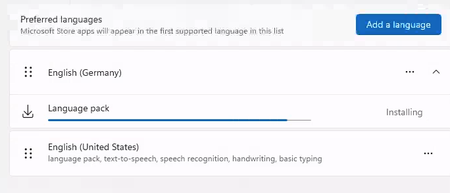
Happy new year to everyone. Is it normal that the Windows 365 PC , 2 core with 8GB RAM takes more than 30 minutes (still running) to install a language pack? I see lots of online discussions stating that the disk performance is terrible for this configuration and hence the performance. Any suggestions or words of advice would be appreciated.7.4KViews2likes10Comments