gdpr
32 TopicsPrivacy & Your exercising your rights
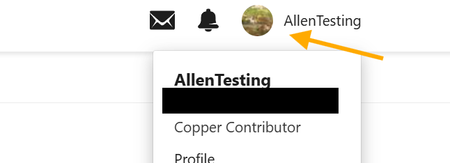
On this page Privacy How to View and Export Personal Data How to Delete Your Personal Data Additional Data Collected Privacy We want to ensure that any data collected is transparent and appropriate for your use of the community. As a Microsoft Tech Community user, you have rights under the General Data Protection Regulation (GDPR), including the ability to access and manage your personal data. This page explains how you can view, export, and request removal of your personal information. For more details on how Microsoft collects and uses data, please refer to the Microsoft Privacy Statement. How to View and Export Personal Data All data management options are available under My Settings > Security & Account. Access your profile and activity Navigate to Microsoft Tech Community Click Sign in (top right) Select your profile avatar and choose Profile From here, you can view information related to your activity, including: Your profile details Recent likes and uploaded images Activity history, including: Conversations you have started Conversations you have replied to Content you have liked Replies marked as “Solution” Groups you are a member of Blogs you have contributed to Export your personal data Open the avatar menu and select My Settings > My Settings Navigate to Security & Account & Account Screen, in order you can view IP Addresses you have used to login, download your personal data and then close your account. From this page you can: Download Data: Download a copy of your posts, replies, and personal information in JSON format. View IP Addresses: See the IP addresses used to access your account. You may delete these, but new logins will record a new IP address. How to Delete Your Personal Data Go to My Settings > Security & Account Select Close Account Closing your account will: Anonymise your community contributions Remove identifying information from our systems Please note: Any personal information included directly within posts will not be automatically removed You will not be able to create a new account using the same credentials for 72 hours after closure Additional Data Collected In addition to the above, we collect data about how the service is used, including: Visits and visits by geographic region Registration date and most recent sign-in Number of sign-ins and time spent online IP address information Roles and permissions Search terms Device type and browser/OS configuration Page views Content location and ranking Badges earned25KViews10likes0CommentsGDPR Compliancy with OneDrive and SharePoint
Microsoft is committed to helping our business customers comply with the General Data Protection Regulation (GDPR). Last month, and how we help businesses around the world, not just in Europe, take control, manage compliance, and avoid risk. Today we wanted to share how the OneDrive For Business and SharePoint have approached meeting these GDPR requirements.101KViews8likes2CommentsAZ-500: Microsoft Azure Security Technologies Study Guide
The AZ-500 certification provides professionals with the skills and knowledge needed to secure Azure infrastructure, services, and data. The exam covers identity and access management, data protection, platform security, and governance in Azure. Learners can prepare for the exam with Microsoft's self-paced curriculum, instructor-led course, and documentation. The certification measures the learner’s knowledge of managing, monitoring, and implementing security for resources in Azure, multi-cloud, and hybrid environments. Azure Firewall, Key Vault, and Azure Active Directory are some of the topics covered in the exam.23KViews4likes3CommentsUnexpected Error when navigating the Microsoft Tech Community
All, We are aware of higher than normal instances of unexpected errors this morning. This does not appear to impacting all users but users who are impacted may see a black bar asking you to report it to our team and quote a reference number. Users who experience this error may also encounter missing page elements i.e. no boards or blogs listed on corresponding pages. Update: This issue is not affecting all users, if you get an unexpected error then try again either from a different browser or device, even opening the page using the InPrivate mode can result in not getting this error. We are investigating this as a matter of urgency and will post updates here. Resolved: 10:00am GMT - The issue that caused this spike has now been resolved. Please remember unexpected errors can happen for a variety of reasons and so if you continue to receive them it does not mean this issue has resurfaced. Please try to reload the page that caused the error again and if no resolution then please contact our team. Thanks and once again please accept our apologies for any disruption this event caused.529Views3likes0Comments
Failure to install update error: 0x80070643 @allmembers
I am very 9interested in learning how this process works and getting the answer to my question answered. How do I fix this so that all my updates go thru automatically again? I am very grateful for any and all help. Have a blessed night.149KViews3likes20Comments
angular.version 1.8.2?
If I check my console for the angular.version I see this site is running version 1.8.2 Latest version is 14.0.6 Seems this is potentially a huge issue, or am I missing something? Below links will give even more information: https://awesometechstack.com/analysis/website/techcommunity.microsoft.com/ https://observatory.mozilla.org/analyze/techcommunity.microsoft.com2.2KViews2likes3Comments