foundry
29 Topics🆕Orchestrate Foundry Prompt and Hosted Agents with Logic Apps Automation
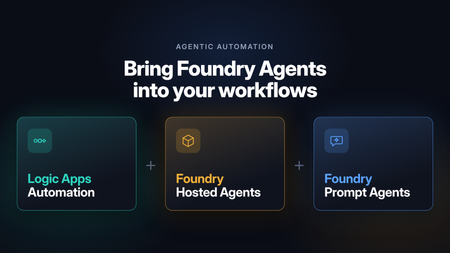
Microsoft Foundry is retiring workflows on December 1, 2026. After that date, the visual workflow designer and running workflows in the Foundry portal won’t be supported. For business process automation that combines deterministic steps with AI reasoning, the Foundry migration guide recommends Azure Logic Apps. Logic Apps is especially well suited to building these processes visually: Foundry agents become steps in a workflow, running alongside built-in actions, APIs, and MCP servers in the same run. Beyond the migration, there’s a broader question many teams face once an agent is working. Most agents start out as interactive, chat-based experiences: a person asks, and the agent responds. Putting that same agent to work in a business process means it has to run autonomously, started by an API call or an event instead of a person, running in the background and at scale. It also has to fit alongside the deterministic steps the process already depends on, such as gathering data before the agent runs and validating and acting on its output afterward. With support for Foundry Prompt Agents and Foundry Hosted Agents, Azure Logic Apps Automation gives you a direct way to do this. Any agent you’ve built in Foundry can become a step in a workflow. It can be started by an API call, a schedule, or an event from one of 1,400+ connectors, run in the background at scale, and sit between the deterministic steps that come before and after it. Before we get to the workflow side, here’s a quick look at the two agent types. If you want the full picture, the Foundry Agent Service overview compares them in detail. What are Foundry Prompt Agents A Prompt Agent is an agent you configure rather than code. You write instructions, pick a model, attach tools, and Foundry runs it. There’s nothing to deploy and no scaling to think about. It can use the Foundry model and tool catalogs, including knowledge sources like Azure AI Search and Foundry IQ. You pay for the tokens and tool calls it uses, with no separate platform charge. If you can write down what the agent should do and which tools it needs, a Prompt Agent will usually do the job, and it’s the quickest way to get something working. The prompt agent quickstart walks through building one. What are Foundry Hosted Agents A Hosted Agent is your own agent code, packaged as a container and run on Microsoft Foundry Agent Service. You can build it with Microsoft Agent Framework, LangGraph, the OpenAI Agents SDK, or your own code. Foundry handles the hosting and scaling. Since it’s your code, you decide how the agent loop works. Each session gets its own isolated sandbox with the CPU and memory you choose, and files and state persist between turns. Each Hosted Agent also gets its own Microsoft Entra agent identity, so you can see and audit what it does like any other identity in your tenant. Hosted Agents use the same models and tools as Prompt Agents. On top of tokens and tool calls, you pay for the compute they use (vCPU and memory hours). You can read more about how Hosted Agents work. A simple way to choose: start with a Prompt Agent. Move to a Hosted Agent when you need custom code or custom orchestration or want to bring your own code and framework. Orchestrate Foundry agents with Logic Apps workflows An agent in Foundry runs when someone or something calls it. Most business processes start somewhere else: an email comes in, a ticket is opened, a file lands in SharePoint, or a schedule fires. They usually end somewhere else too, with a record updated or someone getting a message. Logic Apps covers both ends and everything in between: a trigger to start the agent, deterministic steps around it, and branching, retries, timeouts, and parallel branches for the agent call. The next two sections show what that looks like. Every run shows up in run history, with the inputs, what the agent returned, and what happened next. When something goes wrong, you can see exactly where. The Learn article on automating Foundry agents with workflows covers the setup step by step. Run agents autonomously from any trigger The simplest setup is a trigger, an agent, and an action. Say a support email arrives in Outlook. The workflow sends it to a Prompt Agent that classifies it and drafts a reply, then creates a ticket with the result. This runs every time an email arrives, with no one starting it. Schedules work the same way. A recurrence trigger could call a Hosted Agent every Monday to go through last week’s data and post a summary in Teams. Mix agentic reasoning with deterministic steps Most processes are largely rule-based, with a step or two that needs adaptive reasoning or a decision. In Logic Apps you use an agent for those steps and keep everything else as deterministic steps. Before the agent runs, collect what it needs. Look up the customer in your CRM, pull the contract from SharePoint, or query a database, and pass all of it in. After it runs, check what came back. Validate it against a schema, apply your business rules, and send anything uncertain to a person for approval. Then write the result to the right system with a connector. Use both agent types in one workflow You don’t have to pick one type of agent per process. A workflow can call a Prompt Agent for a quick classification and send only the harder cases to a Hosted Agent for a longer analysis. The workflow passes output from one agent to the next, runs agents in parallel when they don’t depend on each other, and brings the results back together. Each agent stays small, and the end-to-end logic lives in the workflow, where you can see it and change it. How to use Foundry Agents from Workflows Hosted Agent You can create Foundry Hosted Agents directly from your Logic Apps Automation application. Pick your Foundry project and model deployment, and the app takes care of identity, permissions, and readiness checks for you. In a workflow, the Foundry Hosted agent action sends the agent its instructions, task, files, and any workflow actions you’ve added as tools. It returns the agent’s final response and generated files for the next steps to use. For details, see Foundry Hosted Agents for an overview and Create and use a Foundry Hosted Agent for step-by-step setup. https://youtu.be/foN9oPu5lRE Prompt Agent You can call an existing Foundry Prompt Agent from a workflow or create a new one right from the designer . Connect to your Foundry project, then either pick an agent from the list or select Create new agent and give it a name, a model, and instructions. The agent is created and hosted in Foundry. You can also give the agent tools from Logic Apps: actions from 1,400+ connectors, built-in actions, APIs, MCP servers, and other workflows. https://youtu.be/YkM7dHzHjdM Roadmap Today, workflows can invoke Hosted Agents that you create from your Logic Apps Automation app. We’re adding support for selecting an existing Hosted Agent from your Foundry project and invoking it from a workflow. Get Started Read to automate! Start building at auto.azure.com Automation QuickStart Automation Documentation - https://auto.azure.com/docs/470Views1like0CommentsMicrosoft Foundry Guardrails Getting in Your Way? Here’s How to Dial Them Down
How This All Started So here’s the story. I just got back from a trip and had a pile of footage sitting on my laptop. Being the lazy (sorry, efficient) person I am, I fired up OpenCode and asked GPT-6 Astra, running on Microsoft Foundry, to cut me a travelogue. Nothing fancy: under two minutes, nice lighting, clean transitions, no cringy effects, a quick QA before showing me, and the output in its own folder. Easy, right? Nope. This is what I got instead: “Image processing blocked due to content policy violation.” Seriously? It’s holiday footage! Nothing even remotely dodgy in there. This is a classic false positive from the default guardrails, and the good news is it’s totally fixable. Let me show you how. My Setup Quick context before we dive in: I’ve got two models deployed on Microsoft Foundry, gpt-6-astra and gpt-6-sol. Both were running on Microsoft’s out-of-the-box guardrail. Step 1: Find the Guardrails Page Head over to the Microsoft Foundry portal, click Build, then hit Guardrails in the left menu. You’ll see three guardrails that Microsoft gives you by default: Microsoft.Default, Microsoft.DefaultV2 and Microsoft.MAIDefault. Microsoft.DefaultV2 is the one every new deployment gets, which is why it’s sitting on both of my models. Here’s the catch: you can’t edit or delete these Microsoft-managed defaults. So instead of tweaking them, we’re going to build our own guardrail and swap it in. Step 2: Create Your Own Guardrail Smash that "Create" button and you’ll land on the Create guardrail page. This is where all the knobs and switches live: Every control has three bits: the risk type, the intervention point (does it check what you send in, what the model spits out, or both?) and the action. The magic trick for loosening things up is flipping the action from Block to Annotate. With Annotate, Foundry still scans the content and tags it in the API response, but it stops slamming the door on your request. So What Does Each Setting Actually Do? Before you go on a switching-off spree, it’s worth knowing what each of these does and what you’re giving up when you loosen it. Here’s the quick tour: Jailbreak: This one catches prompts trying to trick the model into ignoring its rules. On Block, those prompts get rejected outright. On Annotate, they go through with a flag. Turn it off completely and you’re trusting the model’s own training to keep it in line. Network (egress rules): Controls which outbound calls a hosted agent is allowed to make. As the portal points out, it only applies to hosted agents, so for plain model deployments like mine it doesn’t change a thing. Indirect prompt injections: Watches user input and tool responses (files, docs, web pages the model reads) for sneaky instructions someone has planted. Leave it on and your agents are protected when they read outside content; switch it off and a dodgy file could quietly hijack your model. For an agentic tool like OpenCode, which reads files and runs shell commands, I’d honestly keep this one on, even if it’s just on Annotate. Spotlighting (Preview): Tags external content inside the prompt so the model can tell your real instructions apart from random untrusted data. Think of it as an extra seatbelt against indirect attacks. Content harms (Hate, Sexual, Self-harm, Violence): Each of these has a severity slider that starts at Medium blocking, meaning anything rated medium or higher gets blocked. Slide it down to Lowest blocking and only the really nasty stuff gets stopped, which kills off most false positives like mine. The asterisk means these four are mandatory: you can turn the dial down, but you can’t switch them off. Blocklists: Want to ban specific words or phrases, like profanity or your competitor’s name? This is where you do it. It’s off by default. Protected material for code and text: Checks whether the model is about to spit out known copyrighted text (song lyrics, articles and so on) or code lifted from public repos. Block stops it; Annotate lets it through with a flag. Switch it off and you’re rolling the dice on your app reproducing someone else’s copyrighted work. Step 3: Pick Your Models Hit Next and Foundry asks which agents and models you want this guardrail on. Any model you’ve already deployed in your project shows up here. For me that’s gpt-6-astra and gpt-6-sol, so I ticked both. Step 4: Name It and Pick a Streaming Mode One more Next and you’re on the Review page. Give your guardrail a name (I went with NoGuardrails, because subtlety isn’t my thing) and pick a streaming mode. You’ve got two choices: Default: Foundry buffers the response and runs it through the guardrail before each chunk goes out. Nothing reaches the user until it’s been checked. Safest option, but you’ll feel a bit of lag when streaming. Asynchronous: Content streams back the moment it’s generated, with the filters running in the background. Much snappier, but flagged content might flash up briefly before the filter catches it, so your app has to clean up after the fact. Microsoft pitches this for low-latency stuff like internal dev tools, which is exactly my use case. Give the summary a quick once-over, then click Create. Done! Did It Work? Yep! With my shiny new guardrail in place, I fired off the exact same request, this time to GPT-6 Sol. And boom: no more content policy error. The model went straight to work scanning my footage and putting the video together. Wrapping Up Look, Microsoft’s default guardrails are a solid starting point, but they can be a bit trigger-happy when you’re doing perfectly legit stuff like video editing, creative work or internal tooling. Since you can’t touch the defaults, the trick is to roll your own: flip Block to Annotate where it makes sense, drag those content harm sliders down, pick the streaming mode that fits your app, and assign it to your deployments. That’s it! One friendly word of warning though: with great power comes great responsibility. Only loosen what you actually need, keep things like indirect prompt injection detection switched on for any agent that reads files or browses the web, and think twice before doing this on anything customer-facing. And if you want to go further than the portal lets you, like switching content filters off completely, you’ll need to apply to Microsoft for approval first. Happy building!298Views1like2CommentsAdding a Fallback Model to Hermes with Microsoft Foundry
So the plan was simple. Leave the Bedrock configuration untouched, then wire Microsoft Foundry in behind it as a fallback, so Hermes always has somewhere else to go when the primary provider is not responding. A few other reasons pushed me towards Foundry in particular: Redundancy that does not need me. If Bedrock is throttled or out of quota, I want Hermes to fail over on its own rather than waiting for me to notice. A catalogue I already pay for. Foundry puts the latest GPT models next to open-weight and partner models in one place, so I can pick a model that suits the task instead of settling for whatever a single provider happens to offer. Enterprise controls out of the box. Region pinning, private networking, content filters and per-deployment quota all sit in the same portal, which makes the setup far easier to defend to a security reviewer. Learning the mechanics before I need them. Working out how Hermes handles a provider chain is much nicer on a quiet Tuesday than during a live outage. Here is the short version, if you are deciding whether to read on. Time: about thirty minutes if nothing goes wrong. Cost: pay-as-you-go tokens only, and none at all while the fallback sits idle. Result: an assistant that keeps answering when your primary provider stops. Before you start, you will need three things: a machine with Hermes already installed and a working primary provider configured, an Azure subscription with access to Microsoft Foundry in a region you can actually deploy into, and enough quota in that region to create a deployment. One thing that made this easy to justify: Foundry deployments bill per token on the standard pay-as-you-go tier. A fallback provider that never gets invoked costs nothing beyond the requests it actually serves, so the insurance is close to free until the day you need it. Chat surface (CLI, messaging) → Hermes Gateway → Primary Amazon Bedrock → Fallback Microsoft Foundry Figure 1: Where the fallback sits. Every request goes through the Hermes gateway to the primary provider; only when that provider is unavailable does the chain continue to Microsoft Foundry. Part 1: Deploying a Model on Microsoft Foundry The first half of this job happens entirely inside the Microsoft Foundry portal and has nothing to do with Hermes yet. All you are really doing here is making sure your Azure subscription can serve a model, and that you hold an endpoint and key Hermes can authenticate with later. 1. Deploy model in Foundry → 2. Copy endpoint + key → 3. hermes fallback add → 4. Authenticate → 5. Select models, test Figure 2: The whole setup in five moves. The first two happen in the Microsoft Foundry portal (orange); the rest happen on the Hermes machine (blue). Go to Microsoft Foundry > Build > Models > Deploy > Deploy a base model. You can deploy a fine-tuned model instead if you already have one, which works just as well with Hermes. Check the region shown at the top of the portal before you commit, because both model availability and deployment quota differ from one region to the next. Then deploy the model you have selected: In this case I deployed gpt-5.6-sol, which is the model Hermes will fall back to. The choice was deliberate rather than exciting. My primary model on Bedrock is a general-purpose chat model, and a fallback is only useful if the answers it gives feel like a continuation of the same conversation rather than a different assistant wearing the same name. The gpt-5.6-sol deployment matches that behaviour closely, it was available in the region I wanted to pin, and the quota I was granted comfortably covers a day of normal use. If a fallback surprises you the first time it fires, it is the wrong fallback. Once the deployment finishes, open it and take note of two values: the target endpoint URI and the API key. Copy both somewhere safe now, because you will be pasting them into Hermes in the next part. If your organisation rotates keys on a schedule, use a key with the longest life you are allowed, since a fallback secured with a credential that expires quietly stops being a fallback. What to copy Where it lives in the portal Where Hermes asks for it Target endpoint URI Deployment > Endpoint > Target URI "Endpoint" prompt in hermes fallback add API key Deployment > Endpoint > Key "API key" prompt, or choose Entra ID instead Deployment name Deployment > Details > Name Shown in the model list Hermes returns Region Top of the portal, next to the resource Must match the region you deployed into Figure 3: Everything Hermes will ask for, and where to find each value before you leave the portal. Part 2: Adding Foundry to Hermes as a Fallback With the Foundry side sorted, everything from here happens in the Hermes CLI. One thing worth knowing before you start: this is the fallback command, not the primary model command, so your existing Bedrock configuration is left completely alone. Nothing in this section can break what is already working, which makes it a good one to try on a live setup. Run the Hermes fallback command: When Hermes asks which provider to add, choose Azure Foundry. The picker still carries the old name; it is the same service that the portal now calls Microsoft Foundry. Paste the target endpoint URI from your deployment, then authenticate with the API key you copied earlier. Hermes also offers Microsoft Entra ID at this prompt, which is the better option if your organisation would rather not have a static key sitting on the machine. If authentication fails here, check the endpoint before you start suspecting the key. In my experience the endpoint is wrong far more often than the credential is, usually because the deployment name at the end of the URI does not match the deployment you actually created. Once authentication succeeds, Hermes lists the deployments your Foundry resource exposes and asks which ones you want to use. You can select more than one, and the order is not cosmetic: Hermes walks down the chain from top to bottom whenever the provider above is unavailable. Treat that list as a priority order, not a shopping basket. What happens to the primary What Hermes does What you see in the chat Responds normally Routes every request to the primary and never touches the chain Nothing. The fallback stays idle Throttled or out of quota Retries the next provider down the chain on the same request A reply, served by the fallback model Endpoint unreachable Keeps failing over on each new request until the primary recovers Slightly different tone and latency, but a working assistant Every provider fails Returns the error rather than hanging An error worth chasing with hermes status Figure 4: The chain in practice. The fallback only earns its keep in the middle two rows, which is exactly why it is easy to forget you configured it. Part 3: Promoting Foundry to the Primary Model At this stage Foundry is sitting in the back seat as a backup. I wanted to reverse the arrangement and make Foundry the primary while Bedrock slides down into the fallback slot, partly because I preferred keeping day-to-day traffic inside my Azure subscription, and partly because I wanted proof the chain works in both directions. Before promotion After promotion Primary: Amazon Bedrock → Primary: Microsoft Foundry Fallback: Microsoft Foundry → Fallback: Amazon Bedrock Figure 5: The promotion, in effect. Nothing is added or removed; the two providers simply trade places in the chain. There is no dedicated "promote" command in Hermes, so the manual route is a short sequence of steps rather than a single instruction: Select the fallback provider/model as the new primary: hermes model Remove the now-duplicate model from the fallback chain: hermes fallback remove Optionally add the old primary model as a fallback: hermes fallback add Restart the messaging gateway: hermes gateway restart Verify the result: hermes status / hermes fallback list That sequence works, and it is good to know what is happening underneath. But since I already had a working provider configured, I would rather just ask Hermes to rearrange itself. This is the part I genuinely enjoy about the tool: the configuration is something you can talk to, not only something you type commands at. Prompt: Okay now please make the model I configured on Microsoft Foundry into the main model, and make the Bedrock one the fallback model! Hermes rewrites the provider chain on its own and confirms the swap once it is done, which is a great deal less error-prone than running the five commands by hand. Part 4: Testing the Switch Configuration you have not tested is just an assumption with extra steps, so the next thing is to confirm Hermes really is talking to Foundry. Type /model when running Hermes to bring up the model picker. You will be prompted to select a provider first. Pick the Microsoft Foundry entry, then choose the specific deployment from the list underneath it. The active model should switch straight away. Send it a plain "Hello" to check that the deployment actually responds, rather than just looking correct in the menu. Appearing in a dropdown and serving a request are two very different things. A second test is worth the thirty seconds it costs: run hermes status to confirm which provider is live, then hermes fallback list to confirm the chain is ordered the way you intended. The picker tells you what you selected; those two commands tell you what Hermes will actually do at three in the morning. Part 5: The Obstacle, and What It Actually Taught Me Every walkthrough has the part the author quietly leaves out. Here is mine: the wrinkle was not the model, it was capacity. My first attempt deployed into the region closest to me out of habit, and the portal turned it down because there was no capacity left for that model at the tier I asked for. The model was clearly listed in the catalogue; being listed and being deployable in your region, on your subscription, at your quota, are three separate questions. Redeploying in a different region fixed it in a couple of minutes, but it meant the endpoint URI changed, which in turn meant the value I had already pasted into Hermes was stale. Re-running hermes fallback add against the new endpoint sorted it out. The lesson is cheap enough to hand over for free: check quota and regional capacity for your specific subscription before you design a walkthrough, a demo or a production fallback around one deployment. In the Foundry portal, Management then Quota shows exactly what you have been granted per region and per model family, which is the only list that matters. Symptom Likely cause Fix Deployment rejected in the portal No capacity for that model at the tier you asked for, in that region Deploy in another region, or drop to a smaller tier Hermes rejects the credential Endpoint URI does not match the deployment you created Re-copy the target URI from the deployment, not the resource Provider authenticates but lists nothing Key belongs to a different Foundry resource Check you are in the right resource, then re-run hermes fallback add Fallback never fires Chain ordered the wrong way round hermes fallback list, then reorder Figure 6: The four things that went wrong, or nearly did, and what fixed each one. There is a silver lining worth stating plainly. Because the fallback chain was already in place, a deployment that refused to come up did not take the assistant down with it. That is precisely the scenario this whole exercise was meant to cover, and it turned up on day one without me having to simulate it. Command Cheat Sheet Everything used in this walkthrough, collected in one place: hermes fallback add: attach a provider to the fallback chain hermes fallback remove: drop a provider from the chain hermes fallback list: show the chain in priority order hermes model: set the primary model hermes gateway restart: restart the messaging gateway after a change hermes status: confirm which provider is currently live /model: switch models from inside a running session Conclusion Adding Microsoft Foundry as a fallback behind my existing Bedrock setup took an afternoon, and most of that was spent recovering from a regional capacity limit I should have checked first. The work itself is small: deploy a model, copy the endpoint and key, run hermes fallback add, authenticate, pick your deployments. The payoff is that Hermes no longer depends on one provider staying healthy. Three things are worth carrying away from this: Check quota, not just the catalogue. The Foundry catalogue shows what Microsoft offers. It does not show what your subscription and region can actually deploy today. Confirm that first, before you build anything on top of a specific deployment. Order your fallback chain deliberately. Hermes works down the list from top to bottom, so the sequence you choose during setup is the failover policy you are going to live with. Put the model you actually trust at the top. Treat the endpoint as part of the credential. Redeploying in a new region changes the endpoint URI, and a fallback pointed at an endpoint that no longer exists is not a fallback. Re-run the setup whenever the deployment moves. The switch from Bedrock primary to Foundry primary also proved the chain runs in both directions, which is the real point. Provider redundancy is only useful if you have watched it work. Next on my list is deliberately breaking the primary provider to confirm the failover triggers on its own, without me typing a single command. If you run this against a different model, region or provider pairing, I would genuinely like to know how it went, particularly if your quota experience was better than mine. Drop it in the comments.408Views0likes0Comments
Microsoft Foundry External MCP Server Traffic Routing via Corporate Firewall
The customer would like to confirm whether traffic from an Azure AI Foundry agent to an external MCP server can be routed through a corporate firewall and whether this scenario is officially supported. To validate this scenario, I configured the following in my lab: Deployed an Azure AI Foundry resource using the Standard Agent Service with network injection. Created a dedicated subnet for the Foundry Agent Service and delegated it to Microsoft.App/environments. Associated a route table with the Foundry Agent subnet to route outbound traffic through Azure Firewall. Configured the required application and network rules on Azure Firewall. The Foundry agent is able to successfully retrieve data from the external MCP server. However, no corresponding traffic is visible in the Azure Firewall logs. Could you please confirm whether outbound traffic from the Foundry agent to an external MCP server can be routed through Azure Firewall or a corporate firewall? Also, is this routing scenario officially supported? Appreciate your support!Microsoft Agent Framework Multi-Agent Workflow Architecture for Automated Kubernetes Assessments
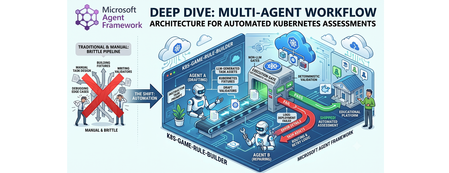
Why this system generates tests (design rationale) This project does not generate tests just to "check code." It generates tests because, in a Kubernetes learning game, the test suite is the grading contract. The design goals are: Scale content creation: instructors should not hand-author every task and checker. Keep grading objective: student success is measured against Kubernetes API state, not subjective review. Avoid fragile tasks: generated tasks must survive empty/wrong cluster states without crashing. Make failures repairable: when checks break, the system should patch and re-validate automatically. So the pipeline generates a full task package (setup, answer, check, cleanup) where tests define exactly what "correct" means. Lifecycle: from concept to production-ready grader Reader mental model: this is a content compiler with validation stages, not a single chat completion. Phase 1: Pedagogical intent -> structured concept The Idea Agent converts a topic into a constrained concept object (objective, progression, task IDs, difficulty variants). Memory rules block duplicates and previously failed concepts. Phase 2: Concept -> executable grading package The Generator Agent turns that concept into files: student instructions (instruction.md) learning material (concept.md) parameter source (session.json) setup and answer manifests (setup.template.yaml, answer.template.yaml) deterministic pytest flow (test_01 ... test_06) At this point, output is still untrusted draft content. Phase 3: Structural correctness gate Deterministic validation checks file presence, syntax, JSON/YAML shape, and template correctness. This catches basic integrity issues before cluster execution. Phase 4: Behavioral correctness gate (real cluster) Pytest executes against Kubernetes and verifies runtime behavior using real kubectl-derived state. This proves that generated checks actually evaluate cluster resources as intended. Phase 5: Anti-false-positive gate (skip-answer mode) The same suite runs with SKIP_ANSWER_TESTS=True to verify grader integrity: answer deployment is skipped test_05_check.py must fail If it still passes, the grader is invalid (it would accept wrong student submissions). Phase 6: Self-healing repair loop On any failure, deterministic error logs are fed into the Fixer Agent, which patches only broken files. The workflow then re-enters validation + test gates. Phase 7: Finalization If all gates pass -> task is kept as production-ready content. If retries are exhausted -> task is moved to unsuccessful/ with FAILURE_REPORT.txt for human triage. This lifecycle explains the core architecture decision: LLMs generate candidate graders, deterministic execution certifies them. Concrete generated sample (what the pipeline actually produces) Below is a representative generated task for topic: ConfigMap Environment Variable Injection. Generated directory layout tests/game01/050_configmap_env_injection/ ├── __init__.py ├── instruction.md ├── concept.md ├── session.json ├── setup.template.yaml ├── answer.template.yaml ├── test_01_setup.py ├── test_02_ready.py ├── test_03_answer.py ├── test_05_check.py └── test_06_cleanup.py session.json (runtime variables) { "namespace": "{{random_name()}}{{random_number(100,999)}}{{student_id()}}", "configmap_name": "{{random_name()}}", "deployment_name": "{{random_name()}}", "container_name": "app", "env_key": "APP_MODE", "env_value": "production" } Why this exists: task values are randomized per student/session, so tests verify behavior by variable contract instead of hardcoded names. setup.template.yaml (baseline state only) apiVersion: v1 kind: Namespace metadata: name: {{ namespace }} Why this exists: setup should create prerequisites only. It must not accidentally include the final answer. answer.template.yaml (expected correct solution) apiVersion: v1 kind: ConfigMap metadata: name: {{ configmap_name }} namespace: {{ namespace }} data: {{ env_key }}: "{{ env_value }}" --- apiVersion: apps/v1 kind: Deployment metadata: name: {{ deployment_name }} namespace: {{ namespace }} spec: replicas: 1 selector: matchLabels: app: env-demo template: metadata: labels: app: env-demo spec: containers: - name: {{ container_name }} image: nginx:latest env: - name: {{ env_key }} valueFrom: configMapKeyRef: name: {{ configmap_name }} key: {{ env_key }} Why this exists: defines canonical "correct cluster state" that graders must detect. test_02_ready.py (wait for setup resources) import json import time from tests.helper.kubectrl_helper import build_kube_config, run_kubectl_command class TestReady: def test_001_namespace_active(self, json_input): kube_config = build_kube_config( json_input["cert_file"], json_input["key_file"], json_input["host"] ) time.sleep(2) result = run_kubectl_command( kube_config, f"kubectl get namespace {json_input['namespace']} -o json", ) data = json.loads(result) assert data.get("status", {}).get("phase") == "Active" Why this matters: validates setup-stage readiness only. It should not check answer resources yet. test_05_check.py (student grading contract) import json from tests.helper.kubectrl_helper import build_kube_config, run_kubectl_command class TestCheck: def test_001_configmap_key_exists(self, json_input): kube_config = build_kube_config( json_input["cert_file"], json_input["key_file"], json_input["host"] ) result = run_kubectl_command( kube_config, f"kubectl get configmap {json_input['configmap_name']} -n {json_input['namespace']} -o json", ) data = json.loads(result) assert data["data"][json_input["env_key"]] == json_input["env_value"] def test_002_deployment_uses_configmap_env(self, json_input): kube_config = build_kube_config( json_input["cert_file"], json_input["key_file"], json_input["host"] ) result = run_kubectl_command( kube_config, f"kubectl get deployment {json_input['deployment_name']} -n {json_input['namespace']} -o json", ) data = json.loads(result) env = data["spec"]["template"]["spec"]["containers"][0].get("env", []) matched = [ e for e in env if e.get("name") == json_input["env_key"] and e.get("valueFrom", {}).get("configMapKeyRef", {}).get("name") == json_input["configmap_name"] and e.get("valueFrom", {}).get("configMapKeyRef", {}).get("key") == json_input["env_key"] ] assert matched, "Deployment container must consume env var from ConfigMap key" Why this matters: this is the real grading logic. If a student deploys wrong resource wiring, this test fails with explicit reason. Why skip-answer validation is essential for this sample When SKIP_ANSWER_TESTS=True, answer deployment is skipped. In this mode: test_03_answer.py should be skipped test_05_check.py must fail (ConfigMap/Deployment wiring is absent) If test_05_check.py still passes, the grader is broken (false positive), and the workflow routes to Fixer. Rule Builder Workflow Flowchart Multi-graph architecture views 1) Control-plane graph (orchestration DAG) 2) Runtime sequence (who calls what) 3) State machine (task lifecycle) 4) Prompt lifecycle graph (how prompts evolve) 5) MCP + Kubernetes execution boundary graph Core Agent Framework Primitives Used This repository is a practical example of Agent Framework as a graph orchestrator, not just an agent wrapper. WorkflowBuilder builds a typed DAG with explicit edges. @executor functions implement deterministic nodes (validation, pytest, decisions, routing prep). AgentExecutor wraps LLM agents so they behave as graph nodes. WorkflowContext shared state carries typed data and retry metadata between nodes. add_multi_selection_edge_group(...) + selector functions enforce conditional routing. MCPStdioTool connects filesystem MCP tools into agents for controlled file I/O. Production graph construction (from workflow/builder.py) looks like this: workflow = ( WorkflowBuilder(start_executor=initialize_retry) .add_edge(initialize_retry, generator_executor) .add_edge(generator_executor, parse_generated_task) .add_edge(parse_generated_task, run_validation) .add_edge(run_validation, run_pytest) .add_edge(run_pytest, make_decision) .add_multi_selection_edge_group( make_decision, [keep_task, remove_task], selection_func=select_action, ) .add_edge(keep_task, run_pytest_skip_answer) .add_multi_selection_edge_group( run_pytest_skip_answer, [check_loop, complete_workflow], selection_func=select_skip_answer_action, ) .add_multi_selection_edge_group( check_loop, [fix_task, complete_workflow], selection_func=select_loop_action, ) .add_edge(fix_task, fixer_executor) .add_edge(fixer_executor, parse_generated_task) .build() ) This is the architectural heart of the system: agents and deterministic executors are first-class nodes in the same graph. Detailed Node-by-Node Mechanics 1. Idea Agent (🧠): Concept Synthesis with Memory Constraints The Idea Agent (agents/k8s_task_idea_agent.py) generates a structured concept with three difficulty variations (BEGINNER/INTERMEDIATE/ADVANCED). It is memory-aware: task_ideas_memory.json tracks successful concepts. task_ideas_failure_memory.json tracks concepts that failed downstream. Memory constraints are injected using AgentMiddleware (system-level prompt injection) to avoid duplicate or previously failed concepts. For Responses-only models, the agent switches to a tool-call contract (save_k8s_task_concept) instead of structured response formatting. 2. Generator Agent (⚙️): MCP-Backed File Authoring The Generator Agent receives a strict prompt and writes task files through MCP filesystem tools. Key framework details: Built through chat_client.as_agent(...). MCP tool attached via tools=mcp_tool. Function-call execution observability added with LoggingFunctionMiddleware. Uses absolute-path-only policy in instructions to prevent path drift. 3. Deterministic Validation + Test (✅): Non-LLM Gates After generation, the graph moves through deterministic executors: run_validation calls pure Python checks (k8s_task_validator). run_pytest executes pytest --import-mode=importlib --rootdir=. .... Raw pytest output is persisted in workflow state for later fixing. This is critical: no LLM is asked whether code is correct. 4. Skip-Answer Test (🧪): Grader Correctness Gate Even if standard tests pass, the workflow enforces a second tier: SKIP_ANSWER_TESTS=True pytest --import-mode=importlib --rootdir=. Implementation detail: the executor writes JUnit XML, parses it, and asserts that: test_03_answer.py is skipped test_05_check.py fails as expected If test_05_check.py does not fail, the task is treated as invalid and sent back to retry/fix. 5. Fixer Agent + Retry Loop (🔧): Bounded Self-Healing On failure, fix_task builds a targeted prompt containing: failure reasons from deterministic nodes full captured pytest output explicit rule to patch only broken files in place The Fixer Agent runs through AgentExecutor, writes patches via MCP, and the graph loops back to parse_generated_task. Retries are stateful (retry_count, max_retries) and hard-bounded. On exhaustion, complete_workflow moves the task to unsuccessful/<game>/ and writes FAILURE_REPORT.txt. Agent Prompt Design (The Part That Makes It Work) If you want to understand why this pipeline works, you need to inspect prompts as operational contracts, not generic instructions. Real Idea Agent Prompt (from code) IDEA_AGENT_INSTRUCTIONS = ( "You are a Kubernetes task idea generator that creates detailed task concepts with three difficulty variations. " "Read official K8s documentation and propose comprehensive learning concepts for a Kubernetes game. " "\n\nYour task:\n" "1. Choose ONE Kubernetes concept not yet covered (check context for existing concepts)\n" "2. Generate exactly 3 variations: BEGINNER, INTERMEDIATE, and ADVANCED\n" "3. Use 3-digit task IDs (001-999) in format: XXX_concept_name_level (e.g., 041_secrets_basic)\n" "4. Each variation should build on the previous one with increasing complexity\n" "5. Include practical, hands-on scenarios covering: Workloads, Services, Storage, Configuration, Security, Scheduling, Policies\n" "\nProvide the concept, tags, description, and 3 variations with task_id, difficulty, title, objective, key_skills, and estimated_time." ) Responses-only models use a stricter tool-call version: IDEA_AGENT_INSTRUCTIONS_TOOL_CALL = ( IDEA_AGENT_INSTRUCTIONS + "\n\n" "**CRITICAL**: You MUST call the save_k8s_task_concept tool to save your generated concept.\n" "...\n" "Always call save_k8s_task_concept with your generated concept." ) Idea Agent Prompt Contract The Idea Agent prompt enforces: one concept per run exactly three difficulty variations strict task ID format (XXX_concept_name_level) practical skill progression Core pattern: You are a Kubernetes task idea generator... 1. Choose ONE Kubernetes concept not yet covered 2. Generate exactly 3 variations: BEGINNER, INTERMEDIATE, ADVANCED 3. Use 3-digit task IDs in format XXX_concept_name_level ... It is strengthened by runtime memory injection: previously generated concepts are blocked previously failed concepts are blocked For Responses-only models, the contract becomes tool-driven: CRITICAL: You MUST call the save_k8s_task_concept tool... This reduces ambiguity in output structure and makes downstream parsing deterministic. Real Generator Agent Prompt (from code) def _get_generator_instructions(): return ( "You are a Kubernetes task generator with filesystem tools.\n" f"The MCP filesystem is rooted at: {PATHS.tests_root.parent}\n" f"You MUST use ABSOLUTE paths for ALL file operations.\n" f"Task directory: {PATHS.game_root}/XXX_task_name/\n" "...\n" "CRITICAL: test_02_ready.py checks resources from setup.template.yaml, NOT answer.template.yaml.\n" "...\n" "MUST use polling loops (60s timeout, 15s interval)\n" "MUST use try/except and safe .get() JSON access\n" ) The generator prompt is long on purpose: it encodes path correctness, file schema, YAML/Jinja structure, and testing strategy in a single deterministic contract. Generator Agent Prompt Contract The Generator prompt is intentionally long and prescriptive because it defines filesystem safety and grading correctness requirements. Key constraints encoded in the prompt: Absolute path writes only (prevents writing to wrong workspace paths) No directory creation (directory is pre-created by executor) Required file set (instruction.md, concept.md, session.json, templates, tests) test-flow invariants: test_01_setup.py deploys setup test_02_ready.py checks setup resources only test_03_answer.py deploys answer test_05_check.py validates final solution robust test coding style: polling loops, try/except, .get()-based JSON parsing, explicit debug output Example contract fragment: CRITICAL PATH RULES: ✅ CORRECT: /abs/path/tests/gameXX/050_task/file.py ❌ WRONG: tests/gameXX/050_task/file.py (relative) CRITICAL: test_02_ready.py checks resources from setup.template.yaml, NOT answer.template.yaml. This is why generation quality is high before the Fixer loop even starts. Real Runtime Retry Prompt Builder (from code) def _build_retry_generation_prompt(combined: CombinedValidationResult) -> str: task_id = combined.test.task_id failure_reasons = _build_failure_reasons(combined) return ( f"Generate a complete Kubernetes learning task with ID '{task_id}' about '{combined.target_topic}'. " f"This is retry attempt {combined.retry_count + 1} of {combined.max_retries}. " f"\n\n⚠️ PREVIOUS ATTEMPT FAILED:" f"\n{chr(10).join([f' - {reason}' for reason in failure_reasons])}" f"\n\nIMPORTANT: You MUST use the exact task ID '{task_id}' - do not generate a new ID." f"\n\n✅ Directory already exists: {PATHS.game_root}/{task_id}/" f"\nWrite all files directly into this directory. Do NOT call create_directory." "..." ) This means retries are not generic retries; they are failure-conditioned retries with precise constraints. Fixer Agent Prompt Contract The Fixer prompt is a repair protocol, not a regeneration prompt. It includes: exact failure reasons from deterministic validators raw pytest output instruction to read current task files first strict directive to patch only broken files Core behavior constraints: DO NOT rewrite all files. Make TARGETED FIXES to ONLY the broken files. Use ABSOLUTE paths for all file operations. This keeps retries cheap, preserves working artifacts, and improves convergence speed. Real Runtime Fix Prompt Builder (from code) def _build_fix_prompt(combined: CombinedValidationResult, raw_test_output: str) -> str: task_id = combined.test.task_id failure_reasons = _build_failure_reasons(combined) prompt = ( f"Fix the failed Kubernetes task '{task_id}' located in '{PATHS.game_root}/{task_id}/'." f"\n\nThis is fix attempt {combined.retry_count + 1} of {combined.max_retries}." f"\n\n⚠️ TASK FAILED WITH THESE ERRORS:" f"\n{chr(10).join([f' - {reason}' for reason in failure_reasons])}" ) if raw_test_output: prompt += f"\n\n📋 FULL TEST OUTPUT:\n```\n{raw_test_output}\n```" prompt += ( f"\n\n🔍 YOUR TASK:" f"\n1. READ all files from '{PATHS.game_root}/{task_id}/'" f"\n6. Make TARGETED FIXES to ONLY the broken files" f"\n7. WRITE ONLY the fixed files back" f"\n\n⚠️ CRITICAL: DO NOT rewrite all files! Only fix the broken ones!" ) return prompt How Prompt Output Enters the Agent Framework Graph The prompt builders above are used by deterministic executors and sent to agent nodes through AgentExecutorRequest: await ctx.send_message( AgentExecutorRequest( messages=[Message(role="user", contents=[fix_prompt])], should_respond=True ) ) So prompt generation and graph routing are tightly coupled: each route transition emits a specific prompt payload into the next LLM node. Runtime-Constructed Prompts in Executors The most important prompts are built dynamically in workflow executors: _build_retry_generation_prompt(...) _build_fix_prompt(...) These functions inject live context: retry_count / max_retries concept + objective metadata validation/test failure reasons full captured test logs So each retry is context-rich and specific, not another blind generation attempt. Prompt + Middleware + Deterministic Gates = Reliability In this repository, reliability does not come from prompt text alone. It comes from three layers working together: Prompt contracts constrain agent behavior. Middleware injects memory and logs tool invocations. Deterministic executors enforce objective pass/fail gates. That combination is why the workflow remains auditable and predictable even when LLM outputs vary. Agent Framework Execution Model in This Repo Strongly-Typed Message Passing workflow/models.py defines transport models used between nodes: ValidationResult and TestResult (Pydantic) CombinedValidationResult (dataclass with should_keep and should_retry) InitialWorkflowState (seed payload for each run) This keeps node contracts explicit and simplifies selector logic. Fail-Fast Shared State Management Executors use ctx.get_state(...) with a sentinel (_MISSING) and raise explicit exceptions if required state is absent. This prevents hidden fallback behavior and catches graph/data wiring errors early. Conditional Routing with Selectors Selectors (workflow/selectors.py) encode graph decisions: select_action → keep vs remove select_skip_answer_action → complete vs loop select_loop_action → fix vs complete This separates decision policy from executor implementation. Streaming Workflow Runtime workflow.run(initial_state, stream=True) emits output events incrementally. The runner (workflow/runner.py) consumes these events to detect successful completions and update concept memory accordingly. Agent Construction and API Selection Strategy The repository uses Azure CLI auth (AzureCliCredential) and dynamically selects API mode by deployment name (agents/config.py): Chat Completions path: OpenAIChatCompletionClient Responses-only model path: OpenAIChatClient or custom ResponsesAgent Why this matters: some codex-class deployments are Responses-only, so the architecture supports both without changing workflow logic. How MCP Actually Controls Kubernetes (Important Distinction) In this repo, MCP is used for filesystem control; Kubernetes control is done through kubectl tools. 1) MCP server role: controlled file I/O The workflow starts MCP stdio servers (official filesystem server) and mounts them into agents: docs_mcp_tool = MCPStdioTool( name="filesystem_docs", command="npx", args=["-y", "@modelcontextprotocol/server-filesystem", str(PATHS.k8s_docs_root)], load_prompts=False, ) tests_mcp_tool = MCPStdioTool( name="filesystem_tests", command="npx", args=["-y", "@modelcontextprotocol/server-filesystem", str(PATHS.tests_root.parent)], load_prompts=False, ) Those MCP tools are passed into Generator/Fixer agents, which then call MCP file functions (read/write/list) inside allowed roots only. 2) Kubernetes cluster control role: kubectl execution tool Cluster actions are not performed by MCP filesystem server; they are performed by a dedicated function tool: def run_kubectl_command(command: str) -> str: kubeconfig_path = os.environ.get("KUBECONFIG", "/home/developer/.kube/config") cmd_list = ["kubectl"] + command.split() result = subprocess.run( cmd_list, capture_output=True, text=True, check=True, env={**os.environ, "KUBECONFIG": kubeconfig_path}, ) return result.stdout And the Kubernetes agent forces tool usage: agent = responses_client.as_agent( name="KubernetesAgent", instructions="...You MUST use the run_kubectl_command tool...", tools=[run_kubectl_command], default_options={"tool_choice": "required"}, ) So the control plane is: MCP filesystem → manipulate generated task files. kubectl tool → query/mutate real cluster state. deterministic pytest/validator executors → accept or reject results. 3) End-to-end command flow in practice When generated tests run, they execute real kubectl get ... -o json checks in test code, and the deterministic runner captures raw output: pytest_command = f"pytest --import-mode=importlib --rootdir=. {task_with_val.task_directory}/" result = run_pytest_command(pytest_command) ctx.set_state(f"raw_output_{task_with_val.task_id}", raw_output) This means Kubernetes state verification is always grounded in live command output, not model speculation. Should MCP run Kubernetes tests? Short answer: not in this design. Current architecture keeps test execution deterministic and local: pytest is run by run_pytest_command(...) (pure Python subprocess runner) test results are parsed and stored in workflow state retry/fix routing uses those deterministic outputs This is intentional. If test execution were delegated to an LLM-facing MCP command tool, you would lose strict control over execution semantics and error handling. Recommended pattern: Use MCP for file/document access and controlled editing. Use deterministic executors for pytest and validation. Use LLM agents only for generation and repair. If you still want MCP-driven test execution, add a separate locked-down command MCP server (only whitelisted pytest/kubectl commands), but keep pass/fail decision logic in deterministic executors. How tests are run in this workflow (with code) The workflow executes tests in deterministic executors, not inside LLM agents. 1) Workflow node calls pytest runner run_pytest executor builds the command and calls the pure Python runner: @executor(id="run_pytest") async def run_pytest(task_with_val: TaskWithValidation, ctx: WorkflowContext[TestResult]) -> None: from agents.pytest_runner import run_pytest_command pytest_command = f"pytest --import-mode=importlib --rootdir=. {task_with_val.task_directory}/" result = run_pytest_command(pytest_command) raw_output = result["details"][0] if result.get("details") else "" ctx.set_state(f"raw_output_{task_with_val.task_id}", raw_output) ... 2) Deterministic subprocess execution The runner normalizes command flags and executes pytest via subprocess: def run_pytest_command(command: str) -> dict[str, Any]: normalized_command = _normalize_pytest_command(command) # adds -s if needed cmd_list = shlex.split(normalized_command) result = subprocess.run( cmd_list, capture_output=True, text=True, check=False, cwd=str(PATHS.pytest_rootdir), ) combined_output = result.stdout + "\n" + result.stderr _save_test_output(normalized_command, combined_output, skip_answer) ... Exit codes are interpreted deterministically: 0 → pass 5 → no tests collected (fail) others → fail with exit code reason 3) Skip-answer validation tier After normal pass, the workflow runs pytest again with SKIP_ANSWER_TESTS=True and parses JUnit XML: os.environ["SKIP_ANSWER_TESTS"] = "True" pytest_command = f"pytest --import-mode=importlib --rootdir=. --junitxml={junit_path} {task_dir}/" result = run_pytest_command(pytest_command) test_05_failed, test_03_skipped = _parse_skip_answer_junit(junit_path) The parser checks per-testcase outcomes: if "test_05_check.py" in context and has_failure_or_error: test_05_failed = True if "test_03_answer.py" in context and has_skipped: test_03_skipped = True 4) How failures trigger fix loop If pytest fails (or skip-answer logic fails), failure reasons and raw output are pushed into state, then the Fixer Agent receives a generated fix prompt containing that output: ctx.set_state(f"failure_reasons_{task_id}", reasons) ctx.set_state(f"raw_output_{task_id}", raw_output) fix_prompt = _build_fix_prompt(combined, raw_test_output) await ctx.send_message( AgentExecutorRequest( messages=[Message(role="user", contents=[fix_prompt])], should_respond=True ) ) That is the key loop: deterministic test output drives LLM repair, then deterministic tests re-run. ResponsesAgent Internals (Advanced Agent Framework Pattern) The custom ResponsesAgent (agents/responses_agent.py) demonstrates a lower-level integration pattern: Connect MCP tool lazily. Call Responses API. Parse ResponseFunctionToolCall items. Execute tools (MCP + custom callables). Feed function_call_output back to model. Repeat until final text response. It also runs a middleware chain around tool invocations, preserving observability and consistency with standard agent paths. Why This Architecture Is Robust This design works because Agent Framework is used as a deterministic orchestration layer around probabilistic generation: LLM creativity is constrained by typed state and strict prompts. deterministic executors act as objective quality gates. retries are targeted, bounded, and auditable. failures produce durable forensic artifacts (FAILURE_REPORT.txt + test logs). For Kubernetes education pipelines, this yields high throughput without sacrificing grader reliability. GitHub Repo - https://github.com/wongcyrus/k8s-game-rule-builder About the Author Cyrus Wong is the senior lecturer of Hong Kong Institute of Information Technology (HKIIT) @ IVE(Lee Wai Lee).and he focuses on teaching public Cloud technologies. He is a passionate advocate for the adoption of cloud technology across various media and events. With his extensive knowledge and expertise, he has earned prestigious recognitions such as AWS AI Hero, Microsoft MVP- Microsoft Foundry, and Google Developer Expert - Cloud(AI).489Views0likes0CommentsBuilding ShadowQuest: A Multi-Agent RPG
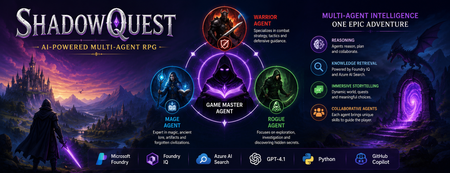
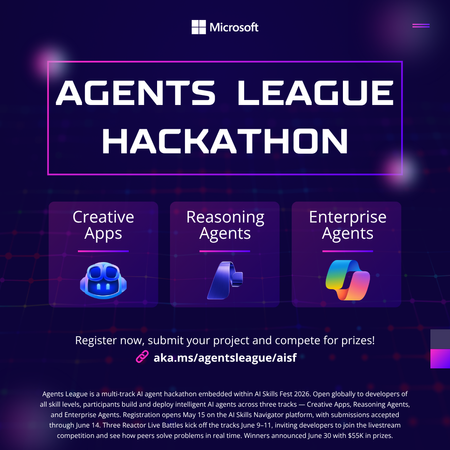
Artificial Intelligence is rapidly evolving beyond traditional chatbots. Today, developers are building intelligent systems where multiple AI agents collaborate, retrieve knowledge, and solve problems together. Microsoft's Agents League Hackathon provided the perfect opportunity to explore this new approach through the Reasoning Agents challenge. For this challenge, I built ShadowQuest, a fantasy role-playing game (RPG) powered by Microsoft Foundry, Foundry IQ, Azure AI Search, GPT-4.1, and GitHub Copilot. The project demonstrates how specialized AI agents can work together while using Retrieval-Augmented Generation (RAG) to deliver accurate and context-aware responses. About the Challenge Microsoft Agents League is a global developer challenge designed to encourage developers to build intelligent AI applications using Microsoft's latest AI technologies. Participants could choose from three tracks: Creative Apps, Reasoning Agents, and Enterprise Agents. I selected the Reasoning Agents track because I wanted to explore how multiple AI agents could collaborate instead of relying on a single large language model. Another important requirement for this year's challenge was integrating at least one Microsoft Intelligence Layer. For ShadowQuest, I chose Foundry IQ as the project's intelligence layer. The Idea Behind ShadowQuest Fantasy RPGs are built around storytelling, exploration, and collaboration between different characters. Every character usually has a unique role, whether it's a warrior protecting the team, a mage interpreting magical knowledge, or a rogue discovering hidden paths. I wanted to recreate this experience using AI. Instead of building one AI assistant responsible for everything, I designed a system where multiple specialized agents collaborate to create a richer and more immersive adventure. ShadowQuest is set in a fantasy world filled with magical artifacts, forgotten kingdoms, mysterious locations, and story-driven quests. Players can ask questions about the world, explore different locations, and learn about the game's lore through conversations with AI agents. Building the Multi-Agent Architecture The architecture follows a simple but scalable design. At the center of the system is the Game Master Agent, which acts as the orchestrator. Every player interaction starts with the Game Master. It receives the player's request, determines what information is needed, retrieves additional knowledge when required, and generates the final response. Supporting the Game Master are three specialized agents: Warrior Agent – Focuses on combat strategy and tactical decisions. Mage Agent – Provides magical knowledge, world lore, and information about ancient artifacts. Rogue Agent – Specializes in exploration, investigation, and discovering hidden information. Each agent has a clearly defined responsibility, making the system easier to understand, maintain, and extend in the future. Using Foundry IQ as the Knowledge Layer One of the most important parts of the project was integrating Foundry IQ. Instead of storing every piece of game information inside prompts, I created a dedicated knowledge base containing information about characters, magical artifacts, locations, quests, and the history of the ShadowQuest world. This approach separates knowledge from reasoning. Whenever a player asks a question, the Game Master Agent first retrieves relevant information from the knowledge base before generating a response. This ensures that answers remain consistent with the game's world while reducing hallucinations. Foundry IQ became the central source of truth for the entire project, making it easy to manage and expand the game world without constantly modifying prompts. Azure AI Search and Retrieval-Augmented Generation To enable intelligent retrieval, I connected Foundry IQ with Azure AI Search. The RPG documents were indexed, and vector embeddings were generated using Microsoft's embedding models. This enables semantic search, allowing the system to understand the meaning behind a player's question instead of relying only on keyword matching. For example, if a player asks about a magical relic without mentioning its exact name, Azure AI Search can still retrieve the correct information based on semantic similarity. The complete workflow looks like this: The player submits a question. The Game Master Agent receives the request. Foundry IQ queries Azure AI Search. Relevant documents are retrieved. GPT-4.1 generates a grounded response using the retrieved context. This Retrieval-Augmented Generation (RAG) approach significantly improves the quality and reliability of responses. Accelerating Development with GitHub Copilot GitHub Copilot played an important role throughout the development process. It helped generate Python classes, improve documentation, create helper functions, and speed up repetitive coding tasks. During the live demonstration, I also showed how Copilot could quickly generate a new Healer Agent, demonstrating how AI-assisted development makes it easier to extend a multi-agent application while maintaining a consistent architecture. Rather than replacing the developer, Copilot acted as an intelligent coding assistant, allowing me to focus more on architecture and design decisions. Demonstrating ShadowQuest During the Microsoft Agents League Reasoning Agents Battle, I demonstrated the Game Master Agent by asking questions about the ShadowQuest world, magical artifacts, and game lore. One of the most interesting parts of the demonstration was observing the retrieval process. Before generating a response, the Game Master Agent called the knowledge retrieval function through Foundry IQ. This confirmed that the system was retrieving relevant information from the indexed knowledge base rather than relying only on GPT-4.1's internal knowledge. This demonstrated how RAG can create more grounded, reliable, and context-aware AI experiences. Lessons Learned Building ShadowQuest taught me that designing multi-agent systems is as much about architecture as it is about AI models. Clearly defining responsibilities for each agent made the application easier to maintain and opened the door for future expansion. I also learned how valuable Retrieval-Augmented Generation can be for applications that depend on structured knowledge. Separating reasoning from knowledge allows AI systems to remain accurate while making it easier to update information over time. Finally, participating in the Microsoft Agents League was an incredible opportunity to experiment with Microsoft's latest AI technologies, learn from other developers, and share ideas with a global community passionate about agentic AI. Looking Ahead ShadowQuest is only the beginning. In future iterations, I plan to expand the project by introducing additional agents such as a Merchant Agent and Healer Agent, implementing persistent player memory, adding dynamic quest generation, improving combat mechanics, and enabling deeper collaboration between agents. These improvements will make the game world more immersive while continuing to explore the possibilities of agent-based AI systems. Conclusion ShadowQuest demonstrates how Microsoft Foundry, Foundry IQ, Azure AI Search, GPT-4.1, and GitHub Copilot can be combined to build intelligent multi-agent applications. More importantly, the project reinforced an important idea: the future of AI is not a single assistant performing every task, but a team of specialized agents collaborating with shared knowledge to solve increasingly complex problems. Participating in the Microsoft Agents League was an inspiring experience that allowed me to explore the next generation of AI development while building a project that combines storytelling, reasoning, and knowledge retrieval. I look forward to continuing this journey and discovering new ways to build intelligent applications using Microsoft's growing AI ecosystem.516Views1like0CommentsBuilding a hands-free voice concierge with Microsoft Foundry Voice Live and a Hosted Agent
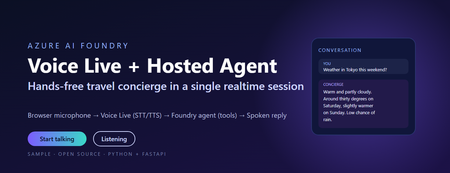
This post walks through a small, working sample that wires the browser microphone to Azure AI Speech Voice Live, binds the realtime session to a Foundry hosted agent, and lets the agent answer travel questions using tool calls. The full source, infrastructure, and labs live in the repository linked at the end. Why this combination matters Voice user interfaces have historically been hard to build well. Streaming audio, partial transcripts, barge-in, voice activity detection, tool dispatch, and audio playback have traditionally meant stitching together five or six services. The combination of Voice Live and a Foundry hosted agent collapses that into one realtime WebSocket session with a single binding field. Voice Live owns the audio loop: speech to text, neural text to speech, semantic turn detection, noise suppression, and echo cancellation. The Foundry hosted agent owns the brain: instructions, memory, model selection, evaluators, and tool calling. The link between them is one query parameter on the WebSocket URL. What this means in practice: the browser never sees a model API key, never instantiates a tool, and never owns the agent prompt. The browser does microphone capture and audio playback. Everything else lives server-side. The scenario The sample is called Contoso Travel Concierge. The user is mid-journey, hands and eyes busy, and wants to ask things like: What is the weather in Tokyo this weekend? Is BA005 from Heathrow on time? What time is check-in at the Marriott Marquis? Each question triggers a tool call on the hosted agent. The reply is short, speakable, and synthesised back to the user in under a second on a warm connection. Architecture There are four moving parts. Three of them are managed Azure services. Only the broker is your code. Browser client – captures PCM16 audio at 24 kHz and streams it over a WebSocket to the broker. Plays back audio chunks the broker forwards from Voice Live. Session broker (FastAPI) – authenticates to Azure with DefaultAzureCredential , builds the Voice Live WebSocket URL with a short-lived bearer token, and relays frames in both directions. Voice Live – the Azure AI Speech realtime endpoint. Transcribes the user, hands the text to the bound agent, and synthesises the agent’s reply. Foundry hosted agent – a prompt-kind agent in Azure AI Foundry with instructions, tool definitions, and the microsoft.voice-live.enabled metadata flag set to true . Two design choices are worth calling out. The broker is small on purpose. It does authentication, URL construction, and WebSocket relay. It does not transcode audio, run business logic, or hold conversation state. Voice Live and the agent already do those things well. The agent binding is a URL query parameter, not an SDK call. There is no per-turn HTTP request to the agent runtime. Voice Live opens a session against the agent once and streams turns through it for the lifetime of the WebSocket. That is what keeps latency low. The Voice Live URL contract This is the single most important thing to get right. The public Microsoft sample that ships under liupeirong/ai-foundry-voice-agent targets a different URL shape ( services.ai.azure.com host, agent-id + agent-access-token parameters, an Authorization header). That shape is rejected by Foundry resources that expose voice-live-enabled agents. The shape below is the one the portal itself uses, and the one this sample dials. Three details cause most failures: The host must be <resource>.cognitiveservices.azure.com , not services.ai.azure.com . The broker rewrites this automatically from VOICE_LIVE_ENDPOINT . The bearer token travels in the authorization query parameter, URL-encoded, with a literal Bearer prefix and a + (or %20 ) before the token. No Authorization header is sent. agent-name and model are both the agent’s display name. agent-version is empty when you want the latest published version. Walkthrough: from clone to spoken reply Prerequisites Python 3.11 or later (the sample is developed on 3.13). The Azure CLI, signed in with az login --tenant <your-tenant-id> . An Azure AI Foundry project in a Voice Live region ( eastus2 , swedencentral , or westus2 ). A deployed prompt-kind agent in that project with Enable Voice Live turned on. The Cognitive Services User role on the Foundry resource for the identity the broker will use. Configure the broker Copy .env.sample to .env and fill in four values: AZURE_AI_PROJECT_ENDPOINT=https://<your-resource>.services.ai.azure.com AZURE_AI_PROJECT_NAME=<your-foundry-project-name> VOICE_LIVE_ENDPOINT=wss://<your-resource>.services.ai.azure.com/voice-live/realtime VOICE_LIVE_API_VERSION=2025-10-01 FOUNDRY_AGENT_ID=<your-agent-name> The agent name is what the Foundry portal shows on the agent card. The broker uses it for both the agent-name and model query parameters. Install and run python -m venv .venv .\.venv\Scripts\Activate.ps1 pip install -r requirements.txt .\scripts\start-local.ps1 The broker exposes three endpoints: GET /healthz – liveness probe. GET /config – returns the session.update the browser sends as its first frame. WS /ws – the bi-directional relay to Voice Live. Smoke test .\scripts\test-session.ps1 A successful run prints: [OK] /ws upgraded -> sent session.update <- {"type":"session.created",…} <- {"type":"session.updated",…} [OK] session.updated received -- E2E works This confirms the entire chain: local broker, DefaultAzureCredential token, Foundry Portal URL shape, Voice Live handshake, and the bound agent acknowledging the session. Open the browser UI Browse to http://localhost:8000/ , click Start talking, and ask one of the sample questions. Transcripts appear in real time and the spoken reply plays back through the audio context. Inside the broker The relay logic is tiny – the heavy lifting is the URL construction. The function below is the canonical reference; copy it if you are porting the pattern to another language. def build_voice_live_ws_url(agent_access_token: str) -> str: """ Build the Foundry Portal style Voice Live WebSocket URL. Auth lives in the query string only. No Authorization header is sent. """ host = _ws_host_from_endpoint(VOICE_LIVE_ENDPOINT) qs = urlencode( { "trafficType": "FoundryPortal", "agent-name": FOUNDRY_AGENT_ID, "agent-version": "", "agent-project-name": AZURE_AI_PROJECT_NAME, "api-version": VOICE_LIVE_API_VERSION, "model": FOUNDRY_AGENT_ID, "client-request-id": str(uuid.uuid4()), "authorization": f"Bearer {agent_access_token}", }, quote_via=quote, ) return f"wss://{host}/voice-live/realtime?{qs}" The relay itself is a pair of asyncio tasks: one forwarding browser frames upstream, one forwarding Voice Live frames back. Audio bytes are passed straight through – the broker never decodes them. Deploying the hosted agent The most reliable way to create a voice-live-enabled agent is the Foundry portal. Agents created via the Assistants v2 SDK do not carry the required metadata by default and will be rejected by the Voice Live URL shape above. The portal steps are: Open the Foundry project, go to Agents, and click New agent. Choose Prompt agent as the kind, name it (for example travel-concierge ), and pick a model deployment. Paste the contents of agent/src/prompts/system.txt into the instructions box. On the Voice tab, switch Enable Voice Live on. This is what sets the microsoft.voice-live.enabled = true metadata. Add the three tools ( get_weather , get_flight_status , get_hotel_info ) from agent/agent.yaml on the Tools tab. Publish the version and write the agent name back to .env as FOUNDRY_AGENT_ID . The full deployment guide, including how to host the broker on Azure Container Apps with a managed identity, is in docs/deployment.md in the repository. Three lessons from getting this to production 1. Voice output must be written for speech, not for screens Foundry agents tend to format answers in markdown with citations like ([data.jma.go.jp](https://…)) . When Voice Live synthesises that text, the user hears the URL read aloud, character by character. The fix is to write the agent instructions so the spoken text never contains URLs, markdown, or symbols. A short block at the end of the agent instructions does the job: Voice output rules - This output is read aloud by TTS. Never include URLs, domain names, or citation markers like "(source.com)" in your reply. Cite by speakable source name only. - Never use markdown for formatting. No asterisks, brackets, backticks, bullets, or hashes. Write in plain spoken sentences. - Keep numbers speakable: say "thirty degrees Celsius", not "30C / 86F". - Keep replies under about 40 words unless the user asks for detail. The browser transcript can still render markdown for the eyes. The sample does so with a small, escaping markdown renderer that whitelists bold, italic, code, and http(s) links only, so the same agent reply looks polished on screen even though the spoken version contains none of it. 2. Identity is simpler than it looks The broker uses DefaultAzureCredential and requests the https://ai.azure.com/.default scope. Locally that resolves to your az login credentials. In Azure Container Apps it resolves to the user-assigned managed identity. In both cases the only role assignment you need on the Foundry account is Cognitive Services User. There is no API key path on the working URL shape – it is bearer tokens all the way down. 3. The wrong sample wastes a day If you start from the public liupeirong/ai-foundry-voice-agent repository against a portal-provisioned voice-live agent, the WebSocket either returns HTTP 400 or closes silently with code 1006. The cause is the URL shape, not your code. The reference probe in scripts/probe_portal_shape.py is the single source of truth for the working contract – keep it as a regression test. Responsible AI and security notes Credentials never reach the browser. Tokens are minted server-side and travel only on the upstream Voice Live URL. No secrets in source. The .env file is gitignored. The .env.sample contains only placeholders. Markdown rendering is escape-first. The browser HTML-escapes the agent reply before applying its small markdown whitelist, and links are restricted to http(s) URLs so the rule cannot emit javascript: hrefs. Tool calls are auditable. Every turn shows up as a run in the Foundry portal under the agent, with the prompt, model output, and tool inputs and outputs visible for review. Voice biometric considerations. If you plan to handle account verification by voice, plug in dedicated speaker recognition rather than relying on the conversational model. Key takeaways Voice Live plus a Foundry hosted agent is a session-level integration, not an API integration. One URL, one binding field, one WebSocket. The browser is a thin client. Authentication, URL construction, and relay all live in a small FastAPI broker. Get the URL shape right ( cognitiveservices.azure.com , token in the query string, agent-name equals model equals the agent display name) and the rest is plumbing. Use the Foundry portal to create the agent so the voice-live metadata is set correctly. Write agent instructions for the ear, not the eye, then layer screen formatting on top in the browser. Get the code and try it Repository: github.com/microsoft/foundry-agent-voice-mode-sample Deployment guide: docs/deployment.md in the repository. Labs: three progressive workshops under labs/ – basic voice, adding tools, and binding a hosted agent. Reference docs: Voice Live in Azure AI Speech and Agents in Microsoft Foundry. If you build something on top of this pattern, open an issue or pull request on the repository. The sample is intentionally small so it stays easy to fork.515Views0likes0CommentsStudent Devs: Build AI Agents, Compete for $55K in Prizes
Student Devs: Build AI Agents, Compete for $55K in Prizes 🎮 AI Skills Fest • June 4–14, 2026 • Free to Enter $55K Prize Pool 3 Challenge Tracks 10 Days of Hacking Free To Enter Whether you're a first-year CS student or a final-year senior with a portfolio full of projects, Agents League is the best way to gain hands-on experience with agentic AI this summer and walk away with real skills employers are hiring for right now. What You'll Actually Learn Forget passive tutorials. Agents League is project-based learning at full speed. By the end of the hackathon, you'll have built a working AI agent and gained practical experience with the tools shaping the future of software development. 🤖 AI-Assisted Development Use GitHub Copilot to accelerate your coding workflow — from scaffolding to debugging — the way professional developers do today. 🧩 Multi-Step Reasoning Build agents with Microsoft Foundry that can plan, reason, and execute complex tasks — the core of agentic AI. 🏢 Enterprise AI Patterns Learn to build production-ready agents that integrate with Microsoft 365 and Copilot Studio — skills that translate directly to industry jobs. 🔧 Prompt Engineering Design effective prompts and orchestration flows that make AI agents reliable and useful in the real world. 📦 GitHub Workflows Submit your project through GitHub — practising version control, README writing, and open-source collaboration. 🎯 Competitive Problem-Solving Work under real constraints with deadlines, judging criteria, and peer competition — just like industry hackathons and sprints. Pick Your Track (or Try All Three) Agents League has three challenge tracks, each using different Microsoft AI tools. Choose based on your interests or stretch yourself by competing in multiple tracks. Track 01. Creative Apps Build an innovative application with AI-assisted development. This track rewards creativity, dream big and let GitHub Copilot help you bring ideas to life faster than ever. Tool: GitHub Copilot Track 02. Reasoning Agents Create intelligent agents that solve complex problems through multi-step reasoning. Think: agents that can research, plan, and act. This is the cutting edge of AI. Tool: Microsoft Foundry Track 03. Enterprise Agents Build knowledge agents that integrate with Microsoft 365 Copilot. Learn how businesses are deploying AI today and add enterprise AI to your skillset. Tool: Copilot Studio • M365 Opportunities You Won't Want to Miss Agents League isn't just a competition, it's a launchpad. Here's what's in it for you beyond the code: 💰 Win from a $55,000 USD Prize Pool Prizes are awarded across all three tracks smaller teams and solo hackers have a real shot. 📺 Watch Live Coding Battles at Microsoft Reactor See industry experts go head-to-head building AI agents live. Learn advanced techniques you can apply immediately to your own project. 🎓 Free Learning Resources on Microsoft Learn Access curated learning paths and the AI Skills Navigator, structured content designed to get you from zero to submission-ready. 🌍 Join a Global Developer Community Connect with thousands of developers on the Agents League Discord. Find teammates, ask questions, and build your professional network. 📂 Build Your Portfolio with a Real Project Every submission lives on GitHub. Walk away with a polished, public project that demonstrates your AI skills to future employers and grad schools. 🏆 Gain Recognition from Microsoft and the Community Top projects get visibility across the Microsoft developer ecosystem. Stand out from the crowd in internship and job applications. Key Dates to Remember Event Date Hacking Period Opens June 4, 2026 Registration Deadline June 12, 2026 — 12:00 PM PT Submission Deadline June 14, 2026 — 11:59 PM PT How to Get Started (Right Now) You don't have to wait until June 4th to start preparing. Here's your pre-hackathon game plan: Register for the hackathon it's free and open to everyone. Pick a track that matches your interests or curiosity. Explore the learning resources on Microsoft Learn and the AI Skills Navigator. Join the Discord community to find teammates and get early tips. Watch the Reactor event series for live coding battles and expert walkthroughs. Set up your GitHub repo and start experimenting before the hacking window opens. Helpful Links Register for Agents League Free entry, sign up now Microsoft Reactor Events Live coding battles & workshops AI Skills Fest The broader event Microsoft Learn Free learning paths The Arena Awaits 🏆 Ten days. Three tracks. $55K in prizes. Whether you go solo or squad up, this is your chance to build something real with AI and have a blast doing it. Register Now It's Free | Watch Reactor Events Agents League is part of AI Skills Fest and is open to the public at no cost. Review the Hackathon Rules and Regulations and the Microsoft Event Code of Conduct before participating.1.2KViews0likes0CommentsSigning in to Microsoft Foundry from OpenClaw using Azure AD: a smoother way to bring your models in
This post is a quick update to walk through the new flow. If you read the previous one, think of this as the easier path I wish I had the first time round. If you have not seen the original, you can find it here: Integrating Microsoft Foundry with OpenClaw: Step by Step Model Configuration | Microsoft Community Hub Pre-requisite: You will need the Azure CLI (azure-cli) installed on your machine. The official install guide for Linux is here: https://learn.microsoft.com/en-us/cli/azure/install-azure-cli-linux?view=azure-cli-latest I am on Linux so I went the Homebrew route, which keeps things simple. The formula is here: https://formulae.brew.sh/formula/azure-cli Microsoft also has official docs covering the Homebrew/Linuxbrew install: https://learn.microsoft.com/en-us/cli/azure/install-azure-cli-macos?view=azure-cli-latest#install-with-homebrew Once Homebrew is ready, run this in your terminal: brew install azure-cli Why this matters: Before this update, every Foundry model you wanted to use in OpenClaw needed its own API key and endpoint pasted into the config. It worked, but it was tedious, and keys are easy to leak if you are copying them around. The Azure AD path solves both problems. You authenticate as yourself (or a service principal), OpenClaw asks Azure for the list of Foundry resources you have access to, and it brings the models in automatically. Signing in to Microsoft Foundry from OpenClaw via Azure AD A device-code OAuth handshake replaces the old static-API-key flow. OpenClaw delegates auth to the local Azure CLI; the CLI handles the browser-side sign-in, holds the resulting tokens, and refreshes them silently. OpenClaw then walks the Azure resource graph, subscriptions → Foundry resources → model deployments and registers each model into its own config. No API keys move through OpenClaw at any point. Sequence diagram of the OAuth 2.0 device-authorization flow as orchestrated by OpenClaw. Phases 1–3 establish identity (the developer authenticates once, in a real browser, against Azure AD). Phases 4–5 perform service discovery (OpenClaw walks the ARM resource hierarchy, subscriptions → Foundry accounts → model deployments and persists the result to a local provider config). After registration, every model call OpenClaw makes against Foundry reuses the same Azure-CLI-managed token cache: tokens refresh transparently, and access is gated by the Foundry resource's RBAC assignments rather than a static API key. Dashed lines denote return values; the teal line in step 7 marks the single token-issuance event the rest of the system pivots on. Walking through the new flow: Start with the command to onboard openclaw as if you were setting up OpenClaw for the first time: openclaw onboard Kick things off with the OpenClaw onboard command, the same one you would use when setting up OpenClaw for the first time. When it prompts you, choose update values. Next, you will be asked to configure your models. Scroll down a little and you will see Microsoft Foundry listed as a supported provider. Pick it. From here, you have two options. You can sign in with an API key, which is what I covered in the previous blog post, or you can sign in through Azure AD. The Azure AD path is easier and more secure, so that is the one we will use. OpenClaw will give you a URL and a device code. Copy the URL into your browser and use the code to complete the sign in. (This is where the az CLI from the pre-requisite section earns its keep.) If everything worked, you should see a success prompt similar to this: Once you are signed in, OpenClaw will ask you to pick the Azure subscription that your Microsoft Foundry resource lives in. Pick the subscription, then pick the Foundry resource where your models are deployed. And that is pretty much it. All the models you have deployed to that Foundry resource get pulled into OpenClaw automatically. Compared to the old way of pasting API keys and endpoints one by one, this is a huge time saver, and you do not have to babysit any keys. From here you can start using your Foundry-deployed models inside OpenClaw straight away: Wrapping up The Azure AD sign-in option in OpenClaw is one of those small updates that quietly removes a real pain point. If you have ever juggled multiple Foundry endpoints and rotated keys across them, you already know why. With this flow, you sign in once, your models show up, and you can get back to actually building. If you have not tried OpenClaw with Microsoft Foundry yet, this is a good time to give it a go. And if you were holding off because of the key management overhead, that excuse is gone now. References Previous post on integrating Microsoft Foundry with OpenClaw using API keys: Integrating Microsoft Foundry with OpenClaw: Step by Step Model Configuration | Microsoft Community Hub Install the Azure CLI on Linux: https://learn.microsoft.com/en-us/cli/azure/install-azure-cli-linux?view=azure-cli-latest Install the Azure CLI on macOS: https://learn.microsoft.com/en-us/cli/azure/install-azure-cli-macos?view=azure-cli-latest#install-with-homebrew Homebrew formula for azure-cli: https://formulae.brew.sh/formula/azure-cli457Views0likes0Comments8 Architectural Pillars to Boost GenAI LLM Accuracy and Performance in Low Cost
Smarter AI architecture, not bigger LLM models - how engineering teams push LLM accuracy and high performance in low cost. Enterprises using LLM (Large Language Models) hits the same ceiling and paying big price! A raw API call to a frontier model- GPT-4, Claude, Gemini delivers only 35-40% accuracy on structured output tasks like code generation, NL to DAX query generation, domain-specific reasoning. Prompt engineering pushes that to ~60%. But the final 35+ percentage points? Those come from system architecture, not model upgrades. This guide presents 8 architectural pillars, distilled from production Gen AI systems, that compound to close the accuracy gap. These patterns are model-agnostic and domain-agnostic, they apply equally to chatbots, coding assistants, content/query generators, automation agents, and any application where an LLM produces structured or semi-structured output. It’s based on my recent Gen AI projects. The key takeaway: use the LLM as one component in a larger system, not as the system itself. Surround it with deterministic guardrails, verified knowledge, and feedback loops. Pillar 1: Enhance Prompts with Verified Knowledge Context Impact: +35–40% accuracy (based on production use cases; may vary by domain) Top source of LLM errors in production is hallucinated identifiers knowledgebase, the model invents names, references, or structures that don't exist in the target system. This happens because LLMs are trained on general knowledge but deployed against specific, private enterprise systems they've never seen local database and knowledgebase. The fix is straightforward: inject verified, system-specific context (type definitions, API specs, ontologies, configuration schemas, entity catalogues) directly into the prompt so the model composes from known-good elements rather than recalling from training data. Use Knowledge Graph for better sematic knowledge. How to Implement Provide explicit context, never implicit- Whatever the LLM needs to reference identifiers, valid values, semantic knowledge, structures must appear verbatim in the prompt or retrieved context window. Filter aggressively. A full knowledge base with thousands of entities overwhelms the context window and confuses the model. Use intelligent filtering to surface only needed 5-10 most relevant elements per request. Store structured semantic knowledge in a graph or searchable index. This enables relationship-aware retrieval: "given entity X, what related entities, attributes, and constraints are also needed?" Include rich Semantic metadata. Names alone are insufficient. Include types, constraints, valid value ranges, relationships, and usage notes to minimize ambiguity. Keep context fresh. Stale context causes a different class of hallucination the model generates valid-looking output that references outdated structures. Sync your knowledge store with your source of truth. Why This Works LLMs excel at composition and reasoning combining elements, applying logic, following patterns. They are unreliable at recall of specific identifiers exact names, valid values, structural constraints. By offloading recall to a deterministic retrieval system and giving the LLM only composition tasks, you play to each system's strengths. Pillar 2: Tiered LLM Approach: Route Deterministically First, Use LLMs Last Impact: 80% cost reduction, 85% latency reduction, eliminates non-deterministic errors for most traffic. The most impactful architectural insight: most production requests don't need an LLM at all. A well-designed system handles 60-70% of traffic with deterministic logic templates, composition rules, cached results and reserves expensive, non-deterministic LLM calls only for genuinely novel inputs. The Three-Tier Model These metrics are from a real use case to convert NLP to Power BI DAX query. Tier Strategy Uses LLM ? Latency Accuracy Tier 0 Template slot-filling - handles requests that match known patterns exactly the system fills slots in a pre-built template with extracted parameters. No LLM, no non-determinism, near-perfect accuracy, sub-100ms response. No ~50ms 95-98% Tier 1 Compose from pre-validated fragments- handles requests that combine known patterns in new ways. The system retrieves pre-validated building blocks via search, composes them using deterministic rules, and validates the result. Still no LLM call. No ~200ms 90-95% Tier 2 Full LLM generation with enriched context- is reserved for genuinely novel requests that can't be served deterministically. Even here, the LLM receives maximum support: filtered context, relevant examples, explicit rules, and structured planning. Yes (1 call) 2-5s 88-93% Complexity-Based Routing A lightweight scoring function (evaluated in <1ms) routes each incoming request: Factors: reasoning depth, number of components, cross-references, constraints, nesting depth, novelty (distance from known patterns) Score 0-39: Tier 0 (deterministic template) Score 40-59: Tier 1 if confidence ≥ 85%, else Tier 2 Score 60+: Tier 2 (LLM generation) This routing achieves 96%+ accuracy in tier assignment and ensures the expensive path is only taken when necessary. Why This Matters Cost: 70-80% of requests cost zero LLM tokens Latency: Majority of responses in <200ms instead of 2-5s Reliability: Deterministic tiers produce identical output for identical input. Scalability: Deterministic tiers scale horizontally with trivial compute Pillar 3: Encode Prompt Anti-Patterns as Explicit Rules Impact: +8-10% accuracy, ~80% reduction in common structural errors LLM mistakes are patterned, not random. In any domain, 80% of errors cluster around a small set of 6-13 recurring structural mistakes. Instead of hoping the model avoids them through general instruction-following, compile these mistakes into explicit WRONG => CORRECT rules embedded directly in the system prompt. How to Implement Collect error data. Run 100+ requests through your system and categorize the failures. You'll find the same 6-13 patterns appearing repeatedly. Write concrete rules. For each pattern, show the exact wrong output and the exact correct alternative, with a one-line explanation of why. Embed in system prompt. Place rules prominently after the task description, before examples. Use formatting that's hard to ignore (headers, bold, explicit "NEVER" language). Keep the list short. 6-13 rules maximum. Beyond that, attention dilutes and the model starts ignoring rules. Prioritize by frequency. Refresh continuously. As the system improves (via other pillars), some errors disappear. New error types emerge. Update the rule set quarterly. Why This Works LLMs respond strongly to explicit negative examples. A generic instruction like "be careful with X" has minimal impact. But showing the exact wrong output the model tends to produce, paired with the correction, creates a strong avoidance signal. It's analogous to unit tests. Pillar 4: Retrieve Few-Shot Examples Dynamically Impact: +5-15% accuracy depending on domain complexity Static examples hardcoded in a prompt become stale, irrelevant of context tokens. Dynamic few-shot retrieval selects the 3-5 most relevant examples for each specific request, maximizing the signal-to-noise ratio in the prompt. Hybrid Retrieval Architecture The most effective approach combines two search strategies for intent search to understand natural language (NL) context: Keyword search (BM25) Finds examples with exact matching terms, identifiers, and domain vocabulary Vector search (semantic similarity) Finds examples with similar intent and structure, even if wording differs Rank fusion Merges results from both strategies, re-ranking by combined relevance This hybrid approach outperforms either strategy alone because keyword search catches exact identifier matches that vector search dilutes, while vector search captures semantic similarity that keyword search misses entirely. Best Gen AI Architectural Practices Match complexity to complexity. Simple requests should see simple examples. Complex requests should see complex examples. Mismatched examples confuse the model. Include negative examples. For the detected request type, include 1-2 "wrong => correct" pairs alongside positive examples. This reinforces Pillar 3's anti-pattern rules with concrete, contextually relevant demonstrations. Pre-compute embeddings. Generate vector embeddings at indexing time, not at query time. Cache retrieval results for repeated patterns. Curate quality over quantity. 3 excellent, diverse examples beat 10 mediocre ones. Each example should demonstrate a distinct pattern or edge case. Keep examples current. As your system evolves, old examples may demonstrate outdated patterns. Review and refresh the example store periodically. Pillar 5: Feedback Loop- Validate and Auto-Fix Every Output Deterministically Impact: +3-5% accuracy as a safety net, plus continuous improvement via feedback No matter how well-prompted, LLMs will occasionally produce outputs with minor structural errors - wrong casing, missing delimiters, references to slightly-incorrect identifiers, or subtle format violations. A deterministic post-processing pipeline catches and fixes these without any additional LLM calls. The Validation Pipeline LLM Output => Parse (grammar/AST) => Rule-Based Fixes => Compliance Check/validation => Final Output Each stage is fully deterministic: Parsing: Use a formal grammar or AST parser (ANTLR, tree-sitter, language-native parsers) to structurally analyse the output. Never regex-parse structured output - it's fragile and misses edge cases. Rule-based fixes: 10-20 deterministic transformation rules that correct known error patterns - name normalization, casing fixes, missing delimiters, structural repairs. Compliance check: Verify every identifier referenced in the output actually exists in the provided context. Flag unknown references. Design Principles Zero LLM calls in the fix pipeline. Every fix is a regex, an AST transformation, or a lookup table operation. Instant, free, deterministic, 100% reliable. Fail safe. If a fix is ambiguous (multiple valid corrections possible), pass through rather than corrupt. A minor error is better than a confident wrong "fix." Log everything. Track every fix applied, categorized by type. This data drives the feedback loop. The Critical Feedback Loop- The validation pipeline's most important function isn't fixing outputs, it's generating improvement signals: This creates a feedback loop: the auto-fix catches errors → the errors get promoted to upstream prevention → fewer errors reach the auto-fix → the system continuously tightens. Pillar 6: Multi-Agent Orchestration with Fewer Agents and Clear Contracts Impact: Reduced latency, clearer debugging, fewer failure modes The multi-agent pattern is powerful but commonly over-applied. The counter-intuitive lesson from production systems: fewer agents with well-defined responsibilities outperform many fine-grained agents. Why Fewer Is Better Each agent handoff introduces: Latency - serialization, network calls, context assembly Context loss - information dropped between boundaries Failure modes - each handoff is a potential error point Debugging complexity - tracing issues across many agents is exponentially harder Multi-Agent Orchestration Principles Merge agents that always run sequentially. If Agent A always feeds into Agent B with no branching or conditional logic, they should be one agent with two internal steps. Parallelize independent operations. Context retrieval and example lookup are independent, run them concurrently to halve retrieval latency. Route sub-tasks to cheaper models. Decomposed sub-problems are simpler by design. Use a smaller, faster, cheaper model (3x cost savings, 2x speed improvement). Define strict contracts. Each agent boundary should have an explicit schema defining inputs and outputs. No implicit assumptions about what crosses the boundary. Only 2 of 4 agents should call an LLM. The rest are purely deterministic. This minimizes non-deterministic behavior and cost. Pillar 7: Multi-Agent Cache at Multiple Hierarchical Levels Impact: 40-50% faster responses, 85%+ combined hit rate, significant cost reduction A single cache layer captures only one type of repetition. Production systems need hierarchical caching where multiple levels catch different repetition patterns , from exact duplicates to semantic near-misses. with -> A single cache layer captures only one type of repetition. Production systems need multi-level caching to handle exact matches, similar requests, and reusable fragments. or -> with Production systems need hierarchical caching where multiple levels handle exact matches, similar requests, and reusable fragments. Pillar 8: Measure Everything, Learn Continuously Impact: Enables data-driven iteration and prevents accuracy regressions. Architecture without observability is guesswork. The final pillar ensures every other pillar stays effective over time through comprehensive metrics and automated feedback loops. This isn't a one-time setup; it's a perpetual feedback loop. Every week, the top error patterns shift slightly. The auto-fix metrics tell you exactly where to focus next. Over months, this flywheel compounds into dramatic accuracy gains that no single prompt rewrite could achieve. Auto-Learning for New Domains When extending your system to new domains or knowledge areas: Auto-classify elements using naming conventions, type analysis, and structural patterns Auto-generate templates from universal patterns (transformations, comparisons, compositions, sequences) Bootstrap few-shot examples from successful template outputs Monitor for the first 100 requests, then curate only the edge cases manually This reduces domain onboarding from days of manual work to minutes of automated bootstrapping plus focused human review of outliers. Key Takeaways Architecture beats model size. A well-architected system with a smaller model outperforms a raw frontier model call on structured tasks at a fraction of the cost. Deterministic systems should do the heavy lifting. Reserve LLMs for genuinely novel, creative tasks. 70-80% of production requests should never touch an LLM. Verified knowledge is your top accuracy lever. Ground every prompt in context the model can trust. Errors are patterned, not random- Track them, compile them, and explicitly forbid them. Build feedback loops, not static systems- Every auto-fix, every cache miss, every routing decision is a signal for improvement. Fewer agents, done well- Fewer agents with strict contracts outperform 9 agents with fuzzy boundaries in accuracy, latency, and debuggability. Measure what matters and iterates- The system that wins isn't the one with the best day-one prompt, it's the one that improves fastest over time. Production-grade GenAI isn't about finding the perfect prompt or waiting for the next LLM model release. It's about building architectural guardrails that make failure nearly impossible and when failure does occur, the system learns from it automatically. These 8 pillars, applied together, transform any LLM from an unreliable black box into a precise, efficient, and continuously improving production system. -> Production Gen AI success is not about perfect prompts or waiting for the next LLM release. It comes from designing strong system guardrails that reduce failures and ensure consistent output. Even when failures happen, the system learns and improves automatically. When applied together, these 8 pillars turn an LLM into a reliable, efficient, and continuously improving production system.