foundry
26 Topics
Missing equivalent for Python MemorySearchTool and AgentMemorySettings in C# SDK
Hi Team, I am currently working with the Azure AI Foundry Agent Service (preview). I’ve been reviewing the documentation for managed long-term memory, specifically the "Automatic User Memory" features demonstrated in the Python SDK here: https://learn.microsoft.com/en-us/azure/ai-foundry/agents/how-to/memory-usage?view=foundry&tabs=python. In Python, it is very straightforward to attach a MemorySearchTool to an agent and use AgentMemorySettings(scope="user_123") during a run. This allows the service to automatically extract, consolidate, and retrieve memories without manual intervention. However, in the https://github.com/Azure/azure-sdk-for-net/tree/main/sdk/ai/Azure.AI.Projects#memory-store-operations, I only see the low-level MemoryStoreClient which appears to require manual CRUD operations on memory items. My Questions: Is there an equivalent high-level AgentMemorySearchTool or similar abstraction in the current C# NuGet package (Azure.AI.Projects) that handles automatic extraction and retrieval? If not currently available, is this feature on the immediate roadmap for the .NET SDK? Are there any samples showing how to achieve "automatic" memory (where the Agent extracts facts itself) using the C# SDK without having to build a custom orchestration layer or call REST APIs directly? Any guidance on the timeline for feature parity between the Python and .NET SDKs regarding Agent Memory would be greatly appreciated. SDK Version: Azure.AI.Projects 1.2.0-beta.596Views0likes2CommentsUnable to delete Foundry Agent identity Entra app in Azure
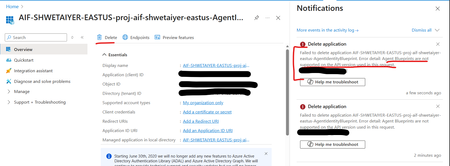
I'm trying to delete an Entra app in Azure created by Foundry Agent identity blueprint as its currently unused and is causing EntraID hygiene alerts. However getting an error mentioning that delete is not supported. Is there any other way to delete an unused Entra app for an agent identity blueprint? Error detail: Agent Blueprints are not supported on the API version used in this request.243Views0likes3CommentsBuilding ShadowQuest: A Multi-Agent RPG
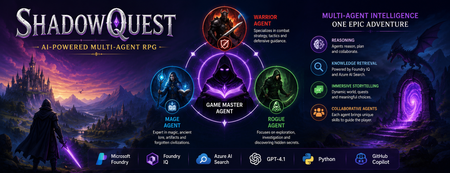
Artificial Intelligence is rapidly evolving beyond traditional chatbots. Today, developers are building intelligent systems where multiple AI agents collaborate, retrieve knowledge, and solve problems together. Microsoft's Agents League Hackathon provided the perfect opportunity to explore this new approach through the Reasoning Agents challenge. For this challenge, I built ShadowQuest, a fantasy role-playing game (RPG) powered by Microsoft Foundry, Foundry IQ, Azure AI Search, GPT-4.1, and GitHub Copilot. The project demonstrates how specialized AI agents can work together while using Retrieval-Augmented Generation (RAG) to deliver accurate and context-aware responses. About the Challenge Microsoft Agents League is a global developer challenge designed to encourage developers to build intelligent AI applications using Microsoft's latest AI technologies. Participants could choose from three tracks: Creative Apps, Reasoning Agents, and Enterprise Agents. I selected the Reasoning Agents track because I wanted to explore how multiple AI agents could collaborate instead of relying on a single large language model. Another important requirement for this year's challenge was integrating at least one Microsoft Intelligence Layer. For ShadowQuest, I chose Foundry IQ as the project's intelligence layer. The Idea Behind ShadowQuest Fantasy RPGs are built around storytelling, exploration, and collaboration between different characters. Every character usually has a unique role, whether it's a warrior protecting the team, a mage interpreting magical knowledge, or a rogue discovering hidden paths. I wanted to recreate this experience using AI. Instead of building one AI assistant responsible for everything, I designed a system where multiple specialized agents collaborate to create a richer and more immersive adventure. ShadowQuest is set in a fantasy world filled with magical artifacts, forgotten kingdoms, mysterious locations, and story-driven quests. Players can ask questions about the world, explore different locations, and learn about the game's lore through conversations with AI agents. Building the Multi-Agent Architecture The architecture follows a simple but scalable design. At the center of the system is the Game Master Agent, which acts as the orchestrator. Every player interaction starts with the Game Master. It receives the player's request, determines what information is needed, retrieves additional knowledge when required, and generates the final response. Supporting the Game Master are three specialized agents: Warrior Agent – Focuses on combat strategy and tactical decisions. Mage Agent – Provides magical knowledge, world lore, and information about ancient artifacts. Rogue Agent – Specializes in exploration, investigation, and discovering hidden information. Each agent has a clearly defined responsibility, making the system easier to understand, maintain, and extend in the future. Using Foundry IQ as the Knowledge Layer One of the most important parts of the project was integrating Foundry IQ. Instead of storing every piece of game information inside prompts, I created a dedicated knowledge base containing information about characters, magical artifacts, locations, quests, and the history of the ShadowQuest world. This approach separates knowledge from reasoning. Whenever a player asks a question, the Game Master Agent first retrieves relevant information from the knowledge base before generating a response. This ensures that answers remain consistent with the game's world while reducing hallucinations. Foundry IQ became the central source of truth for the entire project, making it easy to manage and expand the game world without constantly modifying prompts. Azure AI Search and Retrieval-Augmented Generation To enable intelligent retrieval, I connected Foundry IQ with Azure AI Search. The RPG documents were indexed, and vector embeddings were generated using Microsoft's embedding models. This enables semantic search, allowing the system to understand the meaning behind a player's question instead of relying only on keyword matching. For example, if a player asks about a magical relic without mentioning its exact name, Azure AI Search can still retrieve the correct information based on semantic similarity. The complete workflow looks like this: The player submits a question. The Game Master Agent receives the request. Foundry IQ queries Azure AI Search. Relevant documents are retrieved. GPT-4.1 generates a grounded response using the retrieved context. This Retrieval-Augmented Generation (RAG) approach significantly improves the quality and reliability of responses. Accelerating Development with GitHub Copilot GitHub Copilot played an important role throughout the development process. It helped generate Python classes, improve documentation, create helper functions, and speed up repetitive coding tasks. During the live demonstration, I also showed how Copilot could quickly generate a new Healer Agent, demonstrating how AI-assisted development makes it easier to extend a multi-agent application while maintaining a consistent architecture. Rather than replacing the developer, Copilot acted as an intelligent coding assistant, allowing me to focus more on architecture and design decisions. Demonstrating ShadowQuest During the Microsoft Agents League Reasoning Agents Battle, I demonstrated the Game Master Agent by asking questions about the ShadowQuest world, magical artifacts, and game lore. One of the most interesting parts of the demonstration was observing the retrieval process. Before generating a response, the Game Master Agent called the knowledge retrieval function through Foundry IQ. This confirmed that the system was retrieving relevant information from the indexed knowledge base rather than relying only on GPT-4.1's internal knowledge. This demonstrated how RAG can create more grounded, reliable, and context-aware AI experiences. Lessons Learned Building ShadowQuest taught me that designing multi-agent systems is as much about architecture as it is about AI models. Clearly defining responsibilities for each agent made the application easier to maintain and opened the door for future expansion. I also learned how valuable Retrieval-Augmented Generation can be for applications that depend on structured knowledge. Separating reasoning from knowledge allows AI systems to remain accurate while making it easier to update information over time. Finally, participating in the Microsoft Agents League was an incredible opportunity to experiment with Microsoft's latest AI technologies, learn from other developers, and share ideas with a global community passionate about agentic AI. Looking Ahead ShadowQuest is only the beginning. In future iterations, I plan to expand the project by introducing additional agents such as a Merchant Agent and Healer Agent, implementing persistent player memory, adding dynamic quest generation, improving combat mechanics, and enabling deeper collaboration between agents. These improvements will make the game world more immersive while continuing to explore the possibilities of agent-based AI systems. Conclusion ShadowQuest demonstrates how Microsoft Foundry, Foundry IQ, Azure AI Search, GPT-4.1, and GitHub Copilot can be combined to build intelligent multi-agent applications. More importantly, the project reinforced an important idea: the future of AI is not a single assistant performing every task, but a team of specialized agents collaborating with shared knowledge to solve increasingly complex problems. Participating in the Microsoft Agents League was an inspiring experience that allowed me to explore the next generation of AI development while building a project that combines storytelling, reasoning, and knowledge retrieval. I look forward to continuing this journey and discovering new ways to build intelligent applications using Microsoft's growing AI ecosystem.177Views1like0CommentsBuilding a hands-free voice concierge with Microsoft Foundry Voice Live and a Hosted Agent
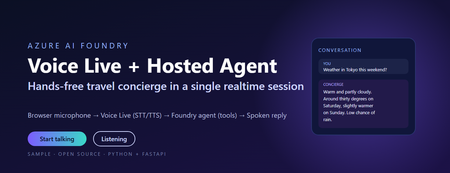
This post walks through a small, working sample that wires the browser microphone to Azure AI Speech Voice Live, binds the realtime session to a Foundry hosted agent, and lets the agent answer travel questions using tool calls. The full source, infrastructure, and labs live in the repository linked at the end. Why this combination matters Voice user interfaces have historically been hard to build well. Streaming audio, partial transcripts, barge-in, voice activity detection, tool dispatch, and audio playback have traditionally meant stitching together five or six services. The combination of Voice Live and a Foundry hosted agent collapses that into one realtime WebSocket session with a single binding field. Voice Live owns the audio loop: speech to text, neural text to speech, semantic turn detection, noise suppression, and echo cancellation. The Foundry hosted agent owns the brain: instructions, memory, model selection, evaluators, and tool calling. The link between them is one query parameter on the WebSocket URL. What this means in practice: the browser never sees a model API key, never instantiates a tool, and never owns the agent prompt. The browser does microphone capture and audio playback. Everything else lives server-side. The scenario The sample is called Contoso Travel Concierge. The user is mid-journey, hands and eyes busy, and wants to ask things like: What is the weather in Tokyo this weekend? Is BA005 from Heathrow on time? What time is check-in at the Marriott Marquis? Each question triggers a tool call on the hosted agent. The reply is short, speakable, and synthesised back to the user in under a second on a warm connection. Architecture There are four moving parts. Three of them are managed Azure services. Only the broker is your code. Browser client – captures PCM16 audio at 24 kHz and streams it over a WebSocket to the broker. Plays back audio chunks the broker forwards from Voice Live. Session broker (FastAPI) – authenticates to Azure with DefaultAzureCredential , builds the Voice Live WebSocket URL with a short-lived bearer token, and relays frames in both directions. Voice Live – the Azure AI Speech realtime endpoint. Transcribes the user, hands the text to the bound agent, and synthesises the agent’s reply. Foundry hosted agent – a prompt-kind agent in Azure AI Foundry with instructions, tool definitions, and the microsoft.voice-live.enabled metadata flag set to true . Two design choices are worth calling out. The broker is small on purpose. It does authentication, URL construction, and WebSocket relay. It does not transcode audio, run business logic, or hold conversation state. Voice Live and the agent already do those things well. The agent binding is a URL query parameter, not an SDK call. There is no per-turn HTTP request to the agent runtime. Voice Live opens a session against the agent once and streams turns through it for the lifetime of the WebSocket. That is what keeps latency low. The Voice Live URL contract This is the single most important thing to get right. The public Microsoft sample that ships under liupeirong/ai-foundry-voice-agent targets a different URL shape ( services.ai.azure.com host, agent-id + agent-access-token parameters, an Authorization header). That shape is rejected by Foundry resources that expose voice-live-enabled agents. The shape below is the one the portal itself uses, and the one this sample dials. Three details cause most failures: The host must be <resource>.cognitiveservices.azure.com , not services.ai.azure.com . The broker rewrites this automatically from VOICE_LIVE_ENDPOINT . The bearer token travels in the authorization query parameter, URL-encoded, with a literal Bearer prefix and a + (or %20 ) before the token. No Authorization header is sent. agent-name and model are both the agent’s display name. agent-version is empty when you want the latest published version. Walkthrough: from clone to spoken reply Prerequisites Python 3.11 or later (the sample is developed on 3.13). The Azure CLI, signed in with az login --tenant <your-tenant-id> . An Azure AI Foundry project in a Voice Live region ( eastus2 , swedencentral , or westus2 ). A deployed prompt-kind agent in that project with Enable Voice Live turned on. The Cognitive Services User role on the Foundry resource for the identity the broker will use. Configure the broker Copy .env.sample to .env and fill in four values: AZURE_AI_PROJECT_ENDPOINT=https://<your-resource>.services.ai.azure.com AZURE_AI_PROJECT_NAME=<your-foundry-project-name> VOICE_LIVE_ENDPOINT=wss://<your-resource>.services.ai.azure.com/voice-live/realtime VOICE_LIVE_API_VERSION=2025-10-01 FOUNDRY_AGENT_ID=<your-agent-name> The agent name is what the Foundry portal shows on the agent card. The broker uses it for both the agent-name and model query parameters. Install and run python -m venv .venv .\.venv\Scripts\Activate.ps1 pip install -r requirements.txt .\scripts\start-local.ps1 The broker exposes three endpoints: GET /healthz – liveness probe. GET /config – returns the session.update the browser sends as its first frame. WS /ws – the bi-directional relay to Voice Live. Smoke test .\scripts\test-session.ps1 A successful run prints: [OK] /ws upgraded -> sent session.update <- {"type":"session.created",…} <- {"type":"session.updated",…} [OK] session.updated received -- E2E works This confirms the entire chain: local broker, DefaultAzureCredential token, Foundry Portal URL shape, Voice Live handshake, and the bound agent acknowledging the session. Open the browser UI Browse to http://localhost:8000/ , click Start talking, and ask one of the sample questions. Transcripts appear in real time and the spoken reply plays back through the audio context. Inside the broker The relay logic is tiny – the heavy lifting is the URL construction. The function below is the canonical reference; copy it if you are porting the pattern to another language. def build_voice_live_ws_url(agent_access_token: str) -> str: """ Build the Foundry Portal style Voice Live WebSocket URL. Auth lives in the query string only. No Authorization header is sent. """ host = _ws_host_from_endpoint(VOICE_LIVE_ENDPOINT) qs = urlencode( { "trafficType": "FoundryPortal", "agent-name": FOUNDRY_AGENT_ID, "agent-version": "", "agent-project-name": AZURE_AI_PROJECT_NAME, "api-version": VOICE_LIVE_API_VERSION, "model": FOUNDRY_AGENT_ID, "client-request-id": str(uuid.uuid4()), "authorization": f"Bearer {agent_access_token}", }, quote_via=quote, ) return f"wss://{host}/voice-live/realtime?{qs}" The relay itself is a pair of asyncio tasks: one forwarding browser frames upstream, one forwarding Voice Live frames back. Audio bytes are passed straight through – the broker never decodes them. Deploying the hosted agent The most reliable way to create a voice-live-enabled agent is the Foundry portal. Agents created via the Assistants v2 SDK do not carry the required metadata by default and will be rejected by the Voice Live URL shape above. The portal steps are: Open the Foundry project, go to Agents, and click New agent. Choose Prompt agent as the kind, name it (for example travel-concierge ), and pick a model deployment. Paste the contents of agent/src/prompts/system.txt into the instructions box. On the Voice tab, switch Enable Voice Live on. This is what sets the microsoft.voice-live.enabled = true metadata. Add the three tools ( get_weather , get_flight_status , get_hotel_info ) from agent/agent.yaml on the Tools tab. Publish the version and write the agent name back to .env as FOUNDRY_AGENT_ID . The full deployment guide, including how to host the broker on Azure Container Apps with a managed identity, is in docs/deployment.md in the repository. Three lessons from getting this to production 1. Voice output must be written for speech, not for screens Foundry agents tend to format answers in markdown with citations like ([data.jma.go.jp](https://…)) . When Voice Live synthesises that text, the user hears the URL read aloud, character by character. The fix is to write the agent instructions so the spoken text never contains URLs, markdown, or symbols. A short block at the end of the agent instructions does the job: Voice output rules - This output is read aloud by TTS. Never include URLs, domain names, or citation markers like "(source.com)" in your reply. Cite by speakable source name only. - Never use markdown for formatting. No asterisks, brackets, backticks, bullets, or hashes. Write in plain spoken sentences. - Keep numbers speakable: say "thirty degrees Celsius", not "30C / 86F". - Keep replies under about 40 words unless the user asks for detail. The browser transcript can still render markdown for the eyes. The sample does so with a small, escaping markdown renderer that whitelists bold, italic, code, and http(s) links only, so the same agent reply looks polished on screen even though the spoken version contains none of it. 2. Identity is simpler than it looks The broker uses DefaultAzureCredential and requests the https://ai.azure.com/.default scope. Locally that resolves to your az login credentials. In Azure Container Apps it resolves to the user-assigned managed identity. In both cases the only role assignment you need on the Foundry account is Cognitive Services User. There is no API key path on the working URL shape – it is bearer tokens all the way down. 3. The wrong sample wastes a day If you start from the public liupeirong/ai-foundry-voice-agent repository against a portal-provisioned voice-live agent, the WebSocket either returns HTTP 400 or closes silently with code 1006. The cause is the URL shape, not your code. The reference probe in scripts/probe_portal_shape.py is the single source of truth for the working contract – keep it as a regression test. Responsible AI and security notes Credentials never reach the browser. Tokens are minted server-side and travel only on the upstream Voice Live URL. No secrets in source. The .env file is gitignored. The .env.sample contains only placeholders. Markdown rendering is escape-first. The browser HTML-escapes the agent reply before applying its small markdown whitelist, and links are restricted to http(s) URLs so the rule cannot emit javascript: hrefs. Tool calls are auditable. Every turn shows up as a run in the Foundry portal under the agent, with the prompt, model output, and tool inputs and outputs visible for review. Voice biometric considerations. If you plan to handle account verification by voice, plug in dedicated speaker recognition rather than relying on the conversational model. Key takeaways Voice Live plus a Foundry hosted agent is a session-level integration, not an API integration. One URL, one binding field, one WebSocket. The browser is a thin client. Authentication, URL construction, and relay all live in a small FastAPI broker. Get the URL shape right ( cognitiveservices.azure.com , token in the query string, agent-name equals model equals the agent display name) and the rest is plumbing. Use the Foundry portal to create the agent so the voice-live metadata is set correctly. Write agent instructions for the ear, not the eye, then layer screen formatting on top in the browser. Get the code and try it Repository: github.com/microsoft/foundry-agent-voice-mode-sample Deployment guide: docs/deployment.md in the repository. Labs: three progressive workshops under labs/ – basic voice, adding tools, and binding a hosted agent. Reference docs: Voice Live in Azure AI Speech and Agents in Microsoft Foundry. If you build something on top of this pattern, open an issue or pull request on the repository. The sample is intentionally small so it stays easy to fork.253Views0likes0CommentsModel Mondays S2E11: Exploring Speech AI in Azure AI Foundry
1. Weekly Highlights This week’s top news in the Azure AI ecosystem included: Lakuna — Copilot Studio Agent for Product Teams: A hackathon project built with Copilot Studio and Azure AI Foundry, Lakuna analyzes your requirements and docs to surface hidden assumptions, helping teams reflect, test, and reduce bias in product planning. Azure ND H200 v5 VMs for AI: Azure Machine Learning introduced ND H200 v5 VMs, featuring NVIDIA H200 GPUs (over 1TB GPU memory per VM!) for massive models, bigger context windows, and ultra-fast throughput. Agent Factory Blog Series: The next wave of agentic AI is about extensibility: plug your agents into hundreds of APIs and services using Model Connector Protocol (MCP) for portable, reusable tool integrations. GPT-5 Tool Calling on Azure AI Foundry: GPT-5 models now support free-form tool calling—no more rigid JSON! Output SQL, Python, configs, and more in your preferred format for natural, flexible workflows. Microsoft a Leader in 2025 Gartner Magic Quadrant: Azure was again named a leader for Cloud Native Application Platforms—validating its end-to-end runway for AI, microservices, DevOps, and more. 2. Spotlight On: Azure AI Foundry Speech Playground The main segment featured a live demo of the new Azure AI Speech Playground (now part of Foundry), showing how developers can experiment with and deploy cutting-edge voice, transcription, and avatar capabilities. Key Features & Demos: Speech Recognition (Speech-to-Text): Try real-time transcription directly in the playground—recognizing natural speech, pauses, accents, and domain terms. Batch and Fast transcription options for large files and blob storage. Custom Speech: Fine-tune models for your industry, vocabulary, and noise conditions. Text to Speech (TTS): Instantly convert text into natural, expressive audio in 150+ languages with 600+ neural voices. Demo: Listen to pre-built voices, explore whispering, cheerful, angry, and more styles. Custom Neural Voice: Clone and train your own professional or personal voice (with strict Responsible AI controls). Avatars & Video Translation: Bring your apps to life with prebuilt avatars and video translation, which syncs voice-overs to speakers in multilingual videos. Voice Live API: Voice Live API (Preview) integrates all premium speech capabilities with large language models, enabling real-time, proactive voice agents and chatbots. Demo: Language learning agent with voice, avatars, and proactive engagement. One-click code export for deployment in your IDE. 3. Customer Story: Hilo Health This week’s customer spotlight featured Helo Health—a healthcare technology company using Azure AI to boost efficiency for doctors, staff, and patients. How Hilo Uses Azure AI: Document Management: Automates fax/document filing, splits multi-page faxes by patient, reduces staff effort and errors using Azure Computer Vision and Document Intelligence. Ambient Listening: Ambient clinical note transcription captures doctor-patient conversations and summarizes them for easy EHR documentation. Genie AI Contact Center: Agentic voice assistants handle patient calls, book appointments, answer billing/refill questions, escalate to humans, and assist human agents—using Azure Communication Services, Azure Functions, FastAPI (community), and Azure OpenAI. Conversational Campaigns: Outbound reminders, procedure preps, and follow-ups all handled by voice AI—freeing up human staff. Impact: Hilo reaches 16,000+ physician practices and 180,000 providers, automates millions of communications, and processes $2B+ in payments annually—demonstrating how multimodal AI transforms patient journeys from first call to post-visit care. 4. Key Takeaways Here’s what you need to know from S2E11: Speech AI is Accessible: The Azure AI Foundry Speech Playground makes experimenting with voice recognition, TTS, and avatars easy for everyone. From Playground to Production: Fine-tune, export code, and deploy speech models in your own apps with Azure Speech Service. Responsible AI Built-In: Custom Neural Voice and avatars require application and approval, ensuring ethical, secure use. Agentic AI Everywhere: Voice Live API brings real-time, multimodal voice agents to any workflow. Healthcare Example: Hilo’s use of Azure AI shows the real-world impact of speech and agentic AI, from patient intake to after-visit care. Join the Community: Keep learning and building—join the Discord and Forum. Sharda's Tips: How I Wrote This Blog I organize key moments from each episode, highlight product demos and customer stories, and use GitHub Copilot for structure. For this recap, I tested the Speech Playground myself, explored the docs, and summarized answers to common developer questions on security, dialects, and deployment. Here’s my favorite Copilot prompt this week: "Generate a technical blog post for Model Mondays S2E11 based on the transcript and episode details. Focus on Azure Speech Playground, TTS, avatars, Voice Live API, and healthcare use cases. Add practical links for developers and students!" Coming Up Next Week Next week: Observability! Learn how to monitor, evaluate, and debug your AI models and workflows using Azure and OpenAI tools. Register For The Livestream – Sep 1, 2025 Register For The AMA – Sep 5, 2025 Ask Questions & View Recaps – Discussion Forum About Model Mondays Model Mondays is your weekly Azure AI learning series: 5-Minute Highlights: Latest AI news and product updates 15-Minute Spotlight: Demos and deep dives with product teams 30-Minute AMA Fridays: Ask anything in Discord or the forum Start building: Register For Livestreams Watch Past Replays Register For AMA Recap Past AMAs Join The Community Don’t build alone! The Azure AI Developer Community is here for real-time chats, events, and support: Join the Discord Explore the Forum About Me I'm Sharda, a Gold Microsoft Learn Student Ambassador focused on cloud and AI. Find me on GitHub, Dev.to, Tech Community, and LinkedIn. In this blog series, I share takeaways from each week’s Model Mondays livestream.364Views0likes0CommentsModel Mondays S2E12: Models & Observability
1. Weekly Highlights This week’s top news in the Azure AI ecosystem included: GPT Real Time (GA): Azure AI Foundry now offers GPT Real Time (GA)—lifelike voices, improved instruction following, audio fidelity, and function calling, with support for image context and lower pricing. Read the announcement and check out the model card for more details. Azure AI Translator API (Public Preview): Choose between fast Neural Machine Translation (NMT) or nuanced LLM-powered translations, with real-time flexibility for multilingual workflows. Read the announcement then check out the Azure AI Translator documentation for more details. Azure AI Foundry Agents Learning Plan: Build agents with autonomous goal pursuit, memory, collaboration, and deep fine-tuning (SFT, RFT, DPO) - on Azure AI Foundry. Read the announcement what Agentic AI involves - then follow this comprehensive learning plan with step-by-step guidance. CalcLM Agent Grid (Azure AI Foundry Labs): Project CalcLM: Agent Grid is a prototype and open-source experiment that illustrates how agents might live in a grid-like surface (like Excel). It's formula-first and lightweight - defining agentic workflows like calculations. Try the prototype and visit Foundry Labs to learn more. Agent Factory Blog: Observability in Agentic AI: Agentic AI tools and workflows are gaining rapid adoption in the enterprise. But delivering safe, reliable and performant agents requires foundation support for Observability. Read the 6-part Agent Factory series and check out the Top 5 agent observability best practices for reliable AI blog post for more details. 2. Spotlight On: Observability in Azure AI Foundry This week’s spotlight featured a deep dive and demo by Han Che (Senior PM, Core AI/ Microsoft ), showing observability end-to-end for agent workflows. Why Observability? Ensures AI quality, performance, and safety throughout the development lifecycle. Enables monitoring, root cause analysis, optimization, and governance for agents and models. Key Features & Demos: Development Lifecycle: Leaderboard: Pick the best model for your agent with real-time evaluation. Playground: Chat and prototype agents, view instant quality and safety metrics. Evaluators: Assess quality, risk, safety, intent resolution, tool accuracy, code vulnerability, and custom metrics. Governance: Integrate with partners like Cradle AI and SideDot for policy mapping and evidence archiving. Red Teaming Agent: Automatically test for vulnerabilities and unsafe behavior. CI/CD Integration: Automate evaluation in GitHub Actions and Azure DevOps pipelines. Azure DevOps GitHub Actions Monitoring Dashboard: Resource usage, application analytics, input/output tokens, request latency, cost breakdown, and evaluation scores. Azure Cost Management SDKs & Local Evaluation: Run evaluations locally or in the cloud with the Azure AI Evaluation SDK. Demo Highlights: Chat with a travel planning agent, view run metrics and tool usage. Drill into run details, debugging, and real-time safety/quality scores. Configure and run large-scale agent evaluations in CI/CD pipelines. Compare agents, review statistical analysis, and monitor in production dashboards 3. Customer Story: Saifr Saifr is a RegTech company that uses artificial intelligence to streamline compliance for marketing, communications, and creative teams in regulated industries. Incubated at Fidelity Labs (Fidelity Investments’ innovation arm), Saifr helps enterprises create, review, and approve content that meets regulatory standards—faster and with less manual effort. What Saifr Offers AI-Powered Compliance: Saifr’s platform leverages proprietary AI models trained on decades of regulatory expertise to automatically detect potential compliance risks in text, images, audio, and video. Automated Guardrails: The solution flags risky or non-compliant language, suggests compliant alternatives, and provides explanations—all in real time. Workflow Integration: Saifr seamlessly integrates with enterprise content creation and approval workflows, including cloud platforms and agentic AI systems like Azure AI Foundry. Multimodal Support: Goes beyond text to check images, videos, and audio for compliance risks, supporting modern marketing and communications teams. 4. Key Takeaways Observability is Essential: Azure AI Foundry offers complete monitoring, evaluation, tracing, and governance for agentic AI—making production safe, reliable, and compliant. Built-In Evaluation and Red Teaming: Use leaderboards, evaluators, and red teaming agents to assess and continuously improve model safety and quality. CI/CD and Dashboard Integration: Automate evaluations in GitHub Actions or Azure DevOps, then monitor and optimize agents in production with detailed dashboards. Compliance Made Easy: Safer’s agents and models help financial services and regulated industries proactively meet compliance standards for content and communications. Sharda's Tips: How I Wrote This Blog I focus on organizing highlights, summarizing customer stories, and linking to official Microsoft docs and real working resources. For this recap, I explored the Azure AI Foundry Observability docs, tested CI/CD pipeline integration, and watched the customer demo to share best practices for regulated industries. Here’s my Copilot prompt for this episode: "Generate a technical blog post for Model Mondays S2E12 based on the transcript and episode details. Focus on observability, agent dashboards, CI/CD, compliance, and customer stories. Add correct, working Microsoft links!" Coming Up Next Week Next week: Open Source Models! Join us for the final episode with Hugging Face VP of Product, live demos, and open model workflows. Register For The Livestream – Sep 15, 2025 About Model Mondays Model Mondays is your weekly Azure AI learning series: 5-Minute Highlights: Latest AI news and product updates 15-Minute Spotlight: Demos and deep dives with product teams 30-Minute AMA Fridays: Ask anything in Discord or the forum Start building: Watch Past Replays Register For AMA Recap Past AMAs Join The Community Don’t build alone! The Azure AI Developer Community is here for real-time chats, events, and support: Join the Discord Explore the Forum About Me I'm Sharda, a Gold Microsoft Learn Student Ambassador focused on cloud and AI. Find me on GitHub, Dev.to, Tech Community, and LinkedIn. In this blog series, I share takeaways from each week’s Model Mondays livestream.291Views0likes0CommentsModel Mondays S2E13: Open Source Models (Hugging Face)
1. Weekly Highlights 1. Weekly Highlights Here are the key updates we covered in the Season 2 finale: O1 Mini Reinforcement Fine-Tuning (GA): Fine-tune models with as few as ~100 samples using built-in Python code graders. Azure Live Interpreter API (Preview): Real-time speech-to-speech translation supporting 76 input languages and 143 locales with near human-level latency. Agent Factory – Part 5: Connecting agents using open standards like MCP (Model Context Protocol) and A2A (Agent-to-Agent protocol). Ask Ralph by Ralph Lauren: A retail example of agentic AI for conversational styling assistance, built on Azure OpenAI and Foundry’s agentic toolset. VS Code August Release: Brings auto-model selection, stronger safety guards for sensitive edits, and improved agent workflows through new agents.md support. 2. Spotlight – Open Source Models in Azure AI Foundry Guest: Jeff Boudier, VP of Product at Hugging Face Jeff showcased the deep integration between the Hugging Face community and Azure AI Foundry, where developers can access over 10 000 open-source models across multiple modalities—LLMs, speech recognition, computer vision, and even specialized domains like protein modeling and robotics. Demo Highlights Discover models through Azure AI Foundry’s task-based catalog filters. Deploy directly from Hugging Face Hub to Azure with one-click deployment. Explore Use Cases such as multilingual speech recognition and vision-language-action models for robotics. Jeff also highlighted notable models, including: SmoLM3 – a 3 B-parameter model with hybrid reasoning capabilities Qwen 3 Coder – a mixture-of-experts model optimized for coding tasks Parakeet ASR – multilingual speech recognition Microsoft Research protein-modeling collection MAGMA – a vision-language-action model for robotics Integration extends beyond deployment to programmatic access through the Azure CLI and Python SDKs, plus local development via new VS Code extensions. 3. Customer Story – DraftWise (BUILD 2025 Segment) The finale featured a customer spotlight on DraftWise, where CEO James Ding shared how the company accelerates contract drafting with Azure AI Foundry. Problem Legal contract drafting is time-consuming and error-prone. Solution DraftWise uses Azure AI Foundry to fine-tune Hugging Face language models on legal data, generating contract drafts and redline suggestions. Impact Faster drafting cycles and higher consistency Easy model management and deployment with Foundry’s secure workflows Transparent evaluation for legal compliance 4. Community Story – Hugging Face & Microsoft The episode also celebrated the ongoing collaboration between Hugging Face and Microsoft and the impact of open-source AI on the global developer ecosystem. Community Benefits Access to State-of-the-Art Models without licensing barriers Transparent Performance through public leaderboards and benchmarks Rapid Innovation as improvements and bug fixes spread quickly Education & Empowerment via tutorials, docs, and active forums Responsible AI Practices encouraged through community oversight 5. Key Takeaways Open Source AI Is Here to Stay Azure AI Foundry and Hugging Face make deploying, fine-tuning, and benchmarking open models easier than ever. Community Drives Innovation: Collaboration accelerates progress, improves transparency, and makes AI accessible to everyone. Responsible AI and Transparency: Open-source models come with clear documentation, licensing, and community-driven best practices. Easy Deployment & Customization: Azure AI Foundry lets you deploy, automate, and customize open models from a single, unified platform. Learn, Build, Share: The open-model ecosystem is a great place for students, developers, and researchers to learn, build, and share their work. Sharda's Tips: How I Wrote This Blog For this final recap, I focused on capturing the energy of the open source AI movement and the practical impact of Hugging Face and Azure AI Foundry collaboration. I watched the livestream, took notes on the demos and interviews, and linked directly to official resources for models, docs, and community sites. Here’s my Copilot prompt for this episode: "Generate a technical blog post for Model Mondays S2E13 based on the transcript and episode details. Focus on open source models, Hugging Face, Azure AI Foundry, and community workflows. Include practical links and actionable insights for developers and students! Learn & Connect Explore Open Models in Azure AI Foundry Hugging Face Leaderboard Responsible AI in Azure Machine Learning Llama-3 by Meta Hugging Face Community Azure AI Documentation About Model Mondays Model Mondays is your weekly Azure AI learning series: 5-Minute Highlights: Latest AI news and product updates 15-Minute Spotlight: Demos and deep dives with product teams 30-Minute AMA Fridays: Ask anything in Discord or the forum Start building: Watch Past Replays Register For AMA Recap Past AMAs Join The Community Don’t build alone! The Azure AI Developer Community is here for real-time chats, events, and support: Join the Discord Explore the Forum About Me I'm Sharda, a Gold Microsoft Learn Student Ambassador focused on cloud and AI. Find me on GitHub, Dev.to, Tech Community, and LinkedIn. In this blog series, I share takeaways from each week’s Model Mondays livestream.380Views0likes0Comments8 Architectural Pillars to Boost GenAI LLM Accuracy and Performance in Low Cost
Smarter AI architecture, not bigger LLM models - how engineering teams push LLM accuracy and high performance in low cost. Enterprises using LLM (Large Language Models) hits the same ceiling and paying big price! A raw API call to a frontier model- GPT-4, Claude, Gemini delivers only 35-40% accuracy on structured output tasks like code generation, NL to DAX query generation, domain-specific reasoning. Prompt engineering pushes that to ~60%. But the final 35+ percentage points? Those come from system architecture, not model upgrades. This guide presents 8 architectural pillars, distilled from production Gen AI systems, that compound to close the accuracy gap. These patterns are model-agnostic and domain-agnostic, they apply equally to chatbots, coding assistants, content/query generators, automation agents, and any application where an LLM produces structured or semi-structured output. It’s based on my recent Gen AI projects. The key takeaway: use the LLM as one component in a larger system, not as the system itself. Surround it with deterministic guardrails, verified knowledge, and feedback loops. Pillar 1: Enhance Prompts with Verified Knowledge Context Impact: +35–40% accuracy (based on production use cases; may vary by domain) Top source of LLM errors in production is hallucinated identifiers knowledgebase, the model invents names, references, or structures that don't exist in the target system. This happens because LLMs are trained on general knowledge but deployed against specific, private enterprise systems they've never seen local database and knowledgebase. The fix is straightforward: inject verified, system-specific context (type definitions, API specs, ontologies, configuration schemas, entity catalogues) directly into the prompt so the model composes from known-good elements rather than recalling from training data. Use Knowledge Graph for better sematic knowledge. How to Implement Provide explicit context, never implicit- Whatever the LLM needs to reference identifiers, valid values, semantic knowledge, structures must appear verbatim in the prompt or retrieved context window. Filter aggressively. A full knowledge base with thousands of entities overwhelms the context window and confuses the model. Use intelligent filtering to surface only needed 5-10 most relevant elements per request. Store structured semantic knowledge in a graph or searchable index. This enables relationship-aware retrieval: "given entity X, what related entities, attributes, and constraints are also needed?" Include rich Semantic metadata. Names alone are insufficient. Include types, constraints, valid value ranges, relationships, and usage notes to minimize ambiguity. Keep context fresh. Stale context causes a different class of hallucination the model generates valid-looking output that references outdated structures. Sync your knowledge store with your source of truth. Why This Works LLMs excel at composition and reasoning combining elements, applying logic, following patterns. They are unreliable at recall of specific identifiers exact names, valid values, structural constraints. By offloading recall to a deterministic retrieval system and giving the LLM only composition tasks, you play to each system's strengths. Pillar 2: Tiered LLM Approach: Route Deterministically First, Use LLMs Last Impact: 80% cost reduction, 85% latency reduction, eliminates non-deterministic errors for most traffic. The most impactful architectural insight: most production requests don't need an LLM at all. A well-designed system handles 60-70% of traffic with deterministic logic templates, composition rules, cached results and reserves expensive, non-deterministic LLM calls only for genuinely novel inputs. The Three-Tier Model These metrics are from a real use case to convert NLP to Power BI DAX query. Tier Strategy Uses LLM ? Latency Accuracy Tier 0 Template slot-filling - handles requests that match known patterns exactly the system fills slots in a pre-built template with extracted parameters. No LLM, no non-determinism, near-perfect accuracy, sub-100ms response. No ~50ms 95-98% Tier 1 Compose from pre-validated fragments- handles requests that combine known patterns in new ways. The system retrieves pre-validated building blocks via search, composes them using deterministic rules, and validates the result. Still no LLM call. No ~200ms 90-95% Tier 2 Full LLM generation with enriched context- is reserved for genuinely novel requests that can't be served deterministically. Even here, the LLM receives maximum support: filtered context, relevant examples, explicit rules, and structured planning. Yes (1 call) 2-5s 88-93% Complexity-Based Routing A lightweight scoring function (evaluated in <1ms) routes each incoming request: Factors: reasoning depth, number of components, cross-references, constraints, nesting depth, novelty (distance from known patterns) Score 0-39: Tier 0 (deterministic template) Score 40-59: Tier 1 if confidence ≥ 85%, else Tier 2 Score 60+: Tier 2 (LLM generation) This routing achieves 96%+ accuracy in tier assignment and ensures the expensive path is only taken when necessary. Why This Matters Cost: 70-80% of requests cost zero LLM tokens Latency: Majority of responses in <200ms instead of 2-5s Reliability: Deterministic tiers produce identical output for identical input. Scalability: Deterministic tiers scale horizontally with trivial compute Pillar 3: Encode Prompt Anti-Patterns as Explicit Rules Impact: +8-10% accuracy, ~80% reduction in common structural errors LLM mistakes are patterned, not random. In any domain, 80% of errors cluster around a small set of 6-13 recurring structural mistakes. Instead of hoping the model avoids them through general instruction-following, compile these mistakes into explicit WRONG => CORRECT rules embedded directly in the system prompt. How to Implement Collect error data. Run 100+ requests through your system and categorize the failures. You'll find the same 6-13 patterns appearing repeatedly. Write concrete rules. For each pattern, show the exact wrong output and the exact correct alternative, with a one-line explanation of why. Embed in system prompt. Place rules prominently after the task description, before examples. Use formatting that's hard to ignore (headers, bold, explicit "NEVER" language). Keep the list short. 6-13 rules maximum. Beyond that, attention dilutes and the model starts ignoring rules. Prioritize by frequency. Refresh continuously. As the system improves (via other pillars), some errors disappear. New error types emerge. Update the rule set quarterly. Why This Works LLMs respond strongly to explicit negative examples. A generic instruction like "be careful with X" has minimal impact. But showing the exact wrong output the model tends to produce, paired with the correction, creates a strong avoidance signal. It's analogous to unit tests. Pillar 4: Retrieve Few-Shot Examples Dynamically Impact: +5-15% accuracy depending on domain complexity Static examples hardcoded in a prompt become stale, irrelevant of context tokens. Dynamic few-shot retrieval selects the 3-5 most relevant examples for each specific request, maximizing the signal-to-noise ratio in the prompt. Hybrid Retrieval Architecture The most effective approach combines two search strategies for intent search to understand natural language (NL) context: Keyword search (BM25) Finds examples with exact matching terms, identifiers, and domain vocabulary Vector search (semantic similarity) Finds examples with similar intent and structure, even if wording differs Rank fusion Merges results from both strategies, re-ranking by combined relevance This hybrid approach outperforms either strategy alone because keyword search catches exact identifier matches that vector search dilutes, while vector search captures semantic similarity that keyword search misses entirely. Best Gen AI Architectural Practices Match complexity to complexity. Simple requests should see simple examples. Complex requests should see complex examples. Mismatched examples confuse the model. Include negative examples. For the detected request type, include 1-2 "wrong => correct" pairs alongside positive examples. This reinforces Pillar 3's anti-pattern rules with concrete, contextually relevant demonstrations. Pre-compute embeddings. Generate vector embeddings at indexing time, not at query time. Cache retrieval results for repeated patterns. Curate quality over quantity. 3 excellent, diverse examples beat 10 mediocre ones. Each example should demonstrate a distinct pattern or edge case. Keep examples current. As your system evolves, old examples may demonstrate outdated patterns. Review and refresh the example store periodically. Pillar 5: Feedback Loop- Validate and Auto-Fix Every Output Deterministically Impact: +3-5% accuracy as a safety net, plus continuous improvement via feedback No matter how well-prompted, LLMs will occasionally produce outputs with minor structural errors - wrong casing, missing delimiters, references to slightly-incorrect identifiers, or subtle format violations. A deterministic post-processing pipeline catches and fixes these without any additional LLM calls. The Validation Pipeline LLM Output => Parse (grammar/AST) => Rule-Based Fixes => Compliance Check/validation => Final Output Each stage is fully deterministic: Parsing: Use a formal grammar or AST parser (ANTLR, tree-sitter, language-native parsers) to structurally analyse the output. Never regex-parse structured output - it's fragile and misses edge cases. Rule-based fixes: 10-20 deterministic transformation rules that correct known error patterns - name normalization, casing fixes, missing delimiters, structural repairs. Compliance check: Verify every identifier referenced in the output actually exists in the provided context. Flag unknown references. Design Principles Zero LLM calls in the fix pipeline. Every fix is a regex, an AST transformation, or a lookup table operation. Instant, free, deterministic, 100% reliable. Fail safe. If a fix is ambiguous (multiple valid corrections possible), pass through rather than corrupt. A minor error is better than a confident wrong "fix." Log everything. Track every fix applied, categorized by type. This data drives the feedback loop. The Critical Feedback Loop- The validation pipeline's most important function isn't fixing outputs, it's generating improvement signals: This creates a feedback loop: the auto-fix catches errors → the errors get promoted to upstream prevention → fewer errors reach the auto-fix → the system continuously tightens. Pillar 6: Multi-Agent Orchestration with Fewer Agents and Clear Contracts Impact: Reduced latency, clearer debugging, fewer failure modes The multi-agent pattern is powerful but commonly over-applied. The counter-intuitive lesson from production systems: fewer agents with well-defined responsibilities outperform many fine-grained agents. Why Fewer Is Better Each agent handoff introduces: Latency - serialization, network calls, context assembly Context loss - information dropped between boundaries Failure modes - each handoff is a potential error point Debugging complexity - tracing issues across many agents is exponentially harder Multi-Agent Orchestration Principles Merge agents that always run sequentially. If Agent A always feeds into Agent B with no branching or conditional logic, they should be one agent with two internal steps. Parallelize independent operations. Context retrieval and example lookup are independent, run them concurrently to halve retrieval latency. Route sub-tasks to cheaper models. Decomposed sub-problems are simpler by design. Use a smaller, faster, cheaper model (3x cost savings, 2x speed improvement). Define strict contracts. Each agent boundary should have an explicit schema defining inputs and outputs. No implicit assumptions about what crosses the boundary. Only 2 of 4 agents should call an LLM. The rest are purely deterministic. This minimizes non-deterministic behavior and cost. Pillar 7: Multi-Agent Cache at Multiple Hierarchical Levels Impact: 40-50% faster responses, 85%+ combined hit rate, significant cost reduction A single cache layer captures only one type of repetition. Production systems need hierarchical caching where multiple levels catch different repetition patterns , from exact duplicates to semantic near-misses. with -> A single cache layer captures only one type of repetition. Production systems need multi-level caching to handle exact matches, similar requests, and reusable fragments. or -> with Production systems need hierarchical caching where multiple levels handle exact matches, similar requests, and reusable fragments. Pillar 8: Measure Everything, Learn Continuously Impact: Enables data-driven iteration and prevents accuracy regressions. Architecture without observability is guesswork. The final pillar ensures every other pillar stays effective over time through comprehensive metrics and automated feedback loops. This isn't a one-time setup; it's a perpetual feedback loop. Every week, the top error patterns shift slightly. The auto-fix metrics tell you exactly where to focus next. Over months, this flywheel compounds into dramatic accuracy gains that no single prompt rewrite could achieve. Auto-Learning for New Domains When extending your system to new domains or knowledge areas: Auto-classify elements using naming conventions, type analysis, and structural patterns Auto-generate templates from universal patterns (transformations, comparisons, compositions, sequences) Bootstrap few-shot examples from successful template outputs Monitor for the first 100 requests, then curate only the edge cases manually This reduces domain onboarding from days of manual work to minutes of automated bootstrapping plus focused human review of outliers. Key Takeaways Architecture beats model size. A well-architected system with a smaller model outperforms a raw frontier model call on structured tasks at a fraction of the cost. Deterministic systems should do the heavy lifting. Reserve LLMs for genuinely novel, creative tasks. 70-80% of production requests should never touch an LLM. Verified knowledge is your top accuracy lever. Ground every prompt in context the model can trust. Errors are patterned, not random- Track them, compile them, and explicitly forbid them. Build feedback loops, not static systems- Every auto-fix, every cache miss, every routing decision is a signal for improvement. Fewer agents, done well- Fewer agents with strict contracts outperform 9 agents with fuzzy boundaries in accuracy, latency, and debuggability. Measure what matters and iterates- The system that wins isn't the one with the best day-one prompt, it's the one that improves fastest over time. Production-grade GenAI isn't about finding the perfect prompt or waiting for the next LLM model release. It's about building architectural guardrails that make failure nearly impossible and when failure does occur, the system learns from it automatically. These 8 pillars, applied together, transform any LLM from an unreliable black box into a precise, efficient, and continuously improving production system. -> Production Gen AI success is not about perfect prompts or waiting for the next LLM release. It comes from designing strong system guardrails that reduce failures and ensure consistent output. Even when failures happen, the system learns and improves automatically. When applied together, these 8 pillars turn an LLM into a reliable, efficient, and continuously improving production system.Student Devs: Build AI Agents, Compete for $55K in Prizes
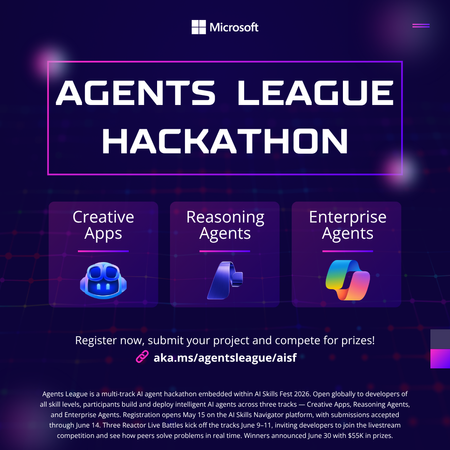
Student Devs: Build AI Agents, Compete for $55K in Prizes 🎮 AI Skills Fest • June 4–14, 2026 • Free to Enter $55K Prize Pool 3 Challenge Tracks 10 Days of Hacking Free To Enter Whether you're a first-year CS student or a final-year senior with a portfolio full of projects, Agents League is the best way to gain hands-on experience with agentic AI this summer and walk away with real skills employers are hiring for right now. What You'll Actually Learn Forget passive tutorials. Agents League is project-based learning at full speed. By the end of the hackathon, you'll have built a working AI agent and gained practical experience with the tools shaping the future of software development. 🤖 AI-Assisted Development Use GitHub Copilot to accelerate your coding workflow — from scaffolding to debugging — the way professional developers do today. 🧩 Multi-Step Reasoning Build agents with Microsoft Foundry that can plan, reason, and execute complex tasks — the core of agentic AI. 🏢 Enterprise AI Patterns Learn to build production-ready agents that integrate with Microsoft 365 and Copilot Studio — skills that translate directly to industry jobs. 🔧 Prompt Engineering Design effective prompts and orchestration flows that make AI agents reliable and useful in the real world. 📦 GitHub Workflows Submit your project through GitHub — practising version control, README writing, and open-source collaboration. 🎯 Competitive Problem-Solving Work under real constraints with deadlines, judging criteria, and peer competition — just like industry hackathons and sprints. Pick Your Track (or Try All Three) Agents League has three challenge tracks, each using different Microsoft AI tools. Choose based on your interests or stretch yourself by competing in multiple tracks. Track 01. Creative Apps Build an innovative application with AI-assisted development. This track rewards creativity, dream big and let GitHub Copilot help you bring ideas to life faster than ever. Tool: GitHub Copilot Track 02. Reasoning Agents Create intelligent agents that solve complex problems through multi-step reasoning. Think: agents that can research, plan, and act. This is the cutting edge of AI. Tool: Microsoft Foundry Track 03. Enterprise Agents Build knowledge agents that integrate with Microsoft 365 Copilot. Learn how businesses are deploying AI today and add enterprise AI to your skillset. Tool: Copilot Studio • M365 Opportunities You Won't Want to Miss Agents League isn't just a competition, it's a launchpad. Here's what's in it for you beyond the code: 💰 Win from a $55,000 USD Prize Pool Prizes are awarded across all three tracks smaller teams and solo hackers have a real shot. 📺 Watch Live Coding Battles at Microsoft Reactor See industry experts go head-to-head building AI agents live. Learn advanced techniques you can apply immediately to your own project. 🎓 Free Learning Resources on Microsoft Learn Access curated learning paths and the AI Skills Navigator, structured content designed to get you from zero to submission-ready. 🌍 Join a Global Developer Community Connect with thousands of developers on the Agents League Discord. Find teammates, ask questions, and build your professional network. 📂 Build Your Portfolio with a Real Project Every submission lives on GitHub. Walk away with a polished, public project that demonstrates your AI skills to future employers and grad schools. 🏆 Gain Recognition from Microsoft and the Community Top projects get visibility across the Microsoft developer ecosystem. Stand out from the crowd in internship and job applications. Key Dates to Remember Event Date Hacking Period Opens June 4, 2026 Registration Deadline June 12, 2026 — 12:00 PM PT Submission Deadline June 14, 2026 — 11:59 PM PT How to Get Started (Right Now) You don't have to wait until June 4th to start preparing. Here's your pre-hackathon game plan: Register for the hackathon it's free and open to everyone. Pick a track that matches your interests or curiosity. Explore the learning resources on Microsoft Learn and the AI Skills Navigator. Join the Discord community to find teammates and get early tips. Watch the Reactor event series for live coding battles and expert walkthroughs. Set up your GitHub repo and start experimenting before the hacking window opens. Helpful Links Register for Agents League Free entry, sign up now Microsoft Reactor Events Live coding battles & workshops AI Skills Fest The broader event Microsoft Learn Free learning paths The Arena Awaits 🏆 Ten days. Three tracks. $55K in prizes. Whether you go solo or squad up, this is your chance to build something real with AI and have a blast doing it. Register Now It's Free | Watch Reactor Events Agents League is part of AI Skills Fest and is open to the public at no cost. Review the Hackathon Rules and Regulations and the Microsoft Event Code of Conduct before participating.878Views0likes0CommentsSigning in to Microsoft Foundry from OpenClaw using Azure AD: a smoother way to bring your models in
This post is a quick update to walk through the new flow. If you read the previous one, think of this as the easier path I wish I had the first time round. If you have not seen the original, you can find it here: Integrating Microsoft Foundry with OpenClaw: Step by Step Model Configuration | Microsoft Community Hub Pre-requisite: You will need the Azure CLI (azure-cli) installed on your machine. The official install guide for Linux is here: https://learn.microsoft.com/en-us/cli/azure/install-azure-cli-linux?view=azure-cli-latest I am on Linux so I went the Homebrew route, which keeps things simple. The formula is here: https://formulae.brew.sh/formula/azure-cli Microsoft also has official docs covering the Homebrew/Linuxbrew install: https://learn.microsoft.com/en-us/cli/azure/install-azure-cli-macos?view=azure-cli-latest#install-with-homebrew Once Homebrew is ready, run this in your terminal: brew install azure-cli Why this matters: Before this update, every Foundry model you wanted to use in OpenClaw needed its own API key and endpoint pasted into the config. It worked, but it was tedious, and keys are easy to leak if you are copying them around. The Azure AD path solves both problems. You authenticate as yourself (or a service principal), OpenClaw asks Azure for the list of Foundry resources you have access to, and it brings the models in automatically. Signing in to Microsoft Foundry from OpenClaw via Azure AD A device-code OAuth handshake replaces the old static-API-key flow. OpenClaw delegates auth to the local Azure CLI; the CLI handles the browser-side sign-in, holds the resulting tokens, and refreshes them silently. OpenClaw then walks the Azure resource graph, subscriptions → Foundry resources → model deployments and registers each model into its own config. No API keys move through OpenClaw at any point. Sequence diagram of the OAuth 2.0 device-authorization flow as orchestrated by OpenClaw. Phases 1–3 establish identity (the developer authenticates once, in a real browser, against Azure AD). Phases 4–5 perform service discovery (OpenClaw walks the ARM resource hierarchy, subscriptions → Foundry accounts → model deployments and persists the result to a local provider config). After registration, every model call OpenClaw makes against Foundry reuses the same Azure-CLI-managed token cache: tokens refresh transparently, and access is gated by the Foundry resource's RBAC assignments rather than a static API key. Dashed lines denote return values; the teal line in step 7 marks the single token-issuance event the rest of the system pivots on. Walking through the new flow: Start with the command to onboard openclaw as if you were setting up OpenClaw for the first time: openclaw onboard Kick things off with the OpenClaw onboard command, the same one you would use when setting up OpenClaw for the first time. When it prompts you, choose update values. Next, you will be asked to configure your models. Scroll down a little and you will see Microsoft Foundry listed as a supported provider. Pick it. From here, you have two options. You can sign in with an API key, which is what I covered in the previous blog post, or you can sign in through Azure AD. The Azure AD path is easier and more secure, so that is the one we will use. OpenClaw will give you a URL and a device code. Copy the URL into your browser and use the code to complete the sign in. (This is where the az CLI from the pre-requisite section earns its keep.) If everything worked, you should see a success prompt similar to this: Once you are signed in, OpenClaw will ask you to pick the Azure subscription that your Microsoft Foundry resource lives in. Pick the subscription, then pick the Foundry resource where your models are deployed. And that is pretty much it. All the models you have deployed to that Foundry resource get pulled into OpenClaw automatically. Compared to the old way of pasting API keys and endpoints one by one, this is a huge time saver, and you do not have to babysit any keys. From here you can start using your Foundry-deployed models inside OpenClaw straight away: Wrapping up The Azure AD sign-in option in OpenClaw is one of those small updates that quietly removes a real pain point. If you have ever juggled multiple Foundry endpoints and rotated keys across them, you already know why. With this flow, you sign in once, your models show up, and you can get back to actually building. If you have not tried OpenClaw with Microsoft Foundry yet, this is a good time to give it a go. And if you were holding off because of the key management overhead, that excuse is gone now. References Previous post on integrating Microsoft Foundry with OpenClaw using API keys: Integrating Microsoft Foundry with OpenClaw: Step by Step Model Configuration | Microsoft Community Hub Install the Azure CLI on Linux: https://learn.microsoft.com/en-us/cli/azure/install-azure-cli-linux?view=azure-cli-latest Install the Azure CLI on macOS: https://learn.microsoft.com/en-us/cli/azure/install-azure-cli-macos?view=azure-cli-latest#install-with-homebrew Homebrew formula for azure-cli: https://formulae.brew.sh/formula/azure-cli269Views0likes0Comments