firewall
25 Topics
Edge Stuck on Setting Up Sync
Using Version 81.0.381.0 (Official build) dev (64-bit) When I setup sync on my work Network, the sync just stays on "Setting up Sync". However, when I go off company WI-FI and onto cellular, the sync works fine and the status changes to "Sync is on". Its more than likely a problem with the company firewall. The IT admin always asks which port/url they need to open. What needs to be opened for Edge Sync to work properly? I tried to watch traffic off my machine, but couldn't make a determination of what URL sync is trying to access.Solved16KViews0likes8CommentsManaging User Access to Internet on Windows Virtual Desktop
I'm very interested in this product and previously, we implemented our own solution through Azure Virtual Machines which we had to manage completely. In our particular use case scenario, we want to control users' access to Internet and block certain protocols. Here are two specific examples of what we want to do: We'd like to create a white list of websites users can visit and block all the rest. We'd like to turn off FTP protocol completely and take any other action we can to prevent users from "uploading" files to outside world. How could we handle these two scenarios if we were to use Azure Windows Virtual Desktop?5.2KViews0likes1Comment
Windows Firewall rules in intune vs local Firewall rules
Hi Team I have a device that is fully managed by Intune. I have created some firewall rules policies to allow certain applications and block others. Before enrolling the device into Defender for Endpoint, there were some firewall rules created locally on the Windows device. My question is: will these manually created firewall rules still work as intended, or will only the policies published through Intune take over?Solved3.8KViews0likes3Comments
Teams phones and firewalls
A customers network people created a separate vlan for the Teams phones. When trying to use either the "Web Sign-in (Cloud)" or "CAP provisioning", they get "Web Sign-in (Cloud) failed Signing Out". Are the firewall ports required for the phones the same found in the full IP and URL list? They never get the web address link and code to sign in.3.1KViews0likes3Comments
Enable Domain Network FW via Intune
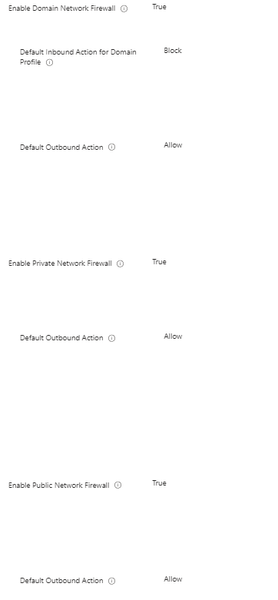
Hello Experts, I've been trying to implement some defender recommendations and can't figure out why " Secure Microsoft Defender Firewall domain profile" does not have any effect on the endpoints... I have followed the guide and configured Firewall policy in Intune / Endpoint Security. I've assigned it to few testing users/machines... Now, it looks like below: when I open the policy I see it was "Succeeded" on all devices... no error no conflict reported when I check in Endpoint security -> Firewall -> "MDM devices running Windows 10 or later with firewall off", all devices have Firewall status "Disabled" The configuration is very simple and looks like the below It is assigned to a group of users When I check on testing machine, I see the below I'm confused as it all seems to be "succeeded" but it has no effect on the end user device looks like. Any idea what am I missing here?Solved2.9KViews0likes9Comments