feedback
368 TopicsFeedback about MS-102 retirement
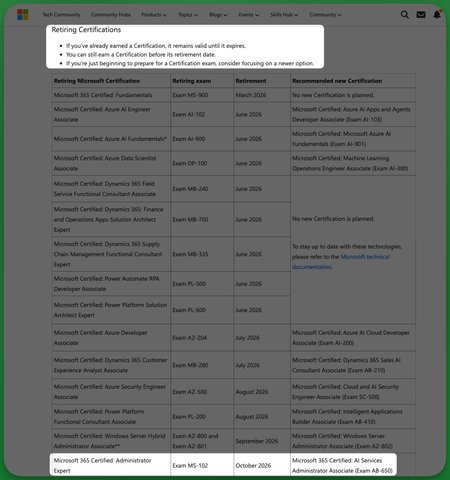
TL;DR: I don't think you should retire the MS-102 as it really is a big downgrade losing and expert M-365 administor certification just for it to be replaced by an unrelated and under leveled AI Services administrator one. Hello community, This is my first post and I think it's a good time to open a thread to share some feedback about the retirement of the MS-102 exam and certification and I encourage others learners and users to do the same. For those who don't know It was announced last June 25th that exam MS-102 and Microsoft 365 Certified: Administrator Expert are retiring October 2026 replaced by AB-650 Microsoft 365 Certified: AI Services Administrator Associate, exam beta on July 26. You can check the announcement here: https://techcommunity.microsoft.com/blog/skills-hub-blog/microsoft-credentials-roundup-june-2026/4528350?WT.mc_id=studentamb_165290 I was shocked to read that because last week I scheduled my exam and I didn't see any notice about future retirement. I just rechecked today and there isn't still any update on the retirement on the MS-102 cert or exam pages: Cert page: https://learn.microsoft.com/en-us/credentials/certifications/m365-administrator-expert/ Exam page: https://learn.microsoft.com/en-us/credentials/certifications/exams/ms-102/ So even today, lot's of users are scheduling the MS-102 exam right now without knowing that it is expected to be retired soon I think's it's a weird move to retire an expert Microsoft 365 administrator certification just for it to be replaced by just an associate certifciation AI Services Administrator Associate. So we lose and expert certification abount managing M365 and we can only get an associate certification about AI services in it's place I think it would've better to have AB-650 as an additional certification, maybe even a prerequisite for the M365 Administrator Expert just like MS-700 or the SC-401 Lot's of recruitments department look for expertise about managing M365 and MS-102 take a big part on lot's of admins resumes to provee their knowledge about managing M365, so we won't only lose a cert or exam, we lose a way to prove knowledge about managing M365 at an expert level. I've read lot's of users complaining about this retirement and I hope you could get feedback about it and rearrange this move. Thank you for reading.333Views9likes9Comments
Microsoft Print to PDF not working/missing.
The Microsoft Print to PDF was not working on my PC so I tried reenabling it via Windows Features in Optional Features and it won't turn back on. It gives error code: 0x800f0922. I also tried other various methods online and none work. All end with various error codes which all result in the service not working/turning on. I even filed feedback about 2 weeks ago with no response yet. I contacted support, where I was recommended to perform a repair via ISO but was then canceled by the agent as I am on an Insider build. I am on build 26300.8687. This is a summary of my diagnostic from Gemini which I had used to try to solve my issue. Here is a summary of the diagnostic, tracking every command I executed in PowerShell and the specific roadblocks the Windows subsystem threw back. The Add-Printer Layer attempted to use modern PowerShell commands to register the printer onto both the interactive prompt port and the standard local file port. Commands Ran: PowerShell Add-Printer -Name "Microsoft Print to PDF" -DriverName "Microsoft Print to PDF" -PortName "PORTPROMPT:" Add-Printer -Name "Microsoft Print to PDF" -DriverName "Microsoft Print to PDF" -PortName "FILE:" * **Errors Faced:** * `ObjectNotFound: (MSFT_Printer:ROOT/StandardCimv2/MSFT_Printer)` * `HRESULT 0x80070002,Add-Printer` --- ## 2. The Legacy PrintUI Layer To bypass the modern PowerShell cmdlet, I tried using the legacy Windows user interface print engine via standard command prompt syntax and escaped quotes. * **Commands Ran:** ```powershell cmd /c "rundll32 printui.dll,PrintUIEntry /if /b `"Microsoft Print to PDF`" /r `"PORTPROMPT:`" /m `"Microsoft Print to PDF`"" rundll32 printui.dll,PrintUIEntry /if /b "Microsoft Print to PDF" /f "C:\Windows\System32\spool\DRIVERS\x64\3\prnms009.inf" /r "PORTPROMPT:" /m "Microsoft Print to PDF" Errors Faced: A graphical dialog box error: Operation could not be completed (error 0x00000002). The system cannot find the file specified. The Deployment Script Layer (WMI/CScript) I tried deploying the printer using Windows’ built-in visual basic administrative scripts to side-step the user interface layer completely. Command Ran: PowerShell cscript $env:windir\System32\Printing_Admin_Scripts\en-US\prnmngr.vbs -a -p "Microsoft Print to PDF" -m "Microsoft Print to PDF" -r "PORTPROMPT:" * **Errors Faced:** * `Unable to add printer Microsoft Print to PDF Error 0x80041002 Not found` * `Operation PutInstance` * `Provider Win32 Provider` * `Description The system cannot find the file specified. Win32 error code 2` Ultimately, every single command failed with an identical variation of **"File Not Found" (Error 2 / 0x80070002 / 0x80041002)**.113Views0likes4Comments
Improve readability of Task Chat in new Microsoft Planner (full-width option needed)
Hello, First of all, thank you for the new Planner experience and the introduction of Task Chat. I think it’s a very welcome improvement over the legacy comments system, because it allows to edit already posted comments. However, there is a significant usability issue that is affecting our daily work: 👉 The Task Chat is displayed in a narrow side panel, which makes reading longer conversations difficult and inefficient. In many real scenarios, task discussions are not just short comments. They often include detailed explanations, decisions, or back-and-forth exchanges between team members. The current layout forces users to read long messages in a very constrained width, which reduces readability and slows down collaboration. Suggested improvement: (preferred) Provide an option to expand Task Chat to full width -maybe another button like the one that already exists for 'Comments'- (or open it in a larger, dedicated view) Alternatively, allow resizing of the chat panel Even a “pop-out” experience (similar to Teams chat) would be helpful This would significantly improve usability, especially for teams, like mine, that rely heavily on Planner for collaborative work and decision tracking. Thanks for considering this feedback. I believe this change would greatly enhance the new Planner experience.161Views4likes0CommentsCritical Edge Sync issue after Win11Pro reinstall – incomplete rehydration
A - ENGLISH VERSION Critical Edge Sync issue after Windows 11 Pro reinstall – incomplete rehydration, Device Info = 5, modules stuck Hello, I am experiencing a major issue with Microsoft Edge synchronization after a full reinstall of Windows 11 Pro. Despite multiple reinstalls, several days of waiting, and all possible local troubleshooting steps, Edge Sync remains incomplete, and none of my historical data is rehydrated. Below is the full context, timeline, symptoms, technical observations, and questions. 1) Full chronological context 1.1 – Full PC reset Clean Windows 11 Pro reinstall Sign‑in with Microsoft personal account Windows Insider Program activated (Beta channel) 1.2 – Edge Beta installed automatically Edge Beta was installed automatically without warning. I suspected it might be the cause of the incomplete sync. 1.3 – Leaving the Insider Program I left Insider only to try restoring full Edge synchronization. 1.4 – New Windows 11 Pro 25H2v2 reinstall Clean install Edge Stable installed Sync enabled Several days of waiting 1.5 – Result: sync still incomplete Even on Edge Stable, historical data never returns. 2) Symptoms 2.1 – Missing data No previous tab groups restored Incomplete history “Other devices” sessions missing Passwords visible in settings but not rehydrated No data from my previous Windows 11 PC 2.2 – Sync modules stuck In edge://sync-internals: Saved Tab Group: frozen for days Passwords: “Running” but no data rehydrated Sessions: incomplete Typed URLs / History: partial 2.3 – Device Info = 5 The cloud still lists 5 devices, including my previous Windows 11 installation. This indicates that historical data should be available. 2.4 – Last Synced active Sync is active, but missing data is never returned. 3) Technical diagnosis Everything points to a “consistent but incomplete” cloud profile state: Client sync works Server reports sync as healthy Historical data is never rehydrated Critical modules remain stuck Issue reproduces across multiple devices (Win10, Win11) This suggests a server‑side Edge Sync profile corruption, or a metadata divergence after: Insider → Stable channel change Windows reinstall Local profile deletion Edge Beta auto‑installation Microsoft account reconnection 4) Key question: Is Edge Beta limited in synchronization? I would like an official clarification: → Does Edge Beta restrict any sync modules? → Are Saved Tab Group, Sessions, or Passwords limited in Edge Beta? → Are there backend differences between Edge Stable and Edge Beta? If Edge Beta is not the cause, I will gladly re‑enable my Insider profile. I left Insider only to attempt restoring full sync. 5) Request I kindly request: → A backend analysis of my Edge Sync profile, to check: metadata integrity module states device list consistency possible corruption ability to rehydrate historical data I can provide: sync‑internals screenshots logs additional details multi‑device testing Thank you very much for your help. B - VERSION FRANÇAISE Problème critique de synchronisation Edge après réinstallation Windows 11 Pro – réhydratation incomplète, Device Info = 5, modules bloqués Bonjour, Je rencontre un problème majeur avec la synchronisation Microsoft Edge, apparu après une réinitialisation complète de mon PC Windows 11 Pro. Malgré plusieurs réinstallations, plusieurs jours d’attente, et toutes les procédures locales possibles, la synchronisation reste incomplète, et mes données antérieures ne sont jamais réhydratées. Je détaille ci‑dessous l’ensemble du contexte, les étapes, les symptômes, les observations techniques et les questions. 1) Contexte chronologique complet 1.1 – Réinitialisation complète du PC Réinstallation Windows 11 Pro “vierge” Connexion au compte Microsoft personnel Activation du programme Windows Insider (canal Bêta) 1.2 – Edge Bêta installé automatiquement Sans avertissement ni information, Edge Bêta a été installé automatiquement sur mon système Insider. Pensant que Edge Bêta pouvait être la cause d’une synchronisation incomplète, j’ai tenté de revenir à Edge Stable. 1.3 – Sortie du programme Insider J’ai quitté le programme Insider uniquement pour tenter de retrouver une synchronisation Edge stable et complète. 1.4 – Nouvelle réinstallation Windows 11 Pro 25H2v2 Installation propre Edge Stable installé automatiquement Synchronisation activée Plusieurs jours d’attente pour réhydratation 1.5 – Résultat : synchronisation toujours incomplète Même après retour à Edge Stable, les données antérieures ne reviennent pas. 2) Symptômes observés 2.1 – Données manquantes Aucun groupe d’onglets antérieur n’est restauré Historique incomplet Sessions “Autres appareils” très partielles Mots de passe visibles dans les paramètres mais non réhydratés dans l’interface Données provenant de mon ancien PC Windows 11 absentes 2.2 – Modules Edge Sync bloqués Dans edge://sync-internals : Saved Tab Group : valeur figée depuis plusieurs jours Passwords : module “Running” mais aucune donnée réhydratée Sessions : incomplètes Typed URLs / History : partiels 2.3 – Device Info = 5 Le cloud conserve encore les identifiants de 5 appareils : PC Windows 10 Smartphone PC Windows 11 actuel PC Windows 11 avant réinstallation PC Windows 11 Insider (Edge Bêta) Cela prouve que les données de l’ancien appareil devraient être disponibles, mais ne sont pas renvoyées au client. 2.4 – Last Synced actif La synchronisation est active, mais ne renvoie pas les données manquantes. 3) Diagnostic technique Tout indique un état “cohérent mais incomplet” du profil cloud Edge : Le client synchronise correctement Le serveur considère la synchronisation comme valide Mais les données historiques ne sont jamais renvoyées Les modules critiques (Saved Tab Group, Passwords, Sessions) restent bloqués Le problème est identique sur plusieurs appareils (Win10, Win11) Cela suggère une corruption du profil Edge Sync côté serveur, ou une divergence entre métadonnées locales et cloud après : changement de canal (Insider → Stable) réinstallation Windows suppression du profil local Edge Bêta imposé réactivation du compte Microsoft 4) Question cruciale : Edge Bêta est‑il bridé dans la synchronisation ? Je souhaite obtenir une réponse officielle : → Edge Bêta limite‑t‑il certaines fonctions de synchronisation ? → Certains modules (Saved Tab Group, Sessions, Passwords) sont‑ils restreints dans Edge Bêta ? → Existe‑t‑il des différences de backend entre Edge Stable et Edge Bêta ? Si Edge Bêta n’est pas en cause, je serai heureux de réactiver mon profil Insider. J’ai quitté Insider uniquement dans l’espoir de retrouver une synchronisation complète. 5) Demande Je sollicite : → Une analyse backend de mon profil de synchronisation Edge pour vérifier : l’intégrité des métadonnées l’état des modules la cohérence des appareils la présence ou non d’une corruption la possibilité de réhydrater les données historiques Je suis prêt à fournir : captures edge://sync-internals journaux détails supplémentaires tests sur plusieurs appareils Merci d’avance pour votre aide.146Views0likes5Comments
This pop-up in my settings: "You need to activate Windows before you can personalize your PC."
I am getting this pop-up in my settings: " You need to activate Windows before you can personalize your PC." Whenever I click on the Activate now button, it appears to be a troubleshooting feature.199Views1like1Comment
Feature Request – Read-only and Locked Fields for Pre-filled Microsoft Forms
Microsoft Forms has recently introduced support for pre-filled responses, which is a very valuable addition. However, the lack of read-only fields significantly limits its usability in real-world and enterprise application scenarios. In many workflows, especially those involving bots, kiosks, or guided user interactions, some fields must be pre-populated with system-generated data such as user identity, email, or contextual information. These fields need to remain visible to the user for transparency, but must not be editable in order to guarantee data integrity and prevent tampering. Currently, there is no reliable way to enforce this behavior. Even when using pre-filled URLs, users can still modify the values before submission. This creates a risk of data inconsistency and makes it difficult to maintain a secure and synchronized interaction between the client and backend systems. This is not just a UX limitation, but also a data integrity issue in integrated workflows. As a result, developers are forced to implement server-side validation and ignore user-provided values for critical fields, which defeats the purpose of pre-filling them in the first place. This forces developers to rely entirely on server-side validation, reducing the effectiveness of pre-filled data and introducing unnecessary complexity. While Power Apps can address this limitation, it is often too complex and heavy for simple scenarios where Microsoft Forms would otherwise be perfectly adequate. Suggested improvement: - Allow form fields to be marked as read-only or locked - Optionally support hidden or system fields - Allow pre-filled values to be protected against tampering - Preserve compatibility with pre-filled URLs This feature would enable Microsoft Forms to be used in secure, system-driven workflows without requiring migration to more complex platforms.192Views0likes1CommentWhy new design of MS Edge shows less items on the Workspaces selection list?
I have some 9 frequently used workspaces. When I want to open one of them only 6 are listed so I often must catch the narrow scrollbar to spot and select the right one. When trying to point to the scrollbar I often miss-click one of them. I'd prefer the list to be longer and the blank space between items smaller. Also it is very handy that icons there are respectively colored but it is just narrow lines. If the color appeared at a bigger surface it would be easier to spot the right one (like e.g. if one of the 3 sheets of the icon was filled). Mabye, making the list size parametrizable (6/12/24) or making the second line with tab count just optional (detailed/compact list layout) would solve this inconvenience. Thanks. (Sorry, my company blocked posting feedback from MS Edge directly. That's why I am asking here.)37Views0likes0Comments