features
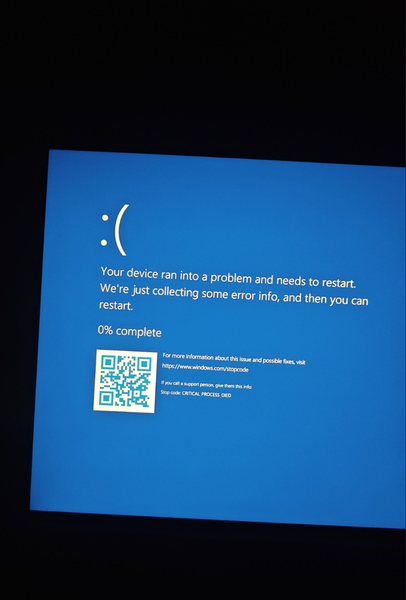
2764 TopicsDell Latitude 5285 running Win11 keeps crashing with a blue screen, error code CRITICAL_PROCESS_DIED
The device is a Dell Latitude 5285. It repeatedly experiences blue screens while running Windows 11, with the stop code CRITICAL_PROCESS_DIED. This issue occurs frequently in Normal Mode but does not occur in Safe Mode Troubleshooting steps attempted: Ran DISM /Online /Cleanup-Image /RestoreHealth; completed. Ran sfc /scannow; no integrity conflicts were found. Ran chkdsk C: /scan; no issues were found with the file system. Performed a clean boot, disabling all non-Microsoft services and startup items; the blue screen still occurs. The system has generated a mini-dump file: C:\Windows\Minidump\081226-9625-01.dmp. In Device Manager, the USB Root Hub (USB 3.0) displays error code 43, but it has not yet been confirmed to be directly related to the blue screen. Wireless network adapter model: Intel(R) Dual Band Wireless-AC 8265.6Views0likes0Comments
Any free video to transcript converter without sign up for Windows?
Hello everyone, a beginner is looking for a free way to convert a video into a text transcript on a Windows PC, ideally without creating an account or signing up. The transcript is needed for interviews. The video is about 30 minutes long, in English, with clear audio. Is there a built-in feature or free video to transcript converter app that can do this? Ideal features include being completely free with no hidden paywall, keeping the video private, and exporting the text easily to Word or a text file. Thank you for your help!69Views0likes12Comments
Keyboard Buttons working whenever they want
Hello, I have an ASUS K571GT and I've noticed in the past 2 months, certain keyboard buttons are working whenever they want. Pushing the 1 button: Tapping it once will either produce nothing, or 111 in a row. Shift 1 doesn't produce a ! anymore. Pushing the q button: Will produce 5 qqqqq in a row. Shift q doesn't produce a capital q. Similar to Pushing the 1 button, If I tapped the q button 7 times, it will makes 33 q's in a row. Pushing the Tab button: Does the same thing. Tap it once and its as if I hit the tab button 3-5 times. I popped up the 3 buttons, cleaned them, air dusted there to take out any debris. I pushed the buttons and it all worked, perfect! Popped them all back on. Worked for 5min before they stopped working. Holding down the right shift button wouldn't produce a capital Q, but holding down the left one can? And then that stopped working too. Anybody know what's wrong? Or have any solutions?3Views0likes0CommentsBest way to capture screenshot on Windows 11 PC?
I recently switched to Windows 11 and I'm not a big fan of the built-in screenshot tool. I often need to capture part of the screen and make a few quick edits afterward. What is the best way to capture screenshot on Windows 11? I'm looking for something simple, fast, and easy to use. Any recommendations?83Views0likes12CommentsQuel est le meilleur logiciel pour Télécharger des musiques Spotify?
Bonjour, je cherche un bon logiciel de bureau pour enregistrer des chansons et des playlists Spotify afin de pouvoir les écouter hors ligne. Je suis assez débutant dans ce domaine et je ne sais pas vraiment quel téléchargeur Spotify choisir. Idéalement, j’aimerais quelque chose de simple à utiliser, avec une bonne qualité audio et qui puisse gérer plusieurs chansons à la fois. Quelle solution utilisez-vous pour télécharger des musiques Spotify sur un ordinateur ?56Views0likes10CommentsHow to unlock your phone if you forgot the password or pattern?
Google Pixel Pro 9 with a digital password and pattern. It is a backup phone so I use it less frequently as the daily Samsung S26 Ultra. The problem is that I completely forgot the password and the pattern. Now, the phone is locked due to too many failed attempts. How to unlock your phone if you forgot the password or pattern? This seems a tricky issue here as the phone could be factory reset and the data would be deleted. Is this correct? Or any safe way available without losing data?97Views0likes11Comments
Windows 11 25H2 Build 9457 lockscreen not changing picture
Hello to all, so, we have three laptops that have Windows 11 25H2 Build 9457, two of these have Enterprise whilst the third one has the Pro version installed, one of the Enterprise laptops is my work laptop, the other one I use for testing image installations etc and is freshly installed with this build. The Pro version is my personal laptop and has also been freshly installed. Ever since having the latest build installed on all three of these laptops, the lockscreen picture does not work, all three remain on the default blue bloom one. I have tried changing from spotlight to picture, restart, then switch to spotlight again with no success. I have deleted the contents of the Assets folder located under this folder MicrosoftWindowsContentDeliveryManagercw5n1h2txyewy , and also the settings folder, rebooted and had no success. I also tried the powershell script that registers the content delivery manager and had no success either I ran a dism check health and all three have no corruption detected, the same after running an sfc scannow. All this on three of these laptops. Then i decided to log on to the local Admin account of my work laptop and after a couple of minutes i locked the screen and the lockscreen picture changed I said to myself so it is working now, i signed out logged in with my domain account and the lockscreen defaulted back to the blue bloom picture. The same happened with the test laptop, i use a test domain user account for this, when i change to a local account the lockscreen picture changes, when i go back to a domain account it defaults to the blue picture. Also happens with my personal laptop where i use a microsoft account to log in. I am literally out of ideas what is causing this because using a local account makes the lockscreen spotlight work, when using a domain or Microsoft account it seems to break it. Thank you for any help.48Views0likes0Comments
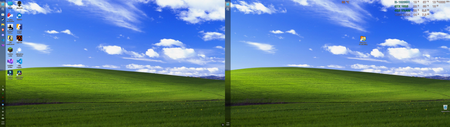
The left-side taskbar in Windows 11 offers an excellent experience in a multi-monitor setup
I’ve always been used to having the taskbar at the bottom, but recently I saw someone on Reddit using a left-side taskbar layout, so I gave it a try. It turned out to be surprisingly good on a dual-monitor setup—not only is it more efficient, but it also looks more balanced. Best of all, many apps look more natural with the taskbar on the left; for example, Discord’s left-side menu pairs very well with the taskbar. Configuration: Device: Dell G15 5510 laptop CPU: i5-10200H @ 2.4GHz GPU: GTX 1650 (laptop version) RAM: 16GB DDR4 Storage: 512GB NVMe SSD31Views0likes0Comments