features
2857 Topics
Phone Link Not Syncing Messages
On my Surface Pro 11 I'm having issues with Phone Link not syncing text messages with my Pixel 9 Pro. I've tried removing the apps from my surface and phone and starting fresh, but nothing helps. I would really appreciate any help anyone can offer. Thanks12Views0likes0Comments
How do I snip and capture a screenshot on my mac?
I recently started using a Mac and I'm still getting used to the keyboard shortcuts and basic features. On Windows 11, I was used to quickly snipping part of the screen when I needed to save or share something, but I'm not sure how to snip on mac. What is the easiest way to capture a screenshot on mac? Sometimes, I need to take full screen screen and sometimes for a scrolling screenshot. In addition, I also need to crop and edit the screenshot. P.S. It is an MacBook Pro M5 with the latest macOS.68Views0likes10CommentsWhat is the best png to jpg converter without losing quality?
I recently switched to Windows 11 and I'm looking for the best way to convert PNG images to JPG format while keeping the quality as high as possible. The PNG screenshots are more than 1MB and I want to change it to 100 kb jpg. I understand JPG conversion isn't 100% lossless, but I want to minimize any visible quality drop. My question: Is there a reliable png to jpg converter without losing quality? P.S. I tried the built-in Photos app "Save As" option but the size does not change.47Views0likes10CommentsHow to convert html to markdown file on Windows 11?
I often save web pages or articles as HTML and want to turn them into clean Markdown so I can use them in note apps or documentation tools. I'm not very technical, so I'm looking for an easy way to convert html to markdown on Windows 11 — ideally a free tool, website, or app rather than something that requires coding knowledge. If anyone knows a reliable converter or a simple step-by-step method, I'd really appreciate the help. Thank you!56Views0likes10CommentsSave the date: Windows Office Hours – September 17, 2026
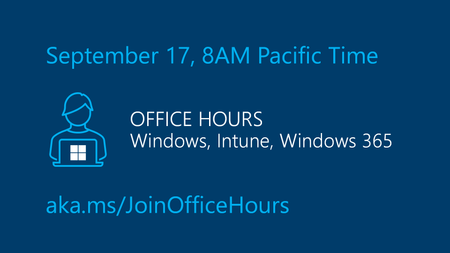
The next Windows Office Hours is coming up on September 17 from 8:00–9:00 AM PT. Spend an hour connecting directly with Microsoft experts across Windows, Microsoft Intune, Configuration Manager, Windows 365, Windows Autopilot, security, public sector, FastTrack, and more. Whether you're looking for guidance, troubleshooting help, or best practices, this live discussion is an opportunity to get your questions answered. This is a live, chat-based event with no video and no meeting link. Simply join the discussion, ask your questions, and participate in conversations with Microsoft engineers and specialists. Can't make it? Add your questions to the event page ahead of time and we'll cover them during the session.38Views0likes0CommentsHow to Repair Windows 11 Without Losing Your Files
Windows 11 is generally reliable, but like any operating system, it can develop problems over time. You might find that your computer keeps crashing, takes forever to start, shows a blue screen, gets stuck during updates, or simply refuses to behave the way it used to. Link to the post38Views0likes0CommentsWin11 Settings app crashes when trying to open the Storage page after connecting an external drive
After connecting an external USB storage device, opening Settings → System → Storage may sometimes cause the Settings app to crash or become unresponsive. If no external storage device is connected, the page loads normally. This issue occurs more frequently on storage devices formatted as exFAT or those containing a large number of files.36Views0likes2CommentsHow can I convert markdown to pdf on Windows 11?
I'm still pretty new to working with Markdown. I have some .md files that I use for notes and documentation, and now I need to convert MD into PDF files so I can share or print them. I'm using Windows 11 and haven't really done this before. What is the easiest way to convert a Markdown file to PDF on Windows 11? I'd like the formatting, headings, code blocks, images, and links to stay as close to the original Markdown as possible. If there is a simple markdown to pdf converter that doesn't require much technical knowledge, that would be great.110Views0likes10CommentsmacOS monterey download for creating a bootable usb installer?
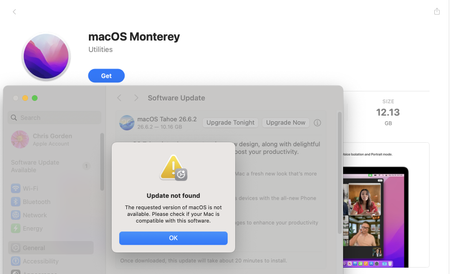
MacBook Pro was broken and unable to boot into the desktop. I have another Mac but can't download macOS Monterey installer app, as it says: The requested version of macOS is not available. Please check if your Mac is compatible with this software. I also have a Windows PC and was told I can do that on a Windows PC either. How can I download macOS Monterey dmg file and make a bootable USB from it?92Views0likes8Comments
How do I rotate PDF pages and save the changes for free?
I have a PDF with a few pages that are sideways, while the rest are in the correct orientation. I need to rotate only those pages by 90 degrees and save the file so they still appear correctly when someone else opens it. I usually view PDFs in Microsoft Edge, but I’m not sure whether rotating a page there changes the saved file or just the way I see it. Is there a free way to make the rotation permanent without Acrobat Pro? I’d also be interested in whether the same method can rotate every page when an entire PDF is upside down. Thanks for any guidance. NathanReed67Views0likes2Comments