features
2748 Topics
Automatic Timezone Inaccurate
I had an issue wherein we are trying to implement an automatic timezone for users as they travel alot. The objective is that whenever a user goes say US, the timezone will automatically adjust to where he is. What we did is 2 things: To forcibly enable location services on a user device Enable the tzautoupdate via script Note: No defined/default timezone is selected Upon observation on a test user when enabled, everything is perfect except for when he was onsite at an office in UK. For some reason, when he is connected to office the timezone automatically shifts to UTC-4. We have tested it for almost 2 weeks and its still the same hence we halted the testings and removed the configuration. I have found similar issue that it might be related to Geolocation of Microsoft Database and unfortunately there is no way to update it or request it to be updated as there is no procedure how to raise them to update as well. https://learn.microsoft.com/en-au/answers/questions/5869140/persistent-incorrect-geolocation-on-windows-device In line with it, I created a microsoft case and based on our discussion and testings there is no issue on the device and/or the configuration and the only action plan that we have is to hope that this discussion gets to be seen and maybe microsoft updates their Geolocation Database.7Views0likes0Comments
What is the best tool for audio to text transcription?
I need advice from experienced users about choosing a reliable tool for converting speech recordings into written text. I want to understand which features can improve accuracy, support different audio formats, and provide a smooth workflow for regular transcription tasks involving audio to text transcription. Finding the right solution also requires knowing how well it handles different environments, accents, and real-time conversations. Any suggestions about performance, usability, and accuracy for Live audio to text transcription would be helpful for making a better choice.69Views0likes12Comments
Windows 11 File History recopies unchanged files whenever its Control Panel page is opened
I am reporting a repeatable File History problem on a fully updated Windows 11 computer. File History is configured to back up my libraries every hour to a separate physical internal HDD that Windows accepted as the File History destination. To eliminate the possibility of an old or damaged backup configuration, I reformatted the destination drive and configured File History again from the beginning. Steps and observations: The initial File History backup completed successfully and consumed approximately 38 GB. I did not modify the protected source files after the initial backup. I closed and reopened Control Panel > System and Security > File History merely to check the backup status. Immediately after the File History page loaded, it changed to “Saving copies of your files.” The destination drive then consumed approximately another 38 GB, creating new physical versions of files that had not been modified. Pressing Stop ends the active backup cycle. However, after closing and reopening the File History Control Panel page, another backup cycle starts again. This behavior is repeatable whenever the File History page is reopened. A scheduled hourly backup also added approximately 14 GB, despite there being no corresponding amount of intentionally changed source data. I understand that File History is supposed to preserve multiple versions of files that have actually changed. The problem is that it is physically recopying unchanged files and rapidly consuming the entire backup drive. Expected behavior: Opening the File History Control Panel page should only display its current status or scan for changes. Only new or modified files should be copied during the next backup cycle. Actual behavior: Opening the File History page itself triggers a backup cycle that writes another large physical copy of unchanged data. Has anyone else reproduced this behavior on Windows 11? I would also appreciate it if the Windows team could investigate whether opening the legacy File History Control Panel applet is incorrectly forcing a complete or partial re-indexing and recopying of unchanged files. Feedback Hub report: https://aka.ms/AA13n2f37Views0likes0CommentsUnderstanding the New Task Manager in Windows 11 (Complete Guide)
If you’ve been using Windows for years, you probably rely on Task Manager whenever your computer slows down, an app freezes, or you simply want to see what is happening behind the scenes. With Windows 11, Microsoft has redesigned the Task Manager with a modern interface, better performance monitoring, and improved navigation. While the core purpose remains the same monitoring system resources and managing running applications the new Task Manager in Windows 11 is more powerful and easier to use once you understand its layout and features. https://dellenny.com/understanding-the-new-task-manager-in-windows-11-complete-guide/1.1KViews0likes2Comments
How to convert or turn speech to text on my computer?
A tech newbie. I have some voice recordings, online meeting audio, and a few speeches that I would like to turn into readable text, but I am not sure what tool or method works best on Windows 11. I know Windows has some built-in voice typing features, but I am not sure if they are only for live dictation or if they can also transcribe existing audio files. I don't know much about computers, so I would prefer a simple solution that does not require complicated setup. Can anyone recommend a good way to turn speech to text on Windows 11? Thanks in advance!2.4KViews0likes11Comments
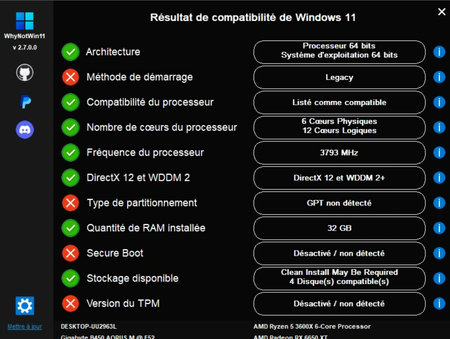
Migration to Windows11 impossible while gear ok
I would like to migrate to w11 from my W10. Currently, Windows tells me that my installation is not compatible. So I looked a little, in terms of components (I have an R5 3600X and a B450m Aorus) I'm good, it's more about options not activated and configuration. I ran WhyNotWin11, and this is what I get11Views0likes0Comments
Look for a safe youtube mp3 converter I can use on Windows 11
I don't like the online one as it doesn't support batch conversion. And some of them even force pops up full screen ads. So I got stuck here for two days for finding a good one. A bit plus if it delivers high quality mp3 and support youtube playlist & music videos. Please suggest the best youtube mp3 converter I can use on Windows 11. Thanks83Views0likes10Comments
why won't my laptop factory reset on windows 11?
Hi everyone, I'm trying to factory reset my laptop running with Windows 11 but it won't complete. It either gets stuck, shows an error, or rolls back to the way it was before. Not a tech guy, so I'm hoping someone can help me figure out what's wrong. Why won't my laptop factory reset in Windows 11 and how to fix it? I'd appreciate a step-by-step approach since I don't want to accidentally make things worse.193Views0likes10CommentsIs UUP dump a legitimate tool for Windows ISO download?
I want to download some old version of Windows ISO but Microsoft does not hold these ISO image files on its website now. I heard about UUP dump is also an available place for downloading Windows ISO files. Is this correct?904Views0likes10CommentsHow do I rotate PDF pages and save the changes for free?
I have a PDF with a few pages that are sideways, while the rest are in the correct orientation. I need to rotate only those pages by 90 degrees and save the file so they still appear correctly when someone else opens it. I usually view PDFs in Microsoft Edge, but I’m not sure whether rotating a page there changes the saved file or just the way I see it. Is there a free way to make the rotation permanent without Acrobat Pro? I’d also be interested in whether the same method can rotate every page when an entire PDF is upside down. Thanks for any guidance. NathanReed163Views0likes4Comments