feature
245 Topics
How to add pages to an existing PDF on Windows?
I have an existing PDF and need to insert several pages from another PDF into the middle of it, rather than simply attach the second file at the end. I’d also like to add a blank page occasionally and be able to check or adjust the page order afterward. I usually open PDFs in Microsoft Edge on Windows, but I haven’t found a way to insert pages there. Can Edge do this, or do I need a separate PDF editor? I’d prefer a free method without Acrobat Pro, whether that’s a desktop application or an online tool. What would you recommend for placing the new pages exactly where they belong while keeping the existing document intact?135Views0likes1CommentHow to type on a PDF?
Hi everyone, I need to type directly on a PDF, but the document does not contain fillable form fields. I can open it in Microsoft Edge, but I’m not sure whether there is a reliable way to add text anywhere on the page and save the changes without affecting the original layout. Is there a built-in or free way to do this, especially if I need to change the font size and move the text into the correct position? I’d prefer not to convert the PDF to Word first, as that may change the formatting. Any suggestions would be appreciated. Thanks!404Views0likes1Comment
Bookmarks are being forced into the active Tab Group (New behavior)
Hi there, I’ve noticed a very frustrating change in the latest Edge update. When I open a bookmark from the Favorites bar, it is now automatically forced into the currently active Tab Group. This behavior is counter-intuitive. For example, if I am browsing in a "Social" group and click a bookmark for "Gmail," I want it to open as a standalone tab, not as a part of the "Social" group. Currently, I have to manually drag every new tab out of the group, which is a major workflow killer. Disabling experimental flags doesn't fix this anymore. Please provide a toggle in the Settings menu to disable "Tab Group Inheritance" for bookmarks or revert this change. It should be the user's choice whether to add a new tab to a group or not.153Views0likes0Comments
Feature request
I switched from using Chrome to edge as it seems to run smoother on desktop and Android. One thing that I miss the most is the grouped tabs view at the bottom of the screen, I used that all the time when on chrome to go from one tab to another in that specific group easily if I open a bunch of links when looking for something. Should be easy enough to implement since it's already in other chromium browsers.76Views0likes0Comments
[tab-group feature suggestion] Add a 'current tab' notion in tab groups
I like the tab group feature to organize tabs, but clicking a tab group tab has a completely different user experience as clicking a non-grouped tab. By adding a current tab in a tab group, the user experience can be more unified: clicking a tab activates it (brings it to the foreground), clicking a tab group tab activates the current tab in the tab group. This allows for quickly swithing between the 'documentation' for the tab you're working with and the 'project' for the tab you're working with, for instance. The current functionality of 'expanding' the tab group can be moved to the right-click context menu.105Views0likes0Comments
FEATURE REQUEST: User-settable Favored AND Unfavored sources for search results
Google recently introduced https://blog.google/products/search/preferred-sources/ which allows people to see news results from sources they prefer more frequently. I think this is a great idea, and it would be even better if users could specify preferred and un-preferred sources for all search results in general, not just news results. For example, when I search for "nodejs logging," almost the entire first page of results is from company blogs or tutorial websites whose perspective I don't really care about: These sites are EVERYWHERE and I frequently find myself digging through many search results to find sources that I actually do want to hear from. There is no need for me to see five different company blog posts that look like paraphrasings of each other summarizing the "best practices for logging in nodejs" or similar. Maybe showing one of these posts from a source that I trust is appropriate, but after that, I'm interested in authentic community discussions (e.g., StackExchange, Reddit), RFC-type websites (not sure if these exist for Node.js, but things like Python's PEPs or Rust's RFCs, so very official, community-driven discussions), official documentation from the logging libraries themselves, and personal blog posts that go more in-depth into a real person's opinions about and experiences with logging. One way I could signal to Bing that this is what I want, is to set websites like StackExchange, Reddit, official documentation pages, personal blogs I like, etc. as "favored" sources, and set what I consider to be "slop" websites, like LogRocket, as "unfavored" sources. Another example of the above, which I want to emphasize because it frequently comes up for me, is looking up references for functions in the Python standard library, for example, "python open()". The first page of results in this case come from realpython.com, w3schools.com, geeksforgeeks.org, programiz.com, and a bunch of videos for the remainder of the page. In my opinion, it is insane that we get every website except the official Python.org documentation for open(), which is actually what I'm looking for. I could rectify this by adding python.org as a preferred source. A final example that frequently pops up for me is cooking. I often search questions like "how many cups are in a pound of sliced carrots," and invariably, I get search results from websites like these: I can't prove it, but these websites look like they are LLM-generated to me. At any rate, I much prefer to hear it from a source like this, which looks more like an actual publication with an editorial team and humans vetting the information: Since chefsresource.com comes up so frequently in my search results, and I always avoid looking at it, it would make sense for me to "blacklist" it by adding it as an unfavored source, so that almanac.com result is more likely to come up as a relevant result to me. Google search seems to avoid all of these problems by default, and it behaves more the way I want for a search engine. Still, I think allowing users to tailor their own search results by specifying "favored" and "unfavored" sources would be a great differentiating feature for Bing search.299Views0likes0CommentsSuggestions For Edge From My Experience (Microsoft, Please Listen 🤞
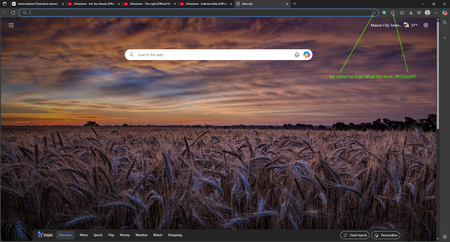
What's up, Microsoft Community! 👋 I literally don't remember how long ago it was when I posted asking on how to join the Edge Insider Program, but things have changed for me a little since then, & but my love for tech, & innovation remains, as it always will. So, without further ado, let's jump right into this post, since I have some suggested upgrades & changes I would like to see be made for the pc version of Edge, based on my experience with it in the last several years... And also, the post itself will be divided into 2 categories: Privacy, & Improvements. Instead of typing out the longest novel in recorded history about my relationship with Edge, I will simply sum it up: It's a great browser, & it most certainly rivals Chrome in a number of ways, & despite some of its current flaws, I do enjoy using it. But, there are some things I would like to see changed, which I will lay out for y'all. 👇 PRIVACY: Compared to the likes of Google Chrome, even though Microsoft still does collect a certain amount of data, in order to provide the Microsoft-based services to it's users, I personally tend to consider the privacy situation to be slightly better than Chrome, just not as invasive. Especially, given that there are literally settings you can actually toggle on or off in order to enhance your privacy. And I could have laid out some of the privacy enhancements I would like to see improved within, in a great amount of detail, but I'm not always the best at coming up with the right words to say at the right times. 🙄🤦♂️😂 So, I instead got the opinion of an AI chatbot I use more often, in order to brainstorm ideas for improving Edge's privacy. And you can see my full chat interaction in this recording, courtesy of this publicly accessible Google Drive link: https://drive.google.com/file/d/1HtPXsMtOv8l3GyiNMS1Wg_pnWdXPnN6U/view?usp=sharing (By the way, if any of you tend to agree with these improvements, be sure to like the post, or upvote, if that's even possible. 😉👍) IMPROVEMENTS: 1. In my own personal opinion, having a translator baked right into your browser is WAY better than nothing at all, even if it sucks. But, that leads me to an area where I feel like Microsoft might want to re-think their strategy: The Microsoft Translator is quite frankly, not that good at all compared to Google Translate, or even DeepL Translate- the latter of which I consider to be an "underdog" type of company compared to the bigger players out there, & they pride themselves on their quality translations, even though their list of supported languages is still expanding, as is their business, as we speak. (And I even confirmed this myself by testing the Microsoft Translator out on a few foreign websites I know of, & also by consulting with four different AI chatbots, & they all said that compared to its competition out there, it just isn't cutting the mustard, which is quite embarrassing.) However, I would like to pitch a wild idea to Microsoft: Why not just scrap the built-in translation, for DeepL, while showing them some love & support for their hard work, & commitment? 🤷♂️😏 2. For this part, I decided to combine two of the complaints I have into one, since they BOTH have to do with the appearance within the browser. And I know that this may or may not align with some people out there, but the point I'm highlighting is that this isn't what I prefer. These two complaints I have include: Not having the ability to hide the "Add this page to favorites", AND the "Extensions" buttons from the toolbar, which is right next to the address bar. (And you can see what I mean by viewing the included screenshot.) I do happen to recall that Microsoft used to have the option to hide the extension button itself from the toolbar, but for whatever reason(s), that isn't really a thing as of right now, & I even checked this within the settings, & by making sure that I have the latest browser version, which I do. Still, to say that I'm disappointed would be a gross understatement, to say the least, but I REALLY hope that Microsoft listens to this bit of feedback, & takes the right course of action, here... 🫤🥺🤞🙏 3. By now, I'm sure a good number of you, who happen to be tech-savvy, probably know that Microsoft Edge IS considered to be faster, & more resource efficient compared to Opera, or even Google Chrome, for instance. But, there is 1 browser which I use, & that I genuinely think Microsoft could take some serious inspiration from, & it's Brave. From what I have observed myself, & also going by other data online, there is no doubt about it that Brave is markedly more efficient compared to Edge. And it comes down to how Brave handles privacy within their browser, as a whole, but also from some architectural tweaks to the underlying Chromium code itself that makes Brave, quite frankly, noticeably better than Edge, in this case. (Now, before any of you bother to take up your lighted torches, pitchforks, & prepare to roast me, just hear me out that I'm not actually playing favorites, here. But, I do think there is room for improvement, on this front.) 4. One incredibly useful feature that I absolutely LOVE in modern day web browsers is being able to hover over my tabs, when needed, or in case I ever feel the need to get a quick check while I am multitasking. But, while the functionality within Edge is pretty decent, the accuracy isn't NEARLY as good as compared to what Opera uses, which in my opinion, somehow has the best implementation of this technology, however they pulled this off. (Seriously, folks. I'm not even joshing you, here. Try doing it within with Opera, Opera Air, or even Opera GX, for that matter, & I'm sure you will totally see what I mean.) Now, while I would never in my life, ask for one company to copy another's, or steal a patent, or whatever, this is another area where I think Edge can be improved in, so, I will keep my eyes & ears pealed for future releases down the line, or even if Microsoft DOES end up seeing my post, here. 5. And onto my final complaint- earlier on, I noticed that Edge did have the Secure Network in preview/beta, & while accessing foreign websites, or even watching movies online, it really came in handy for me. But now, it has been removed from the toolbar, & only the toggle for it exists in the settings. So, Microsoft, I hope you guys are working on refining this particular feature, & I hope you plan to bring it back soon. 🤞 Well, with all that being said, I hope this post gets noticed by y'all in the community, & that perhaps, it aligns with what others hope to see in future releases of Edge. If any of you happen to have any questions for me, or need additional details, feel free to drop me a line, or even comment on this post, & I will be happy to get back with you, & fill any of you in. Thanks in advance, everyone! 🙏🙇♂️😊319Views0likes0CommentsMicrosoft Edge has got a new feature to magnify images on the web
This feature allows you to right-click on any image on the web and select an option to magnify it. The image will be opened in full size and its Alt text will be displayed under it. I personally like this feature because before this i would right-click on the image and open it in a new tab. To try out this new feature simply head to this release page in my GitHub repository, install Edge Canary channel and then follow the instructions in there: https://github.com/HotCakeX/MSEdgeFeatures/releases/tag/120.0.2198.0 Video demo: https://youtu.be/N3L6QwdIaPM3.2KViews1like2Comments