exchange
44 Topics
mail@mydomain is causing a cert mismatch error in all browsers for Outlook.com
Hello, I have created a CNAME for our users in my domain so that they can access webmail. For example, it's called mail.mycustomdomain.com, and it is directed to Outlook.com But when I try to visit mail.mycustomdomain.com, it shows a security warning and recommends going back. I can understand because the SAN name in the certificate presented by Outlook doesn't include my CNAME. Is there anything I can do as a workaround so our users can enter the CNAME without encountering a Certificate Mismatch Error? It is causing repeated calls to the helpdesk, and we would like them to use something simple they can remember. Thanks356Views0likes3Comments
Graph http 449 throttled
We are experiencing a lot of Microsoft Graph trolling errors from some of our applications that are hosted in Azure Web App Services and other third party such as Front App to name one. I am trying to find an approach or strategy to figure out and narrow down what may be causing so many of these events. Whether I can narrow down by application or process, I am not sure yet. We enforce MFA on all our users, but of course, on Azure Enterprise Applications, we don't, which are used extensively in our ecosystem of apps. Any help is much appreciated here.140Views0likes1Comment
Advice needed: Multitenant organization issues
Hey peeps, a client of mine is asking for an optimal solution to their sub-optimal organization structure. I want to see if there's something more I can do here or if we are stuck with our environment the way it is. It's such a strange ask that it will take a few paragraphs to describe, so bear with me. Client has a central corporate entity, but the "branch" entities operate separately and have a fair amount of self-governance. This central corporate entity has a Microsoft365 tenant and that's what everyone's email matches, including branch members. Let's call it corp.onmicrosoft.com with a verified domain of corp.com. So, everyone at corporate and the branches have addresses/UPNs of @corp.com. Before my time, one of the self-governing branches chose to setup a Sharepoint site specific to their branch. They put all the files on a separate 365 tenant of corp-ny.onmicrosoft.com with verified domain corp-ny.com. There are a couple of identities on that 365 tenant, but since everyone uses their corp.com email, they access the Sharepoint data from their primary corporate identities as GUESTS of the branch's tenant. So the branch tenant has 3 members and 100+ guests. We perform IT for just the BRANCH, not the corporate structure. Since corporate IT is not interested in changing infrastructure at this time, we would like to convert all the guest identities on the branch tenant to members and we can then leverage technologies like Intune & CA and move them off of their on-premise AD server that is not doing AD Connect. I have a quick script that will do all of that - convert, license, set some properties for all 100 members. Seems okay! After the change, members will have their corporate identity for email, and the branch identity for Sharepoint and Windows login. We've identified a problem, however, with notifications. When you comment on a file in Sharepoint, a notification is generated for anyone that participates in that file. The notification is sent from the commenter's identity. Currently, that means notifications come from @corp.com . However, after the change those notifications will come from corp-ny.com. This domain does NOT have an MX record associated with it 😞 and we think this will lead to a LOT of confusion if people try to reply directly to the emails. It might also have the potential(?) to fail email spoofing checks or be flagged as suspicious by email servers. Additionally, the notifications would be sent to their branch identities, which I assume would not deliver. Even if it did deliver and we added an MX record, it would be in an inbox that's not checked by the team. My question is: Can I mask the notification email to be from "email address removed for privacy reasons" for all of the notifications? Or, Can I "spoof" the emails so that they appear to be sent from the corporate identity? Secondly, What's the best way to deal with notifications headed to the wrong inbox? Can a transport rule redirect these emails to their corporate emails?446Views0likes1CommentO365 Email Migration to Another Tenant while Deferring Migration of Sharepoint files
Hi, This is the context: ChildCompany has O365 and it has an Azure AD in hybrid mode synchronizing to a on-prem AD server. They have an internal domain ChildCompany.com, and an external domain ChildCompany.com where they also receive and send email using O365. ParentCompany is going absorb the ChildCompany some time in next year, and I was asked about the integration options. According to this https://download.microsoft.com/download/b/a/1/ba19dfe7-96e2-4983-8783-4dcff9cebe7b/microsoft-365-tenant-to-tenant-migration.pdf I could do a phased migration, where the end state is that they decomm their onprem AD and that they only use our ParentCompany systems. The business requirement is to start their integration with Email, and then in later phases do the Sharepoint integration as that requires way more analysis on their data sources, as they also have wikis and many other on prem legacy stuff. They are less than 50 users, so I can use Quest migration tools for the email part, but I wonder what needs to happen in what order. This is what I have in mind: Migrate their current O365 into our ParentCompany Office 365 subscription, so that they can continue logging in into their domain joined windows machines using childCompany.co, so they start using ParentCompany.com email addresses, but the problem then is how can they continue using their sharepoint and onedrive resources associated with the Azure and local domain at ChildCompany.com? This is more or less what I have in mind, for the intermediate step, the cutover: Child Company ParentCompany --------------------- ---------------- On-Prem | MS Cloud: | MS Cloud: ---------------|----------------------|-------------- Local AD (ADFS)| Azure Subscription | Azure Sub | Azure AD | Azure AD |--------------------- |--------------------- | O365 Sub -> | O365 Sub | Exchange mailboxes-> | Exchange mailboxes | Sharepoint? -> | ??? | -------------------- |--------------------- I wonder how could it be possible to defer the sharepoint and onedrive migration, so that the child company users can still work on their sharepoint files using their normal auth methods, while disabling childcompany.com as MX so they start using ParentCompany.com mailboxes.Is that even possible? Would make more sense to try to migrate everything at once? That is way more work, but I'm weighting my options.1.7KViews0likes7CommentsNow available for Exchange, SharePoint and Teams - advanced deployment guides
The FastTrack team recently announced the availability of advanced deployment guides for Exchange, SharePoint and Microsoft Teams in the Microsoft 365 admin center. To learn more about deploying Microsoft 365 services in your organization and how to find these helpful guides, check out the team's latest blog post below: New Year, new Microsoft 365 Core advanced deployment guides for Exchange, SharePoint, and Teams!444Views0likes0CommentsWhy username and suffix are merged in the first field of User logon name of Active directory
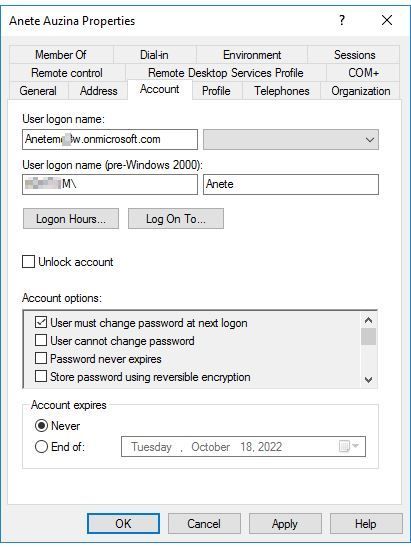
Hi, Hope everyone is safe and well. We have synced the local active directory to azure by azure ad connect. All usernames in azure active directory became userorganisation.onmicrosoft.com I could not separate username from UPN suffix, I started to correct manually the issue per user but as we have several users in the active directory is there a way to correct the username of all users? Can anyone please advise how can I do that. Best Regards.1.1KViews0likes1Comment
Outlook connectivity test fails / Office365 SMTP - SAML Assertion Invalid Signature
We have developed our own SAML IDP and have configured Office365 for federation to our SAML IDP. We can login to Office365, Teams, etc all with no errors. However, when we try the Outlook connectivity test at https://testconnectivity.microsoft.com/, or when we attempt to send an SMTP email through smtp.office365.com, then we are getting a failure. The failure is shown below for the Outlook connectivity test (personal information changed) X-CalculatedBETarget: MW4PR14MB5440.namprd14.PROD.OUTLOOK.COM X-BackEndHttpStatus: 503 X-RUM-Validated: 1 X-AutoDiscovery-Error: LiveIdBasicAuth:FederatedStsUnreachable:<UNH:<PII.Email:7J+GS+4rufdDUc9R4mr7Ifl48VhyJ296RJq6lQpEsKg=@softexinc.com>><RequestId=7fdb0084-ea19-4729-8290-aa2a663cbaba,ST=23:03:23><UIPH:<PII.IP:aU/9Mm6Oy7mcCIl2kWkA43wQoeRe2WNIcRrp/8UOlNo=>><HitHrd<X-forwarded-for:<PII.IP:aU/9Mm6Oy7mcCIl2kWkA43wQoeRe2WNIcRrp/8UOlNo=>><PTS:False><BA:255,UP:-46840,ExCaught:False,BlockStatus:1><IOOH<IV1OOH<SHIBB-Business-1717ms><SAML_F:T:,M:STSFailure,E:Saml Assertion has invalid signature<?xml version='1.0' encoding='UTF-8'?><SOAP-ENV:Envelope xmlns:SOAP-ENV="http://schemas.xmlsoap.org/soap/envelope/"><SOAP-ENV:Header><ECP:Response xmlns:ECP="urn:oasis:names:tc:SAML:2:0:profiles:SSO:ecp" AssertionConsumerServiceURL="https://login.microsoftonline.com/login.srf" SOAP-ENV:actor="http://schemas.xmlsoap.org/soap/actor/next" SOAP-ENV:mustUnderstand="1" /></SOAP-ENV:Header><SOAP-ENV:Body> <SAML RESPONSE IS HERE> </SOAP-ENV:Body></SOAP-ENV:Envelope>><SAML:AddV2N><FEDERATED><UserType:Federated><LogonFailed-FederatedStsFailed><AS:FederatedStsFailed><Tid=8ccccceb-0040-4e3e-a7bc-733ee9f8ef80><V1; X-DiagInfo: MW4PR14MB5440 X-BEServer: MW4PR14MB5440 X-Proxy-RoutingCorrectness: 1 X-Proxy-BackendServerStatus: 503 X-FirstHopCafeEFZ: DSM X-FEProxyInfo: DS7PR06CA0008.NAMPRD06.PROD.OUTLOOK.COM X-FEEFZInfo: DSM X-FEServer: DS7PR06CA0008 Content-Length: 0 Date: Fri, 09 Sep 2022 05:35:18 GMT Server: Microsoft-IIS/10.0 X-Powered-By: ASP.NET We get a call into our IDP's SAML ECP SOAP endpoint (ActiveLogOnUri) where we build the SAML Response/Assertion to return and we sign both the Response and Assertion with our SAML signing certificate (same certificate that is set in Office 365 federation as the SigningCertificate). We return successfully from our SAML ECP SOAP endpoint, and then see the error above. If we take our SAML Response and put it in the SAML Response Validater at https://www.samltool.com/validate_response.php, we see that the response and XML signature is validated. We also wrote a C# code to read the SAML response and validate the signature using the SignedXML class. One note: our SAML response is returned with no extra whitespace/newlines. We sign the SAML response with no extra whitespace/newlines and return the response from the SAML ECP SOAP endpoint the same way, so we don't think this is related to whitespace. We can not figure out why Office365 returns this SAML Invalid Signature error ONLY when the SAML ECP SOAP endpoint is invoked via the Outlook connectivity test or SMTP email sending. Any help is appreciated.1.7KViews0likes1CommentSPF Failing Alignment
Admins: If this is the wrong forum, please let me know. I'm new here. Greetings everyone! I recently setup DKIM and DMARC for my organization. We are utilizing Exchange Online for our email services. Everything is proceeding swimmingly except for some SPF alignment failures. I am raising this issue here because the servers in question are all: <variable>.obe.outbound.protection.outlook.com On the surface, it looks like Outlook protection is forwarding emails between its servers, which would explain why SPF alignment is failing. However, I am not certain I understand why this forwarding is occurring. Here are a couple of examples:3.9KViews0likes1Comment