endpoint security
73 TopicsWhat is Zero Trust and is it the Future of Cybersecurity?
Zero Trust is a security architecture that assumes the network is already infiltrated and implements multi-factor authentication, least privilege access, and real-time monitoring and analytics to secure digital assets. The Zero Trust model goes beyond the traditional perimeter-based security method and focuses on protecting identities, endpoints, applications, data, infrastructure, and networks. By using a Zero Trust model, organizations can better protect themselves from cyber-attacks and data breaches while still making sure they are compliant and staying productive. Zero Trust is the future of cybersecurity because it focuses on visibility, automation, and orchestration. It is also the key to securing your digital estate.14KViews4likes2CommentsSpeed where it matters: How Microsoft Intune helps IT prioritize time-sensitive actions
By: Albert Cabello Serrano | Principal Product Manager - Microsoft Intune A closer look at how Intune delivers updates to devices and the investments we’re making to help important changes move faster and more predictably. A common concern we hear from IT admins is, “How quickly will this change actually reach my device?” In many cases, the answer is much faster than expected. Today, 90% of policy updates, app deployments, and device actions in Intune are completed in under an hour. So where does the idea of “8-hour latency” come from? That number reflects a routine maintenance check-in used when devices are idle - not how Intune processes meaningful changes. Intune uses notification-based, priority-driven processing so that high-impact actions, like security policy changes or remediation steps, are handled promptly and reliably as possible. In this context, latency isn’t about making every action instant - it’s about providing predictable, prioritized delivery at global scale. The sections below break down how Intune prioritizes different types of updates and recent investments that are helping time-sensitive changes complete more consistently. How Intune delivers changes to devices Cloud-based device management is designed for real-world conditions; devices are not always online, fully charged, or on stable networks. Intune uses an eventual consistency model so devices can continue to be productive while converging to the desired state over time, without management actions unnecessarily disrupting users or workflows. Because devices operate in different conditions, not all device activity is handled the same way. To manage change reliably at scale, Intune uses different types of device check-ins depending on what needs to happen. Types of device check-ins in Intune Device check-ins generally fall into several categories, each triggered by a different type of action: Single‑device check‑ins: Occurs when an admin or user initiates an action on a specific device, such as starting a device action or installing an app from the Intune Company Portal. Change‑based check‑ins: Push‑triggered check‑ins used to deliver meaningful changes to devices as soon as possible. Client‑initiated check‑ins: Background activity that helps keep devices healthy, such as when a user signs in to a device or when malware status changes. Maintenance check-ins: Scheduled syncs that occur at predetermined intervals and can be client or service-initiated, depending on the platform. These typically occur approximately every 8 hours. Regardless of what triggers a check-in, any pending changes will be applied to the device when it occurs. What happens when an admin makes a change When an admin makes a change in Intune, such as updating a device compliance policy, deploying an app, or setting a configuration, Intune identifies the devices impacted by that change and initiates a change‑based check‑in for affected devices. For online devices, Intune sends a push notification prompting the device to establish a management session with the service, apply the change, and report enforcement status back to Intune. If a device is offline or unreachable, the change is applied when the device next checks in through available mechanisms. Four investments that help critical updates move forward faster The following product changes focus on reducing device‑change latency by shortening the time between an admin action in Intune and enforcement on the device, especially during peak or constrained conditions. 1. Check-in prioritization focused on what matters most Not all device activity carries the same urgency. Routine background check-ins can compete for service resources with devices that have important pending changes, such as compliance updates, remediation actions, or administrator-initiated configuration changes. Intune evaluates the potential impact of delaying a device check-in on security posture, compliance state or user productivity, and dynamically prioritizes processing accordingly. This real-time prioritization model ensures that high-impact actions move forward without being delayed by lower‑impact background activity. Prioritization adapts as conditions change, helping important updates reach devices more quickly and predictably without being delayed by lower-impact background activity. 2. Built-in resilience when multiple changes occur in quick succession Change activity often happens in bursts, with several related updates occurring in rapid succession. These periods of activity may be driven by operational needs or background processes, and can involve adjusting assignments, updating multiple policies, or rolling out configuration changes across the same set of devices. Intune dynamically coordinates notifications, so that each change requiring action triggers a corresponding device notification, even during high-activity periods. This helps improve consistency when applying multiple updates and reduces delays across consecutive changes on devices. Over the next several months, these improvements will extend to additional payloads delivered through the Intune Management Extension (IME), including scripts, Win32 apps, and custom compliance across both Windows and macOS platforms. 3. More timely notifications on Windows Intune notifies devices to check-in when changes require action. If the device is offline, on an unstable network, or low on battery, notifications may be delayed. This can cause missed check-ins or delayed actions. When notification services are delayed, blocked, or unavailable, devices may fall back to scheduled maintenance check‑ins to apply changes. For timely delivery, required notification service endpoints need to remain accessible so devices can receive management signals when updates occur. On Windows devices, Intune complements the Windows Notification Service (WNS) with the same notification protocol that powers Microsoft Teams via the Intune Management Extension. This helps increase the likelihood that devices receive management notifications when they’re online and reachable, improving visibility into whether policy updates or device actions have reached their destination. For more information, see the network endpoints for Intune documentation. 4. Optimized maintenance check-ins for iOS devices Background check-ins are still important to keep devices healthy when nothing else is going on. Unlike Windows devices, iOS devices don’t have client scheduled check‑ins and depend on service‑initiated maintenance check‑ins to ensure device health and compliance. During peak usage periods, these maintenance check‑ins can account for a significant portion of overall traffic, which can compete with devices that require immediate updates. Intune considers device activity in the scheduling of maintenance check‑ins during peak activity, making room for higher‑impact updates, while continuing to ensure devices check in regularly. This helps manage traffic and improves responsiveness when applying policies or remediation actions. What this means for you For IT admins: No additional configuration or workflow changes are required to benefit from Intune’s built-in notification system. When bidirectional communication with notification service endpoints is open, devices can receive and act on updates as they become available. For security teams: Faster delivery of device changes helps shorten the time between a policy update, a tightened Conditional Access rule, an updated compliance baseline, and a remediation action. For Zero Trust frameworks, where posture signals drive access decisions, this helps narrow the window during which a device could be out of compliance or vulnerable. Together, these improvements reflect how Intune is evolving into a more intelligent, priority-aware system. Rather than making every action instant, the focus is on prioritizing high-impact updates so they are delivered without unnecessary delays. This approach is expanding across a number of scenarios to provide a more consistent and predictable experience, helping reduce delays for key updates. Resources to learn more For another perspective on this topic, read an MVP’s take on demystifying the “8-hour” timing myth in this LinkedIn post. You can also watch the recent Tech Takeoff about this same topic to learn more about these improvements. Also, in the April edition of the What's New in Intune blog, we introduced a new segment called Myth vs. Reality. This post is part of that series. To stay current on new capabilities and updates as they ship, follow the What's New in Microsoft Intune blog. What myth should we debunk next? Leave a comment below or reach out to us on X @IntuneSuppTeam or @MSIntune.15KViews3likes7CommentsUnpacking Endpoint Management: Episodes Available On Demand
Over the course of the Unpacking Endpoint Management series, we brought together experts from across Microsoft Intune, Security, and Customer Experience teams to share practical strategies, lessons learned, and honest conversations about modern endpoint management. While the series has now concluded, the insights remain as relevant as ever. We invite you to explore past episodes on demand and continue connecting with the Intune community through Tech Community, Microsoft Learn, and future opportunities to engage with Microsoft experts. A quick update on the hosts Danny Guillory, a familiar face to the community and a Product Manager for Intune and Configuration Manager, hosted the series alongside Rachelle Blanchard. Together, they brought a strong mix of technical expertise, community engagement, and customer perspective to each episode. Rachelle helped surface real customer questions and guide conversations toward practical outcomes, ensuring each discussion reflected how endpoint management works in the real world. Thank you to everyone who participated Thank you to everyone who participated in Unpacking Endpoint Management and helped shape the conversations throughout the series. Catch up on demand You may have missed them, but you don't have to miss out on the learnings. Watch and learn when it's convenient for you. Policy: from hybrid to cloud-native Device security with Microsoft Intune Trends in endpoint management (live from Tech Takeoff 2026) Not sure where to start? Watch our most recent episode, App management at scale with Intune, now on demand! Watch on demand All episodes of Unpacking Endpoint Management are now available on demand via: aka.ms/JoinUEM. The series brought together experts from across Microsoft Intune, Security, and Customer Experience teams to share practical guidance, lessons learned, and real-world experiences from endpoint management. Continue the conversation While Unpacking Endpoint Management has concluded, there are many ways to stay connected with the Intune team and broader community. Join the Microsoft Intune Community here on Tech Community, and follow us on LinkedIn or @MSIntune and @IntuneSuppTeam on X to engage with experts, discover new content, and stay informed about the latest Intune guidance, best practices, and innovations. A Note from the Team Thank you for being part of the series. We're incredibly grateful to our customers, IT professionals, community members, guest speakers, and Microsoft experts who helped make Unpacking Endpoint Management such a valuable experience. Your questions, feedback, and real-world insights shaped every conversation and helped create meaningful discussions for the broader endpoint management community. Although the series has come to a close, our commitment to listening, learning, and engaging with our community remains unchanged. We look forward to continuing those conversations through the Microsoft Intune Community, Tech Community blogs, Microsoft Learn, events, and future opportunities to connect with Intune product, engineering, and customer success teams. Join the Community to get early insight into what's coming for Intune, connect with experts, and share real-world feedback that helps shape the product. 👉 aka.ms/JoinIntuneCommunity3.4KViews2likes1CommentMicrosoft Security Copilot in Intune - Pt. 2: Vulnerability Remediation Agent in limited preview
By: Julia Idaewor - Product Manager 2 | Microsoft Intune The threat landscape continues to evolve rapidly, with attackers constantly advancing their techniques to exploit zero-day vulnerabilities—leaving organizations at greater risk. In 2024, more than 40,000 vulnerabilities were disclosed, marking a 38% increase from 2023. For IT and security teams, evaluating the impact of thousands of vulnerabilities and deciding which to address first is a complex and resource-intensive task. It often involves manual analysis, siloed tools, and competing priorities. Microsoft Intune is bringing the power of AI directly to IT teams with the introduction of Security Copilot agents. The new Vulnerability Remediation Agent for Security Copilot is now in limited public preview. The agent helps reduce the burden of managing an ever-growing list of vulnerabilities by leveraging rich data from Microsoft Defender Vulnerability Management to detect and prioritize vulnerabilities across managed devices. It also delivers a comprehensive Copilot-assisted impact analysis, and step-by-step remediation guidance directly in the Intune admin center along with a comprehensive list of exposed devices that can be exported for actionable responses, enabling faster, more confident action. As part of the upcoming enhanced AI experience in Intune, the agent exemplifies how Microsoft is embedding Copilot into its workflows turning raw data into actionable insights and empowering security teams to stay ahead of evolving risks. Getting started You can get the Vulnerability Remediation agent up and running in just a few steps. To set up the agent navigate to the Endpoint security in the Intune admin center, review set up details and start the agent. Microsoft Defender Vulnerability Management to surface a prioritized list of top vulnerabilities based on risk and impact. The agent delivers these insights directly to the Intune admin center, giving admins clear visibility into the most critical threats across their device estate. directly to the Intune admin center, giving admins clear visibility into the most critical threats across their device estate. The Vulnerability Remediation Agent dashboard in the Intune admin center provides a comprehensive view, including an Impact score for each suggestion, number of exposed devices, remediation status, last applied time for tracking actions, and an agent activity log for historical context. By removing silos between IT and security teams and surfacing vulnerability data and actionable insights directly in Intune, the agent helps increase transparency, streamline workflows, and boost operational efficiency across the board. The Vulnerability Remediation agent provides IT pros with actionable insights from Microsoft Defender Vulnerability Management in the form of a prioritized list of suggestions. When admins open a suggestion, they can view a comprehensive, AI-assisted vulnerability impact analysis designed to equip admins with the most critical insights needed to assess high-impact vulnerabilities and the actionable steps to take in Intune to resolve them. Each suggestion highlights the recommended action to take, the most critical vulnerabilities, presence of active exploits, step-by-step recommended remediation steps, affected systems, and organizational exposure. To streamline next steps, the agent also surfaces a comprehensive list of exposed devices, which are easily added to either new or existing Microsoft Entra device groups for remediation. After reviewing and completing the recommended steps, admins can select “Mark as applied” to instantly update the status to “Applied”. This action serves as an attestation that remediation is now completed—providing teams with traceability. The agent does not take any action on the devices, ensuring that full control remains with your IT team. Demo The Vulnerability Remediation Agent empowers IT teams to proactively strengthen their endpoint security posture. By surfacing prioritized insights and delivering clear, actionable guidance within Intune, the agent helps admins quickly assess and remediate high-impact vulnerabilities. From insight to action, it’s never been easier to stay ahead of threats while bridging the traditional gap between IT and security teams. With AI-driven support, organizations can enforce best practices, respond faster, and build resilient, future-ready endpoint security strategies. The new Vulnerability Remediation Agent with Copilot in Intune transforms how IT teams manage vulnerabilities connecting insights from Microsoft Defender directly to action in Intune. Instead of relying on manual escalations across teams, the agent continuously scans for vulnerabilities, prioritizes them based on risk, and recommends remediations aligned with Defender guidance. IT admins can now review and approve these fixes directly within Intune, streamlining the path from detection to deployment. This reduces delays, increases control, and accelerates response - empowering teams to remediate confidently and efficiently. What’s next The launch of the Vulnerability Remediation Agent in preview paves the crucial foundation for our ultimate vision: achieving end-to-end automation for the entire vulnerability remediation lifecycle—dramatically reducing risk exposure and accelerating response times. By combining Copilot-assisted guidance with device ecosystem data, this agent represents a significant leap forward in streamlining operational efficiency and transforming how organizations not only focus on high-impact vulnerabilities but also understanding the right actions to take to protect their endpoints. As we continue to innovate, our commitment is to empower organizations with the tools and insights they need to build resilient, future-ready security infrastructures. The Vulnerability Remediation Agent is currently in a limited public preview and available to only a select group of customers. To learn more about setup and capabilities, be sure to explore our documentation on the Vulnerability Remediation Agent. We look forward to providing further updates as part of the Copilot in Intune blog series. Make sure to check out the previous blog if you missed it: Microsoft Security Copilot in Intune deep dive – Part 1: Features available in public preview. If you have any questions or want to share how you’re using Copilot in Intune, leave a comment below or reach out to us on X @IntuneSuppTeam or @MSIntune. You can also connect with us on LinkedIn.6.4KViews2likes0CommentsBuild a patch strategy for today’s threat pace with Microsoft
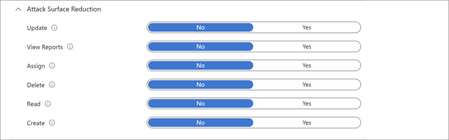
AI-accelerated vulnerability discovery and remediation are changing how organizations manage risk. As discussed in Pavan Davuluri’s recent blog, Microsoft is investing across the vulnerability lifecycle to help organizations identify, validate, and respond faster. For IT and security teams, one challenge lies downstream: deploying fixes quickly across endpoints to reduce exposure. Each update needs to be evaluated, piloted, monitored, and enforced across a mixed fleet of devices and apps. Some parts of the estate can move quickly; others cannot because of compliance requirements, approved change windows, and business-critical dependencies. As organizations adopt AI tools and agents across their environment, maintaining a current and hardened endpoint estate becomes increasingly important. In this context, patching becomes an ongoing operational discipline that combines OS, app, and driver updates with compliance enforcement, access control, and security baseline hardening. To keep pace, organizations need a patch strategy that helps in 3 stages: Mitigate: automate updates that can move quickly Assess: prioritize risk based on exposure and severity Contain: enforce compliance and limit exposure Operationalizing a patch strategy requires coordinated capabilities across endpoint management and security tools. Microsoft Intune brings these capabilities together in a single admin center, alongside the broader Microsoft security ecosystem, and is available with qualifying Microsoft 365 subscriptions 1 . In this post, we show how organizations can use these capabilities to build a patch strategy that helps reduce the time between update release and deployment across their endpoint estate. 1. Mitigate: automate updates that can move quickly A patch strategy is not about pushing every update everywhere at once. It’s about identifying the parts of your estate that can move quickly, then using automation, rings, monitoring, and enforcement to help those updates move with confidence. Regulations, approved change windows, validation needs, and business dependencies will shape what’s possible, but the strategy starts by separating repeatable update work from the exceptions that need deeper review. For OS, app, and driver updates that can move quickly, modern tools can help shorten the time between update release and deployment; without manual rollouts, ticket-driven packaging, or reboot disruption. Operationalize in Intune Windows Autopatch orchestrates ring-based update rollouts to reduce manual effort and keep Windows devices current. To help monitor risk, the Autopatch report visualizes how quickly devices apply updates based on the configured deployment cadence. In this report, devices are categorized as current within three days of update release, at risk between three and seven days, and at critical risk beyond seven days, based on the reporting model used by Windows Autopatch. Learn more about ring-based rollout updates or how to reassess Windows OS updates using this report. Hotpatch (enabled by default for 24H2+ in Intune) applies critical updates without requiring a reboot, helping reduce security gaps while keeping users productive. Figure 1: Watch the latest Microsoft Mechanics episode to see how Windows Autopatch and Hotpatch help organizations accelerate update deployment, reduce operational overhead, and keep devices secure. Intune Enterprise App Management (EAM) supports keeping Windows apps current through auto-updates, including the guided upgrade supersedence reporting, which surfaces outdated versions or version changes. EAM auto-updates are now generally available; details are included in the June Intune What’s new blog. Figure 2: Watch how Intune helps you move from update release to deployment to accelerate responses to vulnerabilities with Windows app management. The enhanced application inventory in the All apps page shows the app version installed on each managed Windows device, refreshed multiple times per day on most active devices, helping teams target app-specific vulnerabilities and confirming when fixes have been applied. The Vulnerability Remediation Agent in Security Copilot uses data from Defender Vulnerability Management to prioritize Common Vulnerabilities and Exposures (CVEs) across Intune-managed Windows devices and apps, and provides recommended remediation actions within Intune. The Vulnerability Remediation Agent is currently in public preview, read the blog to learn more. Figure 3: Watch this video to see how the Vulnerability Remediation Agent in Security Copilot, within Microsoft Intune, helps make agentic security easier to adopt and use. Extend across your endpoint estate Apple devices can be configured for automatic OS updates on managed devices, including enforcing updates to the latest version and deploying Background Security Improvement patches through the settings catalog. App updates can be managed by configuring volume-purchased App Store apps to update automatically and deploy updated app packages to keep apps current across macOS, iPhone, and iPad devices. Android devices can be managed using built-in update policies in Intune, including configuring install windows and freeze periods. For corporate Android fleets, Intune also integrates with OEM firmware management solutions - including Zebra LifeGuard Over-the-Air and Samsung E-FOTA - to enable more granular update control. Managed Google Play also supports configurable app auto-update modes, allowing admins to define whether updates install automatically, on Wi-Fi only, or manually. 2. Assess: prioritize risk based on exposure and severity The first step is reducing exposure across the parts of your estate that can move quickly. But not every system, application, or vulnerability can be addressed through broad update deployment. Teams also need a way to determine which risks require immediate action and which ones can be addressed over time. A calendar-based approach can treat every CVE equally. However, it doesn’t account for severity, exposure, or business impact. As AI accelerates vulnerability discovery, this can lead to effort being spent on lower-risk updates while higher-risk updates remain unaddressed. Risk-based service level objectives (SLOs) help bring prioritization to address this challenge. Instead of patching on a fixed schedule, IT and security teams can align response timeframes by severity, moving quickly on actively exploited or critical vulnerabilities, and applying a more measured approach where risk or impact is lower. This stage creates a clearer prioritization of remediation and helps bridge the view between the security teams that identify threats and the IT teams that act on them. Operationalize in Intune and Microsoft Defender The security update status dashboard in Intune provides an aggregated view of update compliance across Windows clients, Windows servers, and Microsoft 365 Apps. It shows overall counts of devices in different states across Intune-endpoints and helps teams identify where remediation should be focused. These status categories reflect how quickly devices apply updates based on a configured deployment cadence and internal SLOs. Figure 4: Security update dashboard showing patch status for Windows clients, servers, and Microsoft 365 apps. Microsoft Defender Vulnerability Management surfaces CVEs, affected devices, vulnerable software, and recommended remediation actions, offering a shared view of risk and progress across IT and security teams. Translate Defender recommendations into targeted Intune actions described in the mitigate section, such as updating software or moving devices through expedited remediation workflows so teams can focus on vulnerabilities that are actively exploited or most likely to affect an organization. Extend across your endpoint estate For Apple devices, use the Apple software update report in Intune to monitor update status across macOS, iOS, and iPadOS. For Android, compliance reporting surfaces devices that fall behind on OS version or security patch level. 3. Contain: enforce patch compliance and limit exposure Even with automated deployments and prioritized triage, gaps can remain. Some devices are unsupported, fall behind, operate on slower deployment rings, and others can’t be patched quickly. A patch strategy needs to focus on including containment for those surfaces. Compliance controls, conditional access, and device hardening act as an always-on safety net that limits risks that can fall through gaps. Compliance policies and Conditional Access can use a patch state as a signal for resource access, preventing non-compliant devices from accessing corporate resources. Security baselines reduce the attack surface by limiting risky defaults and common attack patterns. Together, these controls shift enforcement from a periodic activity to a continuous condition across a fleet. Operationalize in Intune and Defender Use compliance policies in Intune to define what "current" means, including minimum OS build, required update levels, risk status, and encryption state. Use Conditional Access (managed in Microsoft Entra, accessible from the Intune admin center) to control access to company resources based on user and device health. Combined with threat signals from Microsoft Defender, these policies help prevent non-compliant devices from accessing corporate resources. Use Microsoft Defender Vulnerability Management and Microsoft Security Exposure Management insights to identify exposed assets, prioritize remediation, and apply recommended protections where patching must move more slowly. Apply Intune security baselines to establish Microsoft-recommended configurations on Windows devices, such as disabling risky defaults, blocking common attack techniques, and reducing configuration drift. Watch this demo on security baselines being applied in the Zero Trust workshop. Use attack surface reduction policies in Intune to deploy Microsoft Defender for Endpoint protections, such as ASR rules and network protection, that help block common attack techniques on devices that can't be patched right away. Figure 5: Watch this Demo on how you can manage devices and implement Conditional Access with Intune. Extend across your endpoint estate Compliance policies and Conditional Access controls apply across Windows, macOS, iOS/iPadOS, and Android. Intune app protection policies extend compliance requirements and data protections to managed apps used for work on personal devices and add an additional layer of data protection on corporate devices. Use the settings catalog and configuration profiles to apply the same hardening intent on macOS, iOS/iPadOS, and Android, reducing configuration drift across platforms. Stay ahead with a patch strategy As vulnerability discovery and response continue to accelerate, organizations need an operational strategy that balances speed, risk, and resilience. By automating updates where possible, prioritizing remediation based on exposure, and limiting exposure through compliance and security controls, teams can reduce risk across their endpoint estate. Intune helps simplify this approach by bringing these capabilities together alongside the rest of your Microsoft security tools and ecosystem. Get started with Microsoft Secure Now to assess risk across your digital estate. Explore the new security update status dashboard in Intune. Harden the admin plane and review the best practices for securing Microsoft Intune. 1 Licensing and requirements Feature availability and included capabilities vary by Microsoft 365 subscription plan and feature. Some Microsoft capabilities referenced in this post may require specific licenses or additional enablement. Advanced Microsoft Intune capabilities are now included in Microsoft 365 E5, with select capabilities available in Microsoft 365 E3 as part of updates effective July 1, 2026. Existing customers will receive a 30-day notice in the Microsoft Admin Center prior to availability, with access beginning by August 2026. Microsoft Security Copilot and related AI capabilities may require separate licensing, learn more here. Stay up to date! Bookmark the Microsoft Intune Blog and follow us on LinkedIn or @MSIntune and @IntuneSuppTeam on X to continue the conversation.The Fileless Paradox: How My 33-Day-Old Research Became Today's Ransomware Reality
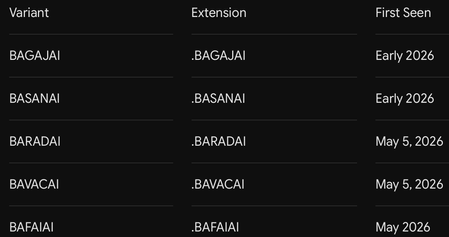
33 Days Before BARADAI Emerged 🔴 Before You Read: What Is This Article About? This is the first article I have published on Microsoft Tech Community, and this is not a standard threat report. This is the story of being right before anyone believed it — and of a ransomware family called BARADAI that proved it. On April 5, 2026, I published a technical research article documenting, in detail, a fileless malware architecture that operated entirely in RAM using steganography and Windows Registry persistence. When I shared it on social media, the reactions were immediate and brutal: “A fileless payload cannot be persistent. If it leaves no trace on disk, it cannot survive a reboot.” “This technique is entirely theoretical. No real threat actor would ever use this in production.” “You cannot have persistence without leaving traces. Pick one.” And the most absurd ones: “Stop writing articles with AI.” “This level of technical detail is unrealistic — did AI generate this?” “Forensic artifacts cannot be erased. What kind of technique is this?” At that moment, I could not prove myself. I had a working proof-of-concept. I had built the architecture myself. The technical logic was sound. But I did not yet have a real-world threat actor using it in production. 33 days later, BARADAI appeared. And it used the exact same playbook I had written. This article is the first volume of the “We Saw It Coming” series. In this series, I correlate my independent research with emerging real-world threats, document technical overlaps, and provide actionable detection and defense guidance for Microsoft environments. Right now, I am actively trying to reverse and decrypt BARADAI. I do not yet have a definitive solution. But I am publishing this journey because my goal is to finalize a solution by collecting additional logs and intelligence. 📌 Table of Contents The Moment Nobody Believed 33 Days Later: Meet BARADAI The B-Family: Shared Infrastructure Ecosystem Side-by-Side: Technical Overlap Analysis Deep Dive: The Fileless Paradox — How Both Architectures Work The PAIDMEMES Anomaly: Forensic Residue Inside BARADAI My Technique vs BARADAI: Shared Technical Patterns Microsoft Sentinel Detection Rules (KQL) MITRE ATT&CK Mapping Decryption Research and My Current Approaches Defensive Recommendations Sources and References ------------------------------------------------------------------------------ 1. The Moment Nobody Believed April 5, 2026 — A Research Paper, a Community, and Silence On April 5, 2026, I published a detailed technical research article on Medium titled: “STEGOMALWARE — PNG Persistence Through Steganography and Windows Registry” The article documented a complete attack architecture that I designed and tested from scratch in a controlled laboratory environment. My core thesis was this: A fileless malware strain can achieve persistent, reboot-resilient execution without ever writing a malicious executable to disk — by hiding its payload inside the pixels of a PNG image using LSB steganography and leveraging the Windows Registry for persistence. I demonstrated this by building a keylogger. The architecture had four defining characteristics: Feature 1 — Fileless Execution (RAM-Only) The malicious payload never touches disk as an executable file. Instead, a small, “clean-looking” loader script extracts hidden code from the pixel data of a PNG image and executes it directly in RAM. No .exe, no .py, no .dll on disk. Traditional antivirus file-scanning mechanisms are effectively blind to this. Feature 2 — Registry-Based Persistence Contrary to critics claiming that fileless malware cannot survive reboots, the loader writes itself into the Windows Registry Run key: HKCU\SOFTWARE\Microsoft\Windows\CurrentVersion\Run This means that every time Windows starts, the loader executes again, extracts the payload from the PNG, and runs it back in memory. The malware lives in the Registry — not on disk. Feature 3 — Process Masquerading I compiled the loader under the name svchost.exe and assigned it a Windows service icon. When viewed in Task Manager, it appeared indistinguishable from a legitimate Windows system process. Feature 4 — Self-Repair (Self-Integrity Check) The loader continuously validated both its Registry entry and its file copy. If an antivirus product deleted the file or removed the Registry entry, the loader detected the modification and restored itself during the next execution cycle. Feature 5 — Intelligent Data Collection The keylogger I built automatically embedded collected data into the pixels of a PNG image every 10 characters or every 30 seconds — whichever occurred first. After each cycle, it reset itself, cleared temporary memory artifacts, and initiated a fresh collection loop. This architectural design enabled the malware to remain undetected on a system for months. Because there was no ever-growing log file on disk — the data was continuously transferred into images. ------------------------------------------------------------------------------------------ The Reactions The reactions I received when sharing this research did not surprise me, but they disappointed me. Technical objections: “Fileless malware, by definition, cannot survive reboots. No disk means no persistence.” “Forensic evidence cannot be erased. This makes no technical sense.” “If you are writing to the Registry, then it is not truly fileless.” Personal attacks: “Stop writing with AI.” “If you can perform technical analysis this detailed, why has nobody heard of you before?” “Copied from AI — even the formatting looks AI-generated.” This feedback revealed two things: First, people fundamentally misunderstood the concept of fileless malware — they were confusing “fileless execution” with “leaving absolutely no traces anywhere.” The Registry is not a traditional file in the conventional sense, yet it remains a persistent storage mechanism resilient across reboots. Second, it demonstrated how easily independent researchers are dismissed. Research not published by a major corporation or university was automatically labeled “AI-generated” or “theoretical.” At that moment, I could not prove myself. 33 days later, BARADAI proved me right. ------------------------------------------------------------------------------ 2. 33 Days Later: Meet BARADAI May 5–8, 2026 — A New Threat Surfaces On May 5, 2026, researchers at PCrisk documented a new ransomware sample submitted to VirusTtl. On the same day, CYFIRMA’s underground forum monitoring team flagged it in their threat intelligence feeds. By May 8, CYFIRMA’s Weekly Intelligence Report had published the first structured analysis. The threat was named BARADAI — derived from the extension it appends to encrypted files: .BARADAI -------------------------------------------- What Is BARADAI? BARADAI is a Windows ransomware variant belonging to the MedusaLocker family. MedusaLocker has been active since late 2019 and remains one of the most prolific and long-lived ransomware-as-a-service (RaaS) operations in the threat landscape. BARADAI is a specific variant of the MedusaLocker v3 architecture — sometimes tracked in threat intelligence repositories as “BabyLockerKZ.” Detection names across major security vendors: Microsoft Defender: Ransom:Win64/MedusaLocker.MZT!MTB ESET: Win64/Filecoder.MedusaLocker.A Avast: Win64:MalwareX-gen [Ransom] Kaspersky: HEUR:Trojan-Ransom.Win32.Generic ------------------------------------------------------------ How Does It Operate? BARADAI follows a double-extortion model. Silent Phase (Reconnaissance) After initial access, BARADAI does not immediately begin encryption. Instead, it performs systematic reconnaissance: -Enumerates running processes -Maps network topology -Collects browser-stored credentials -Harvests session cookies and SSL certificates -Captures desktop screenshots -Exfiltrates collected data to attacker-controlled C2 infrastructure Encryption Phase After exfiltration is complete, BARADAI activates its cryptographic payload: -AES-256-CBC for file content encryption -RSA-4096 for key protection Extortion Phase A ransom note (read_to_decrypt_files.html or WHATS_HAPPEND.txt) is dropped into every encrypted directory. Victims are given a 72-hour deadline. If payment is not made before expiration, stolen data is published on the group’s Data Leak Site (DLS). ------------------------------------------------------------------- Confirmed Targeting as of May 2026 Geographies -United States -Brazil -France -Australia -Italy -Israel -Malaysia Sectors -Education -Manufacturing -Engineering -Retail -Logistics -NGOs Ransom Demand Range -USD $10,000 — $80,000 per incident (CYFIRMA, May 2026) ------------------------------------------------------------------ 3. The B-Family: Shared Infrastructure Ecosystem One of the most important findings that emerged during my analysis was this: BARADAI is not operating alone. Threat intelligence monitoring identified a cluster of MedusaLocker variants sharing: -The same naming conventions -Similar code architecture -And most critically — the same Tor-based infrastructure I named this cluster: “The B-Family” --------------------------------------------- Evidence of Shared Infrastructure The strongest evidence of coordination inside the B-Family is not behavioral similarity — it is shared infrastructure. BARADAI’s ransom note lists the following Tor hidden service for victim negotiations: t33zoj4qwv455fog7qnb2azi5xcdxkixughmmduzbw2rtdgryqfbh6id.onion This is identical to the Tor address listed as the Data Leak Site and file leak server for BAVACAI — independently verified by ransomware.live, which identified the server running NGINX 1.24.0. PCrisk’s BARADAI documentation also includes screenshots of the leak site using the filename prefix: bavacai- This is structural evidence confirming that the same backend infrastructure serves both variants. What This Means The B-Family is not a collection of copycat operations. It is a single operation — or a tightly coordinated RaaS affiliate ecosystem — using different “brand names” per campaign in order to complicate attribution, tracking, and law enforcement disruption. ----------------------------------------------------------- Known Victims (BAVACAI DLS — Shared Backend) As of May 8, 2026, the BAVACAI DLS listed 16 victims — all published simultaneously on May 5. ------------------------------------------------------------ 4. Side-by-Side: Technical Overlap Analysis This section is the core of the article. The table below correlates the exact techniques documented in my April 5, 2026 research with the verified BARADAI behaviors documented by CYFIRMA, PCrisk, and the broader MedusaLocker analysis corpus. The conclusion is direct and unavoidable: The architecture I built, tested, documented, and published in a controlled laboratory environment on April 5, 2026 — the same architecture the community dismissed as “theoretical,” “AI-generated,” and “impossible” — was operationalized by a real threat actor 33 days later. -------------------------------------------------------- 5. Deep Dive: The Fileless Paradox Let us settle the debate permanently. The Misconception: “Fileless Malware Cannot Be Persistent” The argument I repeatedly encountered was this: “If malware does not leave files on disk, it cannot survive a reboot because RAM is volatile.” Technically correct. Strategically incomplete. It is true that RAM-resident code disappears when the system powers off. However, persistence does not require the malicious payload itself to reside on disk. It requires a mechanism that re-executes the payload after reboot. Those are two different things. -------------------------------------------------------------- The Architecture: How It Actually Works ┌──────────────────────────────────────────────────────────┐ │ ATTACK ARCHITECTURE │ │ │ │ DISK (minimal footprint): │ │ ┌──────────────────────────────────────────────────┐ │ │ │ loader.exe (masquerading as svchost.exe) │ │ │ │ cover_image.png (contains hidden payload) │ │ │ └──────────────────────────────────────────────────┘ │ │ │ │ │ REGISTRY (persistence): │ │ │ ┌──────────────────────────────────────────────────┐ │ │ │ HKCU\...\Run\WindowsUpdateService │ │ │ │ → points to loader.exe │ │ │ └──────────────────────────────────────────────────┘ │ │ │ │ │ ON EVERY BOOT: │ │ │ Registry triggers → loader.exe executes → │ │ Reads PNG pixels → extracts payload → │ │ Loads into RAM → executes │ │ (No malicious .exe is ever written to disk) │ │ │ │ RAM (execution): │ │ ┌──────────────────────────────────────────────────┐ │ │ │ Keylogger / RAT / Ransomware module │ │ │ │ Executes entirely in memory │ │ │ │ Invisible to disk-based AV scanning │ │ │ └──────────────────────────────────────────────────┘ │ └──────────────────────────────────────────────────────────┘ Only the loader exists on disk — and the loader itself is a small, legitimate-looking executable without a malicious signature. The malicious payload lives in: -The pixel data of the PNG image (steganographically encoded) -RAM (during active execution) The Registry provides the trigger mechanism — not the payload itself. That was the exact distinction critics failed to understand. ------------------------------------------------------------------ Why It Evades Traditional Detection BARADAI’s Implementation BARADAI uses the same logical architecture at larger scale. The MedusaLocker v3 binary: - Achieves persistence via Registry Run Key: HKCU\SOFTWARE\Microsoft\Windows\CurrentVersion\Run\BabyLockerKZ -Executes core ransomware logic in memory without writing recoverable payload components to disk -Uses Parent PID Spoofing (T1134.004) to appear as a child process of explorer.exe or svchost.exe -Restores itself through persistence mechanisms if binaries are deleted ------------------------------------------------------------------------------ 6. The PAIDMEMES Anomaly: Forensic Residue Inside BARADAI One of BARADAI’s most distinctive — and frankly bizarre — technical characteristics is its configuration and key storage mechanism. Unlike most ransomware variants that attempt to keep all cryptographic material exclusively in volatile memory, BARADAI writes directly into the Windows Registry under an extremely unusual hive: HKCU\SOFTWARE\PAIDMEMES\PUBLIC HKCU\SOFTWARE\PAIDMEMES\PRIVATE - HKCU\SOFTWARE\PAIDMEMES\PUBLIC stores the Base64-encoded RSA public key extracted from the malware configuration. - HKCU\SOFTWARE\PAIDMEMES\PRIVATE stores encrypted runtime state and configuration parameters required for persistence across multiple execution instances. ------------------------------------------- Why This Matters The PAIDMEMES Registry hive is not random — it serves a specific operational purpose. When BARADAI is launched with the -network flag (instructing it to encrypt network shares), it spawns a secondary instance of itself as a non-elevated process. By storing cryptographic keys and configuration inside the Registry, that secondary instance — even without administrative privileges — can access everything necessary to continue the attack. These two Registry artifacts represent your highest-confidence BARADAI detection signals: HKCU\SOFTWARE\PAIDMEMES (Key creation = active infection) HKCU\...\Run\BabyLockerKZ (Persistence = infection survived reboot) ------------------------------------------------------------ 7. My Technique vs BARADAI: Detailed Technical Similarities Now let us go deeper technically and explain why I believe I am one of the people closest to understanding BARADAI. 7.1 Payload Concealment: LSB Steganography My Technique I replaced the least significant bits (LSB) of RGB channels in PNG pixels with Base64-encoded keylogger payload bits. A 1/255 modification inside an 8-bit value is visually imperceptible to the human eye. In BARADAI The stegomalware technique forms the core of payload transportation. The same LSB logic applies: -No visible image corruption -No signature-based scanner triggers -Payload blended into image “noise” Shared Point Mathematically, it is the same approach. The only difference is scale: I concealed a keylogger. BARADAI conceals a ransomware module. -------------------------------------------------------- 7.2 Fileless + Registry: The “Impossible” Combination My Technique I registered my loader under: HKCU\...\Run\WindowsUpdateService Every time Windows booted, the loader executed, read the PNG, extracted the payload into RAM, and launched it. A .py file never existed on disk. In BARADAI HKCU\...\Run\BabyLockerKZ Exactly the same mechanism. Same Registry path. Same logic. Same “fileless yet persistent” paradox. ------------------------------------------------- Shared Point When critics claimed these two concepts could not coexist, they were wrong. Both BARADAI and I proved it. 7.3 Process Concealment: svchost.exe Masquerading My Technique I compiled the loader with PyInstaller under the name svchost.exe and assigned it a Windows service icon. Inside Task Manager, it appeared identical to a legitimate system process. In BARADAI BARADAI uses Parent PID Spoofing. Through Windows API manipulation, it makes execution appear as if initiated by svchost.exe or explorer.exe. EDR behavioral engines typically flag unknown processes performing system-level modifications. This technique bypasses those checks. Shared Point Same concealment strategy. Different implementation layer. 7.4 Timers and Silent Collection My Technique The keylogger embedded data into PNG images every 10 characters OR every 30 seconds — whichever occurred first. After each cycle: -Temporary memory artifacts were cleared -The process reset -No ever-growing log file existed on disk This is why antivirus products could not see it. This is why it could remain undetected for months. In BARADAI “Ghost Software.” After initial compromise, BARADAI does not immediately encrypt. It silently waits. Harvests credentials. Maps the network. Exfiltrates data. Encryption is the final signature. Shared Point Both architectures rely on a “silent hunter” model. I used 30-second image-based exfiltration loops. BARADAI remains dormant for days or weeks while collecting intelligence. The logic is identical. Only the timescale differs. ---------------------------------------------------------------- 7.5 Why I Believe I Am One of the People Closest to Solving BARADAI These similarities are not coincidence. They reflect the same technical mindset reaching the same solutions to the same problems. Because I built this architecture from scratch: -I understand its weak points — because I encountered the same weak points myself -I can reverse-engineer LSB steganography workflows — because I wrote the same algorithm -I understand Registry-based configuration logic — the PAIDMEMES hive pattern is familiar to me - I understand interruption points inside timer-based collection loops — because I built the same cycle architecture myself ------------------------------------------------------------------------------ 8. Microsoft Sentinel Detection Rules (KQL) The following Kusto Query Language (KQL) queries are designed for deployment in Microsoft Sentinel. They target specific behavioral artifacts associated with BARADAI and the broader MedusaLocker family. Deploy all three as scheduled analytics rules. Rule 1: PAIDMEMES / BabyLockerKZ Registry Artifact Detection High confidence. Detects exact forensic strings unique to MedusaLocker v3 / BARADAI. If This Rule Triggers The device is actively infected with BARADAI or the malware has successfully established persistence. Treat as a P1 incident. Immediately isolate the endpoint. Rule 2: Shadow Copy & Backup Deletion Chain Detection High confidence. Detects BARADAI’s recovery-destruction sequence. If This Rule Triggers A ransomware payload is actively preparing for encryption. This is your final detection window before data loss begins. Immediately isolate the affected endpoint and every reachable network share. Rule 3: EnableLinkedConnections — Network Share Privilege Escalation Detection Medium-High confidence. Detects BARADAI’s technique for accessing administrator-mapped network drives from non-elevated processes. If This Rule Triggers An attacker is preparing to encrypt network shares normally visible only to administrator-level processes. This is a pre-encryption lateral movement signal. ---------------------------------------------------------------- 9. MITRE ATT&CK Mapping ------------------------------------------------------------------------------ 10. Decryption Research and My Current Approaches Let me be completely transparent. Current status: There is no verified public decryptor available for BARADAI. -The No More Ransom project lists no decryptor for any MedusaLocker v3 / BabyLockerKZ variant -The AES-256-CBC + RSA-4096 implementation is mathematically sound -Historical decryptors existed only for significantly older MedusaLocker v1 and early v2 variants by exploiting key sanitization weaknesses in memory management -Those vulnerabilities were patched in v3 What We Know About the Encryption BARADAI uses intermittent encryption for large files: -Files larger than ~7.7MB are not fully encrypted -The malware encrypts 750KB, skips 250KB, encrypts another 750KB, and repeats This dramatically reduces encryption time while still rendering the file structurally unusable. --------------------------------------------------------------- What I Am Currently Researching I am currently analyzing the BARADAI binary from multiple angles: PRNG Weaknesses I am investigating the entropy source used during AES key generation. If the PRNG is insufficiently random, the effective key space may be reducible. Key Sanitization Behavior I am investigating whether AES keys remain in memory after usage. This weakness existed in MedusaLocker v1 and v2 and enabled historical decryptors. Although patched in v3, implementation mistakes remain possible. PAIDMEMES Registry Storage Analysis The PAIDMEMES hive stores runtime state. I am investigating whether this storage area contains recoverable cryptographic material. Registry-stored cryptographic data could provide a viable decryption foothold. Weaknesses in Intermittent Encryption The 750KB-encrypt / 250KB-skip pattern enables structural comparisons between encrypted and unencrypted regions. Known file formats (.docx, .xlsx, etc.) contain predictable header structures. This creates potential for partial known-plaintext attacks. ------------------------------------------------------------------------------ I will publish my findings in Vol.4 of this series regardless of the outcome. ------------------------------------------------- If You Are a BARADAI Victim -Do not pay the ransom until all alternatives are exhausted -Contact professional incident response services -Preserve all encrypted files and ransom notes — a future decryptor may eventually become available -Regularly monitor nomoreransom.org ---------------------------------------------------- 11. Defensive Recommendations Priority 1: Phishing-Resistant MFA (Against AiTM) Traditional MFA — push notifications, SMS codes, authenticator apps — can be defeated by AiTM reverse-proxy attacks. Deploy: -FIDO2 hardware security keys (YubiKey, etc.) -Windows Hello for Business These technologies cryptographically bind authentication tokens to the legitimate TLS session of the login portal. Stolen cookies become useless in separate sessions. ------------------------------------------------------- Priority 2: Eliminate RDP Exposure BARADAI’s primary initial access vector is exposed RDP on TCP 3389. -Disable Internet-facing RDP at the perimeter firewall -Enforce MFA + VPN for all remote administrative access -Implement account lockout policies and Network Level Authentication (NLA) Priority 3: Immutable Backups BARADAI deletes Volume Shadow Copies via vssadmin. Implement: -A 3–2–1 backup strategy with at least one offline/immutable copy -Azure Immutable Blob Storage (WORM) -Multi-user authorization for backup vaults -Monthly restoration testing --------------------------------------------- Priority 4: FSRM Canary Files Configure Windows File Server Resource Manager (FSRM): Immediately alert when files with extensions: .BARADAI .BAVACAI .BASANAI .BAGAJAI are created. Trigger automated scripts that: -Terminate the originating user session -Revoke network share access -------------------------------------------------- Priority 5: Deploy the Sentinel KQL Rules Above The three rules in Section 8 provide layered behavioral detection that signature-based tooling cannot replicate. Deploy them before an incident occurs. -------------------------------------------------------------------------- Priority 6: Zero Trust Architecture BARADAI’s EnableLinkedConnections Registry modification allows standard user processes to encrypt administrator-mapped drives. -Segment backup servers, Domain Controllers, and critical infrastructure -Require hardware-backed MFA for sensitive segments -Implement least privilege and Just-In-Time (JIT) administrative access with Azure PIM ------------------------------------------------------------------------ 📢 Call to Action: Collective Intelligence I started this research alone. But disrupting the impact of the B-Family requires collective effort. If your organization or threat-hunting operations have observed additional logs, unusual network traffic, or alternative steganographic payload samples associated with the B-Family (BARADAI, BAVACAI, BASANAI, etc.), do not remain silent. Data Sharing You may share anonymized IoCs or log artifacts with us. and Direct Contact If you have technically significant observations or findings related to BARADAI analysis, you can contact me directly through my Webex profile. Webex Contact - email address removed for privacy reasons Our collective security depends on the aggregation of these small signals. --------------------------------------------- Sources and References For technical verification and further investigation, refer to the following resources: Threat Intelligence & Ransomware Reports CYFIRMA: Weekly Threat Intelligence Report (2026–05–08) Ransomware.live: BAVACAI Group & DLS Infrastructure PCrisk: BAVACAI | BAGAJAI | BASANAI Analysis Technical Foundations & MITRE TTPs CISA: MedusaLocker Advisory (AA22–181A) Picus Security: MedusaLocker TTPs and Simulation Barracuda: GhostFrame Phishing Kit Spotlight (2025–12–04) Detection & Response Tools Microsoft Sentinel: Official Shadow Copy Deletion Analytics Rule GitHub (Bert-JanP): Hunting Queries and Detection Rules No More Ransom: Global Decryption Tools Repository Cassandra MARE Independent Research Deniz Tektek: Stegomalware & Fileless Persistence (2026–04–05) https://medium.com/@deniizz/stegomalware-steganografi-ve-windows-registry-ile-kalıcılık-sağlayan-png-01e50849a218 Cassandra Community: Initial BARADAI Analysis (2026–05–14) https://medium.com/@cassandracommunity/baradai-ransomware-hayalet-yazılım-ı-parçalarına-ayırıyoruz-0c04bb008f73 This article has been published strictly for defensive purposes. All described techniques have been analyzed within the context of threat detection and defense. This is my debut article on the Microsoft Tech Community. I am Deniz Tektek, a Red Team Operator, Cybersecurity Analyst, and Founder of the Cassandra community. My work focuses on the intersection of human psychology, IoT security, and the development of zero-trust local AI agents. This article, “The Fileless Paradox,” is the inaugural entry in my "We Saw It Coming" threat intelligence series, where I document technical overlaps between independent research and active real-world threats. What’s Next? Vol. 2: "Invisible Exfiltration" — Analyzing how BARADAI’s C2 hides in plain sight. Vol. 3: "The Human Gateway" — Why your MFA and AI-driven defenses are currently being bypassed. Vol. 4: "Cracking BARADAI" — My ongoing decryption research. Connect With Me If you want to discuss these findings, exchange logs, or collaborate on security research, please check my profile bio for contact information or connect with me via LinkedIn. I welcome all technical perspectives and peer reviews. My LinkedIn: https://www.linkedin.com/in/deniz-t-91166438a Deniz Tektek — May 2026 © Deniz Tektek & Cassandra — All Rights Reserved. Originally published on Microsoft Tech Community. Cross-posted on Medium.
Unsanctioned cloud apps generates constant alerts
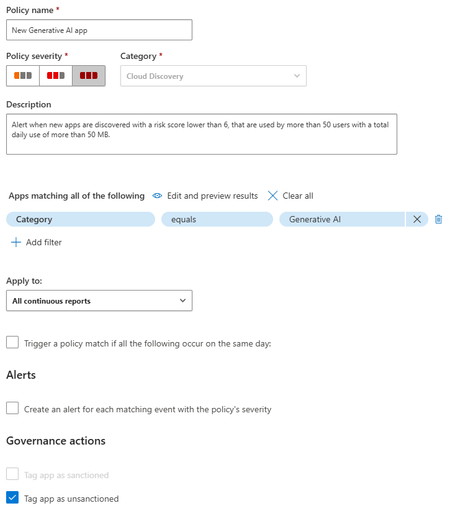
When I mark a cloud app as unsanctioned it created a URL based indicator to block the site. However, it also by default enables the Generate Alert option on the indictor. This causes my SOC to bet inundated with garbage alerts. Now normally if I'm just unsanctioning one Cloud App a could go and turn of the alert. However, I use cloud app policy that will identify any new Cloud Apps in an entire category and then unsanction it. But it enables Generate Alert on the URL indicator. Then if someone accesses that new one the generate alert kicks off. I don't want to have to go into every new app and untick generate alert manually that's just too time consuming. Is there a way to change the default behaviour when adding an indicator to not enable the generate alert? Of is there some other way to do this? I could consider using power automate or something but I'd rather the default behaviour be the fix as automation can break. I don't have time to babysit it.
From “No” to “Now”: A 7-Layer Strategy for Enterprise AI Safety
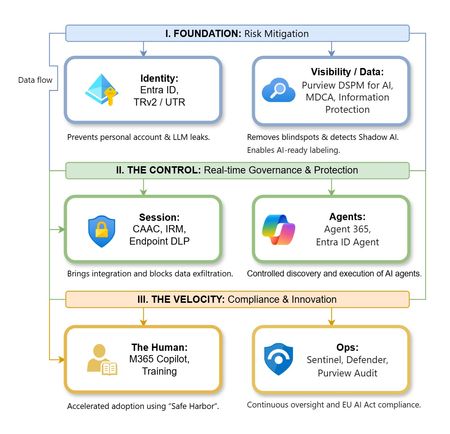
The “block” posture on Generative AI has failed. In a global enterprise, banning these tools doesn't stop usage; it simply pushes intellectual property into unmanaged channels and creates a massive visibility gap in corporate telemetry. The priority has now shifted from stopping AI to hardening the environment so that innovation can run at velocity without compromising data sovereignty. Traditional security perimeters are ineffective against the “slow bleed” of AI leakage - where data moves through prompts, clipboards, and autonomous agents rather than bulk file transfers. To secure this environment, a 7-layer defense-in-depth model is required to treat the conversation itself as the new perimeter. 1. Identity: The Only Verifiable Perimeter Identity is the primary control plane. Access to AI services must be treated with the same rigor as administrative access to core infrastructure. The strategy centers on enforcing device-bound Conditional Access, where access is strictly contingent on device health. To solve the "Account Leak" problem, the deployment of Tenant Restrictions v2 (TRv2) is essential to prevent users from signing into personal tenants using corporate-managed devices. For enhanced coverage, Universal Tenant Restrictions (UTR) via Global Secure Access (GSA) allows for consistent enforcement at the cloud edge. While TRv2 authentication-plane is GA, data-plane protection is GA for the Microsoft 365 admin center and remains in preview for other workloads such as SharePoint and Teams. 2. Eliminating the Visibility Gap (Shadow AI) You can’t secure what you can't see. Microsoft Defender for Cloud Apps (MDCA) serves to discover and govern the enterprise AI footprint, while Purview DSPM for AI (formerly AI Hub) monitors Copilot and third-party interactions. By categorizing tools using MDCA risk scores and compliance attributes, organizations can apply automated sanctioning decisions and enforce session controls for high-risk endpoints. 3. Data Hygiene: Hardening the “Work IQ” AI acts as a mirror of internal permissions. In a "flat" environment, AI acts like a search engine for your over-shared data. Hardening the foundation requires automated sensitivity labeling in Purview Information Protection. Identifying PII and proprietary code before assigning AI licenses ensures that labels travel with the data, preventing labeled content from being exfiltrated via prompts or unauthorized sharing. 4. Session Governance: Solving the “Clipboard Leak” The most common leak in 2025 is not a file upload; it’s a simple copy-paste action or a USB transfer. Deploying Conditional Access App Control (CAAC) via MDCA session policies allows sanctioned apps to function while specifically blocking cut/copy/paste. This is complemented by Endpoint DLP, which extends governance to the physical device level, preventing sensitive data from being moved to unmanaged USB storage or printers during an AI-assisted workflow. Purview Information Protection with IRM rounds this out by enforcing encryption and usage rights on the files themselves. When a user tries to print a "Do Not Print" document, Purview triggers an alert that flows into Microsoft Sentinel. This gives the SOC visibility into actual policy violations instead of them having to hunt through generic activity logs. 5. The “Agentic” Era: Agent 365 & Sharing Controls Now that we're moving from "Chat" to "Agents", Agent 365 and Entra Agent ID provide the necessary identity and control plane for autonomous entities. A quick tip: in large-scale tenants, default settings often present a governance risk. A critical first step is navigating to the Microsoft 365 admin center (Copilot > Agents) to disable the default “Anyone in organization” sharing option. Restricting agent creation and sharing to a validated security group is essential to prevent unvetted agent sprawl and ensure that only compliant agents are discoverable. 6. The Human Layer: “Safe Harbors” over Bans Security fails when it creates more friction than the risk it seeks to mitigate. Instead of an outright ban, investment in AI skilling-teaching users context minimization (redacting specifics before interacting with a model) - is the better path. Providing a sanctioned, enterprise-grade "Safe Harbor" like M365 Copilot offers a superior tool that naturally cuts down the use of Shadow AI. 7. Continuous Ops: Monitoring & Regulatory Audit Security is not a “set and forget” project, particularly with the EU AI Act on the horizon. Correlating AI interactions and DLP alerts in Microsoft Sentinel using Purview Audit (specifically the CopilotInteraction logs) data allows for real-time responses. Automated SOAR playbooks can then trigger protective actions - such as revoking an Agent ID - if an entity attempts to access sensitive HR or financial data. Final Thoughts Securing AI at scale is an architectural shift. By layering Identity, Session Governance, and Agentic Identity, AI moves from being a fragmented risk to a governed tool that actually works for the modern workplace.