encryption
67 TopicsExtending Protection for Confidential SharePoint Online Files
Sensitivity labels offer great protection against unauthorized access, but sometimes files that aren’t encrypted escape from a document library. SharePoint Online can now use sensitivity labels configured with user-defined permissions (UDP) to extend protection to downloaded files. The magic works by configuring permissions on download based on the membership of the user who downloads a file. https://office365itpros.com/2026/02/26/sensitivity-label-extend-protection/146Views0likes0Comments
Encrypted vhdx moved to new host, boots without pin or recovery key
Hyper-V environment. Enabled VTPM on guest Server, 2022 OS and encrypted OS drive C:\ with BitLocker. Host server 2022 has physical TPM. Shut down guest OS and copied vhdx file to another Hyper-V host server that is completely off network (also server 2022 with a physical TPM). Created a new VM based on the "encrypted" vhdx. I was able to start the VM without needing a PIN or a recovery key. Doesn't this defeat the whole point of encrypting vhd's? Searching says that this should not be possible, but I replicated it twice on two different off network Hyper-V host servers. Another odd thing is that when the guest boots on the new host and you log in, the drive is NOT encrypted. So, where's the security in that? Does anyone have any ideas on this or if I'm missing something completely? Or have I just made Microsoft angry for pointing out this glaring flaw??561Views0likes4Comments
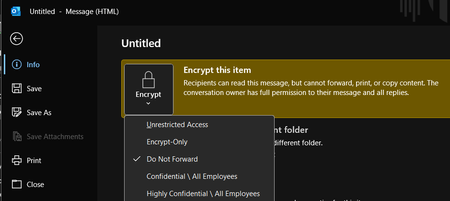
Outlook Classic for M365 - File > Encrypt > 'Encrypt-Only' option applies 'Do Not Forward' label?
I recently joined a new company and am helping support their M365 tenant and admin duties. I'm running into a very weird issue where no recipients can actually read/view the message when we encrypt emails using only 1 specific method (our organization largely uses the Outlook Classic for Microsoft 365 desktop app). If a user follows this method, for some reason the 'Do Not Forward' label is applied to the encryption, despite specifically selecting 'Encrypt-Only' - it defaults to 'Do Not Forward' every single time: New Email > File > Encrypt > Encrypt-Only Sending emails with this method gives any/all recipients a "You don't have sufficient permissions to open the mail." regardless of where they try to open the email (OWA, Outlook Classic, New Outlook) Yet, if the user tries this other method below - the proper Encrypt-Only label is applied, and any Outlook client immediately and opens/views the email as you'd expect: New Email > Options ribbon > Encrypt properly applies the Encrypt-Only label I verified IRM (Identity Rights Management) is enabled for our tenant: And encryption tests pass with flying colors: Ultimately, I'm at a loss for what's going on here and specifically where to check to fix this issue for this 1 specific encryption method. Poking around in the Purview portal, I'm having a hard time figuring out where these encryption policies/settings lie and how to get this method to stop defaulting to 'Do Not Forward' even though 'Encrypt-Only' is checked.Solved1.3KViews2likes5CommentsExternal people can't open files with Sensitivity Label encryption.
Question: What are the best practices for ensuring external users can open files encrypted with Sensitivity Labels? Hi all. I've been investigating proper setup of sensitivity labels in Purview, and the impact on user experience. The prerequisites are simple enough, creating and configuring the labels reasonably straightforward, and publishing them is a breeze. But using them appears to be a different matter! Everything is fine for labels that don't apply encryption (control access) or when used internally. However, the problems come when labels do apply encryption and information is sent externally. The result is that we apply a label to a document, attach that document to an email, and send it externally - and the recipient says they can't open it and they get an error that their email address is not in our directory. This is because due to the encryption, the external user needs to authenticate back to our tenant, and if they're not in our tenant they obviously can't do this so the files won't open. So, back to the question above. What's the easiest / most secure / best way to add any user we might share encrypted content with to our tenant. As I see it we have the following options: Users have to request Admins add the user as a Guest in our tenant before they send the content. Let's face it, they'll not do this and/or get frustrated. Users share encrypted content directly from SharePoint / OneDrive, rather than attaching it to emails (as that would automatically add the external person as a Guest in the tenant). This will be fine in some circumstances, but won't always be appropriate (when you want to send them a point-in-time version of a doc). With good SharePoint setup, site Owners would also have to approve the share before it gets sent which could delay things. Admins add all possible domains that encrypted content might be shared with to Entra B2B Direct Connect (so the external recipient doesn't have to be our tenant). This may not be practical as you often don't know who you'll need to share with and we work with hundreds of organisations. The bigger gotcha is that the external organisation would also have to configure Entra B2B Direct Connect. Admins default Entra B2B Direct Connect to 'Allow All'. This opens up a significant attack surface and also still requires any external organisation to configure Entra B2B Direct Connect as well. I really want to make this work, but it need to be as simple as possible for the end users sharing sensitive or confidential content. And all of the above options seem to have significant down-sides. I'm really hoping someone who uses Sensitivity Labels on a day-to-day basis can provide some help or advice to share their experiences. Thanks, Oz.3.6KViews0likes20Comments
What is the best file encryption software for Windows?
Hello, I handle financial records, legal documents, and personal data that need strong protection. But I'm not an expert in cryptography but want something secure yet user-friendly. I've been researching file encryption tools for Windows but could use some real-world advice. With increasing concerns over data privacy, I want a reliable file encryption software for Windows 11/10 to password protect sensitive files before storing them locally on my PC. Does anyone have good recommendations? Thanks6.9KViews3likes10CommentsUnderstanding DNS: A Nonprofit's Guide to Website Security and Accessibility
At the heart of this post is Kairos IMS, an innovative Impact Management System designed to empower human-serving nonprofits and social impact organizations. Co-developed by the Urban League of Broward County and our trusted technology partner, Impactful, Kairos IMS reduces administrative burdens, enhances holistic care, and enables organizations to leverage data for increased agility and seamless service delivery. In this blog series, we’ll take a closer look at the powerful technologies that fuel Kairos IMS, from Azure services to security frameworks, offering insight into how modern infrastructure supports mission-driven impact. Click here to learn more. What is DNS? DNS, or Domain Name System, is often referred to as the internet's "phonebook." Think of it this way: when you want to visit a website, like www.example.org, you type in the domain name. However, computers don’t understand domain names—they communicate using numbers, called IP addresses, like 192.168.1.1. DNS acts as the translator, converting the user-friendly domain name into the machine-friendly IP address, ensuring you land on the correct website. For example, if you type in your nonprofit’s domain, let’s say www.mycharity.org, the DNS system takes that name, finds the matching IP address, and directs the internet to deliver your website to the user. Without DNS, navigating the web would mean memorizing strings of numbers for every site you wanted to visit—something no one wants to do! Why DNS Matters for Nonprofits A reliable DNS is essential for nonprofits for several reasons: 1. Website Accessibility Your website is often the first point of contact for donors, volunteers, and the communities you serve. If your DNS isn’t functioning correctly, it can lead to downtime, making your site inaccessible. This can result in lost donations, missed opportunities, and frustration for users trying to learn more about your mission. 2. Security A secure DNS setup helps protect your website from cyber threats like phishing attacks or DNS hijacking, where bad actors redirect users to malicious websites. A compromised DNS can damage your nonprofit’s reputation and erode trust among your supporters. 3. Improved User Experience A fast DNS ensures that your website loads quickly. Slow load times can frustrate users and may even discourage potential donors or partners from exploring your site further. Common DNS Issues Nonprofits Face—and How to Fix Them Let’s look at some common DNS-related problems and their solutions: 1. Website Downtime Issue: Your website suddenly goes offline, and users cannot access it. Solution: This could be due to an expired domain or issues with your DNS provider. Make sure your domain name is renewed promptly and work with a reputable DNS provider that offers high reliability and uptime guarantees. 2. Misconfigured DNS Records Issue: Users report being redirected to the wrong website or encountering errors. Solution: Double-check your DNS records, particularly the A records (which map your domain to your IP address) and CNAME records (used for subdomains). Tools like DNSChecker.org can help you verify your configurations. 3. Slow Load Times Issue: Your website loads slowly, frustrating potential donors. Solution: Invest in a DNS provider with a global network of servers. This ensures faster resolution times, especially for users accessing your site from different parts of the world. 4. Security Threats Issue: You suspect your DNS may have been hijacked or compromised. Solution: Implement DNSSEC (DNS Security Extensions) to add an extra layer of protection. Additionally, enable two-factor authentication on your DNS management account to prevent unauthorized changes. Tips for Nonprofits to Manage Their DNS Effectively Managing your DNS may sound intimidating, but with the right approach, it can be straightforward. Here are some tips to help your nonprofit succeed: Choose a Reliable DNS Provider: Look for providers with strong uptime records, robust security features, and excellent customer support. Regularly Monitor Your DNS Settings: Periodically check your DNS records to ensure everything is configured correctly and no unauthorized changes have been made. Educate Your Team: Make sure your staff or volunteers understand the basics of DNS and know who to contact in case of an issue. Enable Automatic Renewals: Avoid domain expiration by enabling automatic renewals for your domain registration. Backup Your Settings: Keep a record of your DNS settings so you can quickly restore them if needed. Conclusion In today’s digital age, having a reliable and secure DNS is crucial for nonprofits. It ensures your website remains accessible, secure, and user-friendly, helping you better serve your community and achieve your mission. By understanding how DNS works and addressing issues proactively, your nonprofit can create a strong online presence and build trust among your supporters. Remember, you don’t have to be a tech expert to manage your DNS effectively. With the right resources and support, you can empower your organization to navigate the world of DNS with confidence.325Views0likes0Comments
Microsoft Purview Encryption on Third Party Apps
Hello Community, I’m working with a desktop-based correspondence management system (CMS) application and would like to apply encryption to the documents that are being created, handled, or stored by this application. Specifically, I’m looking to use Microsoft Purview Information Protection to classify and encrypt these documents. Could someone please guide me on: The steps or best practices to integrate Microsoft Purview labels (with encryption) into a third-party or in-house desktop application? Whether Microsoft Purview SDK or API can be used in such scenarios, and if so, what the implementation flow looks like? Any prerequisites or limitations I should be aware of (e.g., licensing, file formats, offline handling)? How to ensure persistent encryption when files are exported from the application (e.g., to network drives or shared folders)?212Views0likes1CommentModifying Outlook Email Encryption Options
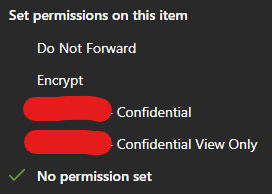
I'm trying to modify our existing Outlook email encryption options a bit, and I cannot find where this is located anymore on the admin side of things. How/where do I find the admin portal that manages this list?: I'm accessing this list by opening a new email > options > Encrypt293Views0likes3CommentsSSAS 2022 Connections fail following restart
I'm using an application which has SSAS 2022 OLAP cubes at the back end. We are having an issue that whenever we restart the server or the service, the connections to the SQL Server that is the data source break. I suspect this is a consequence of SSAS CU1 behaviour where the connection string is encrypted, but - because they get encrypted - there's no way to identify what the change is. SSAS is on the same instance as the SQL Server. Before a restart, i've tried adjusting a few connection properties, notably Impersonation set to Service Account Trust Server Certifcate to True Encryption for data to Optional The connection works fine with these settings. However, post reboot I get a connection error whenver I try toprocess any objects: Errors in the back-end database access module. No provider was specified for the data source. We are using MSOLEDB19 so should be fine, but it seems that post reboot the encrypted connection is somehow misconfiguring. Appreciate any guidance on what could be happening here? I can't avoid restarting the server as org policy demands servers are rebooted every fortnight.404Views0likes0Comments