editing
7 Topics
OneDrive Photos Restyle with AI-now rolling out on mobile and web
Photos capture real moments. With AI Restyle in OneDrive, you can reimagine them in fresh new styles-right where your photos already live. Meet AI Restyle Photos capture real moments. With AI Restyle in OneDrive, you can reimagine those moments in expressive new styles-right where your photos already live. With just a tap, transform everyday photos into cinematic posters, hand‑painted artwork, pencil sketches, anime‑inspired scenes, and more. Choose a style, watch a new version appear in seconds, and keep exploring until it feels just right. Through it all, the people, places, and memories you care about stay unmistakably yours-just seen in a fresh new light. Your photos stay private When you use AI Restyle in OneDrive, your photos remain under your control and are processed only to generate the style you choose. For more information on how AI Restyle works, its intended uses, and limitations, see Transparency note for AI Restyle in OneDrive - Microsoft Support. What you can do with AI Restyle Create something beautiful instantly. Choose from a rotating set of one‑tap styles designed to match the content of your photo-so it’s easy to get a great result right away. New styles are added regularly, giving you fresh ways to reimagine your photos. Add a personal touch when you want. Include an optional prompt to guide the look-no design skills required. Explore until it feels right. Try multiple restyles, undo or redo changes, and keep experimenting until you find the look you love. Share in just a few taps. Go from viewing to restyling to sharing with your favourite apps-without ever leaving OneDrive Photos. Availability AI Restyle is rolling out on OneDrive for iOS, Android, and web for customers with a Microsoft 365 Premium subscription. Availability may vary by region as rollout continues. What’s next We’re continuing to expand AI-powered photo experiences in OneDrive-bringing AI Restyle to additional platforms and investing in new editing capabilities that help you create with confidence while keeping your photos authentic. Try it today Open OneDrive on iOS, Android, or web, sign in with a Microsoft 365 Premium account, open a photo, and tap on ‘AI Restyle’ to start exploring new styles. Have fun creating something new today! Try it on the OneDrive mobile app. iOS: Download Microsoft OneDrive from the App Store Android: Download Microsoft OneDrive from Google Play We’d love your feedback-use 👍👎 to help us improve AI Restyle. #Microsoft #OneDrive #Photos #iOS #Android #Web #AI * This blog was updated on April 7, 2026 to inform how AI Restyle in OneDrive protects users’ privacy and ensures their photos remain secure and under their control.2.2KViews1like1Comment
Edge pdf text addition = massive file size increase
As of today, when I add just a small amount of text (20-30 characters) to a pdf and save, the file size increases from 66KB to 55,000KB ... never happened before. I've reported to Microsoft but they have no solutions. Any ideas to get around? Saving as a separate file has same result. Thanks6.3KViews20likes31Comments
Incorrect closing of the Split arrangement feature
Hi, I often refer to other parts of my document, and for that I enjoy using the Split view feature, to see different parts of my document at once. This feature has a clever function, which automatically chooses which one of the views to close, and which one to expand, based on which was last interacted with. Issue is, this feature works the other way around, always closing the window which I was working in, forcing me to find that place again by scrolling. I tried looking around the internet and I believe this is a bug (with a rather simple solution). If it could be fixed, I'd be grateful, thanks.189Views0likes3CommentsNew AI image editing feature in Microsoft Edge browser version 121 (Canary): Smart object erasing
Microsoft Edge version 121 (Canary) has a new hidden AI assisted photo editing feature. It's called Smart Erase and it's only one of the many AI assisted features that are coming to the Edge browser as the note at the bottom right corner suggests. YouTube demo: https://www.youtube.com/watch?v=S738_Z427Ns This video demos some of the capabilities of Photo editing in Edge browser. These features might not be available to everyone just yet, but if you wish to try them out early, you can use my GitHub repository to easily use this feature and any other hidden experimental feature in Edge canary. Link to the GitHub release related to this feature: https://github.com/HotCakeX/MSEdgeFeatures/releases/tag/121.0.2220.0 Main GitHub repository: https://github.com/HotCakeX/MSEdgeFeatures1.6KViews0likes0CommentsEditing left-side menu of modern site takes you to classic settings page
The site collection is classic mode; the site in question is modern; the left navigation behaves like the classic experience. Clicking the Edit link in the left navigation opens a new page which is in the classic mode: Settings > Navigation Settings. However, when I checked a SharePoint site associated with a Teams site, you are able to make changes on the site page when you click the Edit link -- the modern experience. How do I fix the left navigation on the site in question so that it behaves in the modern mode? Thanks.Solved8.4KViews0likes5CommentsWord online - reviewing mode results in reload error
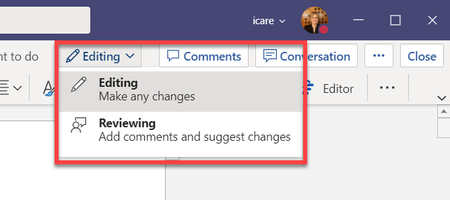
I have asked this in the word hub, but thought I'd also try my luck here. I was today year's old when I learned that Reviewing mode in Word online/web is the equivalent of track changes when using Word online, on its own, or inside of Teams. I now understand that when you put a document into Reviewing mode, it tracks your own changes only, but that you can change this to track for everyone by going to Review > Track Changes > For Everyone. The problem we are encountering is that when someone puts it into Reviewing mode for themselves or for everyone, it results in a reload error telling us our changes are lost and it reverts back to editing mode. What's the solution here? Also is there a way to make it default to track changes for everyone when you toggle to Review mode?Solved1.9KViews0likes1CommentNo Longer Able to Edit in Desktop App
For some reason, I no longer have the option to edit a file that's saved in a Team Channel using the desktop app? I used to have "edit in browser" and "edit in desktop app" as options when viewing the file within teams but the latter option is no longer there? This is very annoying as one of the advantages of Teams and Office 365 over Google Docs is that you could do this, because the browser based editors are not great to use, and have limited functionality. Why has this been removed? When is it coming back? Thanks, Alan8KViews1like2Comments