edge
681 Topics
TypeError: Cannot read properties of undefined (reading 'media_size')
Since version 153.0.4234.48 (Official build) (64-bit) was released and installed on my machine on 9/18/2026 I've been getting the following error while using Edge to debug a Web Application in Visual Studio 2022: TypeError: Cannot read properties of undefined (reading 'media_size') Thead: edge://print StackTrace: at ei.updateSettingsValues (edge://print/index.js:5:91848) at ir.onSelectedDestinationCapReady (edge://print/index.js:3935:3913) at Object.handleChange (edge://print/index.js:3935:175) at or.notify (edge://print/index.js:1:20564) at Kr.notify (edge://print/index.js:1:20736) at Ae.updateDestination (edge://print/index.js:5:51222) at s (edge://print/index.js:5:53037) at Ae.onCapabilitiesSet (edge://print/index.js:5:53089) Source modules: edge://print/index.js c7754cdafbaf1eb70a049a157e46719b4bd6bd79117bb1ad6fc57a38b51bca24 I thought it had to do with the print JavaScript code I was doing, but any page I try to print from the "..." Print menu options does the same thing. The error doesn't occur in Firefox and appears to be caught and ignored in Chrome.263Views0likes2Comments
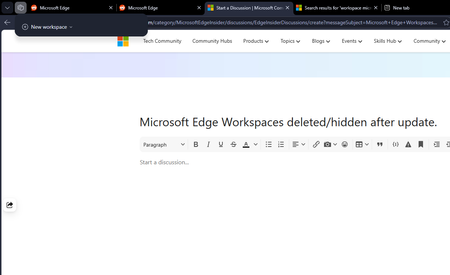
Microsoft Edge Workspaces deleted/hidden after update.
All my workspaces in Edge are hidden and/or are deleted. I updated my windows yesterday night (the restart also updated Edge which was pending) and noticed this issue this morning. I had 10+ workspaces and none of them are here to be found. Tried restarting the browser but no luck there.200Views0likes2Comments
How do you handle sensitive PDF files in Edge without third-party cloud uploads?
Hi everyone, When working with sensitive PDF documents (like financial or personal files), most online PDF editors require uploading files to third-party cloud servers. This raises obvious privacy and security concerns for many users. The most reliable way to maintain data privacy today is using Client-Side Browser Processing (WebAssembly & JavaScript), where operations run entirely inside the local browser memory without transmitting any data over the internet. Key advantages of pure client-side processing: Total Privacy: Zero file transfers or external server logs. Instant Speed: Processing relies on your local CPU, bypassing slow upload/download waiting times. No Software Installation: Works directly inside browsers like Microsoft Edge. For those looking for a practical example of this architecture, https://pdfdocflow.com is a free tool offering 24 browser-based tools (merging, splitting, compressing, watermarking, and signing) operating 100% locally with zero server uploads. How do you usually handle sensitive PDFs while browsing, and do you prefer client-side web tools over installing dedicated software?162Views0likes0CommentsHow to type on a PDF?
Hi everyone, I need to type directly on a PDF, but the document does not contain fillable form fields. I can open it in Microsoft Edge, but I’m not sure whether there is a reliable way to add text anywhere on the page and save the changes without affecting the original layout. Is there a built-in or free way to do this, especially if I need to change the font size and move the text into the correct position? I’d prefer not to convert the PDF to Word first, as that may change the formatting. Any suggestions would be appreciated. Thanks!382Views0likes1CommentFeature Request: Per-profile default account selection in Microsoft Edge
Summary Allow the default account and external-link account-selection behavior to be configured independently for each Microsoft Edge profile. Description Microsoft Edge supports multiple profiles, which are commonly used to work with different Microsoft Entra ID / Microsoft 365 tenants and accounts. Currently, settings such as “Default profile for external links” and related account-selection behavior are shared across Edge profiles. This can cause one profile's account-selection preferences to affect the behavior of other profiles. We would like these settings to be profile-specific. For example: Profile A → user work account Profile B → admin (onmicrosoft.com) account When a user opens an external link while working in Profile B, Edge should consistently use the account/profile configured for Profile B, without inheriting or being affected by the preferences configured for Profile A. Expected behavior Each Edge profile should have its own configurable default account/profile for external links and related account-selection behavior. Changing the setting in one Edge profile should not change or override the corresponding setting in another profile. Use case This is particularly useful for administrators, consultants, developers, and users who regularly work across multiple organizations or Microsoft 365 tenants. Having profile-specific account selection would make multi-tenant workflows more predictable and reduce the risk of opening links with the wrong organizational account. Requested functionality Please make the relevant default-account and external-link account-selection settings profile-scoped rather than globally shared across Edge profiles.204Views0likes0Comments
Webview2 exe missing after edge update
After the recent edge update, the webview2 exe is not updated together. C:\Program Files (x86)\Microsoft\Edge\Application\151.0.4129.59\msedgewebview2.exe is missing. This breaks webview2 apps on Windows. Is there some change to location of webview2? Any new API to get the location of the new webview2, or this is a genuine bug that need to be resolved by Microsoft?468Views0likes1Comment
Edge version 150 JavaScript speechSynthesis.getVoices() undefined voices
For the past few days JavaScript speechSynthesis has had a problem in Edge browser. Sometimes it gets the proper list of voices but most of the time it returns: "Microsoft undefined Online (Natural) - undefined" for every single Natural voice. It then uses the default voice (Microsoft David) for speaking the utterance. Can you fix this bug? Edge Version 150.0.4078.83 (Official build) (64-bit) Thank you.Solved724Views1like4Comments
Edge Block/Add Site Notification - How to Disable with GPO?
Hello, I haven't been able to find answers anywhere so far to figuring this out. Currently looking into using GPO for disabling the Block/Allow to send site notifications tabs found in Privacy, search, and services -> Site permissions -> All permissions -> Notifications. I have been able to block to turn off notifications for all websites by default and block the "Ask before sending" notification settings in the same menu as mentioned above. I did so by creating a GPO with the following settings: Computer Configuration -> Policies -> Administrative Templates -> Microsoft Edge -> Content Settings After navigating to this folder, I opened the "Default Notification Setting" setting. Inside of it I switched it to Enabled and Don't allow any site to show Desktop notifications. I have already looked at the "Allow notifications on specific sites" and the "Block notifications on specific sites" settings, however these just allow you to add websites that you want to block or allow that the user cannot remove. I have discovered that putting a wildcard "*" into the "Block notifications on specific sites" settings values will not allow the user to add any more sites to the list. However this still leaves the user to add any site they wish to the "Allow notifications from specific sites" setting, which is the main concern considering all sites should have notifications disabled. Has anyone else had this problem and found a solution or workaround? This works in Chrome, but Edge has been difficult Thanks.357Views0likes1CommentCrash when submitting web page input fields with soft keyboard Enter
### Summary Microsoft Edge Canary for Android crashes when submitting web page input fields using the Android soft keyboard Enter key. GitHub search is one stable reproduction case, but this is not GitHub-specific. I have also reproduced similar crashes on other websites with text input/search fields. ### Environment - App: Microsoft Edge Canary for Android - Package: `com.microsoft.emmx.canary` - Version: `152.0.4142.0` - Version code: `414200023` - Device: vivo V2417A - Android SDK: 36 - ABI: arm64-v8a ### Reproduction case 1. Open Microsoft Edge Canary on Android. 2. Navigate to `https://github.com/`. 3. Tap the GitHub search box. 4. Type any text. 5. Press Enter on the Android soft keyboard. ### Expected behavior The input/search action should be submitted normally. ### Actual behavior Edge Canary crashes immediately after pressing Enter. ### Scope This does not appear to be specific to GitHub. The same type of crash can also be triggered on other websites when submitting text input/search fields using the Android soft keyboard Enter key. GitHub is used here as a minimal stable repro because it is easy to test. ### Crash information Exception: ```text java.lang.IndexOutOfBoundsException: Index 24 out of bounds for length 0 ``` Relevant stack trace: ```text java.util.ArrayList.get(ArrayList.java:434) android.view.ViewGroup.getAndVerifyPreorderedView(ViewGroup.java:3873) android.view.ViewGroup.gatherTransparentRegion(ViewGroup.java:7438) android.view.ViewRootImpl.performTraversals(ViewRootImpl.java:5207) android.view.Choreographer.doFrame(...) ``` ### Notes - Reproduced directly on the Android phone. - Trigger appears related to submitting web page input/search fields via the Android soft keyboard Enter key.297Views0likes3Comments