edge
859 Topics
Gpo question
Hi, if i set DownloadRestrictions to 2 for preventing Drive by Downloads, it also Block all ZIP files. Is this normal? If i deactivate SmartScreen, it is possible to Download ZIP files, even with this GPO. Is this a bug? Thanks for Feedback/Help in Advanced! best regards Wolle45Views0likes0Comments
TypeError: Cannot read properties of undefined (reading 'media_size')
Since version 153.0.4234.48 (Official build) (64-bit) was released and installed on my machine on 9/18/2026 I've been getting the following error while using Edge to debug a Web Application in Visual Studio 2022: TypeError: Cannot read properties of undefined (reading 'media_size') Thead: edge://print StackTrace: at ei.updateSettingsValues (edge://print/index.js:5:91848) at ir.onSelectedDestinationCapReady (edge://print/index.js:3935:3913) at Object.handleChange (edge://print/index.js:3935:175) at or.notify (edge://print/index.js:1:20564) at Kr.notify (edge://print/index.js:1:20736) at Ae.updateDestination (edge://print/index.js:5:51222) at s (edge://print/index.js:5:53037) at Ae.onCapabilitiesSet (edge://print/index.js:5:53089) Source modules: edge://print/index.js c7754cdafbaf1eb70a049a157e46719b4bd6bd79117bb1ad6fc57a38b51bca24 I thought it had to do with the print JavaScript code I was doing, but any page I try to print from the "..." Print menu options does the same thing. The error doesn't occur in Firefox and appears to be caught and ignored in Chrome.223Views0likes2Comments
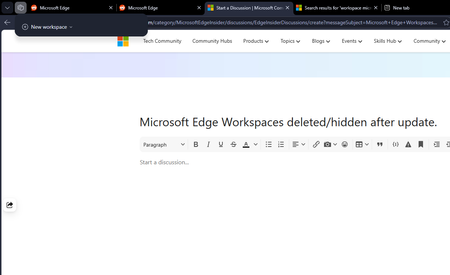
Microsoft Edge Workspaces deleted/hidden after update.
All my workspaces in Edge are hidden and/or are deleted. I updated my windows yesterday night (the restart also updated Edge which was pending) and noticed this issue this morning. I had 10+ workspaces and none of them are here to be found. Tried restarting the browser but no luck there.172Views0likes2CommentsScaling Industrial AI at the Edge with Helin and Azure IoT
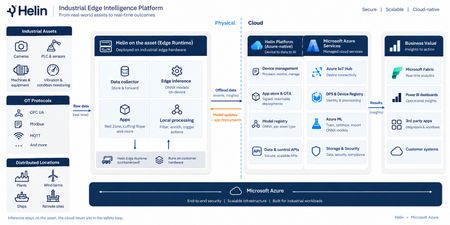
Remote industrial sites generate operational data continuously, but the ability to act on that data in near real time can be challenging. Bandwidth is often limited; connectivity is inconsistent, and the analysis needed to turn raw signals into insight typically depends on cloud connection. When worker safety is on the line, that gap matters even more, since a person entering a hazardous zone has to be detected and flagged on site independent of a cloud connection. Meeting those conditions calls for a secure, repeatable foundation, one that trains models in the cloud, runs inference locally, governs distributed edge devices, and turns the right signals into insight. Helin Data built that foundation: an edge-to-cloud platform that combines local inference, industrial data collection, and fleet observability on Azure. RedZone, Helin's vision AI application for hazardous-zone monitoring, is the first proof point of this platform. It uses the CCTV cameras already installed on a rig to detect when a person enters a defined danger zone around active equipment, triggering a local alert through an on-site interface and status lights, and logging the event for later safety and operational analysis. Because inference runs at the edge, RedZone can detect and alert without waiting on a connection to the cloud, while Azure handles centralized management, analysis, and model lifecycle activities. What sets this solution apart Designed for constrained environments – Inference runs directly on the edge box, so RedZone keeps detecting and alerting even through network outages, with no dependence on the cloud at runtime. Only priority events and metadata detected by RedZone sync to Azure, which keeps bandwidth use low on a constrained connection such as satellite connectivity used at some offshore sites. Secure, scalable fleet governance – Devices onboard automatically through Device Provisioning Service (DPS) with per-device X.509 certificates. Every device is listed in Azure Device Registry (in preview) and projected as native ARM resources, so updates and configuration changes can be targeted, governed, and audited using standard Azure tooling. Helin adds multi-level security, including public key infrastructure (PKI), data encryption, and industry-trusted authentication, protecting data as it moves from the rig to the cloud. Helin's observability layer spans device health, firmware updates, application status, and the data pipeline, so organizations can promptly identify and investigate potential issues across the edge-to-cloud pipeline. A closed edge-to-cloud AI loop – Models are trained and versioned in Azure Machine Learning, then deployed to the edge for local inference. Detections stream back into Microsoft Fabric, where the data can inform model evaluation and future model versions, closing the loop between the field and the cloud. A reusable application foundation – RedZone runs on the same platform and loop that can be adapted for additional customer scenarios. A different hazard, a different zone, or a different operational question can become its own application. Delivering a governed device fleet Azure IoT Hub and DPS provide secure device connectivity, messaging, and automated provisioning. The Azure IoT Hub integration with Azure Device Registry, currently in public preview, represents devices as Azure resources, providing a foundation for Azure-native fleet inventory and governance. Together, these services help Helin onboard, connect, and manage distributed edge deployments. Azure Device Registry (public preview with Azure IoT Hub): Provides the management plane, representing each device as an Azure Resource Manager resource so it can be governed with the same patterns used for other Azure resources including role-based access control, resource groups, tags, and resource-level management, with namespaces acting as the organizational and security boundary. Azure Device Registry integration with Azure IoT Hub and Microsoft-backed X.509 certificate management is in public preview and is not recommended for production workloads. Azure IoT Hub and DPS: Deliver secure onboarding and bidirectional messaging between the devices and the cloud. Helin Data Edge Inference and Data Collector: Runs vision AI inference at the edge and connects into the industrial control systems already on site, so each detection carries operational context. Industrial data is collected, contextualized, buffered, and filtered locally before important signals are sent to Azure. Microsoft Fabric: Ingests telemetry and turns it into an operational model for analysis and reporting, giving organizations clearer insight into their operations. Customer Impact This solution is already proven in a demanding industrial environment. When Helin Data implemented RedZone on Noble’s Maersk Discoverer rig, RedZone detected a person entering a hazardous zone and raised an alert in roughly 150 milliseconds. Processing the detection locally is particularly important offshore, where limited connectivity makes a cloud-dependent response impractical. Helin’s broader edge platform is already supporting Noble across its operations. The offshore drilling contractor, which operates a fleet of more than 40 rigs, uses Helin’s Remote CCTV Manager to provide authorized personnel with live video from more than 20 rigs. Reduced resolution streams sync to Noble’s secure Azure environment for viewing while full resolution recordings stay at the rig to reduce bandwidth use. Together, these examples demonstrate the broader platform pattern: process high-volume data locally, transmit the signals that matter, and centrally manage applications deployed across a distributed industrial fleet. Closing RedZone shows what becomes possible when Azure IoT Hub is used as more than a device-connectivity service. Combined with secure provisioning, Azure-native device governance, edge inference, model lifecycle management, and Microsoft Fabric, it becomes part of a repeatable platform for building and operating industrial AI applications at scale. For customers, the value extends beyond a single safety scenario. The same foundation can support new applications across worker safety, operational visibility, process improvement, and other industrial use cases, without rebuilding the underlying device and data infrastructure each time. Helin brings the industrial application expertise; Azure provides the scalable foundation on which those applications can be deployed, governed, and continuously improved. Take the next step Read the customer case study, Improving safety across a fleet of drilling rigs Learn more about RedZone in Seeing the Human Layer: Helin Brings Edge Vision AI to Industrial Operations on Azure. Explore Helin’s Intelligent Edge Application Platform is now available in Azure Marketplace Resources Deploy Azure IoT Hub with Device Registry integration and certificate management (preview) Azure IoT Hub Documentation Product documentation | Helin Documentation528Views0likes1Comment
How do you handle sensitive PDF files in Edge without third-party cloud uploads?
Hi everyone, When working with sensitive PDF documents (like financial or personal files), most online PDF editors require uploading files to third-party cloud servers. This raises obvious privacy and security concerns for many users. The most reliable way to maintain data privacy today is using Client-Side Browser Processing (WebAssembly & JavaScript), where operations run entirely inside the local browser memory without transmitting any data over the internet. Key advantages of pure client-side processing: Total Privacy: Zero file transfers or external server logs. Instant Speed: Processing relies on your local CPU, bypassing slow upload/download waiting times. No Software Installation: Works directly inside browsers like Microsoft Edge. For those looking for a practical example of this architecture, https://pdfdocflow.com is a free tool offering 24 browser-based tools (merging, splitting, compressing, watermarking, and signing) operating 100% locally with zero server uploads. How do you usually handle sensitive PDFs while browsing, and do you prefer client-side web tools over installing dedicated software?152Views0likes0CommentsIntune Settings Catalog Updates
I am trying to create a Windows Device Configuration Policy for Microsoft Edge. The setting I need is: Force foreground priority for specific URLs (ForceForegroundPriorityForUrls) This setting should have been included in the https://learn.microsoft.com/en-us/intune/whats-new/#week-of-july-27-2026-service-release-2607 and our tenant is on 2608. However, whenever I look for the setting in the catalog, I cannot find it. I can see other older throttling policies, and I can see other polices that were added in the 2607 release. I have checked on two different tenants, both on 2607 or higher and it doesn't show up on either.Solved474Views0likes2CommentsHow to type on a PDF?
Hi everyone, I need to type directly on a PDF, but the document does not contain fillable form fields. I can open it in Microsoft Edge, but I’m not sure whether there is a reliable way to add text anywhere on the page and save the changes without affecting the original layout. Is there a built-in or free way to do this, especially if I need to change the font size and move the text into the correct position? I’d prefer not to convert the PDF to Word first, as that may change the formatting. Any suggestions would be appreciated. Thanks!363Views0likes1CommentFeature Request: Per-profile default account selection in Microsoft Edge
Summary Allow the default account and external-link account-selection behavior to be configured independently for each Microsoft Edge profile. Description Microsoft Edge supports multiple profiles, which are commonly used to work with different Microsoft Entra ID / Microsoft 365 tenants and accounts. Currently, settings such as “Default profile for external links” and related account-selection behavior are shared across Edge profiles. This can cause one profile's account-selection preferences to affect the behavior of other profiles. We would like these settings to be profile-specific. For example: Profile A → user work account Profile B → admin (onmicrosoft.com) account When a user opens an external link while working in Profile B, Edge should consistently use the account/profile configured for Profile B, without inheriting or being affected by the preferences configured for Profile A. Expected behavior Each Edge profile should have its own configurable default account/profile for external links and related account-selection behavior. Changing the setting in one Edge profile should not change or override the corresponding setting in another profile. Use case This is particularly useful for administrators, consultants, developers, and users who regularly work across multiple organizations or Microsoft 365 tenants. Having profile-specific account selection would make multi-tenant workflows more predictable and reduce the risk of opening links with the wrong organizational account. Requested functionality Please make the relevant default-account and external-link account-selection settings profile-scoped rather than globally shared across Edge profiles.197Views0likes0CommentsDirect IoT Hub-to-Fabric message routing, with context preserved via CloudEvents, in Public Preview
Announcing Public Preview of Microsoft Fabric Eventstreams as a native Azure IoT Hub routing endpoint. Customers can now send device telemetry directly into Fabric without building custom integration pipelines, using the same routing rules, filters, and enrichments configurable in IoT Hub. Events are delivered using the CloudEvents envelope, which preserves critical metadata for downstream analytics.467Views1like1Comment