driver
20 Topics
Hardware program missing from Registered programs after vetting status changed to Authorized
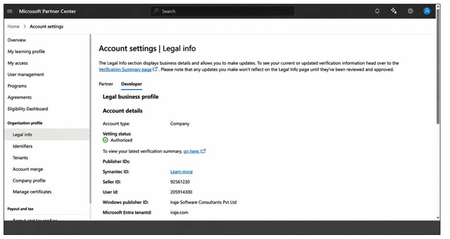
Dear JillArmourMicrosoft JillArmourMicrosoftFollowing up on an earlier concern I raised regarding our legal profile vetting status — with your guidance, that issue is now resolved and both profiles show as Authorized. Thank you for the help. However, we are still unable to see the Hardware program that we registered for, which we need in order to submit drivers for Microsoft attestation signing. Because the earlier escalation had been raised specifically for the vetting status, the support team archived that ticket once vetting was resolved. The Hardware program issue, however, remains open. We would appreciate your guidance on how to proceed. ACCOUNT Company: Iraje Software Consultants Pvt Ltd Windows publisher ID: Iraje Software Consultants Pvt Ltd Seller ID: 92561230 Entra tenant domain: iraje.com (Tenant ID and the previous case reference available on request.) CURRENT STATE - Account settings > Legal info > Developer tab: Account type = Company, Vetting status = AUTHORIZED - Account settings > Legal info > Partner tab: Vetting status = AUTHORIZED - Account settings > Programs > Registered programs shows only: * Microsoft AI Cloud Partner Program (registered 2/12/2019) * Microsoft Collaborate (registered 7/17/2026) The Windows Hardware Developer Program is NOT listed. - As a result we have no Hardware workspace and cannot submit drivers for attestation signing. WHAT WE ARE ASKING 1. Please confirm whether a Windows Hardware Developer Program enrollment exists on this account in a deactivated state, or whether no enrollment exists at all. 2. If an enrollment exists, please reactivate the existing one. We do not want a duplicate enrollment created. 3. If no enrollment exists, please confirm this so that we can complete the registration ourselves without creating a conflicting record. 4. If the registration is pending on the business questionnaire or the EV certificate upload, please let us know which step is outstanding and which email address the questionnaire was sent to, so that we can locate it. Thank you for your support.22Views0likes2Comments
Microsoft Print to PDF not working/missing.
The Microsoft Print to PDF was not working on my PC so I tried reenabling it via Windows Features in Optional Features and it won't turn back on. It gives error code: 0x800f0922. I also tried other various methods online and none work. All end with various error codes which all result in the service not working/turning on. I even filed feedback about 2 weeks ago with no response yet. I contacted support, where I was recommended to perform a repair via ISO but was then canceled by the agent as I am on an Insider build. I am on build 26300.8687. This is a summary of my diagnostic from Gemini which I had used to try to solve my issue. Here is a summary of the diagnostic, tracking every command I executed in PowerShell and the specific roadblocks the Windows subsystem threw back. The Add-Printer Layer attempted to use modern PowerShell commands to register the printer onto both the interactive prompt port and the standard local file port. Commands Ran: PowerShell Add-Printer -Name "Microsoft Print to PDF" -DriverName "Microsoft Print to PDF" -PortName "PORTPROMPT:" Add-Printer -Name "Microsoft Print to PDF" -DriverName "Microsoft Print to PDF" -PortName "FILE:" * **Errors Faced:** * `ObjectNotFound: (MSFT_Printer:ROOT/StandardCimv2/MSFT_Printer)` * `HRESULT 0x80070002,Add-Printer` --- ## 2. The Legacy PrintUI Layer To bypass the modern PowerShell cmdlet, I tried using the legacy Windows user interface print engine via standard command prompt syntax and escaped quotes. * **Commands Ran:** ```powershell cmd /c "rundll32 printui.dll,PrintUIEntry /if /b `"Microsoft Print to PDF`" /r `"PORTPROMPT:`" /m `"Microsoft Print to PDF`"" rundll32 printui.dll,PrintUIEntry /if /b "Microsoft Print to PDF" /f "C:\Windows\System32\spool\DRIVERS\x64\3\prnms009.inf" /r "PORTPROMPT:" /m "Microsoft Print to PDF" Errors Faced: A graphical dialog box error: Operation could not be completed (error 0x00000002). The system cannot find the file specified. The Deployment Script Layer (WMI/CScript) I tried deploying the printer using Windows’ built-in visual basic administrative scripts to side-step the user interface layer completely. Command Ran: PowerShell cscript $env:windir\System32\Printing_Admin_Scripts\en-US\prnmngr.vbs -a -p "Microsoft Print to PDF" -m "Microsoft Print to PDF" -r "PORTPROMPT:" * **Errors Faced:** * `Unable to add printer Microsoft Print to PDF Error 0x80041002 Not found` * `Operation PutInstance` * `Provider Win32 Provider` * `Description The system cannot find the file specified. Win32 error code 2` Ultimately, every single command failed with an identical variation of **"File Not Found" (Error 2 / 0x80070002 / 0x80041002)**.1.6KViews0likes4Comments
Windows 10 wymusza sterownik
Jestem posiadaczem karty sieciowej TP-Link Archer T4U Plus V1.0. pobrałem do niej dedykowane sterowniki. Karta na tych sterownikach chodzi o wiele lepiej. Zasięg jest maksymalny i prędkość kilka razy większa niż z tymi windowsowymi. Jednak bardzo często urządzenie wyłącza się i windows wymusza mi na nim swoje sterowniki od realteka. Paskudnie one chodzą i na nich urządzenie wyłącza się i rozłącza z siecią częściej. Nie wiem już co mam zrobić by nie nadpisywalo tych sterowników. Konwencjonalne opcje mam już za sobą i nawet zmieniałem ustawienia grupy względem windows update próbujac zatrzymanie pobierania wszelkich sterowników. Nic nie działa Ticket: 710205315798Views0likes0CommentsMicron 3400 NVME SSD firmware update error
I'm attempting to update my Micron 3400 NVME SSD's firmware from version P7MU000 to P7MU002 using Micron Storage Executive, but I'm encountering an error: "PKIX path validation failed: java.security.cert.CertPathValidatorException: validity check failed". I've attached the relevant images (Attachments 411805, 411806, and 411807). I suspect that the issue is related to a certificate date problem. When I adjust my computer's clock year to 2023, the update finds the new firmware, but it still won't install automatically or manually. Instead, I receive an error. Let me know if you need any further information or assistance!1.5KViews0likes1Comment
I have an unwanted driver called wdcsam64_prewin8.sys
Hello, I have a driver called wdcsam64_prewin8.sys. I am trying to remove it, but I can't. I tried to delete it using the command prompt, and it cannot be found in Device Manager. I have a Surface Book 2 with Windows 11, and the driver is blocking my memory integrity. I don't use any external drives or anything else, and nothing is connected to the laptop. It's still exactly as I bought it, with no changes on my part. I would be very grateful for any help! 😊 Best regards292Views0likes0CommentsBluetooth earphones doesn't work in Windows 11
Some Bluetooth earphones (like Haylou GT1) don't work on Windows 11 and it was working perfectly on Windows 10. I think the problem with the drivers and especially with the earphone driver not with the Bluetooth driver because the Bluetooth works normally with the controllers. Just to let you know when I disable the "Haylou-GT1 Avrcp Transport" driver and keep the "Haylou-GT1" driver enable it sometimes works but with very bad quality sound so I am some kind of sure it's a driver problem and that driver provider is Microsoft so I think you can fix it. There is a lot of people who had the same problem, look at this link: https://techcommunity.microsoft.com/t5/report-an-issue/bluetooth-earphones-doesnt-work-in-windows-11/m-p/2554552 I contacted Microsoft support and they say: "Only our engineers have the access to its Windows 11" So they advised me to post in here in windows insider (I don't know why, I am not a Windows insider member, I just downloaded windows 11 when it's released for everyone.)27KViews18likes20Comments
Can't sign my driver with sha384 EV code signing certificate
Hello, our company renew EV code signing certificate, and now it has sha384 algorithm, our driver correct pass all HLK tests, and after it i have signed my *.hlkx result with this certificate, but micorosoft partener center can't accept this *.hlkx due to error: "Microsoft allows SHA2 only signature algorithm. Please re-sign with a valid certificate and submit again" Help me, please.5.6KViews2likes12CommentsWhat makes a driver 'High Impact' vs. 'Very High Impact'?
As a quick reminder, drivers are potential causal factors that affect outcome measures such as, but not limited to, overall employee engagement, a sense of belonging as well as perceptions of a great workplace culture. In determining how we differentiate between Low, Medium, High and Very High driver impact, we use the driver's Pearson r correlation tied to the intended outcome measure. Drivers are plotted on the X-Axis and those with less than a .20 Pearson r are considered “Low” impact drivers. Between .20 and less than .40 are “Medium” impact, between .40 and less than .60 are “High”, and .60 and greater are “Very High”. See the table below for additional detail. Minimum Correlation Maximum Correlation Low 0 < 0.2 Medium 0.2 < 0.4 High 0.4 < 0.6 Very High 0.6 1.0 As People Science consultants, we're always leveraging the Driver Impact report to help us understand how different survey measures impact key outcomes across different populations and tying that back to action taking strategies. We'd love to hear from our community...In what ways have you utilized Viva Glint's Driver Impact report to support key findings in your surveys?Fast Microsoft recommended driver block rules update with automatic scheduled task
Microsoft recommended driver block rules in Windows are automatically updated starting with Windows 11 22H2, twice per year, but the list itself is updated more often. Microsoft provides ways to update them faster and out of the schedule. I've created a PowerShell script that does this automatically and you only need to run the script once, then it will create a scheduled task in Windows that runs every 7 days and renews the recommended drivers block list. # create a scheduled task that runs every 7 days if (-NOT (Get-ScheduledTask -TaskName "MSFT Driver Block list update" -ErrorAction SilentlyContinue)) { $action = New-ScheduledTaskAction -Execute 'Powershell.exe' ` -Argument '-NoProfile -WindowStyle Hidden -command "& {Invoke-WebRequest -Uri "https://aka.ms/VulnerableDriverBlockList" -OutFile VulnerableDriverBlockList.zip;Expand-Archive .\VulnerableDriverBlockList.zip -DestinationPath "VulnerableDriverBlockList" -Force;Rename-Item .\VulnerableDriverBlockList\SiPolicy_Enforced.p7b -NewName "SiPolicy.p7b" -Force;Copy-Item .\VulnerableDriverBlockList\SiPolicy.p7b -Destination "C:\Windows\System32\CodeIntegrity";$job = Start-Job -Name "Job1" -ScriptBlock { CiTool.exe -r };Start-Sleep -s 15;Stop-Job $job;Remove-Item .\VulnerableDriverBlockList -Recurse -Force;Remove-Item .\VulnerableDriverBlockList.zip -Force;}"' $TaskPrincipal = New-ScheduledTaskPrincipal -LogonType S4U -UserId $env:USERNAME -RunLevel Highest # trigger $Time = New-ScheduledTaskTrigger ` -Once -At (Get-Date).AddHours(3) ` -RepetitionInterval (New-TimeSpan -Days 7) ` # register the task Register-ScheduledTask -Action $action -Trigger $Time -Principal $TaskPrincipal -TaskPath "MSFT Driver Block list update" -TaskName "MSFT Driver Block list update" -Description "Microsoft Recommended Driver Block List update" # define advanced settings for the task $TaskSettings = New-ScheduledTaskSettingsSet -AllowStartIfOnBatteries -DontStopIfGoingOnBatteries -Compatibility Win8 -StartWhenAvailable -ExecutionTimeLimit (New-TimeSpan -Minutes 3) # add advanced settings we defined to the task Set-ScheduledTask -TaskPath "MSFT Driver Block list update" -TaskName "MSFT Driver Block list update" -Settings $TaskSettings } https://github.com/HotCakeX/Harden-Windows-Security/wiki/Fast-and-Automatic-Microsoft-Recommended-Driver-Block-Rules-updates2.6KViews0likes0CommentsIs Windows Server 2022 drivers all compatible to WS IOT 2022?
https://docs.microsoft.com/en-us/windows/iot/server/windows-server According the description, IOT is a binary equivalent to Windows Server 2022, But when I configs VROC RAID, the driver cannot be loaded during the installation. Are all drivers compatible or specific driver for WS IOT version is needed?973Views0likes0Comments