documentation
137 Topics
Bookshelf checkbox from Quick Start not visible in 0.15.14-preview
The Microsoft Discovery Quick Start says that a checkbox next to each Bookshelf controls whether the Bookshelf is exposed to GitHub Copilot. It instructs users to tick that checkbox before asking Copilot questions. Environment - Discovery App: 0.15.14-preview - OS: Windows 11 What I see In the Bookshelf panel, my Bookshelf row shows an expand arrow, Bookshelf icon, name, document count and provider information, health status, and action icons. I cannot find a checkbox next to the Bookshelf, including when the row is hovered or expanded. The Quick Start refers to this checkbox in multiple places: - The panel overview says checkboxes toggle exposure to GitHub Copilot. - Step 4 says to tick the checkbox next to the new shelf. - Troubleshooting says to check that the checkbox is ticked when Copilot does not use the Bookshelf. I may be overlooking the control, or its visibility may depend on configuration or another environmental difference. Could someone clarify where the checkbox should appear and whether any prerequisite enables it? If the control was intentionally removed or replaced in this version, what is the current supported way to expose a Bookshelf to Copilot?
How can I report an error in MS Teams documentation?
Hey all, how can I report an error that I noticed in MS teams documentation? On this site: https://learn.microsoft.com/en-us/microsoftteams/phone-reference/manage-numbers/phone-number-management-for-slovenia There is a LOA request that is named: "Letter of Authorization (LOA) for Slovania (all numbers) (v.1.0)". This is of course an error - it should say Slovenia, not Slovania. How do I report this to MSFT for checking and fixing the Learn docs? I cannot seem to edit or submit a PR for MS teams. Thanks! BR Tim194Views0likes1CommentPortable Azure topology and documentation snapshots with OSIRIS JSON
Ciao everyone, I’m working on https://github.com/osirisjson/osiris, a vendor-neutral specification for describing infrastructure resources and their relationships as portable point-in-time snapshots. To proof that the specification could work in real-scenarios I already built an initial https://osirisjson.org/en/docs/producers/hyperscalers/microsoft-azure in Go. You run on-premise and it connects through the Azure CLI, reads Azure subscriptions and emits an OSIRIS JSON document that can be used for documentation, topology diagrams, audits, configuration drift analysis, CMDB/IPAM/DCIM workflows, or controlled AI/context workflows without giving those platforms/tools direct access to Azure. The producer currently covers several Azure areas, including networking, compute, storage, identity, databases, containers, integration, observability, backup, automation, management groups, and cross-resource dependency edges such as Private Endpoint to PaaS targets, App Service to Application Insights / Log Analytics, AKS to subnets and node pools, and backup vault relationships. It supports two output purposes: documentation: minimal high-level projection for diagrams, inventory dashboards, and architectural documentation audit: deeper projection with readable properties and extensions after sensitive-field redaction This is not intended to replace Azure tooling, Azure Resource Graph, IaC, Azure Policy, or any existing governance/control-plane workflow. OSIRIS JSON is simply a read-only external producer that generates a vendor-neutral snapshot of the observed Azure environment. I would really appreciate feedback from Azure architects, cloud engineers, and governance practitioners on the mapping model: Which Azure resources and relationships are the most important for documentation and topology generation? Are the current connection types useful for real-world architecture views? What should be prioritized in next releases? Would a documentation/audit split be useful in enterprise environments? You find the current Azure producer documentation here: https://osirisjson.org/en/docs/producers/hyperscalers/microsoft-azure I would really appreciate any feedback, suggestions, edge cases, or ideas from people who operate, document, audit, or govern Azure environments and I also welcome anyone who want to participate on development. Ciao from Italy, Tia427Views0likes2CommentsUpdated Failover Clustering API Documentation
Does anyone know when the Failover Cluster API documentation will be updated? Currently, in learn it only shows Server 2008 and 2012. https://learn.microsoft.com/en-us/previous-versions/windows/desktop/mscs/failover-cluster-apis-portal The same goes for storage spaces. Is there any updated documentation?144Views1like0Comments
Guidance on Planner Premium, Dataverse and Power Automate
Hoping this title invites you to share more knowledge around Planner Premium, Dataverse and working with Automate Scenario: I have a user inside our company saying i need access to Dataverse since he wants to automate some task creation with regards to planner premium. I am pretty ok with that, so he needs a Power Automate Premium license. Although looking at the data in the Projects data tables in the default environment their business units are the root BU - getting a little concerned. Are all projects and related data available for all people that can read the Dataverse tables? If you have some insights or experience please comment :) Could they develop that in a development or sandbox environment before piping it to a designated environment? but there are no Projects tables in dev or in sandbox environment. Main problem: there's so much information about planner and power automate that it's impossible to actually find any guidance around this scenario amongst all classic planner hits1.5KViews0likes1CommentDocAider: Automated Documentation Maintenance for Open-source GitHub Repositories
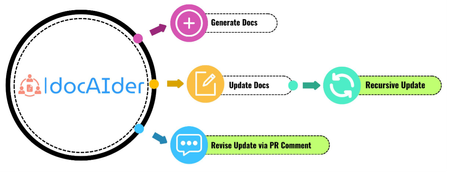
Code–level documentation of a software system provides explanations of the code functionality and usages. Documentation is crucial for giving clear insights into the code for end–users and future developers. However, creating and updating documentation manually is a demanding task, requiring significant resources and labour. With the advancement of generative AI, there is a potential to reduce human labour in documentation tasks significantly. We propose DocAider, an automation tool powered by GPT–4 that integrates the processes of documentation generation and update. DocAider can generate comprehensive and structured documentation in markdown format and update it in response to any changes made in pull requests. The mission of DocAider is to reduce developers’ burden on maintaining documentation for GitHub repositories.6.5KViews2likes0Comments