document processing
147 Topics
Unlocking Microsoft 365 Adoption in Engineering, Manufacturing, and Regulated Industries
Executive Feedback to Microsoft Leadership: Expanding the Value of Microsoft 365 Beyond Cloud-First Workflows Executive Summary Microsoft has successfully built the industry's leading cloud collaboration ecosystem around Microsoft 365, OneDrive, and SharePoint. The strategy has delivered substantial value for information workers, distributed teams, and organizations pursuing cloud-first operating models. However, there is a significant and often overlooked customer segment that remains underserved: engineering, manufacturing, healthcare, medical device, industrial, laboratory, defense, and other regulated organizations whose primary workflows are intentionally built around file-based repositories, network shares, PDM/PLM systems, and controlled document environments. The challenge is not opposition to cloud technology. The challenge is that many of these organizations prioritize data integrity, traceability, predictability, and workflow continuity above all else. As a result, they often perceive modern Microsoft productivity capabilities such as AutoSave, coauthoring, and version history as being unnecessarily coupled to OneDrive and SharePoint. This creates an important business opportunity. Microsoft could unlock substantial additional Microsoft 365 adoption and customer goodwill by extending modern document protection and collaboration capabilities to local, network-hosted, and hybrid file environments without requiring a complete migration to OneDrive or SharePoint. This is not a request to replace cloud services. It is a request to recognize that cloud-first and file-based workflows can coexist. The Opportunity Is Larger Than It Appears Many of Microsoft's largest enterprise customers operate in environments where files are not simply documents. They are: Design history files Manufacturing records Engineering drawings Validation reports Device master records Controlled procedures Laboratory data Regulatory submissions Quality records For these organizations, file location, revision control, ownership, auditability, and retention are operational requirements rather than convenience features. Microsoft itself acknowledges that Office AutoSave currently requires files to be stored in OneDrive or SharePoint. Files opened from traditional file-system locations do not receive the same experience. As a result, many organizations feel they must choose between: Maintaining proven operational workflows. Accessing Microsoft's most advanced productivity features. That is a business decision many organizations simply refuse to make. The Real Barrier Is Not Technology. It Is Trust. Discussions around cloud adoption are often framed as a resistance-to-change problem. Research consistently suggests otherwise. Studies examining enterprise cloud adoption repeatedly identify security concerns, data privacy concerns, and control over organizational information as major barriers to adoption. One study found security concerns dramatically increased the likelihood that organizations would reject cloud adoption. Similarly, KPMG's cloud transformation research notes that concerns about data loss, audit findings, compliance issues, and operational risk can slow or limit cloud initiatives. The lesson is important: Organizations rarely reject technology because it is new. They reject technology because they do not trust it with critical business information. Once users experience: unexpected file overwrites, synchronization ambiguity, permission confusion, data residency uncertainty, conflicting document versions, trust declines rapidly. Trust, not functionality, is often the limiting factor. Engineering Users Experience the World Differently Microsoft's cloud ecosystem was largely designed around information-worker collaboration. Engineering organizations frequently operate under different assumptions: Information Worker Priority Engineering Priority Seamless sharing Data integrity Anywhere access Traceability Real-time collaboration Configuration control Ease of use Auditability Cloud accessibility Revision certainty Neither approach is wrong. The challenge is that Microsoft increasingly optimizes for one while under-serving the other. An Example: AutoSave AutoSave is one of the most valuable additions Microsoft has made to Office. The value proposition is obvious: Reduced data loss Improved productivity Lower cognitive burden Better user confidence Microsoft's own documentation describes AutoSave as continuously saving changes while users work, but only when documents reside in OneDrive or SharePoint. From Microsoft's perspective, this design is understandable. From the customer perspective, the message often becomes: "Modern document protection is available, but only if you adopt Microsoft's preferred storage architecture." Many customers view this not as a technical limitation, but as product segmentation. Microsoft Could Learn from Version Control Systems Modern software development solved multi-user document conflicts decades ago. Git was specifically designed around realities such as: multiple devices, multiple contributors, offline work, concurrent editing, conflicting changes. Critically, Git assumes conflicts are inevitable. Rather than hiding them, Git exposes conflicts and provides mechanisms to resolve them. Many engineers trust Git precisely because its behavior is transparent. By comparison, file synchronization systems often attempt to abstract away complexity. When synchronization fails, users can no longer determine: which version is authoritative, which edits are newer, what happened, who changed what. The engineering mindset is frequently: Show me the conflict. rather than Hide the conflict and make a decision on my behalf. The Untapped Hybrid Customer Much discussion around Microsoft 365 assumes organizations are either: Cloud-first, or Legacy. In reality, many enterprises are neither. Many operate as hybrid organizations and intentionally will continue to do so. Research from industry and security organizations continues to show persistent adoption of hybrid and multi-cloud architectures driven by governance, security, compliance, and operational requirements. These customers are not rejecting Microsoft. They are already paying customers. They often purchase: Microsoft 365 Windows Azure Teams Active Directory SQL Server Yet many would immediately purchase additional capabilities if Microsoft offered: Local AutoSave Office AutoSave functionality for: NTFS local storage SMB file shares NAS systems PDM-managed documents Local Version History Built-in document time travel without cloud dependence. Hybrid Collaboration Coauthoring capabilities that operate through enterprise file infrastructure. Enterprise Conflict Resolution Visualization and reconciliation of competing document changes. Network-Aware Document Protection The same confidence users experience in OneDrive without requiring migration to OneDrive. The Revenue Opportunity This is not merely a product-improvement request. It is a business opportunity. A significant portion of engineering and regulated industries remain hesitant to migrate entirely into cloud-centric document ecosystems because the perceived operational risks exceed the perceived benefits. Rather than forcing an all-or-nothing decision, Microsoft could monetize a middle path: Microsoft 365 Hybrid Collaboration A premium offering delivering: AutoSave Version History Recovery Conflict Resolution Audit Visibility for enterprise-controlled file infrastructure. Organizations that decline OneDrive adoption today may still eagerly purchase these capabilities. In effect, Microsoft could create incremental revenue from customers who are already committed to the Microsoft ecosystem but currently feel underserved by a cloud-only feature strategy. Recommendation Microsoft should stop treating file-server and network-share users as transitional users waiting to migrate. Many are not transitioning. Many have intentionally chosen architectures optimized for regulatory compliance, engineering rigor, operational control, and data governance. The future should not require choosing between: modern productivity features, and trusted enterprise workflows. The organizations building medical devices, industrial equipment, aerospace systems, manufacturing infrastructure, energy systems, and critical technologies represent some of Microsoft's most technically sophisticated and commercially valuable customers. They deserve first-class support for the workflows they intentionally operate. The opportunity is not to move every customer to the cloud. The opportunity is to bring Microsoft's best innovations to every customer, regardless of where their files live.82Views0likes0Comments
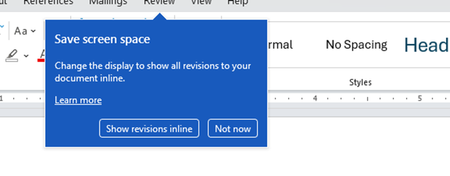
Disable incessant nagware popups
I don't know about everyone else, but I am sick and tired of the nagware pop ups in Word, Excel, PowerPoint, Outlook, etc. Every single product harasses me with pop ups trying to tell me "hey, did you know this feature was here?", "you can do this if you click that", "let me hold your hand through using products you've used for decades even though you don't want daddy Microslop to do that". This is a prime example. I keep getting the same ones again and again and again and everything I've read indicates they should only appear once. But they don't. They keep coming back like a psychotic stalker ex who wants alimony even though you were never married. How do I get this nagware to stop?!541Views1like2Comments
Excel Desktop App hangs when attempting to open documents from SharePoint to edit
User attempts to open Excel Documents saved in SharePoint by selecting Edit in Desktop App. As the Excel Desktop App begins to open a message displays stating: We have opened this document in Microsoft Excel in your computer. However, the Excel App just hangs without fully opening (see Screenshot). No problem detected when opening the Excel Desktop app directly, Desktop App opens freely. Excel MS365 is up-to-date version 2609 build 16.0.20430 64 Bit (Before reinstall). I have uninstalled the MS365 Office packet and reinstall it directly from the User's Office Portal, to no avail.426Views1like2Comments
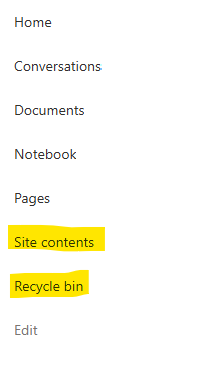
Recycle Bin and Site Content Hidden for Site Members and Site Visitors
I posted this before but made a mistake with my write up, so I am reposting. I have a requirement that the Recycle bin and Site Contents should be be hidden from the Site Members and Site Visitors. Please how can I achieve this because the Server Infrastructure activation is not working for me. Any workarounds? Please help990Views0likes1CommentBecome a Microsoft advanced content management advocate! [Opportunity]
The Microsoft Next Gen Content Services team is launching an advanced content management and experiences Advocates Initiative. We are looking for thought leaders who can amplify product awareness for the latest innovations from SharePoint Premium, SharePoint Embedded, Microsoft 365 Backup, and Microsoft 365 Archive. As advocates, you can help create content to share with your networks, leveraging Microsoft marketing material and updates. If you or anyone you know would be interested in posting about these solutions, please fill out our interest form. As a member of this initiative, you’ll have opportunities to cross-promote on Microsoft channels, receive marketing updates on the products, and enhance your personal brand.999Views5likes3CommentsDynamic Mandatory Fields
In a SharePoint library, I have folders which are = a. Admin b. Events c. Furniture and Moves d. Janitorial and Maintenance e. Parking and Transportation f. Shipping and Receiving g. Supplies and Equipment h. Waste and Recycling I have Meta data across the library whose data type are all choices and are: a. Document Type = Contract, Financial, planning b. Building = Gym, Garage, Heating c. Asset Category = Office, Playground d. Fiscal Year = FY23, FY24, FY25, FY26, FY27 e. Vendor = Maple Leaf, Canadian Tire, Home Depot f. Status = Active, Pending, Not Active g. Retention Label = 3 years, 5 years h. Service Type = Admin, Events, Furniture and Moves, Janitorial and Maintenance, Parking and Transportation, Shipping and Receiving, Supplies and Equipment, Waste and Recycling Service Type and Retention Label are mandatory fields, with the Rule below for all the files in the various folders: IF Folder Name = Admin, then Service Type = Admin and Retention Label = 5 years; the mandatory fields should be Document Type, Status and Fiscal Year IF Folder Name = Events, then Service Type = Events and Retention Label = 3 years; the mandatory fields should be Document Type, Status and Fiscal Year, Building and Vendor IF Folder Name = Furniture and Moves, then Service Type = Furniture and Moves and Retention Label = 3 years; the mandatory fields should be Document Type, Status and Building IF Folder Name = Janitorial and Maintenance, then Service Type = Janitorial and Maintenance and Retention Label = 3 years; the mandatory fields should be Document Type, Status and Fiscal Year IF Folder Name = Parking and Transportation, then Service Type = Parking and Transportation and Retention Label = 3 years; the mandatory fields should be Document Type, Status and Fiscal Year IF Folder Name = Shipping and Receiving, then Service Type = Shipping and Receiving and Retention Label = 3 years; the mandatory fields should be Document Type, Status IF Folder Name = Supplies and Equipment, then Service Type = Supplies and Equipment and Retention Label = 3 years; the mandatory fields should be Document Type, Status and Fiscal Year IF Folder Name = Waste and Recycling, then Service Type = Waste and Recycling and Retention Label = 3 years; the mandatory fields should be Document Type, Status and Vendor I have used Column Default Value Settings for SharePoint to display Auto-Display the Service Type and Retention Label, but I cannot seem to perform the conditional mandatory fields using Validations setting for the other requirements. Please help708Views0likes1CommentRecycle Bin and Site Content Hidden for Site Members and Site Visitors
I have a requirement that the Recycle bin and Site Contents should not be be hidden from the Site Members and Site Visitors. Please how can I achieve this because the Server Infrastructure activation is not working for me. Any workarounds? Please help667Views0likes2Comments
Microsoft Word - Footnote remains on the original page after moving the original reference up
Issue I encountered an issue in Microsoft Word where moving the original footnote reference to an earlier location in the document did not move the footnote itself. The footnote remained on its original page even though the reference had been moved. This was particularly problematic because the same footnote was referenced multiple times throughout the document using cross-references. Cause The footnote is anchored to the original footnote reference in the main text. In my case, Word had somehow lost track of that original anchor, so the footnote stayed on its original page while all cross-references continued to point to it. Solution Hold Ctrl and click the misplaced footnote reference. Word jumps to the original footnote reference in the main text. Cut the original footnote reference (Ctrl+X). Paste it in the correct location using Keep Source Formatting. Press Ctrl+A, then F9 to update all fields. Verify that: the footnote has moved to the correct page, the numbering has updated correctly, all cross-references still work. In my document, one footnote had previously lost its connection to the original reference, so its numbering did not update automatically. That one had to be repaired manually. Important Do not create a new footnote or copy the footnote text itself. Move the original footnote reference in the main text. This preserves the existing footnote, its numbering, and every cross-reference that points to it. I hope this helps someone else. It took me quite a while to figure out what was happening.287Views0likes1CommentWord/PowerPoint are not suitable replacements for Publisher
I’m writing following the guidance that Word and PowerPoint can be used as replacements for Publisher. This feedback is based on completing a real production document, not theoretical use Having just completed a fairly complex, layout-heavy technical document, I thought it only fair to share how that works in practice. In theory, I can see the logic: Word handles documents PowerPoint handles layouts Therefore, between the two, everything should be covered Unfortunately, in reality, this appears to be more of a theoretical exercise than a practical solution. Publisher was clearly designed for: Fixed, page-based layouts Precise positioning of objects Efficient alignment of mixed content (text, images, tables) Producing consistent, professional multi-page documents By comparison: Word is admirably committed to reminding you that it would prefer everything to flow freely, regardless of whether you want it to or not PowerPoint, while better behaved, does seem to assume every page is a standalone slide rather than part of a structured document Both tools can, with enough persistence, be persuaded into doing the job. However, this involves a level of manual intervention, workaround, and general negotiation with the software that feels somewhat at odds with modern productivity software. To put it simply: They are not replacements in any meaningful, real-world sense. The end result can be achieved, but the process is unnecessarily time-consuming, fragile, and prone to unexpected layout changes—particularly when precision actually matters. Replacing a purpose-built publishing tool with two applications that were never designed for that role gives the impression that this use case has been… optimistically simplified. I would strongly encourage Microsoft to either: Provide a genuine page-layout solution within the Office suite, or Enhance existing applications so they can support fixed-layout publishing without constant workarounds At present, the gap left by Publisher is very noticeable for anyone producing structured documents beyond basic text. I appreciate the direction of Microsoft 365 overall, but in this particular area, the experience feels less like an evolution and more like working around a missing tool. Regards Andy652Views1like2Comments