device management
1749 TopicsWindows 11 Search Function Suddenly Stops Working
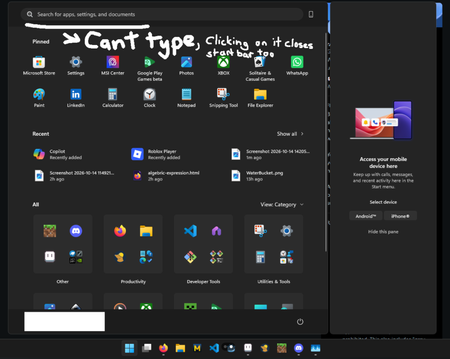
This morning, after turning on my computer, it was unusually sluggish. During the reboot process, the system froze, so I held down the power button to force a shutdown. After restarting, the system responded normally, but I noticed that most of Windows' native search functions were malfunctioning: the search box disappeared, was unresponsive, or wouldn't accept text. At first, I suspected that I had accidentally deleted a component using RevoUninstaller two months ago, but the system had been rebooting normally until then. Additionally, some system applications are running abnormally and take a very long time to open. I've already tried running the troubleshooter and selecting the Reset this PC (keep my files) option, but neither resolved the issue. Specs: CPU: AMD Ryzen 9 9900X RAM: 32GB Graphics Card: NVIDIA RTX 5080 (16GB), AMD Radeon Graphics Storage: 209GB used / 1.82TB total OS: 64-bit Windows 11, Product ID: 00342-22935-85203-AAOEM50Views0likes1Comment
win re wim file
I have NOT played with any system files on my Windows 11 PC but have found that under "create a restore point", there is a line that says "WinRETools (Missing)". It has been there for years in an uncorrupted status and I don't understand why it is now missing. it appears I need a file called Winre.wim and that it can be extracted from a Windows 11 ISO file. I have downloaded 2 ISO files, one in "English (United States)" and one in "English (Great Britain)". There was also an option for "English (International)". BUT none of these match the region shown by my Control Panel which says my PC is English (Australia). Web searches say this language mismatch is a problem and I've posted a separate query to the Community regarding this. Nevertheless I have proceeded to follow the various instructions on the web / Microsoft website about: download a zip extraction software. find install.win within the ISO file, and open it/extract/find the file winre.wim. BUT this is where I'm stuck - no matter how many times I've tried, there is NO winre.wim file within the ISO file. It appears that if my PC crashes and I need to recover/rebuild from the ISO file, and I won't be able to because the winre.wim file is missing from my computer's C drive, under Windows\System 32\Recovery. Help!!47Views0likes1Commentwin re wim file
When this file is missing from C-Windows-System Recovery, what are the exact steps for setting it up again please? I have found various suggestions on the web, but they seem to be incomplete as one are working. I'd appreciate a detailed and complete step by step instruction.23Views0likes0Comments
The Surface Phone 2.0: The way to revive the past in a way everyone profits.
The tech industry is currently facing a massive user-experience crisis, particularly in mobile and tablet computing. As a student regularly using iPadOS for schoolwork, I experience this firsthand. Apple's 'walled garden' has become an unnecessary complication: transferring a simple file requires uploading it to an unreliable third-party cloud storage service and downloading it on the target device. Multitasking is deeply flawed—windows crush, stretch, and break UI layouts, while the system frequently lags and crashes. This artificial lock-in forces user dependency through restriction, rather than delivering genuine utility. Microsoft has a historic opportunity to counter this by introducing an 'open-loop' ecosystem that respects the user’s intelligence. A system where users stay not because they are trapped by a hardware lock, but because they simply don't want to leave. Microsoft's core strength has always been treating the user as an administrator of their own device—embracing a 'if you break it, you can easily reinstall it and learn from your mistakes' philosophy. This concept is proven by long-term device stability: my 2015 Lumia 430 Dual SIM, despite being packed to capacity with photos, music, and videos, still runs smoothly and navigates flawlessly. This is a testament to the unmatched core optimization Microsoft is capable of. The market does not need another restricted tablet or a repetitive Android skin. We need the revival of the Universal Windows Platform (UWP) and 'One Windows' philosophy under a new hardware standard: The Microsoft Surface Phone 2.0. Here is a structured business and technical blueprint for how Microsoft can commercialize its past innovations and deliver a truly seamless ecosystem: 1. Unified Interface Architecture (Versatility over Restrictions) Instead of forcing a single mobile layout, the device should adapt dynamically to the user's workload, bridging past achievements with current innovations: • Tile Mode: A modernized revival of the legendary Live Tiles interface for quick, glanceable mobile data. • Desktop Mode: A complete desktop environment with unconstrained floating windows, fully exploiting the capabilities of Windows on ARM. • Console Layout (XBOX Mode): Out-of-the-box integration of the newly introduced XBOX Mode (Compact Home Experience). When paired with a controller or running Xbox Cloud Gaming, the phone instantly transforms into a fully-fledged portable gaming console. 2. Commercializing Past 'Failures' and Abandoned Innovations Microsoft has spent billions developing revolutionary technologies that were abandoned prematurely due to market timing, rather than technical failure. The Surface Phone 2.0 should consolidate and ship these features directly to consumers: • The Revival of Continuum: This remains Microsoft's most powerful concept. Plugging the phone into a monitor should instantly launch a full desktop Windows 11 environment. The modern processing power of ARM chips makes this transition flawless today. • Reclaiming Abandoned Shells: The modular interface designs from Windows 10X, the user experience of Project Andromeda, and the spatial computing foundations of Windows Mixed Reality should be reintegrated. If a user wears an XR headset, the phone should seamlessly project UWP apps into a 3D environment. 3. Cross-Platform Infrastructure Integration The Surface Phone 2.0 must serve as the universal anchor for a frictionless, continuous workflow under a single Microsoft Account: • Windows in the Car: A native dashboard interface to directly challenge Apple CarPlay and Android Auto, linking Bing Maps, Outlook calendars, and media seamlessly. • Frictionless Cloud & Local Continuity: True cross-device synchronization. If a user is modifying a Word or PowerPoint document on their PC and needs to leave, a native 'Continue working from...' notification should instantly appear on the Surface Phone, opening the exact file at the precise position it was left. • Hardware Tiering: Maintaining a stable, highly-optimized mid-range hardware line alongside flagship devices. The Windows ecosystem has historically proven that superb software optimization beats a raw hardware spec race. 4. Solving the 'App Gap' with Multi-Layered Architecture To prevent the ecosystem stagnation that affected Windows 10 Mobile, the device must support a versatile environment: • Native ARM64 UWP & Win32 applications for full-scale desktop performance. • A Built-in Android APK Subsystem (a revived, optimized iteration of virtualization) as a fallback mechanism, ensuring users have immediate access to mainstream applications while developers transition to native tools. 5. Next-Generation System-Wide AI Utilizing modern hardware-level Neural Processing Units (NPUs), a deeply integrated Copilot must replace old voice assistants. A reliable, context-aware, system-wide 'Hey, Copilot' assistant that works locally to manage scheduling, cross-device file tracking, and automation would instantly differentiate this device from competitors. Conclusion By unifying XBOX Mode, enterprise continuity through Continuum, and an open infrastructure that trusts the user, Microsoft can deliver a device that scales from a phone to a desktop, a car dashboard, and a console. The hardware and cloud infrastructure are finally ready. It is time to execute. (compressed and turned into human text by AI)44Views0likes0Comments
Intel Extension 2.0.10200.8 keeps reappearing after successful installation
Windows Update repeatedly offers Intel – Extension – 2.0.10200.8, even though update history shows it was successfully installed. After restarting, the same update returns and requires another restart. This causes repeated mandatory restarts under our organisation’s update policy and affects device compliance. How can we safely clear this update from the queue and stop it reappearing without disabling other Windows updates?37Views0likes0Comments
"windows can't stop 'volume' because a program is still using it." error
Hello I have an ongoing issue and I am just fed up at this point. I'm using Windows 11, Acer Aspire 3 laptop. Anytime I try to eject an external HD over 500GB I get the "windows can't stop 'volume' because a program is still using it. Close any programs that might be using the device, and then try again later" error. I have tried closing all windows and apps, turning off the windows. exe task, and even swicthing the disk to "offline"... I still get the error. Any ideas what I can do, or where I can go to find an answer. Thanks!2Views0likes0Comments
Win 11 Pro - Unable to log in with MS 365 Business Basic account
Good day, I have a couple of new build Win11Pro 26H2 units that have been setup with a local admin account. When I go to SETTINGS, ACCOUNTS, OTHER USERS, ADD ACOUNT it comes up with a message stating "Looks like this isn't a Microsoft account." I know that this is a valid account as this is my MS365 Admin Center account. Is there something that I am missing on how to add an account? I had read that it had to be WinPro, so upgraded from Home to Pro. Thanks for any support that you can provide. Bill Wilson58Views0likes1CommentWindows 11 forces PIN validation on boot for Edge, Teams and Phone Link
Hello. I am facing a persistent issue in Windows 11 where Microsoft Edge (running multiple windows and dozens of open tabs that I must keep active), Teams, and the Phone Link app demand PIN validation (Windows Hello) via toolbar prompts or "Your account requires attention" notifications upon every system startup. OneDrive is the only app that does not experience this issue. I want to make it absolutely clear that I DO NOT want to disable any convenience features (automatic reopening of apps on boot and Edge startup boost are enabled by necessity), I DO NOT want to switch to a local account (I strictly need settings synchronization active between my other Windows 11 devices), and I DO NOT clear cookies on close. To save time and avoid repetitive, generic troubleshooting steps, please note that I have already performed advanced troubleshooting procedures. I have disabled the Windows Hello requirement in settings, cleared credentials in Credential Manager, reset the Ngc security cache folder via terminal, applied local Group Policies for Edge, and even implemented a registry startup queue delay to prevent overcrowded login requests before the internet connection stabilizes. The issue gets temporarily fixed for 2 or 3 startups after applying these fixes, but Windows automatically overwrites or ignores these directives and goes back to demanding the PIN to revalidate the Single Sign-On (SSO) token of my personal Hotmail email across native background apps. There is clearly a hidden system maintenance scheduled task or a Cloud Identity Service component forcing this strict re-authentication cyclically, overriding user preferences. How can I stop Windows Hello from interfering with the automatic, silent login of these specific apps without breaking my device synchronization settings?140Views0likes2Comments