device management
1862 Topics
Help with Nokia Lumia 635 RM-974 - Urgent!
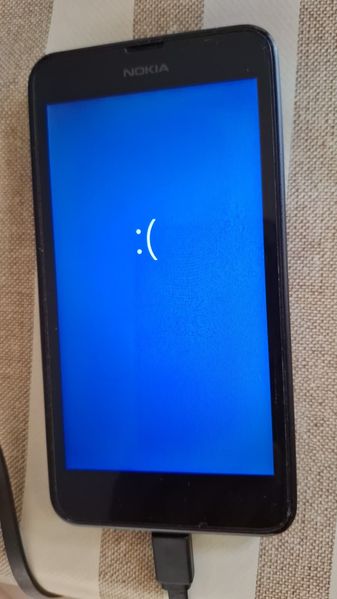
I have a Nokia Lumia 635 (model RM-974). Unfortunately, it won't boot up correctly. Every time I try to turn it on, the Nokia logo appears, followed by a BSOD. When I connect it to my PC, it consistently shows up in Device Manager as an "Unknown USB Device (Device Descriptor Request Failed)." The phone's buttons work perfectly, but even when I try to enter a specific mode, the phone just displays the Nokia logo and restarts—it just keeps doing that. The only mode I can still access is the one triggered by holding Volume Up + Power (the one showing the lightning bolt and gear icons), but even in this mode, the PC recognizes it the same way. I have tried using different PCs and cables and installing various drivers, but that isn't the problem. Unfortunately, since the PC doesn't recognize the USB-connected device, tools like WDRT, thor2, or WPInternals can't detect it either. I look forward to hearing from you soon.26Views0likes0CommentsWindows 11 has been running terrible lately – lag, black screen, disk struggling
I've been having some issues with Windows 11 over the past few days and honestly, my PC just feels worse overall. When I'm playing a game and hit the Windows key, everything starts lagging hard—disk usage spikes, system slows down, and it takes forever to respond. I thought it might be a maintenance thing at first, but after seeing similar reports in videos, I'm starting to think it's actually a Windows problem. The weird part is when I boot up—the screen goes black for about 30 seconds to a minute, then the wallpaper finally appears. But if I try to type my password, it goes black again and I end up having to force restart using the power button. Is anyone else dealing with this? Got any suggestions on what to check or try?33Views0likes1CommentWin11 Laptop battery drain occurs in sleep mode even when Modern Standby is disabled
When the laptop enters sleep mode, the battery continues to drain faster than expected, even if Modern Standby is disabled via the registry or BIOS. The battery level decreases noticeably within a few hours, and this phenomenon is even more pronounced when a USB device is connected during sleep. Neither changing the sleep settings nor disabling the wake-up timer resolves this issue.26Views0likes1Comment
How do I remove or disable the password prompt in Windows 11 sign-in?
Windows 11 forced me to add a password login during installation. Now, I am just tired of entering the password each time at the sign-in screen as it is a Home PC and no one can access the computer. How do I completely disable the password prompt in Windows 11 during sign-in and lock screen? I tried a couple of suggestions but the password can't be removed sadly!66Views0likes10Comments
How to permanently change folder details columns in Windows 11
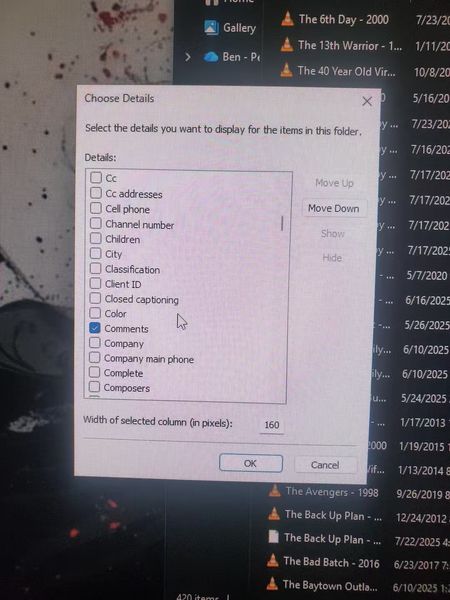
I'm still getting used to Windows 11, but I've run into something I can't figure out. I always use Details view for my folders, and I want to add the Title and Comments columns permanently—so I don't have to keep manually adding them every time I open a new folder. I'm comfortable with Regedit if that's what it takes, but I'd need some guidance on where to go and what to change. Anyone know how to make this stick across all folders?30Views0likes1CommentWindows11 System sounds sometimes play through wrong audio endpoint after connecting USB-C dock
After connecting a USB-C dock with a built-in audio port, system audio may sometimes continue to play through the built-in speakers even if the default playback device is set to the dock's audio output. Correct audio routing can only be restored by restarting the Windows Audio service or reconnecting the dock.21Views0likes1Comment
File History Broken After KB5101684 & KB5120249?
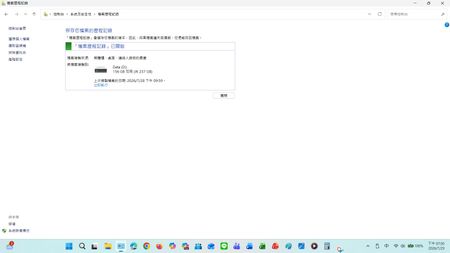
Hello everyone,(Note: I previously posted this issue on several community channels and feedback hubs, but only received a few hundred views and a few responses. Because this issue severely impacts daily backups on multiple machines, and there has been no clear official response, I am summarizing and refining the technical details here to help other IT users and track the scope of this issue.) This is not spam. Others also reported an anomaly in the file history log when updating security patch KB5101650 on July 14th. I am tracking a file history error that exists on two completely different hardware configurations. Both machines were running perfectly before installing these updates, requiring no manual folder redirection or configuration changes. Affected Environments: Laptop: Windows 11 25H2 → KB5101684 (Installed July 29, 2026) Desktop: Windows 10 22H2 → KB5120249 (Installed August 12, 2026) Observed Symptoms: Copying physical files to the backup drive (D drive) still works normally. The Last Backup timestamp in File History in Control Panel remains unchanged. Newly created files (Word documents, images, videos) consistently display No previous version available under Properties. The automatic backup correction dates for some unbacked-up files and folders (desktop, favorites) have also changed. Temporary Workaround: To force a logger restore: Open Control Panel > File History > Select Choose Drive in the left-hand menu. Reselect your existing backup drive and save. If you encounter the exact same file history failure on Windows 10 or 11, click I'm having this problem too and leave your system version information. Collective data is our best tool for pushing Microsoft engineering to release official patches.147Views0likes3Comments
Desktop background black
After (re)start of my Win 11 HP PC the desktop background is always black. I can only change it for the current session, then it goes black again. This is the situation after the latest win updates. Is there a fix? [2026-08-28 updates: (KB5120998) (26200.9278) (KB5122385) Realtek Semiconductor Corp. MEDIA Driver Update (6.0.10013.1) Intel(R) Corporation Extension Driver Update (1.0.4220.0) Microsoft Defender Antivirus – KB2267602 (version 1.457.375.0)]282Views0likes5CommentsWMIC Deprecation: Why remove it entirely instead of providing a backward-compatible stub?
I am writing to express my frustration regarding the recent removal of the Windows Management Instrumentation Command-line (`wmic`) tool from recent Windows 11 builds. Like many IT professionals, I maintain dozens of legacy batch scripts that rely on `wmic` for basic system queries (such as pulling the local date and time). Automatically removing this tool breaks decades of established scripts, causing unnecessary downtime and forcing us to rewrite code that has worked flawlessly for years. While I understand the push to modernize and transition administrators toward PowerShell and CIM cmdlets, removing the executable entirely feels like a heavy-handed approach. **A Proposed Solution:** Instead of a hard break, why couldn't Microsoft replace the legacy `wmic.exe` with a lightweight stub or alias? This stub could accept the traditional `wmic` command-line arguments, translate them, and delegate the work to the modern PowerShell/CIM equivalents under the hood. Backward compatibility has always been one of Windows' greatest strengths. Please consider adding a compatibility layer for fundamental system tools before deprecating them completely, rather than breaking the IT infrastructure that relies on them.68Views0likes1Comment