device management
1962 TopicsMy computer beeps and black screen
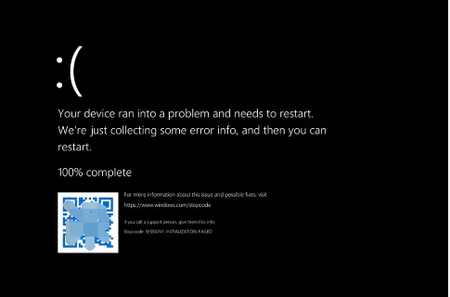
Sometimes, usually around night time, I'll hear a sudden beep sound coming from my computer. It's not a notification beep or an error beep. It's happened multiple times, and I'm not sure what's causing it. Sometimes the beep is accompanied by a brief black screen or a flicker, but other times it just disappears as quickly as it started. The other issue my computer will go to a black screen for a few seconds before reverting back to normal. This has happened even when I'm in the middle of using the computer, and it's not related to any specific task or program. I've tried restarting my computer and checking for updates, but the issues persist. Has anyone else experienced anything similar.1KViews44likes2Comments
The i7-7700K meet the minimun requierments to run Win11. But its not suported, Why?
Hi, I have an i7-7700K. This CPU have TPM 2.0, It's compatible with Secure Boot, it have 4 core up to 4.2 GHz. It also is 64bit. I don't know why this CPU is not supported by Microsoft to install Windows 11. Update, 10/18/2021: Yesterday I bought a MacBook Air, I know that the MacBook isn't the best computer and that you are limited within the horizon of Apple. But I don't trust Microsoft and the new Windows 11. What if I bough another computer of 2.000 US dollars and in some years Microsoft decided that I need a new computer? At least, with the new M1 chip of Apple I know that they will support the hardware and the will send me Updates and give Support.432KViews30likes318CommentsWhat is an enablement package?
An enablement package is a small update that activates features or functionality that are already present on a device but currently dormant. Think of it as a switch rather than a full operating system replacement. In a traditional feature update, Windows downloads several gigabytes of installation files, replaces major operating system components, and migrates the device to a new OS build. With an enablement package, most of that work has already happened through monthly cumulative updates delivered over time. An enablement package simply turns on the appropriate functionality and updates the Windows version designation. Because the underlying operating system files are already present on the device, Windows does not need to perform a full operating system replacement. Windows 11, version 26H2 will be delivered through an enablement package Windows 11, versions 26H2, 25H2, and 24H2 share the same underlying source code and servicing branch. That means much of the code required for version 26H2 has already been delivered to supported devices through monthly cumulative updates, remaining inactive until the feature update is installed. Once Windows 11, version 26H2 is generally available later this year, organizations can use the enablement package to move devices running Windows 11, version 25H2 or 24H2 to version 26H2 with minimal downtime. For more details on preparing for Windows 11, version 26H2, see Get ready for Windows 11, version 26H2. Note: Because Windows 11, versions 26H2, 25H2, and 24H2 share a common servicing branch, they will share the same release note KB identifiers for both monthly security updates and monthly optional non-security preview updates. You can see this with versions 25H2 or 24H2 today. What are the benefits of an enablement package? For IT organizations, enablement packages provide several practical advantages: Smaller downloads that consume significantly less network bandwidth. Faster installation times compared to traditional feature updates. Shorter maintenance windows and reduced user disruption. Simplified testing because the underlying operating system code is already present and serviced through monthly updates. A familiar update experience that resembles a monthly quality update more than a traditional OS upgrade. Is testing still necessary? Organizations should continue validating new Windows releases according to their internal processes. However, devices moving from Windows 11, version 24H2 or 25H2 to version 26H2 are not moving to a completely different operating system build. Because these releases share the same servicing branch, organizations can generally focus validation efforts on newly enabled default functionality, business-critical applications, and organization-specific configurations instead of revalidating the entire operating system stack.65KViews19likes28Comments
Freeze when alt-tabbing out of games
Hi. For about a week or 2 I have been getting a new bug. My entire PC freezes when I alt-tab out of a game, specifically VALORANT but it happens with other games as well. Playing on windowed/windowed borderless doesn't help. I can still hear sounds and can even still be heard when in a discord call but the only way to unfreeze is to hit the power button and force restart. I hate having to do this every time I play because it is harmful to my PC. I've seem similar threads before about this issue coming up since the last few weeks none with a real fix. Is Microsoft aware of /looking into the the issue? I've heard it's an issue on windows 11 only hence why I posted here. I even tried to downgrade back to windows 10 but it states it's not possible on this computer anymore. Is there a fix coming? edit: forgot to mention, first exiting fullscreen with F11 and then alt-tabbing out doesn't work either, still freezes237KViews19likes43CommentsCBS crashes on Windows 11 24H2 KB5046740
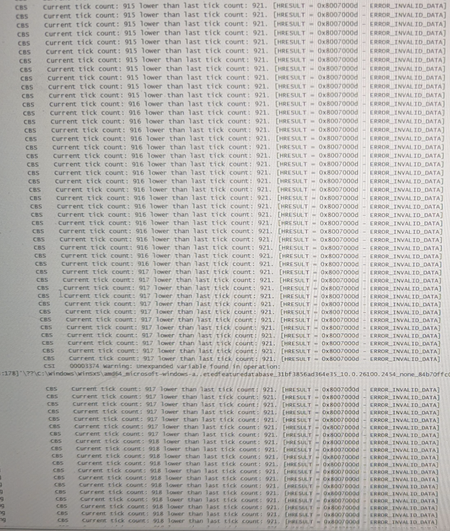
I'm trying to maintain a stable system, but every Windows update seems to trigger a CBS crash, making the machine barely functional. The issue first appeared after upgrading to 24H2, and despite performing several in-place upgrades (refresh installs), the problem hasn't gone away. While the computer successfully merged all MSU files and installed the latest Windows version using the in-place upgrade process, I can't rely on this method for every update—it’s simply not practical. Here’s what I discovered this time: The Windows update KB5046740 was applied using an unexpanded variable, specifically referencing ($build.nttree). This occurred during the transition from version 10.0.26100.2314 (installed via in-place upgrade) to 10.0.26100.2454.Solved1.5KViews18likes2CommentsHow to Recover OST Database in Outlook?
I'm having trouble recovering my OST database in Outlook and could use some help. Recently, I've encountered issues with my Outlook profile, and it's made me unable to access my emails and data. I suspect that the OST file might be corrupted or lost, and I'm not sure how to go about restoring it to get back all my important emails and settings. If anyone has experience with recovering OST files or knows the best methods to do so, I would really appreciate your guidance on the steps I need to take. Thank you!494Views17likes2Comments