deployment
1191 Topics
Win11 Forget this network option missing for saved Wi-Fi networks in Settings
In Settings → Network & Internet → Wi-Fi → Manage known networks, the Forget button does not appear when selecting certain saved networks. This option is visible for some networks but is missing for others, particularly those added via a QR code or imported from another device. The button still does not appear after reconnecting or restarting the computer.26Views0likes2Comments
Win11 Display settings page shows a black preview for the connected external monitor
In Settings → System → Display, the preview thumbnail for the external monitor appears as a black rectangle instead of the desktop screen. The monitor itself is functioning normally and can display the extended desktop. Even after changing the resolution or disconnecting and reconnecting the monitor, the preview remains black. Restarting File Explorer or the computer does not resolve this preview issue.22Views0likes0Comments
Appx volume still offline after restoring failed HDD to NVMe — PackageVolume.Repair fails 0x80070490
My 1 TB HDD failed. It hosted D:, including my Codex local workspace. I imaged what I could recover, rebuilt D: on an NVMe partition, restored the files and checked the hashes. The files are accessible, but Windows still marks the existing D:\WindowsApps Appx volume offline. C: and G: are online. The old volume name resolves to D:, but the Appx record’s stored MediaId differs from the current storage ID. Both Mount-AppxVolume and PackageVolume.Repair() fail with 0x80070490 (“Element not found”). Microsoft’s https://learn.microsoft.com/en-us/windows/windows-app-sdk/api/winrt/microsoft.windows.management.deployment.packagevolume.repair describes backing up a drive, replacing it, and restoring the contents when the new drive has a different media ID. That sounds like my situation, but Repair itself fails. What specific diagnostic would show what it cannot find, or is there a supported way to reconnect the existing package volume? I need to preserve the existing app registrations and original user data. I have a backup and more detailed diagnostics if something specific would help. Windows: Windows 11 Pro, 64-bit, [enter version and OS build from winver] Get-AppxVolume shows: Name: \\?\Volume{c236dfe0-118d-01dd-f06f-1be1c688ee00} PackageStorePath: D:\WindowsApps IsOffline: True A separate read-only diagnostic found: Stored MediaId: {20202020-5720-2D44-7335-CDAC60868D70} Current storage ID: {30303030-305F-3030-7335-CDAC60868D70}24Views0likes0CommentsOctober 2026 Windows Update causing major issues
We have had about 50 computers in our organization giving boot failures after Windows restarts to apply the October update, KB5127648. Affected machines are Dell devices, both laptops and desktops. The most common error message is "file missing or containing errors \windows\system32\winload.efi" The only fix for now is to try booting into Safe Mode and uninstall the October update. We use a 3rd party tool to patch our devices, Automox, but manually triggering updates from Windows Settings yields similar results. But what I have noticed is that when running Windows Update from Settings, multiple drivers and firmware udpates are also being installed, so I'm wondering if there is incompatibility with outdated stuff in our machines. So we're pushing Dell updates for drivers, firmware, and BIOS, along with Windows Updates hoping that this will take care of the issue. Has anyone else experienced anything similar with this update? Or have any ideas on what may be the root cause in our case? Any feedback will be much appreciated.3.3KViews1like8Comments
USB Audio Class 1.0 Code 10/no-audio issue fully resolved in KB5127648 and Windows 11 26H2?
a { text-decoration: none; color: #464feb; } tr th, tr td { border: 1px solid #e6e6e6; } tr th { background-color: #f5f5f5; } Microsoft acknowledged the USB Audio Class 1.0 issue associated with the September 2026 Windows update line. KB5129195 fixed the multichannel (8-channel / 3D audio) symptom, but Microsoft documentation indicated that other USB Audio Class 1.0 symptoms remained unresolved. Specifically: Device Manager Code 10 errors No audio output USB audio device initialization failures Unresponsive volume controls or sound settings KB5127648 has since been released and Windows 11 26H2 is now available. Can Microsoft clarify: Is the USB Audio Class 1.0 issue now fully resolved? If resolved, which KB is considered the final fix? Does Windows 11 26H2 include the complete fix? When will the Windows Release Health entry move from Mitigated to Resolved? We are currently delaying approval of Windows 11 cumulative updates because the available documentation remains unclear regarding the remaining Code 10 / no-audio symptoms. We have already had to disable automatic approval of Windows 11 updates in our enterprise patch-management workflow pending clarification. Ridiculous that Microsoft continues to fail at QA80Views0likes0CommentsWindows 11 Computer Is Unusually Slow; Task Manager Shows Abnormal Behavior
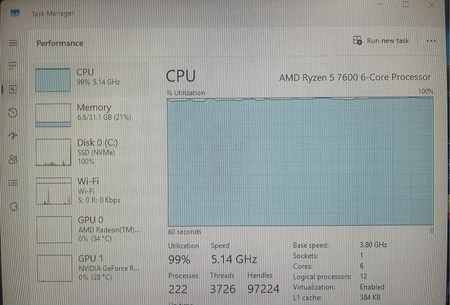
Yesterday, my computer was running perfectly fine, but today it took about two minutes to boot up. Once I reached the desktop, programs loaded extremely slowly, and almost every action required a long wait. The status shown in the screenshot below is what I saw when I opened Task Manager. I'm not sure if this is normal or if there's a problem—could you please help me analyze this?64Views0likes2Comments
Win11 Run as different user option missing from the Start menu right-click context menu
When you right-click an app in the Start menu, the Run as different user option no longer appears. The option is still available when you right-click an executable file directly in File Explorer, but it is not available in the Start menu. Even when using the workaround of pressing Shift + right-click, the option still does not appear in the Start menu.84Views0likes1CommentHow do I stop Windows 11 from reinstalling Copilot and widgets after every update?
I keep removing Copilot, widgets, and other stuff I never asked for, but after almost every major Windows 11 update, they come right back. I've disabled them in Settings and even used group policy for some, but it doesn't seem to stick long-term. It's frustrating having to clean up the same bloat over and over. Is there a reliable way to block these permanently, like a registry tweak or a script that survives updates? Or is this just something we have to deal with now? I'm on 25H2 and would rather not do a clean install just to get a leaner system.172Views0likes1CommentWindows 11 update broke my Wi-Fi again—anyone else dealing with this?
Installed the latest cumulative update for Windows 11 25H2, and now my Wi-Fi keeps dropping every few minutes. It reconnects on its own, but it's annoying as hell during calls and downloads. I tried rolling back the driver and resetting the network stack, but nothing's stuck so far. This isn't the first time an update has messed with my connection either. Anyone else hit this after a recent update? Did you find a driver version or a workaround that actually works, or am I stuck waiting for the next patch? I'm about ready to just use Ethernet and call it a day.1.9KViews0likes0Comments