deployment
1191 Topics
How to bypass windows 11 system requirements during installation on an old Laptop?
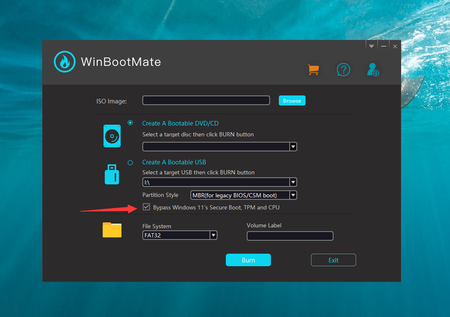
Hi, I have a Dell XPS 13 laptop bought in 2016. It comes with Intel Core i5-5200U, 4GB RAM and 128 SSD. When I am trying to install Windows 11 from a USB drive on this laptop, an error pops up and says this pc can't run Windows 11. Is there any way to skip this and bypass windows 11 system requirements during installation? This is a test computer and I have a complete backup of important staff. I want to give a try on Windows 11 instead of the old Windows 8.1 on this old laptop. Unfortunately, I don't have enough budget to build a new PC that meets all the system requirements of Windows 11. Much appreciated if you some one could shed some lights on bypassing windows 11 system requirements during installation. [Updates on Mar 18]: For quick reference, I managed to install Windows 11 on my old laptop with the help of WinBootMate app suggested by user Menda380. It has a built-in module to bypass the requirements.Solved509KViews2likes44Comments
Upgrade from Windows 11 Home to Pro cost
I am looking at purchasing a new Surface Pro 7+ with the 12.3" touchscreen. It comes with Windows 11 Home. I am reasonably sure I will prefer to have Pro instead. What is the cost for the activation key to make that happen?? I cannot find a place on the store to answer this question. Thank you,, Peter309KViews4likes18CommentsHow to quickly optimize Office 365 traffic for remote staff & reduce the load on your infrastructure
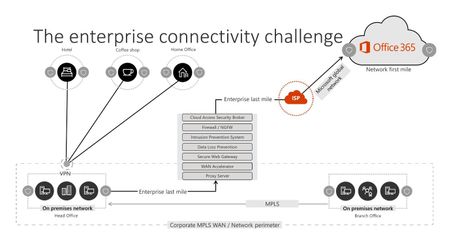
Over the past few weeks, Microsoft, and more specifically the Office 365 Network team have seen a large influx of questions from customers around how best to optimize their Office 365 connectivity as they work diligently to plan for a large amount of their userbase suddenly working from home. We’ve also seen similar queries from customers looking for best practice whilst rapidly enabling their Office 365 benefits, Free Teams plans or free 6 month E1 trial recently announced to rapidly roll out Teams to allow their business to continue to function and allow users to collaborate effectively without being in the Office.291KViews31likes35Comments
How to bypass or fix the processor isn't currently supported for Windows 11
Hi all, I have a modern PC with a high profile CPU Intel i7-7700HQ. When I was trying to upgrade this computer from Windows 10 to Windows 11 24H2, it says This PC doesn't currently Windows 11 system requirements. I was told to run the PC Health Check app to see what kind of hardware requirements are missing. The following error is returned by the app: The processor isn't currently supported for Windows 11 This is ridiculous as the CPU is pretty new and works fine when running Windows 10. Why Microsoft asks me to upgrade to Windows 11 but it does not allow me to do that. Is there any way to bypass or fix "The processor isn't currently supported for Windows 11" error? Looking forward to your suggestion!290KViews8likes44Comments