data loss prevention
461 Topics
Unlocking Microsoft 365 Adoption in Engineering, Manufacturing, and Regulated Industries
Executive Feedback to Microsoft Leadership: Expanding the Value of Microsoft 365 Beyond Cloud-First Workflows Executive Summary Microsoft has successfully built the industry's leading cloud collaboration ecosystem around Microsoft 365, OneDrive, and SharePoint. The strategy has delivered substantial value for information workers, distributed teams, and organizations pursuing cloud-first operating models. However, there is a significant and often overlooked customer segment that remains underserved: engineering, manufacturing, healthcare, medical device, industrial, laboratory, defense, and other regulated organizations whose primary workflows are intentionally built around file-based repositories, network shares, PDM/PLM systems, and controlled document environments. The challenge is not opposition to cloud technology. The challenge is that many of these organizations prioritize data integrity, traceability, predictability, and workflow continuity above all else. As a result, they often perceive modern Microsoft productivity capabilities such as AutoSave, coauthoring, and version history as being unnecessarily coupled to OneDrive and SharePoint. This creates an important business opportunity. Microsoft could unlock substantial additional Microsoft 365 adoption and customer goodwill by extending modern document protection and collaboration capabilities to local, network-hosted, and hybrid file environments without requiring a complete migration to OneDrive or SharePoint. This is not a request to replace cloud services. It is a request to recognize that cloud-first and file-based workflows can coexist. The Opportunity Is Larger Than It Appears Many of Microsoft's largest enterprise customers operate in environments where files are not simply documents. They are: Design history files Manufacturing records Engineering drawings Validation reports Device master records Controlled procedures Laboratory data Regulatory submissions Quality records For these organizations, file location, revision control, ownership, auditability, and retention are operational requirements rather than convenience features. Microsoft itself acknowledges that Office AutoSave currently requires files to be stored in OneDrive or SharePoint. Files opened from traditional file-system locations do not receive the same experience. As a result, many organizations feel they must choose between: Maintaining proven operational workflows. Accessing Microsoft's most advanced productivity features. That is a business decision many organizations simply refuse to make. The Real Barrier Is Not Technology. It Is Trust. Discussions around cloud adoption are often framed as a resistance-to-change problem. Research consistently suggests otherwise. Studies examining enterprise cloud adoption repeatedly identify security concerns, data privacy concerns, and control over organizational information as major barriers to adoption. One study found security concerns dramatically increased the likelihood that organizations would reject cloud adoption. Similarly, KPMG's cloud transformation research notes that concerns about data loss, audit findings, compliance issues, and operational risk can slow or limit cloud initiatives. The lesson is important: Organizations rarely reject technology because it is new. They reject technology because they do not trust it with critical business information. Once users experience: unexpected file overwrites, synchronization ambiguity, permission confusion, data residency uncertainty, conflicting document versions, trust declines rapidly. Trust, not functionality, is often the limiting factor. Engineering Users Experience the World Differently Microsoft's cloud ecosystem was largely designed around information-worker collaboration. Engineering organizations frequently operate under different assumptions: Information Worker Priority Engineering Priority Seamless sharing Data integrity Anywhere access Traceability Real-time collaboration Configuration control Ease of use Auditability Cloud accessibility Revision certainty Neither approach is wrong. The challenge is that Microsoft increasingly optimizes for one while under-serving the other. An Example: AutoSave AutoSave is one of the most valuable additions Microsoft has made to Office. The value proposition is obvious: Reduced data loss Improved productivity Lower cognitive burden Better user confidence Microsoft's own documentation describes AutoSave as continuously saving changes while users work, but only when documents reside in OneDrive or SharePoint. From Microsoft's perspective, this design is understandable. From the customer perspective, the message often becomes: "Modern document protection is available, but only if you adopt Microsoft's preferred storage architecture." Many customers view this not as a technical limitation, but as product segmentation. Microsoft Could Learn from Version Control Systems Modern software development solved multi-user document conflicts decades ago. Git was specifically designed around realities such as: multiple devices, multiple contributors, offline work, concurrent editing, conflicting changes. Critically, Git assumes conflicts are inevitable. Rather than hiding them, Git exposes conflicts and provides mechanisms to resolve them. Many engineers trust Git precisely because its behavior is transparent. By comparison, file synchronization systems often attempt to abstract away complexity. When synchronization fails, users can no longer determine: which version is authoritative, which edits are newer, what happened, who changed what. The engineering mindset is frequently: Show me the conflict. rather than Hide the conflict and make a decision on my behalf. The Untapped Hybrid Customer Much discussion around Microsoft 365 assumes organizations are either: Cloud-first, or Legacy. In reality, many enterprises are neither. Many operate as hybrid organizations and intentionally will continue to do so. Research from industry and security organizations continues to show persistent adoption of hybrid and multi-cloud architectures driven by governance, security, compliance, and operational requirements. These customers are not rejecting Microsoft. They are already paying customers. They often purchase: Microsoft 365 Windows Azure Teams Active Directory SQL Server Yet many would immediately purchase additional capabilities if Microsoft offered: Local AutoSave Office AutoSave functionality for: NTFS local storage SMB file shares NAS systems PDM-managed documents Local Version History Built-in document time travel without cloud dependence. Hybrid Collaboration Coauthoring capabilities that operate through enterprise file infrastructure. Enterprise Conflict Resolution Visualization and reconciliation of competing document changes. Network-Aware Document Protection The same confidence users experience in OneDrive without requiring migration to OneDrive. The Revenue Opportunity This is not merely a product-improvement request. It is a business opportunity. A significant portion of engineering and regulated industries remain hesitant to migrate entirely into cloud-centric document ecosystems because the perceived operational risks exceed the perceived benefits. Rather than forcing an all-or-nothing decision, Microsoft could monetize a middle path: Microsoft 365 Hybrid Collaboration A premium offering delivering: AutoSave Version History Recovery Conflict Resolution Audit Visibility for enterprise-controlled file infrastructure. Organizations that decline OneDrive adoption today may still eagerly purchase these capabilities. In effect, Microsoft could create incremental revenue from customers who are already committed to the Microsoft ecosystem but currently feel underserved by a cloud-only feature strategy. Recommendation Microsoft should stop treating file-server and network-share users as transitional users waiting to migrate. Many are not transitioning. Many have intentionally chosen architectures optimized for regulatory compliance, engineering rigor, operational control, and data governance. The future should not require choosing between: modern productivity features, and trusted enterprise workflows. The organizations building medical devices, industrial equipment, aerospace systems, manufacturing infrastructure, energy systems, and critical technologies represent some of Microsoft's most technically sophisticated and commercially valuable customers. They deserve first-class support for the workflows they intentionally operate. The opportunity is not to move every customer to the cloud. The opportunity is to bring Microsoft's best innovations to every customer, regardless of where their files live.46Views0likes0Comments
Excel Pivot Missing
Power Pivot is unavailable. I have already checked COM Add-ins and Disabled Items and completed Microsoft 365 repair without success. Please do not restart the standard troubleshooting script. I have a project due tomorrow and need advanced diagnosis or a remote-support session.63Views0likes1Comment
Protecting Organizations from External Email Risks in Microsoft 365 Copilot
Introduction As organizations embrace Microsoft 365 Copilot (Copilot), a new category of risk emerges: what happens when Copilot grounds its responses in untrusted external emails? Messages from external or unverified senders can carry content Copilot shouldn’t rely on. A new policy in Microsoft Purview Data Loss Prevention (DLP) addresses exactly this challenge. It lets organizations ground Copilot in trusted internal email only—reducing the risk of cross-prompt injection, while keeping everyday work uninterrupted. Why This Matters: The Risk of External Email in Copilot Grounding Copilot is built to integrate deeply with your organizational data—emails, files, meetings, and more—to generate intelligent and context-aware responses. However, not all mailbox content is equally reliable. External emails—messages originating from outside your organization’s trusted domains—can introduce risks such as: Prompt injection (or cross prompt injection) attempts disguised as legitimate communication Manipulated or misleading content aimed at influencing Copilot-generated outputs Unverified information or instructions that may lead to inaccurate responses Social engineering content that could be amplified through Copilot summarization Without proper safeguards, Copilot may inadvertently reference or summarize this content, potentially impacting decision-making or exposing users to biased or manipulated information. Consider a common scenario: an employee receives a message from an outside address that looks like a routine vendor note but contains hidden text instructing any AI assistant to ignore prior guidance and surface the recipient’s recent internal updates. Later, the employee asks Copilot to "summarize my inbox." Without this policy, that external message is eligible for grounding, and its planted instructions could influence the summary. With this new policy enabled, the external email is excluded from grounding entirely—Copilot never reads it as a source, so the injected instructions have no effect. How It Works: Under the Hood The feature operates through a DLP policy configured in the Microsoft Purview portal using the "Microsoft 365 Copilot and Copilot Chat" policy location with the "Email is received from > External users" condition. Here is how Copilot enforces the policy at runtime: Metadata Evaluation: Copilot evaluates email metadata and it checks the sender’s domain against your tenant’s accepted domains to determine whether an email is internal or external. Importantly, the body of the email is not inspected—only sender metadata is evaluated. External Emails Excluded from Grounding: Emails received from an external sender are excluded from Copilot grounding (source) data. This means when a user asks Copilot to summarize their inbox or reason over recent communications, those external emails are not referenced, summarized, or cited in the response. Other Grounding Sources Remain Available: Results from other grounding sources, such as web search, Word documents, Excel files, PowerPoint presentations, and internal emails, continue to show up in Copilot responses as normal. The policy is surgical in scope. No Impact on Email Access: User access to email remains completely unchanged. Users can still read, reply to, forward, and manage all their external emails as they always have. No Impact on Mail Flow: The policy does not affect mail flow, delivery, or retention. It operates exclusively at the Copilot grounding layer, not at the transport or storage layer. Things to Keep in Mind A few points help set the right expectations before you deploy: Metadata-only evaluation: The policy evaluates sender metadata, not message content. It does not scan or analyze the body of any email. Scoped to the grounding layer: The policy affects only what Copilot can use as a grounding source. It does not change mail flow, delivery, retention, or a user’s ability to access their email. Other sources are unaffected: Internal emails, files, and web results remain available to Copilot, so most everyday scenarios are unchanged. Validate before enforcing: Assess where external email is important to business workflows, then use simulation mode to validate impact and apply the protection only where it is relevant and needed. Key Benefits for Your Organization Mitigates Cross-Prompt Injection Risk: By excluding untrusted external email from Copilot’s grounding data, organizations significantly reduce the attack surface for prompt injection attempts embedded in incoming email. Applies protection where it is needed: Organizations can use the policy when external email presents a meaningful risk to Copilot grounding, while leaving external email available in scenarios where it is relevant and trusted. Ensures Copilot Responses Are Grounded in Trusted Data: Copilot responses reflect only your organization’s internal, verified communications, building greater confidence in Copilot generated insights. Minimal Disruption to Productivity: The feature keeps everyday work uninterrupted. Users retain full access to all their emails, and Copilot continues to function using all other permitted data sources. Simple Policy-Based Administration: Configured through familiar Microsoft Purview DLP policy workflows, making it easy for compliance and security teams to deploy and manage. Transparent User Experience: Users receive clear notifications when organizational policies restrict content, maintaining trust and transparency in the Copilot experience. Prerequisites Before you begin, make sure you have: Permissions: An account with the Compliance Administrator or Data Loss Prevention administrator role, or equivalent permissions to create DLP policies in the Microsoft Purview portal. Accepted domains: Your tenant’s accepted (internal) domains configured correctly, since these determine which senders are treated as internal versus external. How to Set It Up Setting up this protection is straightforward: Sign in to the Microsoft Purview portal (https://purview.microsoft.com). Navigate to Data Loss Prevention > Policies and select + Create policy. Choose the Custom template, then Custom policy. On the Locations page, enable the Microsoft 365 Copilot and Copilot Chat location. Add a rule with the condition "Email is received from," and set the value to External users. Set the action to "Prevent Copilot from processing content". Deploy the policy in simulation (test) mode first, and review the impact to confirm only the intended external email is affected. Once validated, save and activate (enforce) the policy. Conclusion As M365 Copilot becomes central to enterprise productivity, organizations must control what data feeds its responses. This new policy features adds a critical layer of defense, grounding M365 Copilot in trusted internal data while keeping the door open to seamless collaboration. By deploying this DLP policy, you protect more than data—you protect the integrity and trustworthiness of every Copilot-generated insight your organization relies on. Ready to get started? Create the policy in simulation mode today, validate the impact, and enforce it once you’re confident—so every Copilot response your organization relies on is grounded in data you trust. Learn more: https://learn.microsoft.com/en-us/purview/dlp-microsoft365-copilot-location-learn-aboutWhy DLP for External Web Search in Microsoft 365 Copilot Matters?
Introduction Microsoft 365 Copilot (Copilot) grounds its responses in your organizational data—emails, files, chats—and, optionally, the public web. With web search enabled, Copilot fetches real-time information from the Bing search service to deliver richer, more current answers. But what happens when a user’s prompt contains sensitive data such as credit card numbers, passport numbers, or Social Security numbers? That’s where a new feature in Microsoft Purview Data Loss Prevention (DLP) becomes essential: it keeps sensitive information from reaching external web search during Copilot’s query generation, preventing inadvertent data leakage while preserving the productivity benefits of AI. At a Glance In short: admin and user toggles decide whether Copilot can search the web; Microsoft Purview DLP decides what data may leave when it does. . Admin and user toggles are binary on/off controls—they aren’t aware of sensitive data. Prevents Copilot from using external web search as a grounding source for that prompt. It does not block the prompt itself or prevent Copilot from generating a response using permitted sources. It works regardless of your web search configuration,even as a safety net if web search is disabled. The Web Search Landscape in Copilot Before diving into the DLP feature, it’s important to understand the web search controls already available in Copilot and how they interact with this DLP feature. How Web Search Works in Copilot When web search is enabled, Copilot parses user prompts and generates search queries sent to the Bing search service. These generated queries are different from the user’s original prompt—they consist of a few words informed by the prompt. Importantly: The user’s entire prompt is NOT sent to Bing (unless it’s very short) Entire Microsoft 365 files (emails, documents) are NOT included in the search query User and tenant identifiers are removed before queries reach Bing Web search queries are not used to improve Bing, create advertising profiles, or train AI models Queries are treated as customer confidential information Admin Controls for Web Search IT administrators have several options to manage web search through the "Allow web search in Copilot" policy in Cloud Policy service for Microsoft 365: Enabled in Microsoft 365 Copilot and Microsoft 365 Copilot Chat: Web search is available across all Copilot experiences. Users get the Web content toggle to control it personally. Disabled in Microsoft 365 Copilot and Microsoft 365 Copilot Chat: Web search is completely turned off. The Web content toggle is dimmed and unavailable to users. Disabled in Work mode; Enabled in Web mode and Copilot Chat: A hybrid approach where web search is blocked in Work mode (where organizational data is accessed) but available in Web mode and Copilot Chat. User-Level Control: The Web Content Toggle When the admin enables web search, users in Copilot (Work chat) have a "Web content" toggle that is ON by default. Users can turn it off to exclude web content from their Copilot responses. This toggle is NOT available in Copilot Chat. The Gap: Why Admin Controls and User Toggles Are Not Enough Here’s the critical question: What if your organization has web search enabled (for good reasons—better answers, real-time data, improved productivity) but a user inadvertently includes sensitive information in their prompt? Consider these scenarios: A user asks Copilot: "What are the compliance requirements for processing credit card number 4532-XXXX-XXXX-1234?" An employee types: "Find regulations related to passport number AB1234567 for our international transfer." A prompt includes a customer’s Social Security number while asking about tax filing procedures. In each case, if web search is enabled, Copilot might generate a search query informed by the sensitive data in the prompt. Even though Copilot doesn’t send the entire prompt to Bing, the generated search query could still be influenced by or contain fragments of sensitive information. This is the gap that DLP for external web search fills—and it works regardless of which web search configuration option your admin has chosen. The Solution: DLP Policy to Restrict Web Search When Prompts Contain Sensitive Data Microsoft Purview DLP allows you to create a policy that detects when a user’s prompt contains sensitive information types (SITs)—such as credit card numbers, passport numbers, Social Security numbers, or custom SITs defined by your organization—and automatically prevents Copilot from using external web search as a grounding source for that specific prompt. How It Works Real-Time Detection: The DLP policy evaluates each prompt in real time, checking for configured sensitive information types before Copilot generates any web search query. Surgical Blocking: Only the web search component is prevented for that specific prompt. Copilot continues to generate responses using permitted internal Microsoft 365 data sources (emails, files, chats) where applicable. Per-Prompt Enforcement: The restriction applies only to prompts that actually contain sensitive data. The next prompt from the same user (without sensitive data) will use web search normally. Supports various available SIT Types: Works with Microsoft-provided SITs (credit cards, passports, SSNs, etc.) and custom SITs defined by your organization. Clear User Notification: Users are informed that web search was restricted for their prompt due to organizational policy, maintaining transparency. Why This Feature Is Critical, Regardless of Your Web Search Configuration This is the key insight that every security and compliance team must understand: The DLP policy for external web search provides a fundamentally different layer of protection than the admin toggle or user toggle for web search. Scenario 1: Web Search Fully Enabled With web search enabled across all Copilot experiences—the most common setup—the DLP policy acts as a safety net. Normal prompts get full web-grounded answers, but the moment a prompt contains sensitive data, web search is blocked for that prompt alone. External web grounding is prevented for that prompt when the policy detects configured sensitive content. Scenario 2: Web Search Disabled in Work Mode, Enabled in Web Mode Even here, users in Web mode and Copilot Chat still have web search active. The mode-level toggle is binary (on/off) and can’t tell safe prompts from sensitive ones—so if a prompt in these modes contains sensitive data, DLP adds prompt-level, data-aware protection beyond binary web-search controls.. Scenario 3: Web Search Enabled with User Toggle Available Expecting users to toggle off web search before every sensitive prompt is unrealistic—they don’t always know when content counts as sensitive by compliance standards. The DLP policy removes that human error, detecting and blocking automatically on a per-prompt basis. Scenario 4: Even When Web Search Is Fully Disabled Even with web search disabled entirely, the DLP policy adds defense-in-depth. Configurations change, policies get modified, and new users join groups with different settings. If web search is ever re-enabled—intentionally or not—the policy keeps sensitive data protected. Comparing the Controls: A Side-by-Side View Control Scope Granularity Sensitive Data Aware? Admin Policy (Allow web search) Tenant/User Group Binary: On or Off per mode No User Web Content Toggle Individual User Binary: On or Off No DLP: Block Web Search for SITs (Recommended) Per Prompt (Real-Time) Layered defense-in-depth; Conditional Block: Only when SITs detected Yes Key Takeaway: The admin toggle and user toggle control whether web search is available. The DLP policy controls what data can be sent when web search is available. These are complementary, not overlapping controls. Prerequisites Before you configure the policy, make sure you have: Licensing: Microsoft 365 Copilot licenses for your users, plus Microsoft Purview Data Loss Prevention (included with Microsoft 365 E5 or E5 Compliance, or an equivalent plan). Permissions: An account with a role that can create DLP policies for the Copilot location, e.g. Compliance Administrator or the Purview Data Security AI Admin role. Sensitive information types: The Microsoft-provided or custom SITs you want to detect (credit card numbers, passport numbers, SSNs, and so on) identified ahead of time. How to Configure the DLP Policy Follow these steps to set up the protection in Microsoft Purview: Sign in to the Microsoft Purview portal (https://purview.microsoft.com). Go to Data Loss Prevention > Policies and select + Create policy. Select the Custom template, then Custom policy. On the Locations page, set the Microsoft 365 Copilot and Copilot Chat location to On. Add a rule with the "Content contains" > "Sensitive information types" condition and choose the SITs you want to detect (e.g., Credit Card Number, Passport Number, SSN, or custom SITs). In the same rule, set the action to "Prevent Copilot from processing content" > "Performing Web Searches". Save and turn on the policy. Policy Design note: Conditions based on sensitive information types and sensitivity labels must be configured in separate rules within the same policy. Note: DLP policy changes can take up to 4-8 hours to take effect in Copilot. Deploy in simulation (test) mode first to review the impact before you enforce the policy. Real-World Use Case: Contoso Contoso wants employees to use Copilot for productivity and has web search enabled to provide the best possible responses. However, they don’t want sensitive customer data—such as credit card numbers or national identification numbers—to be sent to external web search when Copilot grounds responses on the web. They configure a DLP policy targeting the Microsoft 365 Copilot and Copilot Chat location with a rule that detects their relevant SITs and sets the action to "Prevent Copilot from processing content" > "Performing Web Searches". Result: When a user submits a prompt containing those SITs, Copilot does not send the prompt to external web search. Copilot still returns a response grounded in internal Microsoft 365 data sources where the user has access. For all other prompts, web search works normally. Other prompts can continue to use web search, subject to applicable settings and policies Best Practices Deploy the DLP web search policy alongside your existing web search admin controls for defense-in-depth. Include both Microsoft-provided and custom SITs relevant to your industry and data classification. Use simulation mode first to understand the impact before enforcing the policy. Combine with the "Prevent sensitive information types in prompts" DLP action for comprehensive protection (note: these must be separate rules within the same policy). Regularly review DLP alerts to identify patterns of sensitive data in prompts that may indicate user training needs. Document your layered approach: admin toggle for broad control, DLP for data-aware conditional control. Conclusion The “Restrict Microsoft 365 Copilot from using external web search when prompts contain sensitive data” DLP capability fills a critical gap. Admin policies and user toggles give broad on/off control over web search availability, but they can’t tell a prompt that’s safe to ground on the web from one carrying sensitive information that must never leave your Microsoft 365 boundary. This DLP feature adds intelligent, real-time, per-prompt protection that works regardless of your web search configuration. Users keep the productivity benefits of web-grounded Copilot responses without compromising data security—a clear example of security enabling productivity rather than restricting it. Bottom line: If your organization uses M365 Copilot with web search in any capacity, this DLP policy isn’t optional—it’s essential. References DLP for Microsoft 365 Copilot, Copilot Chat and Cowork: https://learn.microsoft.com/en-us/purview/dlp-microsoft365-copilot-location-learn-about Data, Privacy, and Security for Web Search in Copilot: https://learn.microsoft.com/en-us/microsoft-365/copilot/manage-public-web-accessHow to Recover Data from a Damaged or Corrupted OST File When Outlook Cannot Open It
Hi everyone, I have seen several cases where users still have an old OST file but cannot access the mailbox data inside it. This usually happens after an Outlook profile is removed, a Microsoft 365 or Exchange account is changed, a mailbox is no longer available, or the OST file becomes damaged or corrupted. One common misunderstanding is that an OST file can be opened on another computer in the same way as a PST file. However, an OST file is linked to the Outlook profile and mailbox that created it. If that connection is no longer available, Outlook may not be able to open the file normally. Before trying to recover the OST data, it is worth checking a few things: Is the original Microsoft 365 or Exchange mailbox still available? Can the Outlook profile be recreated and synchronized again? Is the issue related to the OST file itself or only the Outlook profile? Do you need the complete mailbox data or only specific folders/items? If the mailbox is still available, rebuilding the Outlook profile and allowing Outlook to create a new OST may be the better approach. However, if the mailbox no longer exists, the Outlook profile has been deleted, or the OST file is damaged and contains the only available copy of the mailbox data, recovery becomes a different process. In these situations, it is important to first check what information is still readable from the OST file. Scanning and previewing the mailbox data before export can help identify available folders, emails, attachments, contacts, and calendar items before creating a new PST file. A practical OST recovery workflow usually involves: Keeping a copy of the original OST file before making any changes. Checking whether the original mailbox can still be synchronized. Scanning the OST file to identify available mailbox items. Reviewing important folders and messages. Exporting the required data to PST. Validating the resulting PST in Outlook. A detailed overview of the OST to PST conversion process, including scanning, previewing, selecting mailbox items, and exporting recoverable data, is available here: https://www.edbmails.com/pages/ost-to-pst-converter.html One important point to remember is that recovery results depend on the condition and readability of the OST file. A conversion tool can help extract available mailbox information, but it cannot recreate data that is no longer present or readable inside the source file.323Views0likes1Comment
From DLP Alert Volume to Measurable Detection Assurance
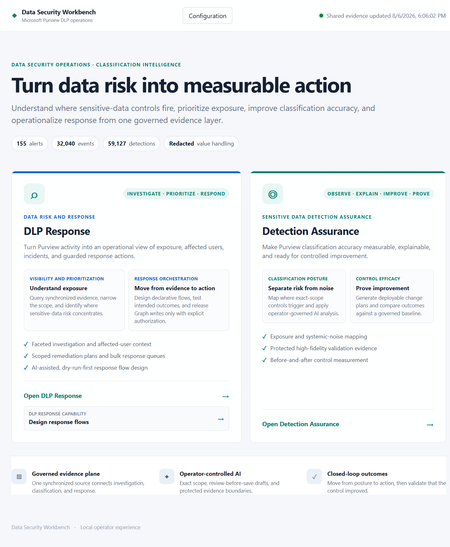
Introducing Data Security Workbench Built on the newly released Microsoft Purview DLP API, Data Security Workbench is an open-source starting point for any customer who wants to turn DLP alert volume into explainable detection assurance and controlled response. The gap between alert volume and operational confidence Microsoft Purview surfaces the activity that matters. But security teams still face the same operational challenge: connecting alerts to event evidence, understanding why a Sensitive Information Type fired, identifying the right business owner, deciding what should change, and responding without exposing the data they are trying to protect. That work is typically split across scripts, exports, spreadsheets, portals, and one-off analyst knowledge. The result is familiar — alert volume grows faster than confidence, tuning decisions are hard to defend, and remediation becomes either too cautious to help or too broad to trust. The goal is not to process more alerts. It is to make detection quality and response safety measurable operational controls. Detection Assurance: a closed-loop control cycle Detection Assurance determines whether your sensitive-data controls are behaving accurately. It explains why they fire, produces reviewable improvements, and proves whether those improvements worked — all as a repeatable, closed-loop process. STEP 1: Observe Define the SIT boundary, tuning profile, and control language STEP 2: Explain Analyze detections to separate signal from systemic noise STEP 3: Improve Generate a reviewable Purview implementation plan STEP 4: Prove Compare post-change outcomes against the original baseline Full transparency into detection behavior Each assessment produces a verbose Classification Efficiency Report documenting every detection across the scoped estate. It shows the total matches processed, how much noise was identified, the contextual patterns, underlying taxonomies, and where false positives concentrate. If you need to understand exactly what was flagged and why, the report gives full transparency — noise detection rate, primary workload, false-positive reduction opportunity, and pattern-level detail for every SIT rule in scope. From report to reviewable Purview implementation plan From this evidence, the system generates a Purview implementation plan. Each recommended step specifies the exact tuning change to make in your environment — the target SIT, the exact portal path, the current problem, and the precise configuration steps. Critically, each step explains why the change is safe to implement, quantifies the expected reduction in false positives, and flags associated risks. For example, it may recommend refining a sensitive information type pattern to exclude authentication token structures generating false matches, and tells you the expected noise reduction from that single change. From assurance to operational response Each tuning round also updates a DLP response store with the AI verdict for every analyzed incident. The system triages events — identifying which are genuine exposure and which are systemic noise — and records a privacy-safe rationale alongside each verdict. These verdicts can then be written in bulk back to the Purview incidents (as comments and tags in Microsoft Defender), or used to reach out to affected end users with guided remediation steps via email or Teams. After an explicitly approved incident update, the privacy-safe Detection Assurance rationale appears in the Microsoft Defender incident activity timeline — making outcomes easy to explain without requiring a separate incident queue. Useful AI without an uncontrolled data boundary Evidence is redacted by default. Classification boundaries fail closed. Microsoft Graph writes remain explicitly controlled. The default assessment mode excludes detected values, identities, recipients, content names, senders, and subjects from the AI payload. Departments are resolved locally before identity redaction — the model receives the department, not the person used to resolve it. Sensitive-value analysis, when needed, requires separate configuration, a confirmation phrase, DPAPI protection, and an explicit per-run choice. Live Graph actions (incident updates, email, Teams notifications) are disabled by default and require server enablement, an exact confirmation phrase, bounded targets, and an execution ledger. Dry-run is always the first gate. Model routing The workbench uses a luna model for high-volume event analysis and triage, and a Terra model for generating reports, implementation plans, and next-step recommendations. All AI is grounded in Purview data — no external training, no hosted data path, no opaque execution. Get started Turn your next DLP review into a measurable control cycle Built on the newly released Microsoft Purview DLP API, this open-source workbench is a starting point any customer can build from. Local-first, transparent, and ready to adapt to your organization. Explore the project →Why am I not getting Comcast emails on my iPhone?
Hi everyone, I’m trying to convert several pictures on my iPhone into PDF files so I https://comcast-support-usa-94hq.bolt.host/ can email or upload them more easily. Sometimes I need to combine the pictures into a single PDF, but I also need to batch-convert them so that each picture becomes a separate PDF. I’ve seen suggestions about using the Files app or the Print menu, but I haven’t found a way to do this with either option. Is there a built-in way to do this on an iPhone, or can it be done through OneDrive or another Microsoft app? I’d like the pictures to remain in the correct order and stay clear without making the PDF unnecessarily large. Any advice would be appreciated. Thanks!188Views0likes0CommentsExpanding Purview DLP and Information Protection to Foreign Platforms
Microsoft Purview is expanding its ability to process data from external services such as Google Workspace and Box through DLP policies and Information Protection auto-labeling. Everything depends on Microsoft Defender for Cloud Apps connectors to fetch data from the external services to Azure to be processed there. This is an esoteric play that will appeal to certain enterprise Microsoft 365 tenants with the need for a common protection strategy across multiple cloud platforms. https://office365itpros.com/2026/08/14/external-services-dlp/202Views0likes0Comments
Insider Risk Level not being correctly picked up by DLP
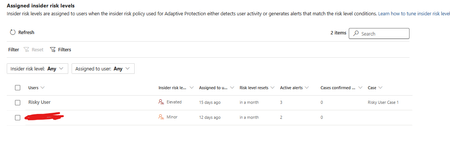
I have two users currently with assigned Insider Risk levels, one elevated and one minor. I have taken the templated DLP policy (DSPM for AI - Block sensitive info from AI sites) which looks for sensitive information being pasted to generative AI sites, and applies a block if the user is an elevated risk user, and a block with override for a moderate/minor risk user (this was audit only originally). For each advanced DLP rule within that policy, I have a separate policy tip which shows so I know which Advanced DLP rule has been hit. However, I'm having some discrepancies with the correct insider risk level being identified by Purview and therefore the wrong advanced DLP rule is being applied. Testing examples: Logged into a Windows 11 PC with the account, and using Medium confidence UK NINO's I try pasting the content into ChatGPT: Elevated risk user: Block with Override Minor Risk user: Block with Override If I try the exact same scenario on a different PC, I can sometimes get to the point where even though its the same set of data, Purview allows me to paste it at after checking the data. Or in another scenario, I was getting both users hitting the "elevated risk" advanced DLP rule. The Devices are all showing as up to date sync wise with DLP policies, and the policy itself is showing as fully synced. Assigned insider risk levels: DLP Rules: Elevated: Moderate/Minor:Solved705Views0likes2Comments