data loss prevention
461 Topics
Unlocking Microsoft 365 Adoption in Engineering, Manufacturing, and Regulated Industries
Executive Feedback to Microsoft Leadership: Expanding the Value of Microsoft 365 Beyond Cloud-First Workflows Executive Summary Microsoft has successfully built the industry's leading cloud collaboration ecosystem around Microsoft 365, OneDrive, and SharePoint. The strategy has delivered substantial value for information workers, distributed teams, and organizations pursuing cloud-first operating models. However, there is a significant and often overlooked customer segment that remains underserved: engineering, manufacturing, healthcare, medical device, industrial, laboratory, defense, and other regulated organizations whose primary workflows are intentionally built around file-based repositories, network shares, PDM/PLM systems, and controlled document environments. The challenge is not opposition to cloud technology. The challenge is that many of these organizations prioritize data integrity, traceability, predictability, and workflow continuity above all else. As a result, they often perceive modern Microsoft productivity capabilities such as AutoSave, coauthoring, and version history as being unnecessarily coupled to OneDrive and SharePoint. This creates an important business opportunity. Microsoft could unlock substantial additional Microsoft 365 adoption and customer goodwill by extending modern document protection and collaboration capabilities to local, network-hosted, and hybrid file environments without requiring a complete migration to OneDrive or SharePoint. This is not a request to replace cloud services. It is a request to recognize that cloud-first and file-based workflows can coexist. The Opportunity Is Larger Than It Appears Many of Microsoft's largest enterprise customers operate in environments where files are not simply documents. They are: Design history files Manufacturing records Engineering drawings Validation reports Device master records Controlled procedures Laboratory data Regulatory submissions Quality records For these organizations, file location, revision control, ownership, auditability, and retention are operational requirements rather than convenience features. Microsoft itself acknowledges that Office AutoSave currently requires files to be stored in OneDrive or SharePoint. Files opened from traditional file-system locations do not receive the same experience. As a result, many organizations feel they must choose between: Maintaining proven operational workflows. Accessing Microsoft's most advanced productivity features. That is a business decision many organizations simply refuse to make. The Real Barrier Is Not Technology. It Is Trust. Discussions around cloud adoption are often framed as a resistance-to-change problem. Research consistently suggests otherwise. Studies examining enterprise cloud adoption repeatedly identify security concerns, data privacy concerns, and control over organizational information as major barriers to adoption. One study found security concerns dramatically increased the likelihood that organizations would reject cloud adoption. Similarly, KPMG's cloud transformation research notes that concerns about data loss, audit findings, compliance issues, and operational risk can slow or limit cloud initiatives. The lesson is important: Organizations rarely reject technology because it is new. They reject technology because they do not trust it with critical business information. Once users experience: unexpected file overwrites, synchronization ambiguity, permission confusion, data residency uncertainty, conflicting document versions, trust declines rapidly. Trust, not functionality, is often the limiting factor. Engineering Users Experience the World Differently Microsoft's cloud ecosystem was largely designed around information-worker collaboration. Engineering organizations frequently operate under different assumptions: Information Worker Priority Engineering Priority Seamless sharing Data integrity Anywhere access Traceability Real-time collaboration Configuration control Ease of use Auditability Cloud accessibility Revision certainty Neither approach is wrong. The challenge is that Microsoft increasingly optimizes for one while under-serving the other. An Example: AutoSave AutoSave is one of the most valuable additions Microsoft has made to Office. The value proposition is obvious: Reduced data loss Improved productivity Lower cognitive burden Better user confidence Microsoft's own documentation describes AutoSave as continuously saving changes while users work, but only when documents reside in OneDrive or SharePoint. From Microsoft's perspective, this design is understandable. From the customer perspective, the message often becomes: "Modern document protection is available, but only if you adopt Microsoft's preferred storage architecture." Many customers view this not as a technical limitation, but as product segmentation. Microsoft Could Learn from Version Control Systems Modern software development solved multi-user document conflicts decades ago. Git was specifically designed around realities such as: multiple devices, multiple contributors, offline work, concurrent editing, conflicting changes. Critically, Git assumes conflicts are inevitable. Rather than hiding them, Git exposes conflicts and provides mechanisms to resolve them. Many engineers trust Git precisely because its behavior is transparent. By comparison, file synchronization systems often attempt to abstract away complexity. When synchronization fails, users can no longer determine: which version is authoritative, which edits are newer, what happened, who changed what. The engineering mindset is frequently: Show me the conflict. rather than Hide the conflict and make a decision on my behalf. The Untapped Hybrid Customer Much discussion around Microsoft 365 assumes organizations are either: Cloud-first, or Legacy. In reality, many enterprises are neither. Many operate as hybrid organizations and intentionally will continue to do so. Research from industry and security organizations continues to show persistent adoption of hybrid and multi-cloud architectures driven by governance, security, compliance, and operational requirements. These customers are not rejecting Microsoft. They are already paying customers. They often purchase: Microsoft 365 Windows Azure Teams Active Directory SQL Server Yet many would immediately purchase additional capabilities if Microsoft offered: Local AutoSave Office AutoSave functionality for: NTFS local storage SMB file shares NAS systems PDM-managed documents Local Version History Built-in document time travel without cloud dependence. Hybrid Collaboration Coauthoring capabilities that operate through enterprise file infrastructure. Enterprise Conflict Resolution Visualization and reconciliation of competing document changes. Network-Aware Document Protection The same confidence users experience in OneDrive without requiring migration to OneDrive. The Revenue Opportunity This is not merely a product-improvement request. It is a business opportunity. A significant portion of engineering and regulated industries remain hesitant to migrate entirely into cloud-centric document ecosystems because the perceived operational risks exceed the perceived benefits. Rather than forcing an all-or-nothing decision, Microsoft could monetize a middle path: Microsoft 365 Hybrid Collaboration A premium offering delivering: AutoSave Version History Recovery Conflict Resolution Audit Visibility for enterprise-controlled file infrastructure. Organizations that decline OneDrive adoption today may still eagerly purchase these capabilities. In effect, Microsoft could create incremental revenue from customers who are already committed to the Microsoft ecosystem but currently feel underserved by a cloud-only feature strategy. Recommendation Microsoft should stop treating file-server and network-share users as transitional users waiting to migrate. Many are not transitioning. Many have intentionally chosen architectures optimized for regulatory compliance, engineering rigor, operational control, and data governance. The future should not require choosing between: modern productivity features, and trusted enterprise workflows. The organizations building medical devices, industrial equipment, aerospace systems, manufacturing infrastructure, energy systems, and critical technologies represent some of Microsoft's most technically sophisticated and commercially valuable customers. They deserve first-class support for the workflows they intentionally operate. The opportunity is not to move every customer to the cloud. The opportunity is to bring Microsoft's best innovations to every customer, regardless of where their files live.24Views0likes0Comments
Excel Pivot Missing
Power Pivot is unavailable. I have already checked COM Add-ins and Disabled Items and completed Microsoft 365 repair without success. Please do not restart the standard troubleshooting script. I have a project due tomorrow and need advanced diagnosis or a remote-support session.46Views0likes1CommentHow to Recover Data from a Damaged or Corrupted OST File When Outlook Cannot Open It
Hi everyone, I have seen several cases where users still have an old OST file but cannot access the mailbox data inside it. This usually happens after an Outlook profile is removed, a Microsoft 365 or Exchange account is changed, a mailbox is no longer available, or the OST file becomes damaged or corrupted. One common misunderstanding is that an OST file can be opened on another computer in the same way as a PST file. However, an OST file is linked to the Outlook profile and mailbox that created it. If that connection is no longer available, Outlook may not be able to open the file normally. Before trying to recover the OST data, it is worth checking a few things: Is the original Microsoft 365 or Exchange mailbox still available? Can the Outlook profile be recreated and synchronized again? Is the issue related to the OST file itself or only the Outlook profile? Do you need the complete mailbox data or only specific folders/items? If the mailbox is still available, rebuilding the Outlook profile and allowing Outlook to create a new OST may be the better approach. However, if the mailbox no longer exists, the Outlook profile has been deleted, or the OST file is damaged and contains the only available copy of the mailbox data, recovery becomes a different process. In these situations, it is important to first check what information is still readable from the OST file. Scanning and previewing the mailbox data before export can help identify available folders, emails, attachments, contacts, and calendar items before creating a new PST file. A practical OST recovery workflow usually involves: Keeping a copy of the original OST file before making any changes. Checking whether the original mailbox can still be synchronized. Scanning the OST file to identify available mailbox items. Reviewing important folders and messages. Exporting the required data to PST. Validating the resulting PST in Outlook. A detailed overview of the OST to PST conversion process, including scanning, previewing, selecting mailbox items, and exporting recoverable data, is available here: https://www.edbmails.com/pages/ost-to-pst-converter.html One important point to remember is that recovery results depend on the condition and readability of the OST file. A conversion tool can help extract available mailbox information, but it cannot recreate data that is no longer present or readable inside the source file.280Views0likes1Comment
Protecting Organizations from External Email Risks in Microsoft 365 Copilot
Introduction As organizations embrace Microsoft 365 Copilot (Copilot), a new category of risk emerges: what happens when Copilot grounds its responses in untrusted external emails? Messages from external or unverified senders can carry content Copilot shouldn’t rely on. A new policy in Microsoft Purview Data Loss Prevention (DLP) addresses exactly this challenge. It lets organizations ground Copilot in trusted internal email only—reducing the risk of cross-prompt injection, while keeping everyday work uninterrupted. Why This Matters: The Risk of External Email in Copilot Grounding Copilot is built to integrate deeply with your organizational data—emails, files, meetings, and more—to generate intelligent and context-aware responses. However, not all mailbox content is equally reliable. External emails—messages originating from outside your organization’s trusted domains—can introduce risks such as: Prompt injection (or cross prompt injection) attempts disguised as legitimate communication Manipulated or misleading content aimed at influencing Copilot-generated outputs Unverified information or instructions that may lead to inaccurate responses Social engineering content that could be amplified through Copilot summarization Without proper safeguards, Copilot may inadvertently reference or summarize this content, potentially impacting decision-making or exposing users to biased or manipulated information. Consider a common scenario: an employee receives a message from an outside address that looks like a routine vendor note but contains hidden text instructing any AI assistant to ignore prior guidance and surface the recipient’s recent internal updates. Later, the employee asks Copilot to "summarize my inbox." Without this policy, that external message is eligible for grounding, and its planted instructions could influence the summary. With this new policy enabled, the external email is excluded from grounding entirely—Copilot never reads it as a source, so the injected instructions have no effect. How It Works: Under the Hood The feature operates through a DLP policy configured in the Microsoft Purview portal using the "Microsoft 365 Copilot and Copilot Chat" policy location with the "Email is received from > External users" condition. Here is how Copilot enforces the policy at runtime: Metadata Evaluation: Copilot evaluates email metadata and it checks the sender’s domain against your tenant’s accepted domains to determine whether an email is internal or external. Importantly, the body of the email is not inspected—only sender metadata is evaluated. External Emails Excluded from Grounding: Emails received from an external sender are excluded from Copilot grounding (source) data. This means when a user asks Copilot to summarize their inbox or reason over recent communications, those external emails are not referenced, summarized, or cited in the response. Other Grounding Sources Remain Available: Results from other grounding sources, such as web search, Word documents, Excel files, PowerPoint presentations, and internal emails, continue to show up in Copilot responses as normal. The policy is surgical in scope. No Impact on Email Access: User access to email remains completely unchanged. Users can still read, reply to, forward, and manage all their external emails as they always have. No Impact on Mail Flow: The policy does not affect mail flow, delivery, or retention. It operates exclusively at the Copilot grounding layer, not at the transport or storage layer. Things to Keep in Mind A few points help set the right expectations before you deploy: Metadata-only evaluation: The policy evaluates sender metadata, not message content. It does not scan or analyze the body of any email. Scoped to the grounding layer: The policy affects only what Copilot can use as a grounding source. It does not change mail flow, delivery, retention, or a user’s ability to access their email. Other sources are unaffected: Internal emails, files, and web results remain available to Copilot, so most everyday scenarios are unchanged. Validate before enforcing: Assess where external email is important to business workflows, then use simulation mode to validate impact and apply the protection only where it is relevant and needed. Key Benefits for Your Organization Mitigates Cross-Prompt Injection Risk: By excluding untrusted external email from Copilot’s grounding data, organizations significantly reduce the attack surface for prompt injection attempts embedded in incoming email. Applies protection where it is needed: Organizations can use the policy when external email presents a meaningful risk to Copilot grounding, while leaving external email available in scenarios where it is relevant and trusted. Ensures Copilot Responses Are Grounded in Trusted Data: Copilot responses reflect only your organization’s internal, verified communications, building greater confidence in Copilot generated insights. Minimal Disruption to Productivity: The feature keeps everyday work uninterrupted. Users retain full access to all their emails, and Copilot continues to function using all other permitted data sources. Simple Policy-Based Administration: Configured through familiar Microsoft Purview DLP policy workflows, making it easy for compliance and security teams to deploy and manage. Transparent User Experience: Users receive clear notifications when organizational policies restrict content, maintaining trust and transparency in the Copilot experience. Prerequisites Before you begin, make sure you have: Permissions: An account with the Compliance Administrator or Data Loss Prevention administrator role, or equivalent permissions to create DLP policies in the Microsoft Purview portal. Accepted domains: Your tenant’s accepted (internal) domains configured correctly, since these determine which senders are treated as internal versus external. How to Set It Up Setting up this protection is straightforward: Sign in to the Microsoft Purview portal (https://purview.microsoft.com). Navigate to Data Loss Prevention > Policies and select + Create policy. Choose the Custom template, then Custom policy. On the Locations page, enable the Microsoft 365 Copilot and Copilot Chat location. Add a rule with the condition "Email is received from," and set the value to External users. Set the action to "Prevent Copilot from processing content". Deploy the policy in simulation (test) mode first, and review the impact to confirm only the intended external email is affected. Once validated, save and activate (enforce) the policy. Conclusion As M365 Copilot becomes central to enterprise productivity, organizations must control what data feeds its responses. This new policy features adds a critical layer of defense, grounding M365 Copilot in trusted internal data while keeping the door open to seamless collaboration. By deploying this DLP policy, you protect more than data—you protect the integrity and trustworthiness of every Copilot-generated insight your organization relies on. Ready to get started? Create the policy in simulation mode today, validate the impact, and enforce it once you’re confident—so every Copilot response your organization relies on is grounded in data you trust. Learn more: https://learn.microsoft.com/en-us/purview/dlp-microsoft365-copilot-location-learn-aboutWhy DLP for External Web Search in Microsoft 365 Copilot Matters?
Introduction Microsoft 365 Copilot (Copilot) grounds its responses in your organizational data—emails, files, chats—and, optionally, the public web. With web search enabled, Copilot fetches real-time information from the Bing search service to deliver richer, more current answers. But what happens when a user’s prompt contains sensitive data such as credit card numbers, passport numbers, or Social Security numbers? That’s where a new feature in Microsoft Purview Data Loss Prevention (DLP) becomes essential: it keeps sensitive information from reaching external web search during Copilot’s query generation, preventing inadvertent data leakage while preserving the productivity benefits of AI. At a Glance In short: admin and user toggles decide whether Copilot can search the web; Microsoft Purview DLP decides what data may leave when it does. . Admin and user toggles are binary on/off controls—they aren’t aware of sensitive data. Prevents Copilot from using external web search as a grounding source for that prompt. It does not block the prompt itself or prevent Copilot from generating a response using permitted sources. It works regardless of your web search configuration,even as a safety net if web search is disabled. The Web Search Landscape in Copilot Before diving into the DLP feature, it’s important to understand the web search controls already available in Copilot and how they interact with this DLP feature. How Web Search Works in Copilot When web search is enabled, Copilot parses user prompts and generates search queries sent to the Bing search service. These generated queries are different from the user’s original prompt—they consist of a few words informed by the prompt. Importantly: The user’s entire prompt is NOT sent to Bing (unless it’s very short) Entire Microsoft 365 files (emails, documents) are NOT included in the search query User and tenant identifiers are removed before queries reach Bing Web search queries are not used to improve Bing, create advertising profiles, or train AI models Queries are treated as customer confidential information Admin Controls for Web Search IT administrators have several options to manage web search through the "Allow web search in Copilot" policy in Cloud Policy service for Microsoft 365: Enabled in Microsoft 365 Copilot and Microsoft 365 Copilot Chat: Web search is available across all Copilot experiences. Users get the Web content toggle to control it personally. Disabled in Microsoft 365 Copilot and Microsoft 365 Copilot Chat: Web search is completely turned off. The Web content toggle is dimmed and unavailable to users. Disabled in Work mode; Enabled in Web mode and Copilot Chat: A hybrid approach where web search is blocked in Work mode (where organizational data is accessed) but available in Web mode and Copilot Chat. User-Level Control: The Web Content Toggle When the admin enables web search, users in Copilot (Work chat) have a "Web content" toggle that is ON by default. Users can turn it off to exclude web content from their Copilot responses. This toggle is NOT available in Copilot Chat. The Gap: Why Admin Controls and User Toggles Are Not Enough Here’s the critical question: What if your organization has web search enabled (for good reasons—better answers, real-time data, improved productivity) but a user inadvertently includes sensitive information in their prompt? Consider these scenarios: A user asks Copilot: "What are the compliance requirements for processing credit card number 4532-XXXX-XXXX-1234?" An employee types: "Find regulations related to passport number AB1234567 for our international transfer." A prompt includes a customer’s Social Security number while asking about tax filing procedures. In each case, if web search is enabled, Copilot might generate a search query informed by the sensitive data in the prompt. Even though Copilot doesn’t send the entire prompt to Bing, the generated search query could still be influenced by or contain fragments of sensitive information. This is the gap that DLP for external web search fills—and it works regardless of which web search configuration option your admin has chosen. The Solution: DLP Policy to Restrict Web Search When Prompts Contain Sensitive Data Microsoft Purview DLP allows you to create a policy that detects when a user’s prompt contains sensitive information types (SITs)—such as credit card numbers, passport numbers, Social Security numbers, or custom SITs defined by your organization—and automatically prevents Copilot from using external web search as a grounding source for that specific prompt. How It Works Real-Time Detection: The DLP policy evaluates each prompt in real time, checking for configured sensitive information types before Copilot generates any web search query. Surgical Blocking: Only the web search component is prevented for that specific prompt. Copilot continues to generate responses using permitted internal Microsoft 365 data sources (emails, files, chats) where applicable. Per-Prompt Enforcement: The restriction applies only to prompts that actually contain sensitive data. The next prompt from the same user (without sensitive data) will use web search normally. Supports various available SIT Types: Works with Microsoft-provided SITs (credit cards, passports, SSNs, etc.) and custom SITs defined by your organization. Clear User Notification: Users are informed that web search was restricted for their prompt due to organizational policy, maintaining transparency. Why This Feature Is Critical, Regardless of Your Web Search Configuration This is the key insight that every security and compliance team must understand: The DLP policy for external web search provides a fundamentally different layer of protection than the admin toggle or user toggle for web search. Scenario 1: Web Search Fully Enabled With web search enabled across all Copilot experiences—the most common setup—the DLP policy acts as a safety net. Normal prompts get full web-grounded answers, but the moment a prompt contains sensitive data, web search is blocked for that prompt alone. External web grounding is prevented for that prompt when the policy detects configured sensitive content. Scenario 2: Web Search Disabled in Work Mode, Enabled in Web Mode Even here, users in Web mode and Copilot Chat still have web search active. The mode-level toggle is binary (on/off) and can’t tell safe prompts from sensitive ones—so if a prompt in these modes contains sensitive data, DLP adds prompt-level, data-aware protection beyond binary web-search controls.. Scenario 3: Web Search Enabled with User Toggle Available Expecting users to toggle off web search before every sensitive prompt is unrealistic—they don’t always know when content counts as sensitive by compliance standards. The DLP policy removes that human error, detecting and blocking automatically on a per-prompt basis. Scenario 4: Even When Web Search Is Fully Disabled Even with web search disabled entirely, the DLP policy adds defense-in-depth. Configurations change, policies get modified, and new users join groups with different settings. If web search is ever re-enabled—intentionally or not—the policy keeps sensitive data protected. Comparing the Controls: A Side-by-Side View Control Scope Granularity Sensitive Data Aware? Admin Policy (Allow web search) Tenant/User Group Binary: On or Off per mode No User Web Content Toggle Individual User Binary: On or Off No DLP: Block Web Search for SITs (Recommended) Per Prompt (Real-Time) Layered defense-in-depth; Conditional Block: Only when SITs detected Yes Key Takeaway: The admin toggle and user toggle control whether web search is available. The DLP policy controls what data can be sent when web search is available. These are complementary, not overlapping controls. Prerequisites Before you configure the policy, make sure you have: Licensing: Microsoft 365 Copilot licenses for your users, plus Microsoft Purview Data Loss Prevention (included with Microsoft 365 E5 or E5 Compliance, or an equivalent plan). Permissions: An account with a role that can create DLP policies for the Copilot location, e.g. Compliance Administrator or the Purview Data Security AI Admin role. Sensitive information types: The Microsoft-provided or custom SITs you want to detect (credit card numbers, passport numbers, SSNs, and so on) identified ahead of time. How to Configure the DLP Policy Follow these steps to set up the protection in Microsoft Purview: Sign in to the Microsoft Purview portal (https://purview.microsoft.com). Go to Data Loss Prevention > Policies and select + Create policy. Select the Custom template, then Custom policy. On the Locations page, set the Microsoft 365 Copilot and Copilot Chat location to On. Add a rule with the "Content contains" > "Sensitive information types" condition and choose the SITs you want to detect (e.g., Credit Card Number, Passport Number, SSN, or custom SITs). In the same rule, set the action to "Prevent Copilot from processing content" > "Performing Web Searches". Save and turn on the policy. Policy Design note: Conditions based on sensitive information types and sensitivity labels must be configured in separate rules within the same policy. Note: DLP policy changes can take up to 4-8 hours to take effect in Copilot. Deploy in simulation (test) mode first to review the impact before you enforce the policy. Real-World Use Case: Contoso Contoso wants employees to use Copilot for productivity and has web search enabled to provide the best possible responses. However, they don’t want sensitive customer data—such as credit card numbers or national identification numbers—to be sent to external web search when Copilot grounds responses on the web. They configure a DLP policy targeting the Microsoft 365 Copilot and Copilot Chat location with a rule that detects their relevant SITs and sets the action to "Prevent Copilot from processing content" > "Performing Web Searches". Result: When a user submits a prompt containing those SITs, Copilot does not send the prompt to external web search. Copilot still returns a response grounded in internal Microsoft 365 data sources where the user has access. For all other prompts, web search works normally. Other prompts can continue to use web search, subject to applicable settings and policies Best Practices Deploy the DLP web search policy alongside your existing web search admin controls for defense-in-depth. Include both Microsoft-provided and custom SITs relevant to your industry and data classification. Use simulation mode first to understand the impact before enforcing the policy. Combine with the "Prevent sensitive information types in prompts" DLP action for comprehensive protection (note: these must be separate rules within the same policy). Regularly review DLP alerts to identify patterns of sensitive data in prompts that may indicate user training needs. Document your layered approach: admin toggle for broad control, DLP for data-aware conditional control. Conclusion The “Restrict Microsoft 365 Copilot from using external web search when prompts contain sensitive data” DLP capability fills a critical gap. Admin policies and user toggles give broad on/off control over web search availability, but they can’t tell a prompt that’s safe to ground on the web from one carrying sensitive information that must never leave your Microsoft 365 boundary. This DLP feature adds intelligent, real-time, per-prompt protection that works regardless of your web search configuration. Users keep the productivity benefits of web-grounded Copilot responses without compromising data security—a clear example of security enabling productivity rather than restricting it. Bottom line: If your organization uses M365 Copilot with web search in any capacity, this DLP policy isn’t optional—it’s essential. References DLP for Microsoft 365 Copilot, Copilot Chat and Cowork: https://learn.microsoft.com/en-us/purview/dlp-microsoft365-copilot-location-learn-about Data, Privacy, and Security for Web Search in Copilot: https://learn.microsoft.com/en-us/microsoft-365/copilot/manage-public-web-access
From DLP Alert Volume to Measurable Detection Assurance
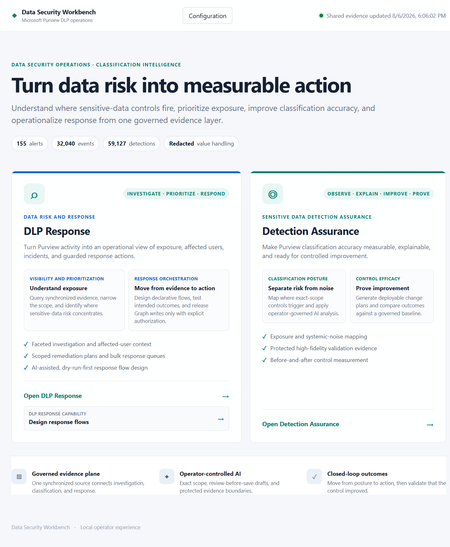
Introducing Data Security Workbench Built on the newly released Microsoft Purview DLP API, Data Security Workbench is an open-source starting point for any customer who wants to turn DLP alert volume into explainable detection assurance and controlled response. The gap between alert volume and operational confidence Microsoft Purview surfaces the activity that matters. But security teams still face the same operational challenge: connecting alerts to event evidence, understanding why a Sensitive Information Type fired, identifying the right business owner, deciding what should change, and responding without exposing the data they are trying to protect. That work is typically split across scripts, exports, spreadsheets, portals, and one-off analyst knowledge. The result is familiar — alert volume grows faster than confidence, tuning decisions are hard to defend, and remediation becomes either too cautious to help or too broad to trust. The goal is not to process more alerts. It is to make detection quality and response safety measurable operational controls. Detection Assurance: a closed-loop control cycle Detection Assurance determines whether your sensitive-data controls are behaving accurately. It explains why they fire, produces reviewable improvements, and proves whether those improvements worked — all as a repeatable, closed-loop process. STEP 1: Observe Define the SIT boundary, tuning profile, and control language STEP 2: Explain Analyze detections to separate signal from systemic noise STEP 3: Improve Generate a reviewable Purview implementation plan STEP 4: Prove Compare post-change outcomes against the original baseline Full transparency into detection behavior Each assessment produces a verbose Classification Efficiency Report documenting every detection across the scoped estate. It shows the total matches processed, how much noise was identified, the contextual patterns, underlying taxonomies, and where false positives concentrate. If you need to understand exactly what was flagged and why, the report gives full transparency — noise detection rate, primary workload, false-positive reduction opportunity, and pattern-level detail for every SIT rule in scope. From report to reviewable Purview implementation plan From this evidence, the system generates a Purview implementation plan. Each recommended step specifies the exact tuning change to make in your environment — the target SIT, the exact portal path, the current problem, and the precise configuration steps. Critically, each step explains why the change is safe to implement, quantifies the expected reduction in false positives, and flags associated risks. For example, it may recommend refining a sensitive information type pattern to exclude authentication token structures generating false matches, and tells you the expected noise reduction from that single change. From assurance to operational response Each tuning round also updates a DLP response store with the AI verdict for every analyzed incident. The system triages events — identifying which are genuine exposure and which are systemic noise — and records a privacy-safe rationale alongside each verdict. These verdicts can then be written in bulk back to the Purview incidents (as comments and tags in Microsoft Defender), or used to reach out to affected end users with guided remediation steps via email or Teams. After an explicitly approved incident update, the privacy-safe Detection Assurance rationale appears in the Microsoft Defender incident activity timeline — making outcomes easy to explain without requiring a separate incident queue. Useful AI without an uncontrolled data boundary Evidence is redacted by default. Classification boundaries fail closed. Microsoft Graph writes remain explicitly controlled. The default assessment mode excludes detected values, identities, recipients, content names, senders, and subjects from the AI payload. Departments are resolved locally before identity redaction — the model receives the department, not the person used to resolve it. Sensitive-value analysis, when needed, requires separate configuration, a confirmation phrase, DPAPI protection, and an explicit per-run choice. Live Graph actions (incident updates, email, Teams notifications) are disabled by default and require server enablement, an exact confirmation phrase, bounded targets, and an execution ledger. Dry-run is always the first gate. Model routing The workbench uses a luna model for high-volume event analysis and triage, and a Terra model for generating reports, implementation plans, and next-step recommendations. All AI is grounded in Purview data — no external training, no hosted data path, no opaque execution. Get started Turn your next DLP review into a measurable control cycle Built on the newly released Microsoft Purview DLP API, this open-source workbench is a starting point any customer can build from. Local-first, transparent, and ready to adapt to your organization. Explore the project →
From “No” to “Now”: A 7-Layer Strategy for Enterprise AI Safety
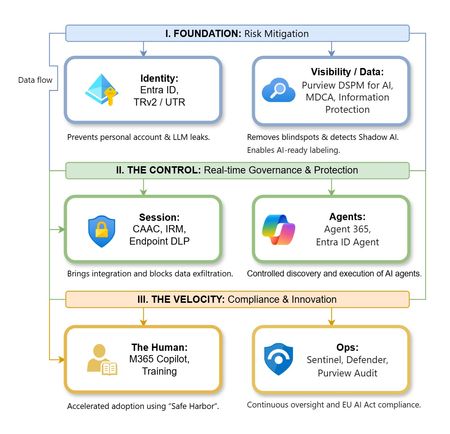
The “block” posture on Generative AI has failed. In a global enterprise, banning these tools doesn't stop usage; it simply pushes intellectual property into unmanaged channels and creates a massive visibility gap in corporate telemetry. The priority has now shifted from stopping AI to hardening the environment so that innovation can run at velocity without compromising data sovereignty. Traditional security perimeters are ineffective against the “slow bleed” of AI leakage - where data moves through prompts, clipboards, and autonomous agents rather than bulk file transfers. To secure this environment, a 7-layer defense-in-depth model is required to treat the conversation itself as the new perimeter. 1. Identity: The Only Verifiable Perimeter Identity is the primary control plane. Access to AI services must be treated with the same rigor as administrative access to core infrastructure. The strategy centers on enforcing device-bound Conditional Access, where access is strictly contingent on device health. To solve the "Account Leak" problem, the deployment of Tenant Restrictions v2 (TRv2) is essential to prevent users from signing into personal tenants using corporate-managed devices. For enhanced coverage, Universal Tenant Restrictions (UTR) via Global Secure Access (GSA) allows for consistent enforcement at the cloud edge. While TRv2 authentication-plane is GA, data-plane protection is GA for the Microsoft 365 admin center and remains in preview for other workloads such as SharePoint and Teams. 2. Eliminating the Visibility Gap (Shadow AI) You can’t secure what you can't see. Microsoft Defender for Cloud Apps (MDCA) serves to discover and govern the enterprise AI footprint, while Purview DSPM for AI (formerly AI Hub) monitors Copilot and third-party interactions. By categorizing tools using MDCA risk scores and compliance attributes, organizations can apply automated sanctioning decisions and enforce session controls for high-risk endpoints. 3. Data Hygiene: Hardening the “Work IQ” AI acts as a mirror of internal permissions. In a "flat" environment, AI acts like a search engine for your over-shared data. Hardening the foundation requires automated sensitivity labeling in Purview Information Protection. Identifying PII and proprietary code before assigning AI licenses ensures that labels travel with the data, preventing labeled content from being exfiltrated via prompts or unauthorized sharing. 4. Session Governance: Solving the “Clipboard Leak” The most common leak in 2025 is not a file upload; it’s a simple copy-paste action or a USB transfer. Deploying Conditional Access App Control (CAAC) via MDCA session policies allows sanctioned apps to function while specifically blocking cut/copy/paste. This is complemented by Endpoint DLP, which extends governance to the physical device level, preventing sensitive data from being moved to unmanaged USB storage or printers during an AI-assisted workflow. Purview Information Protection with IRM rounds this out by enforcing encryption and usage rights on the files themselves. When a user tries to print a "Do Not Print" document, Purview triggers an alert that flows into Microsoft Sentinel. This gives the SOC visibility into actual policy violations instead of them having to hunt through generic activity logs. 5. The “Agentic” Era: Agent 365 & Sharing Controls Now that we're moving from "Chat" to "Agents", Agent 365 and Entra Agent ID provide the necessary identity and control plane for autonomous entities. A quick tip: in large-scale tenants, default settings often present a governance risk. A critical first step is navigating to the Microsoft 365 admin center (Copilot > Agents) to disable the default “Anyone in organization” sharing option. Restricting agent creation and sharing to a validated security group is essential to prevent unvetted agent sprawl and ensure that only compliant agents are discoverable. 6. The Human Layer: “Safe Harbors” over Bans Security fails when it creates more friction than the risk it seeks to mitigate. Instead of an outright ban, investment in AI skilling-teaching users context minimization (redacting specifics before interacting with a model) - is the better path. Providing a sanctioned, enterprise-grade "Safe Harbor" like M365 Copilot offers a superior tool that naturally cuts down the use of Shadow AI. 7. Continuous Ops: Monitoring & Regulatory Audit Security is not a “set and forget” project, particularly with the EU AI Act on the horizon. Correlating AI interactions and DLP alerts in Microsoft Sentinel using Purview Audit (specifically the CopilotInteraction logs) data allows for real-time responses. Automated SOAR playbooks can then trigger protective actions - such as revoking an Agent ID - if an entity attempts to access sensitive HR or financial data. Final Thoughts Securing AI at scale is an architectural shift. By layering Identity, Session Governance, and Agentic Identity, AI moves from being a fragmented risk to a governed tool that actually works for the modern workplace.Authorization and Governance for AI Agents: Runtime Authorization Beyond Identity at Scale
Designing Authorization‑Aware AI Agents at Scale Enforcing Runtime RBAC + ABAC with Approval Injection (JIT) Microsoft Entra Agent Identity enables organizations to govern and manage AI agent identities in Copilot Studio, improving visibility and identity-level control. However, as enterprises deploy multiple autonomous AI agents, identity and OAuth permissions alone cannot answer a more critical question: “Should this action be executed now, by this agent, for this user, under the current business and regulatory context?” This post introduces a reusable Authorization Fabric—combining a Policy Enforcement Point (PEP) and Policy Decision Point (PDP)—implemented as a Microsoft Entra‑protected endpoint using Azure Functions/App Service authentication. Every AI agent (Copilot Studio or AI Foundry/Semantic Kernel) calls this fabric before tool execution, receiving a deterministic runtime decision: ALLOW / DENY / REQUIRE_APPROVAL / MASK Who this is for Anyone building AI agents (Copilot Studio, AI Foundry/Semantic Kernel) that call tools, workflows, or APIs Organizations scaling to multiple agents and needing consistent runtime controls Teams operating in regulated or security‑sensitive environments, where decisions must be deterministic and auditable Why a V2? Identity is necessary—runtime authorization is missing Entra Agent Identity (preview) integrates Copilot Studio agents with Microsoft Entra so that newly created agents automatically get an Entra agent identity, manageable in the Entra admin center, and identity activity is logged in Entra. That solves who the agent is and improves identity governance visibility. But multi-agent deployments introduce a new risk class: Autonomous execution sprawl — many agents, operating with delegated privileges, invoking the same backends independently. OAuth and API permissions answer “can the agent call this API?” They do not answer “should the agent execute this action under business policy, compliance constraints, data boundaries, and approval thresholds?” This is where a runtime authorization decision plane becomes essential. The pattern: Microsoft Entra‑Protected Authorization Fabric (PEP + PDP) Instead of embedding RBAC logic independently inside every agent, use a shared fabric: PEP (Policy Enforcement Point): Gatekeeper invoked before any tool/action PDP (Policy Decision Point): Evaluates RBAC + ABAC + approval policies Decision output: ALLOW / DENY / REQUIRE_APPROVAL / MASK This Authorization Fabric functions as a shared enterprise control plane, decoupling authorization logic from individual agents and enforcing policies consistently across all autonomous execution paths. Architecture (POC reference architecture) Use a single runtime decision plane that sits between agents and tools. What’s important here Every agent (Copilot Studio or AI Foundry/SK) calls the Authorization Fabric API first The fabric is a protected endpoint (Microsoft Entra‑protected endpoint required) Tools (Graph/ERP/CRM/custom APIs) are invoked only after an ALLOW decision (or approval) Trust boundaries enforced by this architecture Agents never call business tools directly without a prior authorization decision The Authorization Fabric validates caller identity via Microsoft Entra Authorization decisions are centralized, consistent, and auditable Approval workflows act as a runtime “break-glass” control for high-impact actions This ensures identity, intent, and execution are independently enforced, rather than implicitly trusted. Runtime flow (Decision → Approval → Execution) Here is the runtime sequence as a simple flow (you can keep your Mermaid diagram too). ```mermaid flowchart TD START(["START"]) --> S1["[1] User Request"] S1 --> S2["[2] Agent Extracts Intent\n(action, resource, attributes)"] S2 --> S3["[3] Call /authorize\n(Entra protected)"] S3 --> S4 subgraph S4["[4] PDP Evaluation"] ABAC["ABAC: Tenant · Region · Data Sensitivity"] RBAC["RBAC: Entitlement Check"] Threshold["Approval Threshold"] ABAC --> RBAC --> Threshold end S4 --> Decision{"[5] Decision?"} Decision -->|"ALLOW"| Exec["Execute Tool / API"] Decision -->|"MASK"| Masked["Execute with Masked Data"] Decision -->|"DENY"| Block["Block Request"] Decision -->|"REQUIRE_APPROVAL"| Approve{"[6] Approval Flow"} Approve -->|"Approved"| Exec Approve -->|"Rejected"| Block Exec --> Audit["[7] Audit & Telemetry"] Masked --> Audit Block --> Audit Audit --> ENDNODE(["END"]) style START fill:#4A90D9,stroke:#333,color:#fff style ENDNODE fill:#4A90D9,stroke:#333,color:#fff style S1 fill:#5B5FC7,stroke:#333,color:#fff style S2 fill:#5B5FC7,stroke:#333,color:#fff style S3 fill:#E8A838,stroke:#333,color:#fff style S4 fill:#FFF3E0,stroke:#E8A838,stroke-width:2px style ABAC fill:#FCE4B2,stroke:#999 style RBAC fill:#FCE4B2,stroke:#999 style Threshold fill:#FCE4B2,stroke:#999 style Decision fill:#fff,stroke:#333 style Exec fill:#2ECC71,stroke:#333,color:#fff style Masked fill:#27AE60,stroke:#333,color:#fff style Block fill:#C0392B,stroke:#333,color:#fff style Approve fill:#F39C12,stroke:#333,color:#fff style Audit fill:#3498DB,stroke:#333,color:#fff ``` Design principle: No tool execution occurs until the Authorization Fabric returns ALLOW or REQUIRE_APPROVAL is satisfied via an approval workflow. Where Power Automate fits (important for readers) In most Copilot Studio implementations, Agents calls Power Automate (agent flows), is the practical integration layer that calls enterprise services and APIs. Copilot Studio supports “agent flows” as a way to extend agent capabilities with low-code workflows. For this pattern, Power Automate typically: acquires/uses the right identity context for the call (depending on your tenant setup), and calls the /authorize endpoint of the Authorization Fabric, returns the decision payload to the agent for branching. Copilot Studio also supports calling REST endpoints directly using the HTTP Request node, including passing headers such as Authorization: Bearer <token>. Protected endpoint only: Securing the Authorization Fabric with Microsoft Entra For this V2 pattern, the Authorization Fabric must be protected using Microsoft Entra‑protected endpoint on Azure Functions/App Service (built‑in auth). Microsoft Learn provides the configuration guidance for enabling Microsoft Entra as the authentication provider for Azure App Service / Azure Functions. Step 1 — Create the Authorization Fabric API (Azure Function) Expose an authorization endpoint: HTTP Step 2 — Enable Microsoft Entra‑protected endpoint on the Function App In Azure Portal: Function App → Authentication Add identity provider → Microsoft Choose Workforce configuration (enterprise tenant) Set Require authentication for all requests This ensures the Authorization Fabric is not callable without a valid Entra token. Step 3 — Optional hardening (recommended) Depending on enterprise posture, layer: IP restrictions / Private endpoints APIM in front of the Function for rate limiting, request normalization, centralized logging (For a POC, keep it minimal—add hardening incrementally.) Externalizing policy (so governance scales) To make this pattern reusable across multiple agents, policies should not be hardcoded inside each agent. Instead, store policy definitions in a central policy store such as Cosmos DB (or equivalent configuration store), and have the PDP load/evaluate policies at runtime. Why this matters: Policy changes apply across all agents instantly (no agent republish) Central governance + versioning + rollback becomes possible Audit and reporting become consistent across environments (For the POC, a single JSON document per policy pack in Cosmos DB is sufficient. For production, add versioning and staged rollout.) Store one PolicyPack JSON document per environment (dev/test/prod). Include version, effectiveFrom, priority for safe rollout/rollback. Minimal decision contract (standard request / response) To keep the fabric reusable across agents, standardize the request payload. Request payload (example) Decision response (deterministic) Example scenario (1 minute to understand) Scenario: A user asks a Finance agent to create a Purchase Order for 70,000. Even if the user has API permission and the agent can technically call the ERP API, runtime policy should return: REQUIRE_APPROVAL (threshold exceeded) trigger an approval workflow execute only after approval is granted This is the difference between API access and authorized business execution. Sample Policy Model (RBAC + ABAC + Approval) This POC policy model intentionally stays simple while demonstrating both coarse and fine-grained governance. 1) Coarse‑grained RBAC (roles → actions) FinanceAnalyst CreatePO up to 50,000 ViewVendor FinanceManager CreatePO up to 100,000 and/or approve higher spend 2) Fine‑grained ABAC (conditions at runtime) ABAC evaluates context such as region, classification, tenant boundary, and risk: 3) Approval injection (Agent‑level JIT execution) For higher-risk/high-impact actions, the fabric returns REQUIRE_APPROVAL rather than hard deny (when appropriate): How policies should be evaluated (deterministic order) To ensure predictable and auditable behavior, evaluate in a deterministic order: Tenant isolation & residency (ABAC hard deny first) Classification rules (deny or mask) RBAC entitlement validation Threshold/risk evaluation Approval injection (JIT step-up) This prevents approval workflows from bypassing foundational security boundaries such as tenant isolation or data sovereignty. Copilot Studio integration (enforcing runtime authorization) Copilot Studio can call external REST APIs using the HTTP Request node, including passing headers such as Authorization: Bearer <token> and binding response schema for branching logic. Copilot Studio also supports using flows with agents (“agent flows”) to extend capabilities and orchestrate actions. Option A (Recommended): Copilot Studio → Agent Flow (Power Automate) → Authorization Fabric Why: Flows are a practical place to handle token acquisition patterns, approval orchestration, and standardized logging. Topic flow: Extract user intent + parameters Call an agent flow that: calls /authorize returns decision payload Branch in the topic: If ALLOW → proceed to tool call If REQUIRE_APPROVAL → trigger approval flow; proceed only if approved If DENY → stop and explain policy reason Important: Tool execution must never be reachable through an alternate topic path that bypasses the authorization check. Option B: Direct HTTP Request node to Authorization Fabric Use the Send HTTP request node to call the authorization endpoint and branch using the response schema. This approach is clean, but token acquisition and secure secretless authentication are often simpler when handled via a managed integration layer (flow + connector). AI Foundry / Semantic Kernel integration (tool invocation gate) For Foundry/SK agents, the integration point is before tool execution. Semantic Kernel supports Azure AI agent patterns and tool integration, making it a natural place to enforce a pre-tool authorization check. Pseudo-pattern: Agent extracts intent + context Calls Authorization Fabric Enforces decision Executes tool only when allowed (or after approval) Telemetry & audit (what Security Architects will ask for) Even the best policy engine is incomplete without audit trails. At minimum, log: agentId, userUPN, action, resource decision + reason + policyIds approval outcome (if any) correlationId for downstream tool execution Why it matters: you now have a defensible answer to: “Why did an autonomous agent execute this action?” Security signal bonus: Denials, unusual approval rates, and repeated policy mismatches can also indicate prompt injection attempts, mis-scoped agents, or governance drift. What this enables (and why it scales) With a shared Authorization Fabric: Avoid duplicating authorization logic across agents Standardize decisions across Copilot Studio + Foundry agents Update governance once (policy change) and apply everywhere Make autonomy safer without blocking productivity Closing: Identity gets you who. Runtime authorization gets you whether/when/how. Copilot Studio can automatically create Entra agent identities (preview), improving identity governance and visibility for agents. But safe autonomy requires a runtime decision plane. Securing that plane as an Entra-protected endpoint is foundational for enterprise deployments. In enterprise environments, autonomous execution without runtime authorization is equivalent to privileged access without PIM—powerful, fast, and operationally risky.Why am I not getting Comcast emails on my iPhone?
Hi everyone, I’m trying to convert several pictures on my iPhone into PDF files so I https://comcast-support-usa-94hq.bolt.host/ can email or upload them more easily. Sometimes I need to combine the pictures into a single PDF, but I also need to batch-convert them so that each picture becomes a separate PDF. I’ve seen suggestions about using the Files app or the Print menu, but I haven’t found a way to do this with either option. Is there a built-in way to do this on an iPhone, or can it be done through OneDrive or another Microsoft app? I’d like the pictures to remain in the correct order and stay clear without making the PDF unnecessarily large. Any advice would be appreciated. Thanks!181Views0likes0Comments