cpu
19 TopicsHigh CPU Usage from ‘Service Host: SysMain’ Should I Disable It ??
There has been persistent system slowdowns on my windows 10 PC, and after checking Task Manager. I noticed that "Service Host: SysMain" is consistently using 20-40% of my CPU, even after I boot it. The specs on the PC : Windows 10 pro Intel core i5. 8gb ram. 1tb hdd. is it safe to permanently disable SysMain on a system with an HDD? will it affect boot times or app performance long term? What can I do to reduce SysMain's resource usage rather than disabling it completely ?701Views3likes4CommentsCPU Management in IIS Application Pools: A Deep Dive into Advanced Settings for Optimal Performance
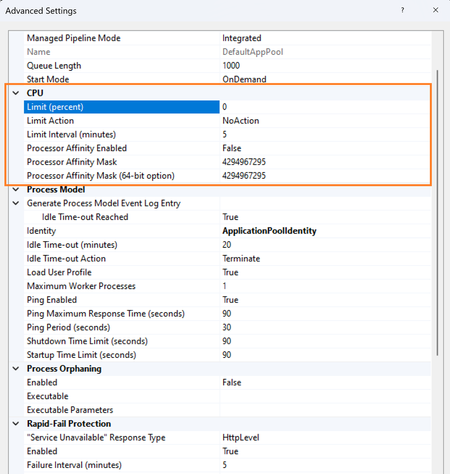
Application pools provide an isolation between different web application in Internet Information Services (IIS) by allowing you to manage the resources, recycling, and performance per application. Control of CPU usage is going to be one of the most critical factors in the performance and management of an application pool. IIS includes a dedicated section under ApplicationPool -> Advance Settings for the management of CPU. it provides varied settings that enable you to optimize the utilization of the CPU so that a particular server resource does not become dominated by one application. This article will dive into the CPU settings for an ApplicationPool, explaining each option and its configuration.4.4KViews4likes0CommentsGetting Started Using Phi-3-mini-4k-instruct-onnx for Text Generation with NLP Techniques
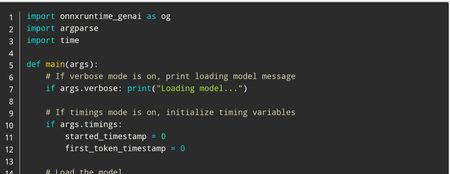
In this tutorial, we'll cover how to use the Phi-3 mini models for text generation using NLP techniques. Whether you're a beginner or an experienced AI developer, you'll learn how to download and run these powerful tools on your own computer. From setting up the Python environment to generating responses with the generate() API, we'll provide clear instructions and code examples throughout the tutorial. So, let's get started and see what the Phi-3 mini models can do!12KViews1like1CommentGeneral AVD Slowness
We have a pool of NV24s_V3 VMs running. The VMs have 170+ applications on them so we have to keep the total number of users per VM down to 12. That being said, I can power on one of our VMs, let it boot up and sit for 10-15 minutes to get through all its startup processes and then login. When I login and get to my desktop, OneDrive will sync for a bit, but outside of that the CPU is under 10%, RAM is under 10% used and Disk Util is 15-20%. Even with those numbers low and me being the ONLY user on the VM, its still slow to open applications. It even takes 5-6 seconds for File Explorer to open. I see defender processes running under Disk stats, but it alone shouldnt be causing that kind of slow down, especially when the CPU / RAM / Disk stats are low. Anyone have any advice of something to look at to speed up performance? We have already excluded Defender from scanning Program Files and Program Files (x86). Just very troubling that its slow with just 1 user logging onto a 24 proc, 200+ GB RAM VM.2.2KViews0likes2Comments
CPU Context Switches
I've done a fair bit of research on this topic but there are diverse opinions on what constitutes CPU contention as it relates to CPU Context Switches. I'm curious if anyone has specific thoughts on the topic. Do you measure contention based on a generic threshold value (say, 5000-10000 context switches per CPU)? I've read in some places that context switches should be evaluated on a per-server basis, with some servers having higher values than others while still not experiencing contention.1.2KViews0likes0Comments
Allocate Memory to Applicaitons in AVD
We've recently made a move from Citrix to MS AVD (windows 10 multisession). We've been told by a tech that AVD does not support the ability to assign memory/cpu per app. I am not an Azure tech and the searches I've done so far have come up empty. is there any definitive documentation from MS on this?Solved1.2KViews0likes1Comment
Improve Control and Limit of RAM and CPU
Please, such other web browser O...GX, can It would be very nice if they added the option of RAM and CPU limiter. This helps a lot for low-resource PC cases, and to limit the maximum limit that Edge could use, preventing it from removing RAM from other applications that are being used.1.1KViews1like1CommentSQL Server malfunctioning
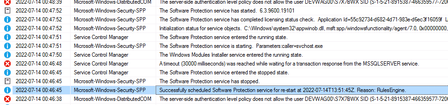
Hi Recently on our client's database server we experience some problems in functioning of SQL Server. Failures happen every few hours and so far we were not able to find clear explenation. Clients (aplications) that are trying to perform some operations on database are receiving such error message: .Net SqlClient Data Provider: A network-related or instance-specific error occurred while establishing a connection to SQL Server. The server was not found or was not accessible. Verify that the instance name is correct and that SQL Server is configured to allow remote connections. (provider: Named Pipes Provider, error: 40 - Could not open a connection to SQL Server) Series of errors lasts about 60-90s and then everything goes back to normal working state. We matched time that we see errors occurring with two events in Windows Event Logger in Application section that are present every time communication troubles happen. The Software Protection service entered the stopped state and Succesfully scheduled Software Protection... At the same time in Performance Monitor CPU parameters we see that one core is working on 100% of it's capabilities (100% processor time, 0% user time) while other cores are about ~95% Idle. What is also worth to mention is that C1%Time drops to ~0 (about 1%) and C2%Time increases drasticly from ~50% to ~90% Have you ever experienced any problems like that? What can be the main reason for all of this?732Views0likes0Comments