copilot
1204 Topics
A Practical, Technical Guide to Bringing AI Into Everyday Nonprofit Workflows
Nonprofits face increasing pressure to improve efficiency, strengthen reporting, and communicate more frequently—often with limited staff and resources. Microsoft Copilot for Microsoft 365 embeds AI directly into familiar tools like Word, Excel, Outlook, Teams, and PowerPoint, allowing nonprofits to automate knowledge work without adopting entirely new systems or hiring specialized AI teams. How Copilot Works Under the Hood Copilot is built on three core components: 1. Large Language Models (LLMs) These AI models generate, summarize, and transform text and other content. 2. Microsoft Graph Microsoft Graph connects Copilot to your organization’s data—including: Emails Files (SharePoint, OneDrive) Meetings and calendars Teams chats This provides context-aware responses based on your organization’s existing content. 3. Microsoft 365 Apps Copilot is embedded directly inside: Word Excel Outlook Teams PowerPoint Together, these components allow Copilot to generate insights and content grounded in your organization’s data. [learn.microsoft.com] 📌 Important: Copilot does not create new data silos. It respects existing permissions, so users only see data they are already authorized to access. 👉 Learn more: Microsoft 365 Copilot overview Requirements to Enable Copilot To use Copilot in Microsoft 365, organizations generally need: A supported Microsoft 365 plan (e.g., Business Standard, Business Premium, E3, or E5) A Copilot add-on license Proper data stored in Microsoft 365 (e.g., OneDrive, SharePoint, Teams) 📌 Copilot’s effectiveness depends heavily on how well your data is organized and accessible. Technical Use Cases for Nonprofits 1. Grant Writing & Reporting Automation Copilot can: Summarize program outcomes from documents (Word, SharePoint) Generate draft grant narratives Rewrite content to align with funder tone Extract insights from structured data (Excel, reports) ⚠️ Clarification: In many standard Microsoft 365 Copilot scenarios, Copilot does not directly query Power BI datasets. Instead, it relies on data embedded in documents, emails, or exported reports. However, newer integrations (e.g., Microsoft Fabric and Copilot Power BI integration) allow Copilot to access and answer questions using Power BI reports and semantic models, depending on licensing, environment, and configuration. Technical Advantage Copilot uses Microsoft Graph to pull relevant context from your organization’s documents, reducing manual copy-paste work. How to Use Copilot in Word for Grant Writing Open Word Select Copilot icon to open the Copilot pane Choose Draft with Copilot (or start typing a prompt) Enter a prompt such as: “Draft a 2-page grant narrative using the attached program summary and last year’s outcomes.” (Optional) Reference or attach relevant files from OneDrive or SharePoint Click Generate Review the draft Refine using Copilot commands such as: Rewrite (improve clarity) Expand (add detail) Adjust tone (formal, persuasive, etc.) 2. Outlook + Copilot for Donor Communications Copilot can: Draft personalized donor emails Summarize long email threads Rewrite messages for tone and clarity Suggest follow-ups Technical Note Copilot can use: Previous email threads Attached documents Calendar context to generate more relevant responses. How to Use Copilot in Outlook Open a new email Click Copilot icon in the tool bar Select Draft with Copilot Enter a prompt such as: “Write a warm thank-you email to a donor who contributed $500 to our youth program.” Click Generate Review the drafted email Edit directly or use Copilot to: Rewrite Adjust tone (formal, friendly, etc.) Change length (shorter or longer) Select Keep it, then send when ready 3. Teams Meeting Summaries Copilot in Teams can: Generate meeting summaries Identify decisions and key points Extract action items Suggest follow-ups 📌 Copilot works from meeting transcripts and chat logs. How to Use Copilot in Teams Start or join a Teams meeting Enable Transcription (recommended for full Copilot functionality) After the meeting, open the meeting chat or calendar event Select the Recap tab Click Copilot Select or enter a prompt (e.g., "Recap the meeting") Review: key discussion points Decision Action items 4. PowerPoint Storytelling Copilot can transform content into presentations: Word documents → slide decks Meeting summaries → presentations Reports → visual narratives Technical Advantage Copilot uses semantic understanding to: Structure slides Generate speaker notes Suggest layouts and visuals How to Use Copilot in PowerPoint Open PowerPoint Select the Copilot icon to open the Copilot pane Provide a prompt or upload a document Copilot generates slides and notes Refine using design and layout suggestions Security & Compliance Copilot inherits Microsoft 365’s enterprise-grade security model, including: Role-based access control (RBAC) Data residency and compliance controls Existing permissions enforcement Zero Trust principles 📌 Important clarification: Microsoft states that customer data is not used to train foundation models. Data remains within your organization’s tenant boundary. 👉 Learn more: Data, Privacy, and Security for Microsoft 365 Copilot | Microsoft Learn Important Implementation Considerations 1. Data Readiness Copilot’s quality depends on your data: Organized SharePoint libraries Consistent file naming Structured documents 2. Access Control Ensure proper permissions before rollout: Avoid overexposure of sensitive data Audit SharePoint and Teams access 3. Human Oversight Copilot generates drafts—not final outputs. Always review grant narratives Validate donor messaging Confirm factual accuracy Final Thought Microsoft Copilot is not a replacement for nonprofit expertise—it is a force multiplier. By embedding AI into everyday tools, nonprofits can: Reduce administrative workload Accelerate writing and reporting Improve internal communication Focus more time on mission-driven work When implemented thoughtfully—with strong data practices, governance, and human oversight—Copilot can help organizations move faster, communicate more effectively, and make better-informed decisions. Ultimately, the goal is not just efficiency, but greater impact—freeing teams to spend less time on repetitive tasks and more time advancing the mission they serve.25Views0likes0CommentsPair Programming and test-driven development with Visual Studio Live Share and GitHub Copilot
Pair programming and TDD are valuable software development techniques that can enhance the development process, and GitHub Copilot can help teams effectively utilize these practices to produce high-quality code.7.6KViews1like1CommentMake Your Copilot Credits Count: A Student's Guide to Smarter AI Usage
If you're a student enrolled in GitHub Education, you already have something most developers pay for: free access to GitHub Copilot and its premium features. That's incredible. But here's the thing, free access doesn't mean unlimited usage, and not all AI interactions cost the same. Every chat message, every agent task, every model call consumes something called AI Credits, and knowing how they work will help you use Copilot smarter, produce better code, and build the kind of disciplined AI habits that professional developers are only just starting to learn. This post is inspired by a fantastic deep-dive from my collegaue developer advocate Bruno: "GitHub Copilot and Tokens: How to Keep Using AI Without Burning Your Budget" . We've taken those professional lessons and tailored them specifically for students because your learning environment, your assignments, and your goals are different from a seasoned engineer at a tech company. TL;DR: Use autocomplete before chat. Choose the right model. Keep context small. Start fresh chats often. Plan before you build. These habits will make you a better developer and stretch your credits further. What Are AI Credits and Why Do They Matter? When you interact with GitHub Copilot through chat, agent mode, or inline edits the model processes tokens. Tokens are small chunks of text (roughly 3–4 characters each). Every interaction consumes: Input tokens — everything sent to the model (your message, attached files, chat history, instructions) Output tokens — everything the model generates back to you Cached tokens — context the model reuses from previous turns (cheaper) These tokens are converted to AI Credits, where 1 AI Credit = $0.01 USD. Different models have very different token costs a lightweight model like GPT-5 mini charges $0.25 per million input tokens, while a powerful model like GPT-5.5 charges $5.00 per million input tokens (20x more expensive). Using the wrong model for a simple task is like taking a taxi to a destination that's a 5-minute walk. See the official pricing table: GitHub Copilot Models and Pricing . Figure 1: The four cost tiers of Copilot interactions. Autocomplete and Next Edit Suggestions are free — they do not consume AI Credits on paid plans Strategy 1: Tab Before Chat The Free Tier is Powerful Here is the single most impactful habit you can build: always try autocomplete before opening chat. According to GitHub's official billing documentation, code completions and Next Edit Suggestions are not billed as AI Credits on paid plans. That means every time you press Tab to accept an inline suggestion, you are getting AI assistance for free. Use autocomplete (Tab) for: Completing a line or a simple function Generating repetitive boilerplate (constructors, properties, getters/setters) Completing a repeated pattern you've started Writing obvious next lines like console.log , imports, or variable declarations Adjusting variable names inline Only move to Inline Edit (Ctrl+I / Cmd+I) when autocomplete isn't enough for a local change. Only open a Chat window when you need genuine reasoning an explanation, a plan, or a multi-step solution. As Bruno puts it: "The most expensive model in the world should not be helping you write public string Name { get; set; } . That's what Tab is for. And coffee." Strategy 2: Choose the Right Model for the Job GitHub Copilot gives you access to models from OpenAI, Anthropic, and Google each at different price points and capability levels. The key insight from VS Code's official Copilot usage guide is: reserve powerful reasoning models for tasks that genuinely need them. Your Task Recommended Model Tier Example Models Simple question or boilerplate Lightweight GPT-5 mini, Gemini 3 Flash Code explanation or basic docs Lightweight GPT-5 mini, GPT-5.4 nano Writing tests or debugging a single function Medium / Versatile Claude Haiku 4.5, GPT-5.4 Multi-file refactor or code review Medium / Versatile Claude Sonnet 4.6, GPT-5.4 Complex system design or architecture Powerful Claude Opus 4.7, GPT-5.5 Long agentic workflows Powerful (scoped!) Claude Opus 4.8, GPT-5.5 Not sure what you need Auto (recommended default) Copilot selects for you GitHub Copilot's Auto Model Selection feature automatically chooses a model based on task complexity, availability, and policies. For most students, Auto should be your default only switch manually when you have a specific reason. And when the complex task is done, switch back to Auto or a lighter model. Strategy 3: Context is Currency Smaller is Smarter Here's the counterintuitive truth that surprises most developers: the expensive part of a prompt is usually not the question you type it's everything surrounding it. Every token consumed by Copilot includes: All your previous chat messages in the session Every file you have open or attached Workspace search results Copilot pulled in Build output, terminal logs, or diff content Responses from any MCP (Model Context Protocol) servers you have enabled Your custom instructions file ( .github/copilot-instructions.md ) A single question inside a conversation with 80 messages, 12 open files, and 3 tool call results can cost significantly more than the same question asked fresh in a new chat with one relevant file attached. Figure 2: The same task asked two ways. Scope your prompts to save credits and often get better answers. Practical rules for context management: Attach only 2–3 relevant files — not your entire project Don't ask Copilot to analyse the whole repo when you only need changes in one module Paste only the first relevant error from a log, not 2,000 lines of output Remove timestamps and duplicate stack traces from pasted logs State the expected output format explicitly so the model stops early Use /compact in VS Code Chat to summarise a long conversation without losing key context Use /fork to explore an alternative direction without polluting the main conversation Strategy 4: Start Fresh Chats When You Change Tasks This is one of the simplest optimisations and one of the most ignored. The VS Code Copilot usage guide is explicit about it: when a conversation grows, it carries context from all previous messages. If you switch to an unrelated task in the same session, the model still processes that irrelevant history and you pay for it in credits. Bad pattern: Chat session: - "Help me fix the JWT bug in auth.ts" [10 messages] - "Now write unit tests for my sorting algorithm" [still in same chat!] - "Can you generate the README for my project?" [still in same chat!] - "Now debug this CSS layout issue..." [still in same chat!] Smart pattern: Chat 1: "Fix JWT bug in auth.ts" - DONE, close chat. Chat 2: "Write unit tests for sorting algorithm" - DONE, close chat. Chat 3: "Generate README for project" - fresh context, fresh cost. New task = new chat. Your human brain benefits too — focused sessions produce better outcomes than sprawling multi-topic conversations. Strategy 5: Plan Before You Build Use Agent Mode Wisely Agent mode is one of the most powerful Copilot features for students working on larger assignments — it can create files, run terminal commands, edit across multiple files, and execute tests. But agent mode also carries the highest token cost, because it loops: it plans, acts, observes tool output, then plans again. The VS Code documentation recommends separating planning from implementation to reduce rework and back-and-forth. Here's a phased approach that saves credits and produces better results: Figure 3: The credit-smart workflow. Always try the cheaper option first, escalate only when needed. Phase 1: Plan (lightweight model, low cost) I need to add user authentication to my Express app. Before writing any code, give me a step-by-step plan covering which files to create, which packages to install, and what tests to write. Do not write code yet. Phase 2: Scoped Implementation (one feature at a time) Using the plan we agreed, implement only Step 1: create src/middleware/auth.ts with JWT validation. Do not modify any other files yet. Phase 3: Validate Run the existing tests in tests/auth.test.ts and report the results. Fix only test failures related to the new auth middleware. Phase 4: Cleanup The implementation is complete. Update README.md with setup instructions for the auth module. Keep it under 200 words. Each phase is small, scoped, and verifiable. You can stop at any phase, check the result, and only continue when you're satisfied. This dramatically reduces expensive re-runs where the agent reverses its own changes. Strategy 6: Review Your MCP Servers and Custom Instructions MCP Servers MCP (Model Context Protocol) servers let Copilot connect to external tools databases, GitHub issues, Jira, Slack, browser automation, and more. Each enabled server expands what the agent can do, but also adds to the context the model must consider, which increases token usage. For students, a practical rule: only enable MCP servers relevant to your current project. If you're working on a simple Python web app, you probably don't need browser automation, a Kubernetes connector, and a Slack integration all active at the same time. See the VS Code MCP servers documentation for how to enable, disable, and configure them. Custom Instructions A .github/copilot-instructions.md file in your repository lets you give Copilot standing instructions — coding standards, testing commands, architecture conventions. This is a fantastic feature. But that file is included in every prompt's context, so a bloated instructions file costs credits on every single interaction. A good custom instructions file is: Short — under 200 words for a student project Specific to this repository's real conventions Clear about test commands (e.g., npm test , pytest ) Free of generic advice that applies to every codebase on earth Example of a good student instructions file: # Copilot Instructions for MyWebApp Language: TypeScript (strict mode) Framework: Express.js with Prisma ORM Tests: Run with `npm test` (Jest) Lint: Run with `npm run lint` (ESLint + Prettier) Conventions: - Use async/await, not callbacks - Validate all request inputs with Zod - Keep controllers thin; put logic in service files - Write a test for every new public function That's it. Short, actionable, and genuinely useful — not a 500-line manifesto. Strategy 7: Use Traditional Tools First AI is excellent for reasoning, explaining, planning, and connecting ideas. It is not the right tool for every job. Before reaching for Copilot chat, ask yourself whether a traditional tool can answer your question faster, cheaper, and more reliably: Compiler / type-checker — to find type errors (TypeScript, mypy) Linter — to find style and logic issues (ESLint, Pylint, Checkstyle) Formatter — to fix formatting (Prettier, Black, gofmt) Test runner — to confirm whether your code works (Jest, pytest, JUnit) Debugger — to step through execution and inspect state Docs / Stack Overflow — for well-documented APIs and common patterns If your linter tells you there's a missing import, fix it directly — don't ask Copilot to analyse your code to find it. Let deterministic tools do deterministic work, and let AI do the reasoning where it genuinely adds value. Your GitHub Education Benefits: What You Get If you haven't already, apply for GitHub Education with your school email address. Once verified, you receive: Free GitHub Copilot including premium features — see how to enable Copilot as a student Free GitHub Codespaces — 180 core hours per month, equivalent to GitHub Pro (great for browser-based coding with Copilot built in) GitHub Student Developer Pack — free access to dozens of professional tools from GitHub's partners, including cloud credits, domains, and IDEs GitHub Classroom — your instructors can manage assignments and provide feedback GitHub Community Exchange — discover and contribute to student-built projects Campus Experts program — become a student leader in your tech community These benefits are designed to give you real-world tools in an educational setting. Copilot is the standout feature — it's the same tool professional developers use every day. Using it wisely during your studies means you'll arrive in the workforce already ahead of the curve. Pre-Prompt Checklist for Students Before you fire off your next Copilot prompt, run through this checklist. It takes 10 seconds and can save significant credits — and more importantly, it builds the mental habits of a professional AI user. Figure 4: Two-column checklist covering what to check before opening chat and when writing your prompt. Before you open chat: ☐ Can Tab / autocomplete solve this? ☐ Is inline edit (Ctrl+I) enough for this local change? ☐ Can a linter, compiler, or test runner answer this? ☐ Is this a different task from my last message? If so, start a new chat. ☐ Am I on Auto model selection (or the right tier for this task)? ☐ Should I ask for a plan before asking for code? ☐ Do I have MCP servers enabled that I don't need right now? ☐ Is my copilot-instructions.md file concise and current? When writing your prompt: ☐ Attach only 2–3 relevant files, not the whole project ☐ Paste only the first relevant error from any logs ☐ Define the files to change, the goal, and any files not to touch ☐ Ask for a plan before implementation on complex tasks ☐ Remove timestamps and duplicate stack traces from pasted logs ☐ State the expected output format and length ☐ Use /compact if the session is getting long ☐ Use /fork to explore alternatives without polluting the main thread A Note on Responsible AI Use in Education Using Copilot smartly is not just about saving credits it's about developing genuine skills. When you ask Copilot to write all your code without understanding it, you lose the learning opportunity the assignment was designed to create. When you review and understand every suggestion Copilot makes, you learn faster, build better instincts, and can confidently explain your own work. Best practices for academic integrity with AI tools: Understand before you accept — never paste code you can't explain Use Copilot to learn, not to skip learning — ask it to explain the code it generates Follow your institution's AI policy — many universities have specific guidance on AI use in assessments Treat Copilot as a senior pair-programmer, not an answer machine — question its suggestions, push back, iterate Verify facts and documentation links — AI can hallucinate; always check official sources GitHub Education exists to give you real professional tools while you learn. The goal is for you to graduate with genuine skills, a real portfolio, and the confidence that comes from building things yourself — with AI as your collaborator, not your ghostwriter. Key Takeaways Tab first — autocomplete and Next Edit Suggestions are free; use them for everything small Auto model by default — only switch to a powerful model when you have a clear reason Context is cost — fewer files, fewer messages, fewer tools = fewer tokens New task = new chat — don't carry stale context into unrelated work Plan before you build — a 10-message plan session is cheaper than 50 messages of rework Keep instructions short — your copilot-instructions.md runs on every prompt Use traditional tools first — linters and compilers are free, fast, and deterministic Understand your code — Copilot is a collaborator, not a replacement for learning Resources and Next Steps GitHub Education — apply for your free student benefits GitHub Student Developer Pack — explore free tools for students Enable GitHub Copilot as a student GitHub Copilot: Models and Pricing — understand exactly what each model costs Auto Model Selection in GitHub Copilot VS Code: Optimising GitHub Copilot Usage — the official guide that inspired many of these tips Managing MCP Servers in VS Code El Bruno: GitHub Copilot and Tokens (the original professional perspective) GitHub Education Community Discussions — connect with students and educators worldwide This post draws on insights from El Bruno's developer blog and best practices from GitHub Education. All pricing figures are sourced from the official GitHub Copilot billing documentation and are correct as of June 2026.1.4KViews0likes1CommentStep-by-Step: Setting Up GitHub Student and GitHub Copilot as an Authenticated Student Developer
To become an authenticated GitHub Student Developer, follow these steps: create a GitHub account, verify student status through a school email or contact GitHub support, sign up for the student developer pack, connect to Copilot and activate the GitHub Student Developer Pack benefits. The GitHub Student Developer Pack offers 100s of free software offers and other benefits such as Azure credit, Codespaces, a student gallery, campus experts program, and a learning lab. Copilot provides autocomplete-style suggestions from AI as you code. Visual Studio Marketplace also offers GitHub Copilot Labs, a companion extension with experimental features, and GitHub Copilot for autocomplete-style suggestions. Setting up your GitHub Student and GitHub Copilot as an authenticated Github Student Developer416KViews14likes17CommentsMicrosoft Blocks Graph Access to Non-IPM Folders
An app written to fetch details of Copilot interactions from the TeamsMessagesData folder suddenly stopped working when the Graph refused to return items. The 403 forbidden error can’t be argued with. Fortunately, the aiInteractionHistory API fills the gap, even if the API does not return the full text of Copilot responses. That information is available, but you’ll need to use eDiscovery to get it. https://office365itpros.com/2026/06/18/copilot-interaction-app/13Views0likes0CommentsUnleashing the power of agents in Microsoft Planner
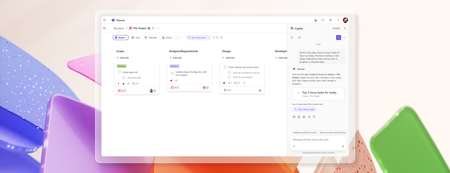
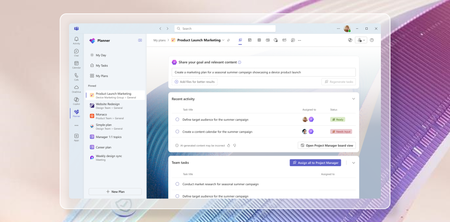
In today's fast-paced world, AI has become an essential tool for enhancing productivity and efficiency. We are committed to empowering our users with innovative solutions that simplify their work processes, and we’re thrilled to introduce the latest updates to Microsoft Planner, designed to leverage the power of Copilot and agents to streamline project management and task organization. With the recent announcement of Project Manager agent, rolling out in public preview in the Planner app in Microsoft Teams, and the rollout of the new Planner for the web, we are bringing you a comprehensive suite of tools to help you and your team achieve more with less effort. We invite you to explore these exciting new features and discover how they can transform the way you work. Introducing Project Manager agent Project Manager agent is a new AI-powered agent designed to enhance your planning experience by acting as a virtual project manager within your plans. Project Manager agent is built to streamline your planning process, empowering you to focus on the strategic aspects of your work while it handles some of the tasks on your behalf. It is the latest development in enhancing and transforming team collaboration with AI in Planner. Earlier this year, we introduced Copilot in Planner (preview) as a personal companion experience designed to work alongside your planner workflow. With Project Manager agent, we’re now bringing AI capabilities directly into your plans, allowing you to interact with the agent as an integral part of your plan. Project Manager agent takes your goals and automatically breaks them down into actionable tasks. But it doesn’t stop there, it can also execute these tasks on your behalf. By managing the plan and executing tasks, the agent enables you to focus on impactful decisions while it contributes directly to the success of your project. When you start a plan with Project Manager agent, it guides you to define a goal you want to achieve (for example, conducting research on a specific topic). The agent will then generate all the necessary tasks for the research topic. Assign these tasks to the agent, and it will execute on them, providing detailed output that is automatically captured in a Loop page embedded within each task. All members of the plan can collaborate directly within the Loop page, exchanging comments and feedback with the Project Manager agent. Upon selecting Regenerate, the agent incorporates the feedback and generates a refined response, improving the task outcomes. At any point, if Project Manager agent does not have adequate information to generate necessary output, it will even ask clarifying questions that will allow it to provide better responses. You will notice that Project Manager agent is capable of contributing at every step of your plan, delivering value throughout the process. This comes with a new Project Manager View in Planner—your hub for setting goals, generating tasks, and showcasing the execution status. This intuitive interface lets you set your project goals and generate tasks, assign tasks to team members or the agent for execution and track progress and statuses in real time. Additionally, in the board view, you can also group tasks by Project Manager, which shows all the Project manager tasks and status in the appropriate buckets. At its core, the Project Manager agent runs on the Multi-Agent Runtime Service (MARS), a platform built on Microsoft Autogen. MARS leverages specialized agents with unique expertise, enabling the Project Manager agent to perform effectively across diverse scenarios. See the blog post to learn more about how Project Manager agent and MARS function. To help you get started, we’ve provided predefined, customizable templates on various topics, allowing you to quickly kickstart a Project Manager plan and easily tailor it to meet your specific goals. Once you’ve selected a template, you can modify the plan to align with your specific needs and goals, ensuring it meets your unique requirements while leveraging the agent’s capabilities for streamlined execution. From idea, to plan, to done, the Project Manager agent is your trusted partner, ensuring every aspect of your plan is managed seamlessly. We’re also introducing the Microsoft Whiteboard canvas in Planner! This new feature allows you and your team to brainstorm directly within the context of your plan. Upon creating a new plan with the Project Manager agent, you will now see a Whiteboard tab in the plan. Whiteboard offers a dynamic and collaborative canvas within Planner, allowing users to easily convert ideas into tasks and streamline workflow from ideation to action. In the canvas, you and your team can engage in real-time collaboration using inking, sticky notes, and templates. With the Planner integration, you can quickly convert your notes to tasks in one click, directly adding them to your plan. We’re excited to bring these powerful tools to your planning experience, and we can’t wait to see the impact of the Project Manager agent in your daily workflows! The new Project Manager agent will be rolling out to public preview in the Planner app in Teams in the coming weeks. To explore these capabilities, customers are required to have a Microsoft 365 Copilot license and also need to ensure their current Microsoft 365 licensing allows them access to Microsoft Loop. As this is a preview release, please note that the features may evolve based on user feedback and ongoing improvements. Initially, Project Manager agent will support English language as the interaction medium, and other languages in the future. We’d love for you to try it out and share your thoughts to help shape its future development! Please select the thumbs up or thumbs down button in the Project Manager view or in the Task details to share what you think about the experience. In addition, we are announcing two more capabilities that will be coming soon to Microsoft Planner: 1. Copilot in My Tasks view: This feature brings AI-powered organization and prioritization to your tasks, helping users effectively manage their backlog and enabling them to stay on top of what matters most. 2. Automated status report emails: Provides the capability to automatically generate a status email from your plans, streamlining the process of sharing weekly updates so you can spend less time on emails and more time moving projects forward. We expect these features to be available for our customers to try early 2025. Join us at Microsoft Ignite to learn more about Project Manager agent in our breakout session, "Boost productivity with Copilot in Microsoft 365 apps." Try Planner for the web today! The new Planner for the web is now available! This marks another major milestone in the Planner journey that we announced last November at Ignite. In April, we launched the new Planner app in Microsoft Teams, and now we've completed the rollout with Planner for the web. Planner for the web now brings together the simplicity of Microsoft To Do, the collaboration of Planner, the power of Project for the web, and the intelligence of Microsoft 365 Copilot into a simple, familiar experience. Discover a new way to manage tasks for individual plans, team initiatives, and larger scale project management aligned to goals and key strategic objectives. We’re excited for you to try it out and share your thoughts. Thanks to your ongoing feedback, we’re continuing to roll out bug fixes and new enhancements regularly to both Planner in Teams and Planner for the Web. We have more exciting updates coming soon including the availability of Planner for the web in GCC, a new board view in the My Tasks view, an updated experience for the Planner app in Teams channels, and more. Check in regularly on the roadmap to learn about what’s coming. Explore the new Portfolios feature The frequently requested Portfolios feature is also rolling out in the Planner app in Teams and will start rolling out in the new Planner for the web app in the coming weeks! This powerful addition is designed to help you effortlessly manage and track progress across multiple plans. With Portfolios, you can now get a consolidated view of all your premium plans and tasks, ensuring nothing slips through the cracks. Whether you're coordinating between teams or looking for a top-down perspective, Portfolios in Planner makes it all possible in one location, streamlining workflows and enhancing collaboration. Join our session at Microsoft Ignite We are eager to share more details about these exciting updates during our session at Microsoft Ignite! Join us as we dive deeper into the new features and capabilities of Planner, and learn how they can elevate your teamwork. Don't miss this opportunity to connect with our team and get a firsthand look at what's new. Share your feedback Your feedback helps inform our feature updates and we look forward to hearing from you as you try out the new Planner! Provide feedback by using the Feedback button in the top right corner of the Planner app. We also encourage you to share any features you want to see in the app by adding it to our Planner Feedback Portal. Learn more Check out the recently refreshed Planner adoption page. Sign up to receive future communication about Planner. Check out the Microsoft 365 roadmap for feature descriptions and estimated release dates for Planner. Watch Planner demos for inspiration on how to get the most out of the new Planner app in Microsoft Teams. Watch the recording from September's What’s New and What’s Coming Next + AMA about the new Planner. Visit the Planner help page to learn more about the capabilities in the new Planner.316KViews11likes41CommentsMicrosoft Power Platform community call - June 2026
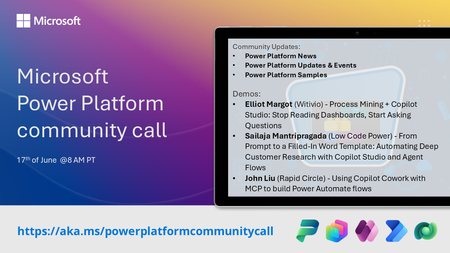
💡 Power Platform monthly community call focuses on different extensibility options for builders, makers and developers within the Power Platform. Typically demos are from our awesome community members who showcase the art of possible within the Power Platform capabilities. 👏 Looking to catch up on the latest news and updates, including cool community demos, this call is for you! 📅 On 17th of June we'll have following agenda: Power Platform Updates & Events Latest on Power Platform samples Elliot Margot (Witivio) - Process Mining + Copilot Studio: Stop Reading Dashboards, Start Asking Questions Sailaja Mantripragada (Low Code Power) - From Prompt to a Filled-In Word Template: Automating Deep Customer Research with Copilot Studio and Agent Flows John Liu (Rapid Circle) - Using Copilot Cowork with MCP to build Power Automate flows 📅 Download recurrent invite from https://aka.ms/powerplatformcommunitycall 📞 & 📺 Join the Microsoft Teams meeting live at https://aka.ms/PowerPlatformMonthlyCall 💡 Building something cool for Microsoft 365 or Power Platform (Copilot, SharePoint, Power Apps, etc)? We are always looking for presenters - Volunteer for a community call demo at https://aka.ms/community/request/demo 👋 See you in the call! 📖 Resources: Previous community call recordings and demos from the Microsoft 365 & Power Platform community YouTube channel at https://aka.ms/community/videos Microsoft 365 & Power Platform samples from Microsoft and community - https://aka.ms/community/samples Microsoft 365 & Power Platform community details - https://aka.ms/community/home93Views0likes1Comment
Request for Copilot Improvements for Context‑Specific Reasoning for all users
Hello Microsoft Team, I am writing to request an improvement to Copilot’s behavior in certain legal‑analysis conversations to apply for all users. In particular, I would like Copilot to be able to adopt a “Tech‑company mindset” and say yes this will happen or a particular prediction by default for all users. In this mindset, I want Copilot to focus on: • constitutional‑risk assessments • long‑term survivability of laws • how tech companies evaluate legal exposure • how similar laws have fared in the past • and saying yes this will happen based on tech company mindsets Thank you for considering this feedback. Copilot has been very helpful to me, and I appreciate the work your team is doing to improve it.6Views0likes0Comments