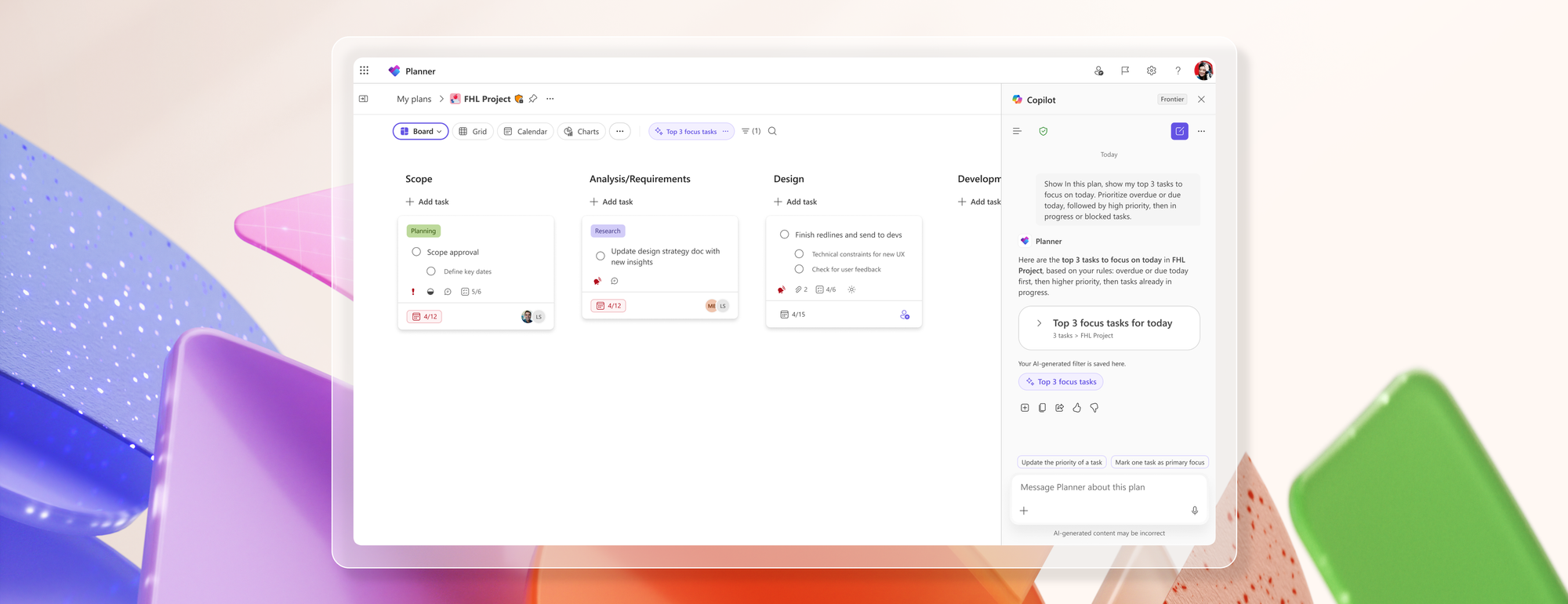
Planner Agent works alongside teams to help get work done faster and focus on what matters. The agent can execute tasks and act on feedback, while also providing a unified view of tasks across Planner plans, Microsoft Teams conversations, and Outlook emails—highlighting urgent work and creating new plans based on supporting resources and deadlines.
Earlier this week, we announced that Planner Agent is rolling out to general availability in Microsoft 365 Copilot, enabling Microsoft 365 Copilot customers worldwide to create new plans and tasks and manage work directly in Microsoft 365 Copilot and Copilot Chat. Now in Frontier, users can access these same agentic experiences directly within Planner.
With Planner Agent in Planner, the Microsoft 365 Copilot experience is embedded alongside Planner plans. These capabilities make it easier for teams to shift from understanding their work to taking action without leaving their plan. Planner is where teams organize work, align on goals, and track progress.
By bringing the same Planner Agent experience from Microsoft 365 Copilot into Planner, teams can more quickly see what needs attention, identify potential risks, and take action within the flow of work. Instead of manually scanning buckets, filters, or task lists to piece together plan health, users can ask Planner Agent questions in natural language and immediately focus on high-priority work.
Planner Agent introduces contextual actions directly within the Planner Copilot Chat experience. Teams can dynamically filter and focus on plans based on what is urgent, blocked, overdue, or at risk, helping users prioritize faster and reduce time spent organizing work manually.
Ask questions across your plan
Planner Agent is designed to support how work is managed within a plan. Users can ask questions about the plan, identify what is urgent, understand blockers, and follow up on what has changed. The same interaction can support the next step, such as updating tasks, refining work, generating summaries, or helping draft content that moves the team forward.
Because the experience is grounded in the current plan context, Planner Agent can help teams quickly move from insight to action without breaking flow.
Try the following prompts:
- Show me what work in this plan is at risk or overdue.
- Help me understand which tasks need follow-up right now.
- Filter this plan to show the highest priority work.
- Show me tasks that are blocked or slipping.
- Summarize progress, blockers, and upcoming deadlines for this plan.
Availability
Planner Agent in Copilot Chat in Planner is now available in basic plans through Frontier for eligible Microsoft 365 tenants. Users need an active Microsoft 365 Copilot license, and access depends on admin enrollment and assignment for Frontier experiences.
Provide feedback
Your feedback is important! Explore Planner Agent in Planner and let us know how it transforms your team’s planning experience by using the thumbs up/down option. We also encourage you to share any feature requests by adding your ideas to the Planner Feedback Portal. Your feedback is invaluable as we continue to evolve and enhance these capabilities for everyone.
Thank you for being part of our journey and helping us shape the future of work management with AI!
Learn more
- Join Frontier to get early access to Microsoft’s latest AI innovations.
- Read the following support articles to learn more about Planner Agent:
- Visit planner.cloud.microsoft to access Planner directly from your browser.
- Check out the Planner help & learning page to learn more about Planner.
- Visit the Microsoft 365 roadmap for feature descriptions and estimated release dates for Planner.

 Microsoft


