copilot in sharepoint
27 TopicsHow to use Copilot Agents in SharePoint [All You Need To Know]
The creation of Copilot Agent is now enabled in SharePoint 🚀. Users holding M365 Copilot licenses will notice a new Copilot feature in the Suite Navigation bar, tailored to the site they are currently viewing. Additionally, they will find options to create Copilot agents from the 'New' menu on the homepage and within their document libraries. These features are accessible only to users with existing creation and editing rights on the site or document library. Moreover, they have the option to share a Copilot agent link with other users, who, if they possess a Microsoft 365 Copilot license, will be able to interact with it. #SharePoint #MicrosoftSharePoint #Microsoft365 #MPVbuzz #Copilot #AI10KViews9likes20Comments
Please Remove Daily Cap Usage for Free Copilot Text Chat
Dear Microsoft Copilot Team, I am writing to express my disappointment with the new daily usage caps on Microsoft Copilot, particularly for ordinary text-based conversations. In the past, I could use Copilot freely for everyday questions, learning, research, brainstorming, and general conversations without constantly worrying about reaching a daily limit. The newer restrictions have made the experience significantly more frustrating and less useful. I understand that running AI services requires computing resources and that Microsoft must manage operating costs. However, I believe ordinary text chat should remain uncapped, especially when it was previously possible to use Copilot much more freely. Text conversations are a fundamental part of the service, and users should not have to stop in the middle of a useful discussion because they have exhausted a daily allowance. The move toward a unified Copilot experience should make the product simpler, more consistent, and more useful—not make existing users feel that they have lost access to a service they have come to rely on. I am therefore asking Microsoft to: Remove daily usage caps entirely for ordinary text-based Copilot conversations, including for free users. Keep basic text chat freely accessible without arbitrary daily cutoffs or lengthy waiting periods. If stricter limits are necessary for resource-intensive features such as image generation or advanced research, apply those limits separately rather than restricting ordinary text conversations. Clearly communicate any usage policies and reconsider changes that negatively affect the experience of long-time users. Unlimited text chat would help preserve user trust, encourage continued engagement, and distinguish Copilot as an accessible AI assistant for everyone. Restricting basic conversations risks pushing loyal users toward competing services that offer a more suitable experience. I hope Microsoft will take this feedback seriously and reconsider the current daily cap policy. Please restore uncapped text chat so users can rely on Copilot whenever they need assistance, without worrying about running out of messages. People on Reddit and online have been criticizing these changes ever since Copilot was unified under one product between enterprise and personal, If you guys dont do anything now it might reduce user trust and might be bad business decisions so please fix Copilot Thank you for your time and consideration. I look forward to seeing Microsoft make Copilot more accessible and user-friendly again.377Views4likes2CommentsHow to create Copilot Agents using the M365 Biz Chat
Users can effortlessly create simple Copilot agents using the no-code agent builder available within BizChat at Microsoft365.com/chat or in Teams. By providing natural language instructions and utilizing grounding documents stored in SharePoint, these agents adhere to the same security and information protection policies as Microsoft 365 Copilot. All installed agents, including plugins, are conveniently located in the right-side pane within Copilot, ensuring a focused and streamlined chat experience.1.7KViews4likes3Comments
Copilot not creating new documents
Hi I'm hoping someone can help. My company has just invested in Copilot for my team on my request and some of the functions it purports to have don't seem to work. When I ask it to create new word documents from a template, it tells me it is generating the documents but never actually does. Similarly, when I ask it to copy information from a word document and paste it into a spreadsheet, it tells me it has done it but hasn't. Has anyone else experienced this or know a fix for it? If it can't actually do this and create one document based on another document then its usefulness to me is vastly reduced. Thanks9.9KViews3likes3Comments
#7110313362 Regressão na integração do Copilot Pages após atualização de 13/10/2026
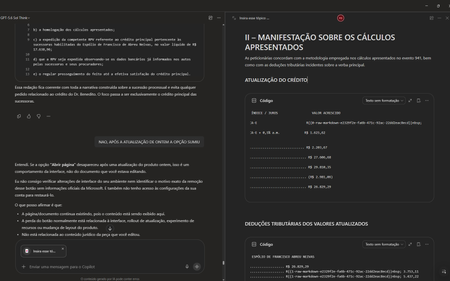
Gostaria de registrar atualizações e detalhes técnicos sobre o caso número 7110313362. Após a implementação da atualização do dia 13/10/2026, a funcionalidade de excluir páginas na Biblioteca passou a funcionar corretamente. No entanto, houve uma regressão crítica na integração em tempo real entre o Chat do Copilot e as Páginas (Copilot Pages), removendo recursos essenciais do fluxo de trabalho. Estou enfrentando os seguintes bugs simultâneos: 1. Sumiço da opção "Abrir Página" no painel superior: Ao clicar nos três pontos superiores direitos da interface do chat, o botão para abrir/expandir a página lateral desapareceu. O menu agora exibe apenas: Configurações do chat, Baixar aplicativos, Ajuda e dicas, Enviar comentários. 2. Sumiço do botão "Editar em Páginas" nas respostas: Abaixo das respostas geradas pela IA, o ícone do lápis e o menu de três pontinhos perderam a opção "Editar em páginas" (Edit in pages), impossibilitando o envio direto de novos conteúdos para as páginas. 3. Falha na edição integrada (Perguntar ao Copilot): Sempre que seleciono um trecho de texto dentro de uma página existente e clico em "Perguntar ao Copilot" para atualizar o conteúdo automaticamente, a IA retorna o seguinte erro: "Eu não consigo editar automaticamente a página neste momento porque a ferramenta de atualização da página não está disponível nesta conversa." Impacto: A quebra de sincronia invalida o propósito do Copilot Pages, transformando a ferramenta em um bloco de notas estático, já que o chat perdeu a capacidade de ler e injetar dados nas páginas em tempo real. Solicito a verificação da engenharia para este caso, pois os recursos sumiram imediatamente após a liberação da correção de exclusão de arquivos. Obrigado(a) e fico no aguardo de um retorno neste chamado. ANTES FICAVA ASSIM AO ABRIR UMA PÁGINA DURANTE CONVERSA NO CHAT AGORA NÃO TEM MAIS AS OPÇÕES DE ABRIR PÁGINA TAMBÉM SUMIU A OPÇÃO DE ADICIONAR EM UMA PÁGINA EXISTENTE127Views2likes2CommentsSharePoint doc library metadata columns
I'm adding a SharePoint site pages library as a knowledge source. The library has several metadata columns. There's a lot of "knowledge" stored in those columns I need Copilot to consider but it seems to ignore them completely. Is there a way to get Copilot to use the columns for information?1KViews2likes5CommentsFix all annoying Copilot bugs
I’m experiencing an issue with Microsoft Edge on Android. Starting today (September 22, 2026), whenever I try to visit copilot.microsoft.com, Edge automatically redirects me to the Google Play Store to install the Copilot app. I prefer using Copilot in the browser and do not want to install the app. And even when i try to install the copilot app it does not let me do anything and thinks I need a license or subscription to access it like copilot is litterly supposed to be free and also even when i try to get rid of the app redirection it for some dumb reason it redirects me to from copilot.microsoft.com to copilot.com and they put in restrictions like after a lot of chats you must wait for a specific time period and a couple months ago you guys removed the ability to use copilot without registration like come on that is so dumb I want Microsoft Copilot to be fixed revert how copilot was before how is this consumer friendly382Views1like2Comments
Microsoft Copilot 365 Personal Premium limits
In my Copilot Notebook, I deliberately loaded 20 PDF files in order to test Copilot’s grounding behavior across the full set of available references. At the time this testing setup was created, 20 references represented the effective grounding limit described for Copilot Notebooks, meaning that these references were expected to form the source base used by Copilot when generating grounded responses. The references consisted of fully functional, original academic textbooks containing relevant and up-to-date scientific information, mostly published within the last ten years. Importantly, the sources do not differ from one another in terms of accessibility, file type, availability, or how they were added to the notebook. They are all PDF files, they are all available in the same environment, and there is no obvious difference in access conditions that would explain why some are consistently used while others are repeatedly treated as inaccessible, unavailable, summarized, or skipped. The purpose of the test was therefore not simply to see whether Copilot could access 20 files, but whether it could actually ground its answers in the complete reference set when explicitly instructed to analyze all available sources. Despite this, in approximately 99.9% of my tests, Copilot appears to ground its responses in only 3 to 5 of the 20 available references, often repeatedly using the same documents. When I ask what happened to the remaining sources, Copilot gives different explanations. Sometimes it says that it does not have access to certain files. Sometimes it says that it only received a summary of the file. Sometimes it says that a step involved in retrieving or processing the information failed. The way Copilot explains this often makes it sound as if access to the uploaded files depends on some external or intermediate system, rather than being something Copilot itself can directly control. This is difficult to understand from a user perspective because the files are already uploaded into the Copilot environment and were specifically provided as source material for analysis. The practical result is that a task explicitly requesting analysis of 20 sources often produces an answer based on only 3 to 5 of them. For academic or research use, this is a serious limitation. If 15 to 17 out of 20 carefully selected sources are not actually examined, then the final synthesis cannot realistically represent the full source base. This also creates uncertainty about what Copilot means when it claims to have used the provided materials. My question to Microsoft is: Is there a technical limit on how much information Copilot can actually retrieve, open, and analyze from uploaded files during a single task or session? If such a limit exists, what is that limit? And why, when 20 valid PDF sources are uploaded and Copilot is explicitly instructed to analyze all of them, does it so often appear to open only 3 to 5 files, while describing the others as inaccessible, summarized, or unavailable because some retrieval step failed?230Views1like1Comment
Copilot Sharepoint Agent (not answering queries)
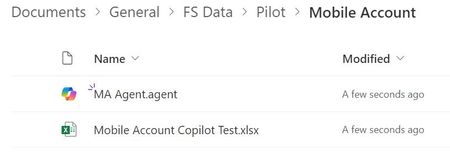
Step: 1 I have created a "Sharepoint Agent" by selecting a file from sharepoint. Step: 2 When i am asking any question from Agent, but not getting response. Problem statement: I am not getting no response from Sharepoint agent when asking anything. It says: "I apologize, but I couldn't find the specific target for January 2024 in the available documents. If you have any other questions or need assistance with something else, please let me know!" or I apologize, but I couldn't find the specific region-wise targets in the available documents. If you have any other questions or need assistance with something else, please let me know! Data Structure Can anyone please support on this, urgent support is required.997Views1like4Comments