copilot in sharepoint
26 TopicsHow to use Copilot Agents in SharePoint [All You Need To Know]
The creation of Copilot Agent is now enabled in SharePoint 🚀. Users holding M365 Copilot licenses will notice a new Copilot feature in the Suite Navigation bar, tailored to the site they are currently viewing. Additionally, they will find options to create Copilot agents from the 'New' menu on the homepage and within their document libraries. These features are accessible only to users with existing creation and editing rights on the site or document library. Moreover, they have the option to share a Copilot agent link with other users, who, if they possess a Microsoft 365 Copilot license, will be able to interact with it. #SharePoint #MicrosoftSharePoint #Microsoft365 #MPVbuzz #Copilot #AI10KViews9likes20Comments
Copilot not creating new documents
Hi I'm hoping someone can help. My company has just invested in Copilot for my team on my request and some of the functions it purports to have don't seem to work. When I ask it to create new word documents from a template, it tells me it is generating the documents but never actually does. Similarly, when I ask it to copy information from a word document and paste it into a spreadsheet, it tells me it has done it but hasn't. Has anyone else experienced this or know a fix for it? If it can't actually do this and create one document based on another document then its usefulness to me is vastly reduced. Thanks9.7KViews3likes3CommentsHow to prevent Copilot from accessing certain documents
Microsoft Purview Data Loss Prevention (DLP) will soon extend to support Microsoft 365 Copilot. DLP policies will be able to identify sensitive documents based on sensitivity labels and exclude processing for Copilot interactions in Microsoft 365 Copilot Business Chat. The preview does not support alerts, incident reports, and policy simulation. Audit records will be available at a later time after policy management is enabled for organizations. A Microsoft 365 Copilot license and a Microsoft 365 E5 license or equivalent are required to use this feature. #Copilot #Purview #Microsoft365 #MPVbuzz #DLP #SharePoint #OneDrive3.6KViews0likes0Comments
Using Copilot to analyze SharePoint document libraries and content.
I am just getting started with Copilot studio. I've been asked to build a prototype where we use Copilot to analyze some large document libraries across several SharePoint sites. The short term goal of this project is to use CP to help us classify/categorize documents into clinical (medical) and non-clinical. For instance, I would want to ask CP to get me an excel list of documents with a column indicating if the document is clinical or not. The long term goal is to use Copilot to apply data classification/sensitivty labels to the documents if they are clinical. We have several sites with libraries where there are multiple TBs of documents that are intermingled (clinical and nonclinical). This could really help us organize this information. By doing this, it gets us in a good position in regards to our data retention policies. I have Copilot studio connected to SP with a delegated app registration. I can send it a name of a document and it can tell me if it contains clinical data or not. I want to scale this up so it do this at a larger scale. My questions are: Is this even possible? If so...how would I approach this? In studio, when I ask basic questions like "How many documents are in this SharePoint site", it says it can't undestand and to rephrase. However, I can ask: Give me the newest document that was created...and it will return a correct result. Any help or direction for me would be huge! Thanks!2KViews0likes2CommentsHow to create Copilot Agents using the M365 Biz Chat
Users can effortlessly create simple Copilot agents using the no-code agent builder available within BizChat at Microsoft365.com/chat or in Teams. By providing natural language instructions and utilizing grounding documents stored in SharePoint, these agents adhere to the same security and information protection policies as Microsoft 365 Copilot. All installed agents, including plugins, are conveniently located in the right-side pane within Copilot, ensuring a focused and streamlined chat experience.1.6KViews4likes3Comments
Copilot in Windows Explorer
A really nice feature would be to use Copilot in the normal Windows Explorer. So we do not only use OneDrive or Teams for our files. We also use local servers/ fileshares. To use that files in Copilot we always have to upload them to copilot. A second reason why Copilot in windows Explorer would be nice is that the most users do not open OneDrive or Teams Folders in the web. They open the synced folders from the Teams Groups or OneDrive in Windows Explorer. Does someone know if such a feature should come? What do you think of this ideas?1.1KViews0likes1Comment
CoPilot for M365 only available as a yearly?
How does a company as successful and forward thinking as Microsoft consistently get it wrong. The uptake of CoPilot among our customer base of 100 clients can be counted on half a hand. We have a customer that would like to trial 5 x users but there is no trial available and the only option is to subscribe to a twelve month commitment for each user. Every other M365 product we use has a monthly option. Why would you do that?1KViews0likes1CommentSharePoint doc library metadata columns
I'm adding a SharePoint site pages library as a knowledge source. The library has several metadata columns. There's a lot of "knowledge" stored in those columns I need Copilot to consider but it seems to ignore them completely. Is there a way to get Copilot to use the columns for information?1KViews2likes5CommentsCopilot Agent - Pass uploaded attachments to Power Automate
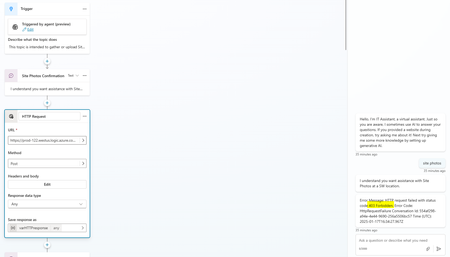
I have an agent with a topic which asks the user to upload photos. I stored these photos in a file variable. My idea is to trigger an HTTP Request which triggers a Power Automate flow and manipulates the files as needed. Has anyone successfully achieved triggering a flow and passing any information? Not seeing information or guides on this issue specifically. I currently receive a 403 Forbidden error on my attempts at a POST HTTP Request.999Views0likes1Comment