copilot in powerpoint
47 Topics
Creating agent using Copilot Agent Builder
I utilized Agent Builder to construct an Agent, incorporating skills designed to generate slides using a default template. However, the output did not meet my expectations. I am uncertain if this is because Agent Builder is restricted to generating text and content alone, rather than both producing content and beautifying my slides, despite me explicitly specifying this in my skills. My intended workflow is to retrieve the content; if an image is present, the agent should extract all the material and organize it for the user to review. If the information is incorrect, the user must manually input the text in the chat; otherwise, they can simply click confirm. Following that, once the text is organized and analyzed, the agent should build the presentation using default templates—complete with speaker notes—and generate visual charts or AI images, ensuring the content maintains a specific writing style. I have consolidated all of these steps into a single skill. Should I segment them into separate skills instead? Additionally, is it possible to create a prompt that both generates and beautifies my slides?45Views0likes0Comments
COPILOT DENIES ACCESS IN BETA VERSION
Hello, I am a Microsoft 365 Insider on the Beta Channel. I recently gained access to the multi-model preview features (Grok and Fable) in Word. While Word was open, my VPN accidentally connected to a restricted region (Russia). Shortly afterward, I was blocked from accessing Copilot and received the following error: "Copilot n’est pas disponible dans votre région." I have since permanently disabled the VPN and returned to my regular home network. However, whenever I rejoin the Beta Channel, the regional restriction immediately returns. I have already tried performing a clean installation of Office, verifying my Windows region settings, and resetting my privacy settings. Unfortunately, none of these steps has resolved the issue. Could this restriction be associated with an account-level setting or a server-side regional eligibility check? If so, is there an official troubleshooting procedure or a Microsoft support team that can review my account's eligibility and help restore access to the preview features? I would appreciate any guidance on how to resolve this issue. Thank you!ر120Views0likes1Comment
Please Remove Daily Cap Usage for Free Copilot Text Chat
Dear Microsoft Copilot Team, I am writing to express my disappointment with the new daily usage caps on Microsoft Copilot, particularly for ordinary text-based conversations. In the past, I could use Copilot freely for everyday questions, learning, research, brainstorming, and general conversations without constantly worrying about reaching a daily limit. The newer restrictions have made the experience significantly more frustrating and less useful. I understand that running AI services requires computing resources and that Microsoft must manage operating costs. However, I believe ordinary text chat should remain uncapped, especially when it was previously possible to use Copilot much more freely. Text conversations are a fundamental part of the service, and users should not have to stop in the middle of a useful discussion because they have exhausted a daily allowance. The move toward a unified Copilot experience should make the product simpler, more consistent, and more useful—not make existing users feel that they have lost access to a service they have come to rely on. I am therefore asking Microsoft to: Remove daily usage caps entirely for ordinary text-based Copilot conversations, including for free users. Keep basic text chat freely accessible without arbitrary daily cutoffs or lengthy waiting periods. If stricter limits are necessary for resource-intensive features such as image generation or advanced research, apply those limits separately rather than restricting ordinary text conversations. Clearly communicate any usage policies and reconsider changes that negatively affect the experience of long-time users. Unlimited text chat would help preserve user trust, encourage continued engagement, and distinguish Copilot as an accessible AI assistant for everyone. Restricting basic conversations risks pushing loyal users toward competing services that offer a more suitable experience. I hope Microsoft will take this feedback seriously and reconsider the current daily cap policy. Please restore uncapped text chat so users can rely on Copilot whenever they need assistance, without worrying about running out of messages. People on Reddit and online have been criticizing these changes ever since Copilot was unified under one product between enterprise and personal, If you guys dont do anything now it might reduce user trust and might be bad business decisions so please fix Copilot Thank you for your time and consideration. I look forward to seeing Microsoft make Copilot more accessible and user-friendly again.431Views4likes2Comments🎬 How to Record a Skill in Copilot for PowerPoint
Creating a Copilot Skill in PowerPoint can now be as simple as showing Copilot what you want it to do. Instead of manually creating a SKILL.md file or uploading one to OneDrive, you can record yourself performing the actions you want the Skill to reproduce. 🎥 Record the action ✨ Copilot creates the Skill ▶️ Run the Skill whenever you need it It changes the idea of building Skills from “write the instructions” to “show Copilot what to do.” This could be a great way to turn repetitive PowerPoint tasks into reusable Skills. 180Views1like0Comments
Create Interactive PowerPoint Slides with Copilot: Step-by-Step Tutorial
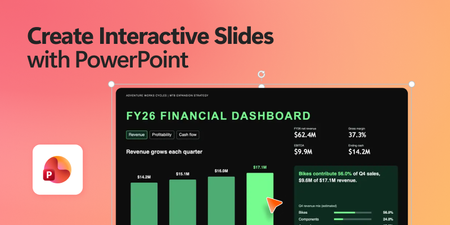
The new Create Interactive Slides skill in Microsoft 365 Copilot opens up some really interesting possibilities for PowerPoint. Instead of limiting presentations to static content, you can start experimenting with much more interactive experiences, including: ✅ Interactive product comparisons ✅ Clickable timelines ✅ Branching paths and decision trees ✅ Interactive quizzes ✅ Dynamic slides that users can explore I’ve been experimenting with this new Copilot skill in PowerPoint and created a step-by-step video showing how it works in practice.1.1KViews2likes0Comments