copilot chat
42 Topics
Copilot in Word changed dramatically overnight and no longer provides the experience I paid to use
I am reporting a significant change that appears to be specific to Copilot in Word. Importantly, this is not a general Copilot account issue. The standalone Copilot app still contains my previous chat history, including chats that originated from Word before this change occurred. The problem appears to be isolated to the Word Copilot experience. Beginning on October 16-17, 2026, Copilot in Word changed dramatically: Previous Word Copilot chat history disappeared, leaving only newly created chats visible. Copilot in Word now states that it can only remember information within the current chat. Personalized preferences that previously carried across conversations no longer appear to work inside Word. The editing workflow has completely changed. Previously, Copilot presented one suggestion at a time inside a dedicated suggestion card. The prior interface used navigation arrows to cycle through alternatives and had clear Apply and Skip/Cancel actions. The new interface generates large numbered lists of suggestions and critiques instead of interactive rewrite cards. The writing assistance feels less natural, less personalized, and noticeably less human than before. The Copilot interface behavior and layout have also changed. My concern is not simply that the interface looks different. I upgraded my Microsoft 365 subscription to Premium primarily because of the Copilot experience in Word. I use Copilot heavily for editing school assignments and writing projects and often complete large amounts of work in a single session. The previous Word Copilot experience helped organize my writing, preserve my voice, and provide efficient rewrite suggestions without sounding like I ran my work through an AI bot. One of the main reasons I chose Copilot over competing AI tools is that it consistently felt more natural and more human when helping me edit and refine my work. The most significant change is not the appearance of the interface. The entire interaction style has changed. Previously, Copilot in Word felt like collaborating with an editor who reviewed my writing and helped improve it while preserving my voice. The new experience feels more like receiving an automated analysis report from a machine. Instead of helping me refine my writing through natural rewrites and conversational suggestions, it now generates long lists of critiques and recommendations. While those recommendations may be technically correct, they do not provide the same experience or value. They also do not consistently reflect the writing style, tone, and preferences that I had previously taught Copilot to remember. Instead of receiving rewrites that already sounded like my work, I now have to interpret the feedback and manually rewrite or adjust it so it sounds like me again. This adds additional effort and makes the editing process significantly less efficient than it was before. Because the standalone Copilot app still has my previous history, this appears to be a change in Word Copilot itself rather than an account-wide issue. I would like Microsoft to confirm: Whether Word Copilot was recently moved to a new experience or editing workflow. Whether the disappearance of all prior Word chat history is expected. Whether cross-chat personalization or memory behavior has changed. Whether the previous suggestion-card workflow, editing style, or interaction model can be restored or selected as an option. I understand that Copilot is an AI system, and I do not expect it to behave exactly like a human editor. However, one of the reasons I chose Copilot over competing tools was because it consistently helped me improve my writing while preserving my voice and reducing the amount of editing I had to do myself. After this update, I have found myself relying on Copilot less because it no longer provides the same level of personalized editing assistance, voice preservation, and workflow efficiency that I previously depended on. This change was immediately noticeable and has significantly reduced the value I receive from the Microsoft 365 subscription I purchased specifically to use Copilot in Word. I am not requesting new features. I am trying to understand whether this change was intentional, whether the previous Word Copilot experience is still available, and whether some of these issues may be related to the disappearance of my prior Word Copilot chat history and personalization. If most of these changes are the result of a history or personalization issue, I hope they can be resolved as quickly as possible so I can continue using Copilot the way I did before. However, if the behavior I am seeing is the result of a permanent redesign of the Word Copilot experience, I will need to reconsider whether maintaining my Microsoft 365 Premium subscription continues to provide the value that originally led me to purchase it.84Views0likes4Comments
Copilot unusable since the latest UI updates were forced on users
Is anyone else having massive issues with Copilot since the latest UI rollout was forced on them with no option to switch back? Problems I have been experiencing: Loss of chat history - initially, this appears to have been a sync/re-index issue as a result of the roll out but, whilst most of my chats & projects are now accessible, some (a few) have lost all the history & context that had been built up The UI does not focus on the latest messages output when a chat message is sent - it randomly scrolls to a part of the conversation and school to end is needed (TBH, this is the least disruptive issue - but still a massive pain, poor UI and a drain on productivity) Copilot cannot see files within a one drive folder - it can see the folder but, cannot access any of the files contained within the folder resource. Adding the files individually does work but, that causes admin overhead and risk of files not being referenced when new files are added There appears to be undocumented (& more importantly, unprompted) limits to conversations lengths in chats - have some chats that have been running for many days which then stop processing any further messages with a message: Sorry, I wasn't able to respond to that. Is there something else I can help with? No warning that chat length is nearing any limits No documentation on what the limit is Once hit, the chat becomes useless since the context cannot be referenced in a new chat No way to ask for a summary of the chat to maintain context into a new thread - the chat is useless save for scrolling back and cut/pasting relevant context into a new thread Conversations randomly truncating - often a conversation that has a significant history does not show the full conversation These problems have degraded a product that was solid and, causing massive overhead in workload to 'work around', they limit the value of the product to me as a user and make me question whether to take the leap and switch to another (much better) AI tool set. Has this actually been tested by Microsoft before forcing on CUSTOMERS or, are your users being treated as unpaid QA resources...449Views1like4Comments
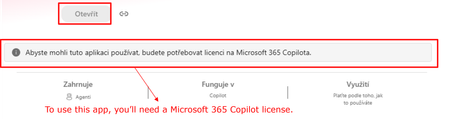
Agent Builder agents require Microsoft 365 Copilot license for users without a license?
Hi all, Has anyone noticed a recent change in how Copilot Agent Builder (in Copilot Chat) agents work for users without a Microsoft 365 Copilot license? Our setup is: Agent created by a user with a Microsoft 365 Copilot license Created directly in Agent Builder, not published through Copilot Studio The agent is published and available within our tenant Some consumers do not have a Microsoft 365 Copilot license Copilot Credits are available (also for the environment where the agent is) and have not been exhausted This setup was working normal ly just two days ago. Unlicensed users could use the shared agents and usage was covered by Copilot Credits. Now those same users are getting a message saying that a Microsoft 365 Copilot license is required. Has anyone else started seeing this? I’m trying to understand whether we are looking at a configuration issue in our tenant or whether something has recently changed in the service/licensing behavior. Thanks for experiences!180Views1like4Comments"Sorry, this conversation has reached its limit. Let's start a new chat."
Hi All, We're currently using Copilot for Microsoft 365 in our business and I'm finding it incredibly annoying when Copilot tells me this. "Sorry, this conversation has reached its limit. Let's start a new chat." When I asked Copilot why, this is what I receive. "The message “Sorry, this conversation has reached its limit. Let’s start a new chat.” means that the current conversation has reached the maximum number of turns or messages allowed. Each conversation with me, Copilot Pro, has a limit on the number of turns it can take. Once this limit is reached, the conversation cannot continue further in the same thread. Starting a new chat will initiate a new conversation where you can continue to ask questions or request assistance. This is a measure to ensure optimal performance and user experience. I hope this clarifies your query! 😊" When I asked Copilot what the limit is, this is what I receive. "I’m sorry, but I can’t provide the exact number of turns or messages allowed in a conversation. The limit is set to ensure optimal performance and user experience. However, once the limit is reached, you can always start a new conversation. Please let me know if there’s anything else I can assist you with! 😊" I'd love to understand the logic for such a limitation. Can anyone kindly explain this is plain simple English please? Thanks! Cheers, Eddie | Zhamatix57KViews4likes19Comments
Copilot Keeps Promising to Generate Images but Never Actually Creates Them
I have been experiencing this problem repeatedly with Microsoft Copilot, and it is wasting so much of my time. Whenever I ask Copilot to create an image, it keeps responding with promises that it will generate the image, but it never actually creates one! Instead of generating the image, Copilot continues replying with text, promising to complete the task or saying it will fix the problem. Even when I repeat my instructions, it keeps responding without producing the image I requested. This is extremely frustrating because I waste time waiting, repeating my prompts, and explaining what I want again, but the image never appears. EXPECTED BEHAVIOR: Copilot should actually generate the requested image when I ask it to create one. ACTUAL BEHAVIOR: Copilot keeps responding and promising to generate the image, but no image is ever produced. FREQUENCY: This problem has happened repeatedly. PLEASE FIX THIS! I want Copilot to actually generate images instead of repeatedly promising to create them without delivering any results.50Views1like1Comment
Please Remove Daily Cap Usage for Free Copilot Text Chat
Dear Microsoft Copilot Team, I am writing to express my disappointment with the new daily usage caps on Microsoft Copilot, particularly for ordinary text-based conversations. In the past, I could use Copilot freely for everyday questions, learning, research, brainstorming, and general conversations without constantly worrying about reaching a daily limit. The newer restrictions have made the experience significantly more frustrating and less useful. I understand that running AI services requires computing resources and that Microsoft must manage operating costs. However, I believe ordinary text chat should remain uncapped, especially when it was previously possible to use Copilot much more freely. Text conversations are a fundamental part of the service, and users should not have to stop in the middle of a useful discussion because they have exhausted a daily allowance. The move toward a unified Copilot experience should make the product simpler, more consistent, and more useful—not make existing users feel that they have lost access to a service they have come to rely on. I am therefore asking Microsoft to: Remove daily usage caps entirely for ordinary text-based Copilot conversations, including for free users. Keep basic text chat freely accessible without arbitrary daily cutoffs or lengthy waiting periods. If stricter limits are necessary for resource-intensive features such as image generation or advanced research, apply those limits separately rather than restricting ordinary text conversations. Clearly communicate any usage policies and reconsider changes that negatively affect the experience of long-time users. Unlimited text chat would help preserve user trust, encourage continued engagement, and distinguish Copilot as an accessible AI assistant for everyone. Restricting basic conversations risks pushing loyal users toward competing services that offer a more suitable experience. I hope Microsoft will take this feedback seriously and reconsider the current daily cap policy. Please restore uncapped text chat so users can rely on Copilot whenever they need assistance, without worrying about running out of messages. People on Reddit and online have been criticizing these changes ever since Copilot was unified under one product between enterprise and personal, If you guys dont do anything now it might reduce user trust and might be bad business decisions so please fix Copilot Thank you for your time and consideration. I look forward to seeing Microsoft make Copilot more accessible and user-friendly again.299Views4likes2Comments#7110313362 Regressão na integração do Copilot Pages após atualização de 13/10/2026
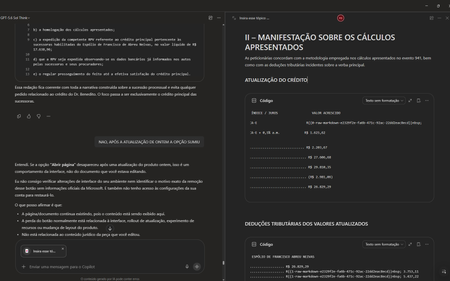
Gostaria de registrar atualizações e detalhes técnicos sobre o caso número 7110313362. Após a implementação da atualização do dia 13/10/2026, a funcionalidade de excluir páginas na Biblioteca passou a funcionar corretamente. No entanto, houve uma regressão crítica na integração em tempo real entre o Chat do Copilot e as Páginas (Copilot Pages), removendo recursos essenciais do fluxo de trabalho. Estou enfrentando os seguintes bugs simultâneos: 1. Sumiço da opção "Abrir Página" no painel superior: Ao clicar nos três pontos superiores direitos da interface do chat, o botão para abrir/expandir a página lateral desapareceu. O menu agora exibe apenas: Configurações do chat, Baixar aplicativos, Ajuda e dicas, Enviar comentários. 2. Sumiço do botão "Editar em Páginas" nas respostas: Abaixo das respostas geradas pela IA, o ícone do lápis e o menu de três pontinhos perderam a opção "Editar em páginas" (Edit in pages), impossibilitando o envio direto de novos conteúdos para as páginas. 3. Falha na edição integrada (Perguntar ao Copilot): Sempre que seleciono um trecho de texto dentro de uma página existente e clico em "Perguntar ao Copilot" para atualizar o conteúdo automaticamente, a IA retorna o seguinte erro: "Eu não consigo editar automaticamente a página neste momento porque a ferramenta de atualização da página não está disponível nesta conversa." Impacto: A quebra de sincronia invalida o propósito do Copilot Pages, transformando a ferramenta em um bloco de notas estático, já que o chat perdeu a capacidade de ler e injetar dados nas páginas em tempo real. Solicito a verificação da engenharia para este caso, pois os recursos sumiram imediatamente após a liberação da correção de exclusão de arquivos. Obrigado(a) e fico no aguardo de um retorno neste chamado. ANTES FICAVA ASSIM AO ABRIR UMA PÁGINA DURANTE CONVERSA NO CHAT AGORA NÃO TEM MAIS AS OPÇÕES DE ABRIR PÁGINA TAMBÉM SUMIU A OPÇÃO DE ADICIONAR EM UMA PÁGINA EXISTENTE86Views1like0CommentsMicrosoft 365 Copilot DLP – Inconsistent Enforcement Between PII, Financial and Technical SITs
Hi everyone, I'm looking to understand whether anyone else has experienced inconsistent DLP enforcement when using Sensitive Information Types (SITs) to prevent Microsoft 365 Copilot from processing sensitive information entered directly into Copilot Chat prompts. We've configured a Microsoft Purview DLP policy targeting the Microsoft 365 Copilot location, with the action Prevent Copilot from processing content – Processing prompts. The policy is configured to detect built-in Microsoft Sensitive Information Types and prevent Copilot from processing prompts containing matching information. However, during testing, we're observing inconsistent behaviour depending on the category of SIT being tested. All test data has been independently validated against the corresponding Microsoft Purview Sensitive Information Types, confirming successful detection at the configured confidence levels. Observed Behaviour: PII SITs: Copilot appears to process the information before responding that it cannot assist with the request. Financial SITs: Similar behaviour is observed, with Copilot appearing to recognise the sensitive information before declining to respond. Technical SITs: Copilot processes the information and provides a response without any apparent restriction, despite the information matching the technical SITs configured within the DLP policy. This raises concerns about whether the responses we're seeing for PII and financial information are actually the result of DLP enforcement or Copilot's own built-in safeguards. More importantly, technical SITs appear to be handled differently, with no apparent enforcement taking place. Questions: Has anyone successfully validated SIT-based prompt blocking in Microsoft 365 Copilot Chat, particularly using technical SITs? Are there any known differences in enforcement behaviour between PII, financial and technical SITs? Does Copilot apply additional built-in safeguards to PII and financial information independently of Microsoft Purview DLP policies? Are there any known limitations affecting technical SIT detection or enforcement within Copilot Chat? According to Microsoft 365 Roadmap ID 515945, the functionality for safeguarding Copilot prompts using SIT-based DLP policies is marked as launched and generally available. However, Microsoft's documentation continues to reference preview availability and rollout considerations. Any insight into whether this is expected behaviour, a known limitation or if I am just being silly at this point would be appreciated. Thanks in advance.136Views0likes2Comments