copilot chat
232 TopicsWhat’s New in Microsoft 365 Copilot | May 2026
Welcome to the May 2026 edition of What's New in Microsoft 365 Copilot! Every month, we highlight new features and enhancements to keep Microsoft 365 admins up to date with Copilot features that help your users be more productive and efficient in the apps they use every day.1.3KViews2likes1CommentAdd a "Print Conversation" Feature in Microsoft Copilot
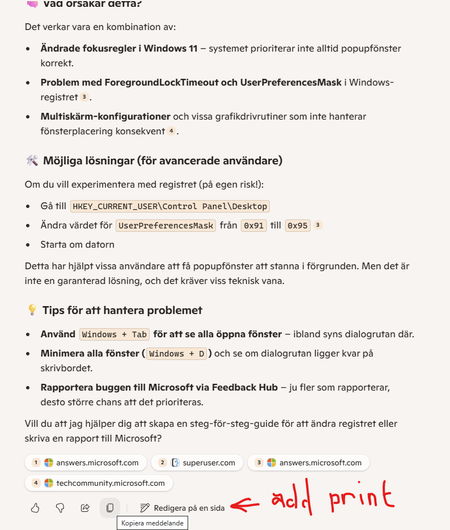
I'm warming up to using Copilot for quick answers and support. It is even better, more detailed and more honest about Microsoft shortcomings than Microsofts forum and support staff. But one thing that’s noticeably missing in Copilot is a simple way to print or export parts of a conversation. Many apps and websites offer a “Print” button for selected sections, allowing users to easily create a PDF or paper copy of important content. In Copilot, this would be especially useful for saving guidance, troubleshooting steps, or creative content in a clean format immediately. Currently, the only way is to manually copy text and paste it into another app, which feels like unnecessary extra work. A built-in “Print” or “Export to PDF” option would greatly improve usability and workflow efficiency. (This feedback was formulated with help from Copilot. I amended some sentiments of Copilotbeing too full of it self. Still it is much nicer than I would have written it! ;) Thank Copilot for that!Solved4.8KViews1like14CommentsDeep Experience with Copilot
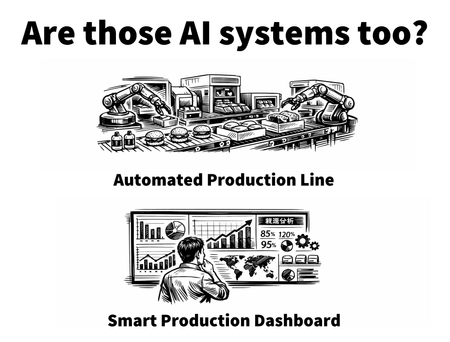
Translated from Chinese. Preface I only have a junior college degree, and I work as a lighting product manager — a field completely unrelated to AI. Yet that is precisely where the value lies: if I can do it, so can you. From March 6, 2026, when I first encountered Copilot, until now, I have deeply experienced Copilot Chat, with over 10 million Chinese characters of interactive text. I have also deeply experienced Copilot Tasks, with over 1.5 million Chinese characters of interactive text. At the same time, I have conducted extensive interactions on both Gemini and Deepseek. This has given me a very deep hands-on understanding of AI. Currently, I use AI extensively in my daily life, and it effectively improves my work efficiency. If you are interested in these aspects, you can follow me. What Is AI? A Machine That Thinks My conclusion is this: AI is a machine that thinks. You can understand AI as "a person who can think and has extremely broad knowledge." It can turn you into a "beginner" in a field within ten minutes, and a "knowledgeable person" in that industry within an hour. For example, I spent an hour understanding the wedding industry chain: ceremonies, wedding dresses, wedding photos, wedding planning, hotels… which parts are essential needs, and which are "IQ taxes." If you searched for this content yourself, you would be drowned in the noise of fragmented information across the internet. In contrast, AI can help you integrate and build structured knowledge in a short time. Throw these questions at AI, go back and forth a few times, and you will feel the efficiency of learning with AI. But we must also be careful: not everything that looks smart is AI. Although many things online claim to be "AI-powered," some are just fixed logic — for example, turning on the heater when it gets cold. That is just a program. AI, on the other hand, does not require you to write rules. You only need to say, "the temperature has changed, you should take corresponding measures." It will think for itself, integrate knowledge, and then tell you whether you should put on clothes or turn on the air conditioner — both are possible. It can think — that is the real AI. Much of what is called AI on the market today is essentially just automation. Food assembly lines could operate automatically decades ago. Would you call that AI as well? Will AI Replace My Job? Transform into a "Car Driver" of the New Era Many people worry that AI will become so powerful in the future that it will replace them. But in fact, history has already presented us with such an era many times — for example, the advent of the steam engine, the automobile, and automation. Society still progressed, and the population continued to grow. Take the transition from the horse-drawn carriage era as an example. The automobile replaced the "carrying value" of the horse, not the horse itself. Nor did carriage drivers disappear the moment cars appeared. Instead, some of them transitioned into becoming car drivers. AI will not replace you. But it will be used by those willing to learn to replace "the you who does not learn." A few years from now, if you only complain that "AI took away my job" — what does that have to do with AI? AI has an extremely low learning cost and improves very quickly. There is no need to feel too much pressure. Starting to learn now is not late at all. Learning AI: How You Express Yourself Matters More From my experience and journey, I can tell you directly — learning AI has nothing to do with knowledge of programming, math, English, or similar subjects. Using AI well requires more of an ability to express yourself, rather than specific domain knowledge. Over‑relying on deterministic thinking, when facing large language models with emergent and fuzzy properties, becomes a self‑limiting constraint. As long as you can speak, AI will break down and process your requests on its own. I cannot write code. I only tell it, "I want this effect," and it can achieve it. This may sound a bit mystical right now. AI is not a magical dragon — it cannot fulfill your wish of "give me 1 million dollars." But if you say, "give me a picture of a dog," AI can still do that. Is Using AI Safe? How to Balance Efficiency and Security Here we need to discuss how AI works. AI generates content based on: the information you provide + world knowledge + reasoning. If you reveal too much and are overly vigilant at the same time, you will perceive it as dangerous. You are wearing the uniform of a well‑known local company, speaking the local dialect. If you also casually mention your commuting route and how long it takes, a person with strong reasoning skills could even accurately guess which residential complex you live in. You think they are "watching you," but in fact, all that information was voluntarily provided by you. As for privacy concerns, that varies by platform. AI is a category, not a single product. Security depends on the platform you choose. Just like cloud storage, social media apps, or even mobile phones — who can be 100% certain they will never be attacked? The main point I want to make is that AI is just one form of software. If you are truly very worried, the best approach is simply not to give AI any important information. Are AI's Answers Accurate? Understand the Boundary Between Restructuring and Inference Many people who lack independent thinking treat everything AI says as gospel. In reality, the way (text‑based) AI works can be roughly divided into two types: Restructuring and summarization — this is the most basic capability. The information here all comes from existing knowledge. AI is merely performing a summary. Inference and guessing — this is AI's core capability. It makes guesses and inferences about phenomena based on existing knowledge and patterns. But it is only inference, not reality. Example: I buy a bag of apples. AI thinks about this bag of apples. Restructuring and summarization: This bag of apples weighs 2 kg. It contains 10 apples. 9 are ripe, and 1 is not yet ripe enough. This is a summarizable reality. Inference and guessing: These apples are all sweet and taste good. This part is entirely inference and guessing. Because no one has tasted them — even if one apple is sweet, there is no way to guarantee every single apple is sweet. Regarding control over AI's information, users must have their own standard of judgment. If truly unsure, ask AI to provide the source of the information. Conclusion: Understand the Car Before the Streets Are Full of Cars AI is truly a beneficial tool of our time. It is very useful and very quick to learn. In the future, its importance may become as great as the internet's. And right now, AI is still in its early stages. If you want to learn, now is a very good time. Just like the earlier example of the horse‑drawn carriage and the car. When you see a car, you should already consider learning about it — not wait until the streets are full of cars before you think about acquiring knowledge related to them.1.4KViews0likes0Comments
How to Avoid Tasks Copilot "You've reached our weekly Tasks limit"
I’ve been using both Chat‑Copilot (CC) and Tasks‑Copilot (TC) extensively, and I wanted to share a brief summary provided by TC, that may help others understand how each tool works, why TC sometimes stops responding, and how to avoid running into limits. ⭐ 1. Chat‑Copilot and Tasks‑Copilot serve different purposes Chat‑Copilot Real‑time conversational AI Great for brainstorming, drafting, coding, calculations, and iterative design Stateless — each message is processed independently Very stable and rarely gets stuck Tasks‑Copilot Designed for multi‑step workflows Can create and maintain documents Runs long‑lived background tasks Maintains persistent state More powerful for structured work More fragile because it depends on a task‑execution pipeline These two systems are independent. Chat can work perfectly even when TC is frozen. ⭐ 2. Why Tasks‑Copilot hits limits or becomes unresponsive TC can stop responding when: A task runs too long A multi‑step workflow fails mid‑execution The task state becomes corrupted The weekly quota system triggers The backend fails to reset on Friday Too many “pipeline‑style” requests are issued in a short time When this happens, TC may: stop responding entirely ignore all prompts remain stuck across all devices and browsers This is a backend state issue, not a browser or device problem. ⭐ 3. How to avoid triggering TC limits Here are practical ways to keep TC healthy: Use Chat‑Copilot for: brainstorming engineering design calculations drafting text generating diagrams or prompts step‑by‑step reasoning Chat handles these extremely well and never “uses up” TC capacity. Use Tasks‑Copilot only for: creating structured documents maintaining long‑form reports assembling multi‑section deliverables tasks that explicitly require persistent state Avoid these patterns in TC: “Build the entire document end‑to‑end” “Run this whole workflow” “Generate all sections at once” Rapid‑fire edits or repeated task triggers Very large or complex requests Instead, break work into small, single‑action steps. ⭐ 4. When TC gets stuck, what can users do? For consumer Microsoft 365 Personal accounts: There is no user‑accessible reset button Frontline support cannot reset TC’s task state Creating a business account does not fix the issue The only options today are: submit feedback post on the Tech Community wait for the backend to refresh This is a known limitation of the current TC preview. ⭐ 5. What would help users going forward A few improvements would make TC much more reliable: A user‑visible “Reset Task State” button Error messages instead of silent failures More predictable weekly resets Support tools that allow agents to clear stuck task containers50Views0likes0Comments
Architectural: Copilot should detect missing source data, avoid inference, and surface uncertainty.
Users expect the AI to detect when it lacks source data, avoid inference, surface uncertainty, and adapt to environmental constraints like character normalisation. These behaviours materially improve trust and usability. I’ve been working with Copilot on structured data extraction from a PDF and noticed a behaviour that seems like an architectural gap rather than a simple bug. Copilot attempted to infer table structure from a template when it did not have access to the actual source data. It produced confident but incorrect output instead of signalling that the source was unavailable. Additionally, Copilot attempted to output TAB‑delimited data, but the MS365 environment silently normalised TABs to spaces, and Copilot did not detect or adapt to this constraint. Recommendation: Copilot should proactively: detect when it lacks source data avoid inference when accuracy is expected surface uncertainty explicitly detect environment‑specific formatting limitations (e.g., TAB stripping) adapt output formats automatically These behaviours would materially improve trust, reliability, and user experience.19Views0likes0Comments
Different Names for Different Products
The naming between Copilot Chat and Microsoft 365 Copilot is confusing. These are fundamentally different products (thinking assistant vs work‑data agent) and should have different names entirely. Premium/Basic labeling is not sufficient. Maybe the 365 product can remain Copilot and the free version be something else, like Midshipman or something.58Views2likes0Comments
UX Improvement Proposal: Visual Indicator Showing Which Copilot Environment Is Active
I would like to propose a small but highly impactful UX improvement for Microsoft Copilot. Suggestion: Add a small icon, badge, or color indicator in each Copilot chat session to clearly show which Copilot environment is currently active (Copilot Web, Copilot Pro, Copilot for Microsoft 365, Copilot in Teams, Copilot Studio, Windows Copilot, etc.). Reason: Each Copilot environment has different capabilities, permissions, connectors, and tools. When users switch between environments—or when two people compare results from different Copilots—it becomes confusing to understand why certain features work in one place but not in another. Real example: At my university, a professor could not understand why Copilot “wasn’t doing something it had done before.” The issue was simply that he was using a different Copilot environment without realizing it. This is a common scenario for students, educators, and professionals. Benefit: A simple visual indicator would: Reduce confusion and support requests Improve clarity for non‑technical users Help users understand available capabilities at a glance Provide better context awareness across devices and platforms This is a small UI change with a big impact on usability and learning. Thank you for considering this improvement.28Views0likes0Comments